
The best Xbox gaming accessories depend on what you want to improve: the Xbox Elite Wireless Controller Series 2 is my best overall pick for players who want extensive control customization, while the GameSir G7 SE is a simpler wired alternative and the Turtle Beach Stealth 500 stands out for wireless audio. The main tradeoffs are wireless convenience versus charging and connectivity needs, feature-rich controls versus a learning curve, and useful add-ons versus accessories that may not fit every setup. This lineup also includes thumbsticks, chatpads, and console cooling options, so not every accessory solves the same problem. Read on for my comparison of all 14 picks and guidance on choosing the right upgrades.

Get the latest gadgets delivered free with Prime
- Fast, free delivery on millions of items
- Prime Video, Amazon Music and more included
- Member-only deals all year
Complete the kit



Key Takeaways
- The Elite Wireless Controller Series 2 is the most adjustable controller pick, while the GameSir G7 SE offers a wired option without the same premium feature set.
- Headset choice depends on how you play: the Stealth 500 is a wireless multiplatform option, the RIG 800 PRO HX adds a base station, and the Xbox Wireless Gaming Headset keeps the setup centered on Xbox.
- KontrolFreek thumbsticks and precision rings solve different control problems: thumbsticks change grip and reach, while rings add resistance around the stick.
- Chatpads and keyboards are convenience accessories, not controller replacements; choose the wired TiMOVO for its direct connection or the wireless MoKo for fewer cable constraints.
- Cooling accessories are console-specific add-ons: the G-STORY is designed for Series S, while the MENEEA targets Series X and combines cooling with a dust cover.
| KontrolFreek Aim Boost Kit for Xbox One and Xbox Series X Controllers, Black Galaxy Edition |  | Best for Adjustable Aim Resistance | Brand: KontrolFreek | Compatibility: Xbox One and Xbox Series X controllers | Included components: Performance thumbsticks and precision rings | VIEW LATEST PRICE | See Our Full Breakdown |
| Turtle Beach Stealth 500 Wireless Multiplatform Gaming Headset for Xbox |  | Best Wireless Headset for Long Sessions | Connectivity: 2.4GHz wireless and Bluetooth 5.2 | Battery life: Up to 40 hours | Drivers: 40mm amplified | VIEW LATEST PRICE | See Our Full Breakdown |
| KontrolFreek FPS Freek Galaxy Purple Performance Thumbsticks for Xbox One and Xbox Series X |  | Best for a Colorful Grip Upgrade | Brand: KontrolFreek | Compatibility: Xbox One and Xbox Series X controllers | Quantity: 2 thumbsticks | VIEW LATEST PRICE | See Our Full Breakdown |
| KontrolFreek FPS Freek Galaxy Black Performance Thumbsticks for Xbox One and Xbox Series X |  | Best Low-Key Thumbstick Upgrade | Brand: KontrolFreek | Compatibility: Xbox One and Xbox Series X controllers | Quantity: 2 thumbsticks | VIEW LATEST PRICE | See Our Full Breakdown |
| G-STORY Cooling Fan for Xbox Series S with Temperature Display and RGB Lighting |  | Best for Series S Temperature Monitoring | Compatibility: Xbox Series S | Fan speeds: 1500, 1750, or 2000 RPM | Temperature display: LED | VIEW LATEST PRICE | See Our Full Breakdown |
| TiMOVO Green Backlight Keyboard for Xbox Gaming Controllers, Black |  | Best for In-Game Messaging | Compatible devices: Xbox One, Xbox One S, Xbox One Elite, Xbox One Elite 2, Xbox Series X and S controllers; Windows 10 | Compatibility note: Not compatible with Xbox One X | Keys and layout: 47-key QWERTY | VIEW LATEST PRICE | See Our Full Breakdown |
| GameSir G7 SE Wired Controller for Xbox Series X|S, Xbox One & Windows 10/11 – White |  | Best Wired Controller for Precision | Compatible platforms: Xbox Series X|S, Xbox One, Windows 10/11 PC | Connectivity: Wired USB | Stick and trigger technology: Hall effect joysticks and triggers | VIEW LATEST PRICE | See Our Full Breakdown |
| Xbox Elite Wireless Controller Series 2, Black | 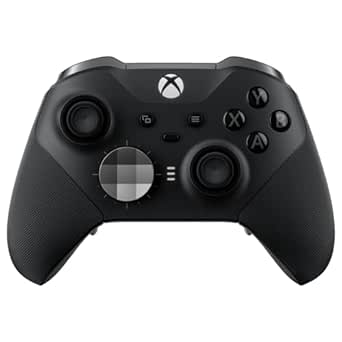 | Best Premium Customizable Controller | Compatible devices: Xbox Series X|S, Xbox One, Windows PC, and supported cloud gaming devices | Connectivity: Xbox Wireless, Bluetooth, USB-C | Battery life: Up to 40 hours | VIEW LATEST PRICE | See Our Full Breakdown |
| RIG 800 PRO HX Wireless Gaming Headset with Multi-Function Base Station for Xbox |  | Best Headset for a Docked Wireless Setup | Compatibility: Xbox Series X|S, Xbox One, and PC | Connectivity: 2.4 GHz wireless | Wireless range: Up to 30 ft | VIEW LATEST PRICE | See Our Full Breakdown |
| Media Remote Control for Xbox One and Xbox Series X|S, Black |  | Best for Couch Media Control | Compatible devices: Xbox One, Xbox Series X|S | Connectivity: Infrared | Maximum range: 10 meters | VIEW LATEST PRICE | See Our Full Breakdown |
| Xbox Wireless Gaming Headset – Carbon Black |  | Best Xbox Headset Overall | Driver size: 40 mm | Frequency response: 20 Hz–20 kHz | Battery life: Up to 20 hours | VIEW LATEST PRICE | See Our Full Breakdown |
| KontrolFreek Precision Rings for Gaming Controllers, 6 Count |  | Best Aim-Tuning Accessory | Quantity: 6 rings | Resistance levels: Soft, medium, and hard | Compatible devices: Xbox One, Xbox Series X|S, PS4, PS5, Switch Pro, and Scuf controllers | VIEW LATEST PRICE | See Our Full Breakdown |
| MENEEA Cooling Fan and Dust Cover for Xbox Series X with Colorful Lighting |  | Best Series X Console Add-On | Compatible device: Xbox Series X | Model number: XSX34 | Fan speeds: 3 | VIEW LATEST PRICE | See Our Full Breakdown |
| MoKo RGB Backlit Wireless Chatpad Keyboard for Xbox Controllers |  | Best for Messaging While Gaming | Compatible devices: Xbox One, One S, Series S, Series X, Elite, Elite 2 controllers, and Windows 11 | Compatibility exclusion: Not compatible with Xbox One X | Connectivity: 2.4 GHz wireless with included receiver | VIEW LATEST PRICE | See Our Full Breakdown |
| Xbox gaming accessorie | Connectivity |
|---|---|
| KontrolFreek Aim Boost Kit for | — |
| Turtle Beach Stealth 500 Wirel | 2.4GHz wireless and Bluetooth 5.2 |
| KontrolFreek FPS Freek Galaxy | — |
| KontrolFreek FPS Freek Galaxy | — |
| G-STORY Cooling Fan for Xbox S | — |
| TiMOVO Green Backlight Keyboar | 2.4 GHz wireless receiver |
| GameSir G7 SE Wired Controller | Wired USB |
| Xbox Elite Wireless Controller | Xbox Wireless, Bluetooth, USB-C |
| RIG 800 PRO HX Wireless Gaming | 2.4 GHz wireless |
| Media Remote Control for Xbox | Infrared |
| Xbox Wireless Gaming Headset | Xbox Wireless, Bluetooth 5.3, Bluetooth LE Audio |
| KontrolFreek Precision Rings f | — |
| MENEEA Cooling Fan and Dust Co | — |
| MoKo RGB Backlit Wireless Chat | 2.4 GHz wireless with included receiver |
More Details on Our Top Picks
KontrolFreek Aim Boost Kit for Xbox One and Xbox Series X Controllers, Black Galaxy Edition
I’d pick the Aim Boost Kit for players who want to tune thumbstick feel, not just add height. Its mixed-height sticks pair with three strengths of precision rings, letting you choose how much resistance to add when aiming at higher sensitivities. That adjustability sets it apart from the FPS Freek Galaxy Purple and Galaxy Black sets, which provide mixed-height sticks but no rings. The tradeoff is that added resistance can feel unfamiliar and may take practice before it helps rather than slows your aim. It also makes more sense for someone willing to experiment with settings than for a player seeking a simple grip upgrade. I’d choose this kit for customizable control; for a straightforward two-stick change, either Galaxy set is simpler.
Pros:- Mixed-height thumbsticks combine a higher aiming stick with a lower stick for movement.
- Three ring strengths let players adjust resistance to their preference.
- Rubber construction is designed to improve grip and comfort.
- Adds both thumbsticks and resistance rings in one kit.
Cons:- Precision rings may feel restrictive until the player adapts.
- The added resistance may not suit players who favor quick, unrestricted stick movement.
Best for: Xbox One and Series X players who use high sensitivity and want to experiment with different levels of aiming resistance.
Not ideal for: Players who prefer an unchanged thumbstick feel or want a simple, no-adjustment grip upgrade.
- Brand:KontrolFreek
- Compatibility:Xbox One and Xbox Series X controllers
- Included components:Performance thumbsticks and precision rings
- Precision ring strengths:3
- Color:Black
- Enclosure material:Rubber
- Model number:6204-XBX
Our verdict“Choose the Aim Boost Kit if you want adjustable aiming resistance alongside mixed-height sticks; pick a Galaxy thumbstick set for a simpler upgrade.”
Turtle Beach Stealth 500 Wireless Multiplatform Gaming Headset for Xbox
The Stealth 500 is the strongest fit here for Xbox players who want one headset for console gaming and Bluetooth-connected devices. Its 2.4GHz wireless and Bluetooth 5.2 support lets you switch between game audio and a mobile connection, while up to 40 hours of battery life means fewer charging interruptions than a short-runtime headset. The lightweight build and memory foam cushions also suit long sessions. Unlike the Xbox Wireless Gaming Headset, this model adds a QuickSwitch button and app-based 10-band EQ, but its advanced audio features are limited to 2.4GHz mode, and deeper tuning requires the Swarm II app. I’d favor the Stealth 500 for battery life and device flexibility; players who want uncomplicated settings may prefer a simpler headset.
Pros:- 2.4GHz wireless and Bluetooth 5.2 support connections across gaming and mobile devices.
- Up to 40 hours of battery life reduces charging frequency.
- Lightweight design, floating headband, and memory foam cushions suit extended wear.
- 10-band EQ and QuickSwitch provide additional sound and connection controls.
Cons:- Some advanced audio features work only in 2.4GHz wireless mode.
- Accessing advanced EQ and settings requires the Swarm II app on a PC or mobile device.
Best for: Xbox players who game for long stretches and want wireless console audio plus Bluetooth access to a phone, PC, or tablet.
Not ideal for: Buyers who want every audio feature available over Bluetooth or prefer to adjust sound without an app.
- Connectivity:2.4GHz wireless and Bluetooth 5.2
- Battery life:Up to 40 hours
- Drivers:40mm amplified
- Microphone:Omni-directional, flip-to-mute
- Compatibility:Xbox Series X|S, Xbox One, PC, iOS, and Android
- Audio features:Spatial audio, Superhuman Hearing, and 10-band EQ
- App support:Turtle Beach Swarm II
Our verdict“Choose the Stealth 500 for long battery life and dual wireless connections, but skip it if you need full feature access over Bluetooth.”
KontrolFreek FPS Freek Galaxy Purple Performance Thumbsticks for Xbox One and Xbox Series X
The Galaxy Purple thumbsticks are a straightforward way to change grip and stick height without adding extra controls to learn. One 10 mm high-rise stick supports finer aiming adjustments, while the 6.5 mm mid-rise stick keeps the other thumb closer to its usual position for movement. That mixed-height layout is shared with the Galaxy Black set, so the meaningful difference is the purple finish rather than a different control arrangement. Compared with the Aim Boost Kit, this pair skips precision rings and is easier to approach, but it also offers less resistance tuning. The rubber concave surfaces are intended to improve grip and help protect the original sticks. I’d choose Purple for players who want the same basic Galaxy setup with a distinct look; check controller compatibility before buying.
Pros:- High-rise and mid-rise sticks give aiming and movement different heights.
- Concave rubber surfaces are designed to support grip and comfort.
- Can help protect the controller’s original thumbsticks from wear.
- Lightweight two-stick set adds no separate control module.
Cons:- Does not include the adjustable precision rings found in the Aim Boost Kit.
- Packaging compatibility information may be outdated, so buyers should verify fit.
Best for: Xbox One and Series X players who want mixed-height grip and aim support with a purple finish.
Not ideal for: Players who want adjustable aiming resistance, or who need an accessory confirmed for a different controller generation.
- Brand:KontrolFreek
- Compatibility:Xbox One and Xbox Series X controllers
- Quantity:2 thumbsticks
- Height configuration:1 high-rise (10 mm) and 1 mid-rise (6.5 mm)
- Shape:Concave
- Material:Rubber
- Color:Purple
Our verdict“Choose the Purple Galaxy set for a simple mixed-height thumbstick upgrade with a distinctive finish, not for adjustable resistance.”
KontrolFreek FPS Freek Galaxy Black Performance Thumbsticks for Xbox One and Xbox Series X
For players who want the Galaxy control layout without a bright accent, the Galaxy Black is the discreet pick. It combines a 10 mm high-rise stick for more precise aiming adjustments with a 6.5 mm mid-rise stick for movement, matching the basic height arrangement of the Purple Galaxy set. That makes the choice between these two largely about appearance; neither includes the three resistance options found in the Aim Boost Kit. The concave rubber grip is designed to improve hold and reduce thumb fatigue, while also covering the controller’s original sticks. This is a focused, low-profile upgrade rather than a full control-tuning kit. I’d choose it for Xbox One or Series X players who want added grip in black, but not for anyone needing compatibility beyond those listed consoles.
Pros:- Mixed heights offer a higher stick for aiming and a mid-rise stick for movement.
- Concave rubber surfaces are designed to provide a non-slip grip.
- May help reduce hand and thumb fatigue during play.
- Covers the original thumbsticks and can help protect them from wear.
Cons:- Compatibility is limited to Xbox One and Xbox Series X controllers.
- Unlike the Aim Boost Kit, it has no precision rings or resistance adjustment.
Best for: Xbox One and Series X players who want mixed-height, rubber-grip thumbsticks that blend into a black controller.
Not ideal for: Players using other controller models or seeking adjustable resistance and more extensive aiming customization.
- Brand:KontrolFreek
- Compatibility:Xbox One and Xbox Series X controllers
- Quantity:2 thumbsticks
- High-rise stick height increase:10.0 mm
- Mid-rise stick height increase:6.5 mm
- Stick shape:Concave
- Material and color:Rubber, black
Our verdict“Choose Galaxy Black for a restrained-looking mixed-height grip upgrade on a compatible Xbox controller, and skip it if you need broader compatibility.”
G-STORY Cooling Fan for Xbox Series S with Temperature Display and RGB Lighting
The G-STORY cooling fan is the only pick here aimed at console airflow rather than controls or audio, making it a targeted add-on for Xbox Series S owners. Its LED temperature display and automatic speed control offer a quick read on conditions, while manual mode gives three fan speeds for players who want direct control. That monitoring makes it more informative than the MENEEA Cooling Fan and Dust Cover for Xbox Series X, but this G-STORY model is specifically for Series S and does not include a dust cover. Installation is simple: place it on the console and connect the included cord. The tradeoff is that automatic mode stops the fan below 35°C, so it is not a continuously running cooler. I’d choose it for visible temperature feedback, not for universal console compatibility.
Pros:- Automatic mode adjusts fan speed according to temperature.
- Three manual speed settings give users direct control.
- LED temperature display and RGB indicators make status visible.
- Lightweight console-top placement and included cord simplify installation.
Cons:- Designed specifically for Xbox Series S.
- Automatic mode stops the fan below 35°C.
- Does not include the dust-cover function offered by the MENEEA Series X accessory.
Best for: Xbox Series S owners who want a console-top fan with temperature feedback and selectable automatic or manual operation.
Not ideal for: Xbox Series X owners, or buyers who want continuous fan operation in automatic mode or a combined dust-cover accessory.
- Compatibility:Xbox Series S
- Fan speeds:1500, 1750, or 2000 RPM
- Temperature display:LED
- Fan control:Automatic and manual modes
- Noise level:17.8 dB
- Power:12 V, 5 watt-hours
- Dimensions:5.91 × 1.38 × 5.91 in
- Materials:Aluminum, copper, and plastic
Our verdict“Choose this G-STORY fan for a Series S setup where temperature display and automatic speed control matter more than continuous cooling or dust coverage.”
TiMOVO Green Backlight Keyboard for Xbox Gaming Controllers, Black
The TiMOVO chatpad makes the most sense for players who regularly send messages, enter codes, or search from the couch without reaching for a separate keyboard. Its 47-key QWERTY layout attaches to a compatible controller, while the 2.4 GHz receiver handles the wireless link and the controller supplies power. The green backlight shuts off after 10 seconds of inactivity, a practical touch for late-night typing. Compared with the MoKo RGB Backlit Wireless Chatpad, TiMOVO keeps the lighting simple rather than offering RGB effects, and it also includes a 3.5 mm audio jack. The main catch is compatibility: it does not work with Xbox One X, and its single-color lighting offers little customization. It is a focused typing accessory, not a replacement for a full keyboard.
Pros:- Attaches to compatible controllers for convenient in-game typing
- Green backlight includes an automatic power-saving mode
- Built-in 3.5 mm audio jack
- Draws power from the connected controller
Cons:- Not compatible with Xbox One X
- Backlight is limited to one color
- Compact 47-key layout is less suited to extended typing than a full keyboard
Best for: Xbox players who frequently message friends or enter text and own a listed compatible controller other than an Xbox One X.
Not ideal for: Xbox One X owners, players who rarely type on their console, or anyone who wants multicolor lighting or a standalone keyboard.
- Compatible devices:Xbox One, Xbox One S, Xbox One Elite, Xbox One Elite 2, Xbox Series X and S controllers; Windows 10
- Compatibility note:Not compatible with Xbox One X
- Keys and layout:47-key QWERTY
- Connectivity:2.4 GHz wireless receiver
- Backlight:Green, single color; power-saving mode after 10 seconds of inactivity
- Audio jack:3.5 mm
- Power source:Connected controller
- Dimensions and weight:5.79 × 2.09 × 1.57 in; 2.5 oz
Our verdict“Choose the TiMOVO if you want controller-mounted text entry and its Xbox compatibility limitation does not affect your setup.”
GameSir G7 SE Wired Controller for Xbox Series X|S, Xbox One & Windows 10/11 – White
The GameSir G7 SE is a strong fit for players who want a second controller or prefer a wired setup, especially if stick and trigger consistency matter more than wireless freedom. Its Hall effect joysticks and triggers use magnetic sensing, a design aimed at precise input and reduced wear from contact-based parts. The USB plug-and-play connection also keeps setup straightforward across Xbox and Windows PCs. Unlike the Xbox Elite Wireless Controller Series 2, the G7 SE does not offer wireless play, interchangeable components, or a set of rear paddles; its stated customization is also more limited. In return, it offers a simpler wired alternative with an ergonomic textured grip and a 3.5 mm headset jack. Skip it if cable range or extensive control customization is central to your setup.
Pros:- Hall effect joysticks and triggers are designed for precise input and long service life
- Wired USB connection supports plug-and-play use without additional drivers
- Textured ergonomic grip supports a secure hold
- Built-in 3.5 mm audio jack
Cons:- Wired connection limits movement and adds cable management
- Only one customizable back button may not suit players who rely on multiple paddles
- Lacks the interchangeable components and wireless options of the Xbox Elite Series 2
Best for: Players who want a wired Xbox or PC controller with Hall effect sticks and triggers, including households needing a dependable second pad.
Not ideal for: Players who need wireless couch play, extensive paddle customization, or a controller they can easily use far from the console.
- Compatible platforms:Xbox Series X|S, Xbox One, Windows 10/11 PC
- Connectivity:Wired USB
- Stick and trigger technology:Hall effect joysticks and triggers
- Audio jack:3.5 mm
- Feedback:Dual vibration
- Grip:Ergonomic, laser-engraved texture
- Dimensions:8.27 × 4.53 × 2.56 in
- Weight:420 g
Our verdict“Pick the GameSir G7 SE if precision-focused wired play matters more to you than wireless convenience or extensive customization.”
Xbox Elite Wireless Controller Series 2, Black
The Xbox Elite Wireless Controller Series 2 earns its premium role through the range of ways it can be adapted to different games and playing styles. Adjustable-tension thumbsticks, three-step hair trigger locks, interchangeable D-pads and sticks, plus four included paddles give players more control over feel and button access than the wired GameSir G7 SE. Up to three customizable profiles let you save preferred setups, while Xbox Wireless, Bluetooth, and USB-C cover console and PC use. Its rechargeable battery is rated for up to 40 hours, though actual life varies with use and accessories. The tradeoff is complexity: the many components and settings are more than a casual player may need, and some app features depend on device and operating-system support. Choose it for hands-on customization, not simply for a basic replacement controller.
Pros:- Adjustable thumbstick tension and three-step hair trigger locks
- Includes interchangeable thumbsticks, paddles, and D-pads
- Supports up to three customizable profiles
- Wireless, Bluetooth, and USB-C connection options
Cons:- Some app functions and compatibility depend on supported devices and operating-system versions
- Battery life varies with usage and accessories
- Its extensive customization may be unnecessary for players who prefer a simple controller
Best for: Experienced Xbox and PC players who switch between game genres and want adjustable sticks, trigger locks, paddles, and saved control profiles.
Not ideal for: Casual players seeking a simple controller, or buyers who do not expect to use its interchangeable parts and profile controls.
- Compatible devices:Xbox Series X|S, Xbox One, Windows PC, and supported cloud gaming devices
- Connectivity:Xbox Wireless, Bluetooth, USB-C
- Battery life:Up to 40 hours
- Profiles:Up to 3 customizable profiles
- Audio jack:3.5 mm
- Included accessories:Carrying case, 6 thumbsticks, 4 paddles, 2 D-pads, adjustment tool, charging dock, USB-C cable
- Color:Black
Our verdict“Choose the Elite Series 2 if you will make use of its adjustable controls and interchangeable parts; otherwise, the GameSir G7 SE is a simpler wired alternative.”
RIG 800 PRO HX Wireless Gaming Headset with Multi-Function Base Station for Xbox
The RIG 800 PRO HX is aimed at Xbox players who want wireless audio with a dedicated place to store and charge the headset. Its multi-function base station and removable USB transmitter give the setup more flexibility than a headset that relies only on a loose charging cable. A flip-to-mute microphone, on-ear controls, and self-adjusting head strap also keep common gaming tasks within reach. Compared with the Xbox Wireless Gaming Headset, this model’s stand is its defining convenience, while its listed battery life is inconsistent: product details say up to 60 hours, but the description says 24. It supports Dolby Atmos, though that requires a compatible device, the Dolby Access app, and a Microsoft account. That makes it a less straightforward pick for buyers who want a clear, uncomplicated battery claim.
Pros:- Base station provides a dedicated charging and storage spot
- Removable USB wireless transmitter supports flexible setup
- Flip-to-mute microphone and on-ear audio controls
- Self-adjusting head strap and dual-material ear cushions are designed for comfort
Cons:- Battery life conflicts between the listed 60-hour and 24-hour claims
- Dolby Atmos requires a compatible device, Dolby Access app, and Microsoft account
- Wireless range is listed up to 30 feet, which may not suit every room layout
Best for: Xbox players who want a wireless headset with a charging base, flip-to-mute mic, and PC compatibility.
Not ideal for: Buyers who need a clearly stated battery runtime, do not want a base station, or prefer a simpler setup without Dolby Atmos dependencies.
- Compatibility:Xbox Series X|S, Xbox One, and PC
- Connectivity:2.4 GHz wireless
- Wireless range:Up to 30 ft
- Drivers:40 mm
- Battery life:Up to 60 hours in product details; 24 hours in description
- Battery charge time:4 hours
- Microphone:Flexible noise-cancelling, flip-to-mute
- Included accessories:Multi-function base station, USB-A wireless transmitter, USB-C charging cable
Our verdict“Choose the RIG 800 PRO HX if a charging dock is central to your headset setup, but factor in the conflicting battery-life claims.”
Media Remote Control for Xbox One and Xbox Series X|S, Black
This Tyadas remote is for Xbox owners who use the console to watch media and would rather reach for a compact remote than navigate streaming apps with a gamepad. Its 16 infrared buttons cover common navigation and playback tasks, while motion-activated backlighting helps locate controls in a dark room. It also has buttons for TV volume, mute, and power, though those functions may not work with every television. Unlike the TiMOVO chatpad, which adds text input to a controller, this accessory is focused on media playback and does not provide gaming controls. The listed 10-meter range suits typical living-room use, but the remote needs two AAA batteries that are not included. Buy it as a media convenience, not as a replacement for an Xbox controller.
Pros:- Motion-activated backlighting makes buttons easier to find in a dark room
- Compact 16-button layout covers common navigation and playback
- Infrared range is listed up to 10 meters
- Includes TV volume, mute, and power controls
Cons:- Requires two AAA batteries, which are not included
- TV controls may not work with all television models
- Does not control all gaming functions
Best for: Xbox One and Xbox Series X|S owners who stream or watch media from the couch and want dedicated playback buttons.
Not ideal for: Players looking for gaming controls, owners who need guaranteed TV integration, or buyers who do not want to supply AAA batteries.
- Compatible devices:Xbox One, Xbox Series X|S
- Connectivity:Infrared
- Maximum range:10 meters
- Buttons:16
- Backlighting:Motion-activated
- Battery requirement:2 AAA alkaline batteries, not included
- Dimensions:6 × 1.6 × 0.7 in
- Weight:0.05 kg
Our verdict“Choose this remote if you mainly use your Xbox for media and want quick playback control without picking up a gamepad.”
Xbox Wireless Gaming Headset – Carbon Black
This is the most versatile headset in this group for players who want native Xbox Wireless without giving up Bluetooth for another device. Its support for Dolby Atmos, Windows Sonic, and DTS Headphone:X gives game audio more spatial options than the Turtle Beach Stealth 500, while the Xbox Accessories app lets you adjust the sound profile. The dual boom microphones, auto-mute, and separate volume and chat balance dials also make it easier to manage party conversation mid-game.
The tradeoff is flexibility at the connection level: there is no wired mode, so it is not the pick for players who want a cable as a backup. Its 20-hour battery life is solid, though the RIG 800 PRO HX may suit buyers looking for a headset bundled with a base station. I’d choose this model for a straightforward, feature-rich Xbox setup rather than for a dedicated charging dock.
Pros:- Supports Dolby Atmos, Windows Sonic, and DTS Headphone:X
- Connects to Xbox through Xbox Wireless and supports Bluetooth 5.3
- Up to 20 hours of rechargeable battery life
- Dual boom mics include auto-mute and an LED indicator
Cons:- No wired connection option
- Does not include a dedicated charging base station
Best for: Xbox players who want spatial audio, adjustable chat balance, and Bluetooth to connect a second device
Not ideal for: Players who need a wired fallback or prefer a headset bundle with a dedicated base station
- Driver size:40 mm
- Frequency response:20 Hz–20 kHz
- Battery life:Up to 20 hours
- Connectivity:Xbox Wireless, Bluetooth 5.3, Bluetooth LE Audio
- Spatial audio:Dolby Atmos, Windows Sonic, DTS Headphone:X
- Microphones:Dual boom mics with LED indicator and auto-mute
- Fit and controls:Adjustable headband, plush earcups, volume and chat balance dials
Our verdict“Choose this headset if you want broad spatial-audio support and dual wireless connectivity without relying on a base station.”
KontrolFreek Precision Rings for Gaming Controllers, 6 Count
For players who overshoot targets with a thumbstick, these rings offer a physical way to add adjustable resistance without replacing the controller. The pack includes soft, medium, and hard options, so you can compare levels and settle on the feel that suits your aim. That makes them a more incremental adjustment than the KontrolFreek FPS Freek Galaxy thumbsticks, which change stick height rather than adding a ring around the stick.
The benefit is control choice, not an automatic accuracy upgrade: added resistance can slow stick movement and takes practice to adapt to. The rings are listed for Xbox One and Series X|S controllers, among other platforms, but the product data does not name every controller model. I’d pick these for players who want to tune their existing sticks, and skip them if a lighter, unrestricted stick feel matters more than resistance.
Pros:- Includes soft, medium, and hard resistance levels
- Designed to add control and reduce overshooting
- Moisture-wicking rubber resists oils
- Flexible material is designed to recover its shape after use
Cons:- Added resistance can take time to get used to
- Compatibility is not specified for every controller model
Best for: Xbox players who tend to overshoot while aiming and want to experiment with different thumbstick resistance levels
Not ideal for: Players who prefer a light, unmodified stick feel or need confirmed compatibility with a specific unlisted controller model
- Quantity:6 rings
- Resistance levels:Soft, medium, and hard
- Compatible devices:Xbox One, Xbox Series X|S, PS4, PS5, Switch Pro, and Scuf controllers
- Material:Rubber
- Colors:Black, purple, and green
- Model number:4005-MIX
Our verdict“Choose these rings if you want to tune thumbstick resistance, but favor the FPS Freek Galaxy sticks if changing stick height is your priority.”
MENEEA Cooling Fan and Dust Cover for Xbox Series X with Colorful Lighting
This accessory suits Xbox Series X owners who want several console add-ons in one unit: a three-speed top fan, lighting, dust plugs, and two extra USB ports. Touch controls make it possible to change fan speed and lighting at the console, while the USB 3.0 port supports data transfer. That gives it a broader role than the G-STORY cooling fan, which is designed for Xbox Series S rather than this console.
The main caveat is how the dust protection works: the cover should be removed while the console is running to allow better heat dissipation, so it is not a set-and-forget operating cover. The second USB port is charging-only, which limits its use for data devices. I’d choose this for a Series X setup where lighting, port access, and dust protection are all wanted; skip it if you want one accessory to stay fully fitted during play.
Pros:- Combines a fan, lighting, dust plugs, and USB ports
- Three fan speed settings
- USB 3.0 port supports data transfer
- Touch controls adjust the fan and lighting
Cons:- Dust cover should be removed while the console is operating
- USB 2.0 port is for charging only
- Designed for Xbox Series X, not Xbox Series S
Best for: Xbox Series X owners who want added USB access, adjustable fan speeds, and dust protection for storage
Not ideal for: Players seeking a fitted dust cover that stays on during operation or an additional USB port for data transfer
- Compatible device:Xbox Series X
- Model number:XSX34
- Fan speeds:3
- USB ports:1 USB 3.0 data port and 1 USB 2.0 charging port
- Lighting:6 monochrome options and 1 mixed-color option
- Included dust protection:2 dust cover sets and silicone dust plugs
- Controls:Touch controls for fan speed and lighting
Our verdict“Choose this for a Series X if you value combined lighting, fan controls, and storage-time dust protection more than an always-on cover.”
MoKo RGB Backlit Wireless Chatpad Keyboard for Xbox Controllers
This compact chatpad is for players who send messages or enter text often and would rather type on a controller than reach for a separate keyboard. Its 47-key QWERTY layout attaches to compatible Xbox controllers, and the three backlight modes help with typing in a dim room. Compared with the TiMOVO backlight keyboard in this roundup, the MoKo’s stated 2.4 GHz wireless connection and included receiver are key details for buyers choosing between chatpads.
Compatibility needs a careful check: this model does not work with Xbox One X, and setup involves pairing the separate receiver. It also draws power from the controller, so the listed guidance is to use it when the controller has more than 20% charge. The 3.5 mm jack adds a handy wired-headset connection, but this is a messaging tool, not a replacement for a full-size keyboard. I’d skip it if your controller model is not on the supported list.
Pros:- Attaches to compatible controllers for in-game typing
- Three RGB backlight modes
- Includes a 3.5 mm audio jack
- Works with several Xbox One, Series, and Elite controllers
Cons:- Not compatible with Xbox One X
- Requires a separate receiver and pairing process
- Powered by the controller, with more than 20% charge recommended
Best for: Xbox players who frequently message friends or enter text and own a listed compatible controller
Not ideal for: Xbox One X owners, players who need a standalone keyboard, or users who want to avoid receiver pairing and controller power draw
- Compatible devices:Xbox One, One S, Series S, Series X, Elite, Elite 2 controllers, and Windows 11
- Compatibility exclusion:Not compatible with Xbox One X
- Connectivity:2.4 GHz wireless with included receiver
- Wireless range:Up to 10 meters
- Keyboard:47-key QWERTY layout
- Backlighting:Rainbow breathing, trichrome, and monochrome modes
- Audio jack:3.5 mm
- Power and dimensions:Powered by controller; 5.59 × 2.13 × 1.65 in
Our verdict“Choose the MoKo chatpad for frequent controller-based messaging if your Xbox controller is supported and you are comfortable pairing its receiver.”

How We Picked
I compared these accessories by the problem they solve for Xbox players, then judged how clearly each product fits that job. For controllers and control add-ons, I prioritized adjustment options, compatibility, and whether the accessory changes feel or gameplay in a way a buyer can identify before purchasing. For headsets and keyboards, I weighed connection type, setup convenience, and how well the design suits a dedicated Xbox setup or broader device use. For cooling products, console compatibility and the practical value of combining functions mattered more than lighting effects.
The order favors accessories with broad usefulness and clear distinctions, not products that simply offer the most features. The Elite Wireless Controller Series 2 leads for players seeking extensive controller customization; the GameSir G7 SE is a more direct wired choice, while the headset and console add-ons rank for narrower needs. I also considered drawbacks such as wires, fit, extra setup, and the possibility that an accessory may not address a buyer’s actual problem. Check the exact console and controller compatibility before choosing any add-on.
Factors to Consider When Choosing Best Xbox Gaming Accessories
Before choosing from this list, start with the frustration you want to fix rather than the accessory category that looks most appealing. A control upgrade cannot improve headset comfort, and a cooling attachment is not a substitute for sensible console placement. These broader checks can help you avoid buying overlapping add-ons or paying for features that will go unused.
Match the Accessory to a Specific Problem
Write down the one limitation you notice most often: control reach, thumbstick grip, voice chat, typing, or console airflow. That short list helps separate a useful upgrade from a novelty that only changes the setup’s appearance. For example, taller thumbsticks and precision rings affect control feel in different ways, so buying both without knowing your preference may create an awkward feel rather than solve it. Likewise, a chatpad makes message entry easier, but it will not replace a full keyboard for extended text input. I’d choose the accessory that addresses the most frequent annoyance first, then add another only if a separate need remains.
Check Console, Controller, and Connection Compatibility
Xbox accessories can be listed for multiple generations while still having limits tied to console, controller shape, or connection method. Check the exact model named by the manufacturer, especially before buying a console-mounted fan or a controller-fit accessory. Also decide whether a wired connection is acceptable where you play; the GameSir G7 SE and TiMOVO keyboard suit buyers comfortable with cables, while wireless models reduce cable clutter but bring their own pairing and charging considerations. Multiplatform support can be useful if you switch devices, but confirm which features work on each platform. Do not assume that matching the Xbox brand name guarantees every accessory feature is available on every Xbox model.
Choose Control Changes You Can Adapt To
Controller upgrades are personal: a more adjustable controller can provide useful options, but each extra control or setting can add time to setup. If you are new to performance accessories, make one change at a time and allow for adjustment before adding another. A thumbstick extension changes reach and leverage; a resistance ring changes how much force is needed to move the stick. Those differences matter more than choosing a color or buying a pair because they look similar. If you share a controller with other players, account for the possibility that your preferred setup may not suit everyone.
Balance Wireless Convenience Against Setup Needs
Wireless headsets and chatpads can make a play area tidier, but convenience depends on charging, connection setup, and how many devices you use. A base station may give a headset a dedicated place to dock, though it also takes up room and adds another component to manage. A wired headset or keyboard can be easier to keep ready if you do not mind a cable reaching your seat. Consider where the console sits and whether you need to move between Xbox and other devices before deciding. For shared rooms or frequent gaming sessions, simple storage and easy charging can matter as much as the headline features.
Treat Cooling Attachments as a Fit and Placement Decision
Cooling fans and dust covers are not interchangeable across Xbox consoles, so match the accessory to the exact Series S or Series X model. Check that the add-on will not block the console’s existing ventilation or make its placement less practical. Lighting can suit a coordinated setup, but it does not tell you whether a fan is the right fit for your space. Before adding an external fan, review the console’s placement and surrounding airflow; the accessory should address a real setup constraint rather than compensate for a cramped location. Choose a combination unit only if its extra function, such as a dust cover, is useful to you.
Pay for Features You Will Use Regularly
Premium accessories make the most sense when their added controls, connectivity, or convenience solve a recurring problem. If you mainly play casually, a straightforward wired controller or a small control add-on may be a better match than a feature-heavy controller. On the other hand, players who regularly adjust controls or rely on wireless audio may value the extra options and dedicated accessories. Think about how often you will use each feature, not just whether it sounds appealing on a product page. A focused upgrade is usually easier to choose and live with than a collection of accessories that overlap.
Frequently Asked Questions
Should I choose the Xbox Elite Wireless Controller Series 2 or the GameSir G7 SE?
Choose the Elite Wireless Controller Series 2 if adjustable controls and a broader set of customization options are your priority. The GameSir G7 SE is better suited to players who are comfortable with a wired controller and want a more straightforward alternative. Think about how often you change control settings and whether a cable fits your play space. If you do not expect to use advanced adjustments, the more feature-rich controller may add complexity without much benefit. Confirm the connection and compatibility details for your setup before deciding.
Which headset makes the most sense if I play on more than one platform?
The Turtle Beach Stealth 500 is specifically positioned as a wireless multiplatform headset, making it a natural option to compare when you move between devices. The RIG 800 PRO HX may suit players who value a multifunction base station, while the Xbox Wireless Gaming Headset is a more Xbox-focused choice. Multiplatform labels do not always mean that every feature works the same way on each device. Check supported connections and platform-specific functions before buying. Also consider whether you want a separate base station in your setup.
Do I need both performance thumbsticks and precision rings?
Not necessarily, because they change different parts of controller feel. The KontrolFreek thumbsticks alter grip and the stick’s reach, while precision rings add resistance around stick movement. Start with the change that matches your own preference rather than stacking accessories by default. If you are unsure, trying one type first makes it easier to tell whether it helps or feels distracting. Check that the accessory fits your controller before ordering.
Is a Series S or Series X cooling fan worth adding?
That depends on your console’s location and whether the accessory fits the exact model. The G-STORY fan is made for Series S, while the MENEEA cooling fan and dust cover targets Series X; they are not interchangeable choices. Review the console’s existing airflow and the space around it before adding an attachment. A fan can add another component to clean, power, or fit into your setup, so lighting alone is a weak reason to buy one. Choose a model only if its fit and extra functions make sense for your placement.
Should I get a wired or wireless Xbox chatpad keyboard?
The TiMOVO keyboard is the wired option in this lineup, while the MoKo chatpad offers wireless use. A cable may be easier to manage if the controller stays close to the console, but it can limit movement and add clutter. Wireless can keep the controller area tidier, though you will need to account for pairing and power needs. Both are designed to make controller-based typing more convenient, not to replace a full keyboard for long writing sessions. Check the fit for your controller and decide which connection suits your seating distance.
Conclusion
For the best overall controller upgrade, I’d choose the Xbox Elite Wireless Controller Series 2 for its broad customization; for a simpler wired pick, the GameSir G7 SE is the better match. My best value-style choice for a focused upgrade is the KontrolFreek Galaxy thumbsticks, especially if you want to change grip and reach without replacing the controller. Beginners should start with one straightforward accessory that addresses a clear problem, such as a thumbstick set or the Xbox Wireless Gaming Headset, rather than piling on control modifications. For premium wireless audio, compare the Turtle Beach Stealth 500 with the RIG 800 PRO HX based on multiplatform use and whether you want a base station. For specific needs, choose the Series S G-STORY fan, the Series X MENEEA unit, or a wired or wireless chatpad only after confirming model fit and connection preferences.