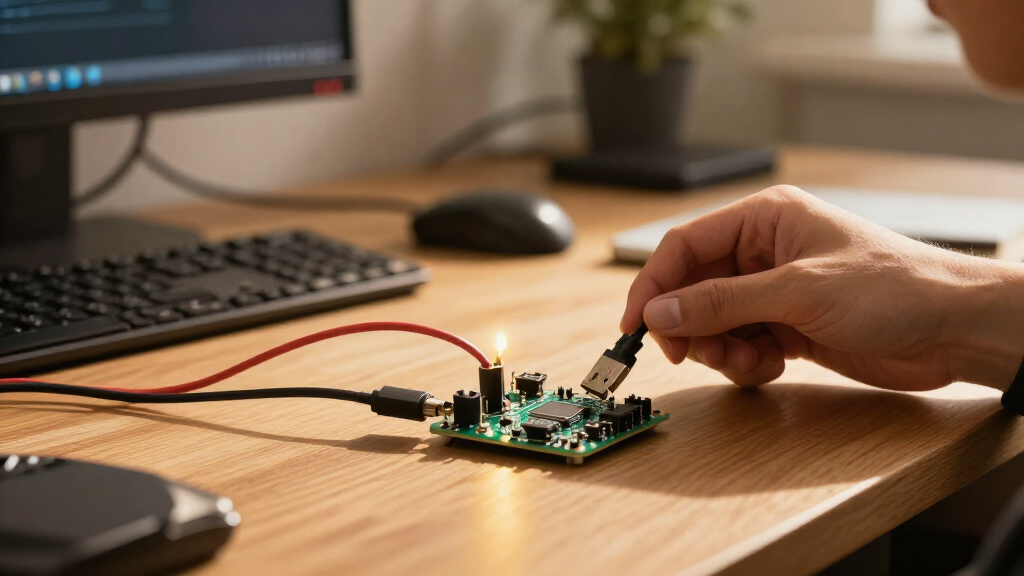

For most makers, I’d choose the ELEGOO ESP32 Development Boards 3-Pack as the best overall option: it pairs a familiar ESP-WROOM-32 platform with USB-C and a useful multi-board pack. The ELEGOO Super Starter Kit is a better starting point for guided learning, while the AITRIP ESP32-2432S028R stands out for projects that need a built-in touchscreen. The main tradeoffs are classic ESP32 compatibility versus newer ESP32-S3 or compact C3 boards, plus whether you need a screen, tutorial, or several spares. I compare all 14 options by project fit, usability, and included extras. Read on to find the board that suits your build.

Get the latest gadgets delivered free with Prime
- Fast, free delivery on millions of items
- Prime Video, Amazon Music and more included
- Member-only deals all year
Complete the kit



Key Takeaways
Familiarity favors the ESP-WROOM-32 boards: several picks use this established platform, making them sensible for common Wi-Fi and Bluetooth projects, while the S3 and C3 options serve different needs.
Touchscreens change the project workflow: the two AITRIP 2.8-inch touchscreen options combine display and input hardware, but they are less flexible as general-purpose boards than a standard development kit.
Pack size is not the same as value: multi-board sets from Hosyond, hiBCTR, AITRIP, and ELEGOO can suit classroom or multi-project use, but buyers should match the included pin layout and chip to their code and wiring plans.
Starter kits prioritize learning over minimal hardware: the ELEGOO and LAFVIN kits add tutorials or components, which can reduce setup friction but may be unnecessary for buyers who already have parts.
Board format matters as much as the chip: USB-C, 30- or 38-pin layouts, breakout accessories, and power expansion boards affect cabling and prototyping, so compare the complete setup rather than the ESP32 name alone.
| Hosyond 3-Pack ESP32-S3 N16R8 Development Boards |  | Best for Memory-Heavy ESP32-S3 Projects | Processor: Dual-core Xtensa 32-bit LX7, up to 240 MHz | Flash: 16 MB | PSRAM: 8 MB | VIEW LATEST PRICE | See Our Full Breakdown |
| AITRIP ESP32 Development Boards, 3-Pack, 30-Pin USB-C with CP2102 |  | Best Value for Standard ESP32 Prototyping | Model: ESP32-WROOM-32 | Quantity: 3 boards | Pin count: 30 pins | VIEW LATEST PRICE | See Our Full Breakdown |
| AITRIP ESP32-2432S028R Development Board with 2.8-Inch Touchscreen |  | Best Single-Board Pick for Touchscreen Interfaces | Display: 2.8-inch TFT touchscreen | Resolution: 240 × 320 | Processor: Dual-core ESP32-D0WDQ6, up to 240 MHz | VIEW LATEST PRICE | See Our Full Breakdown |
| ESP32-S3 Development Board Kit with Power Supply Expansion Board, 240 MHz Dual-Core, 16 MB Flash, 8 MB PSRAM, 44-Pin GPIO Breakout, 3-Pack |  | Best for Peripheral-Rich Builds | Processor: Dual-core, up to 240 MHz | Flash: 16 MB | PSRAM: 8 MB | VIEW LATEST PRICE | See Our Full Breakdown |
| AITRIP 2-Pack ESP32 Development Boards with 2.8-Inch Touchscreen |  | Best Two-Board Touchscreen Bundle | Model: ESP32-2432S028R | Quantity: 2 boards | Display: 2.8-inch TFT touchscreen | VIEW LATEST PRICE | See Our Full Breakdown |
| hiBCTR 6-Pack ESP32-DevKitC-32 Development Boards, USB-C, 38-Pin |  | Best for Multi-Board Projects | Chip: ESP-32D | Boards included: 6 | Pin count: 38 | VIEW LATEST PRICE | See Our Full Breakdown |
| ELEGOO ESP-32 Super Starter Kit with Tutorial |  | Best for Guided Learning | Processor: Espressif ESP-32, dual-core | RAM: 520 KB SRAM | Wireless: Wi-Fi and Bluetooth 4.2 | VIEW LATEST PRICE | See Our Full Breakdown |
| AITRIP ESP32 ESP-WROOM-32 Development Board with USB-C | 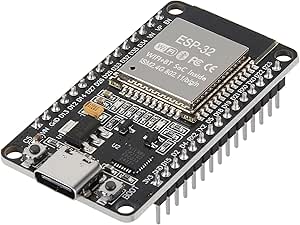 | Best Single-Board Workhorse | Module: ESP-WROOM-32 | Processor: Dual-core 32-bit, 240 MHz | Flash: 32 Mbit (listed as 4 MB) | VIEW LATEST PRICE | See Our Full Breakdown |
| LAFVIN ESP32 Basic Starter Kit with Tutorial |  | Best for Sensor-Based First Projects | Model: ESP32 Basic Starter Kit (LA043) | Wireless: Wi-Fi and Bluetooth | Compatible software: Arduino IDE | VIEW LATEST PRICE | See Our Full Breakdown |
| Teyleten Robot ESP32-C3 Supermini Development Board, Wi-Fi and Bluetooth, 3-Pack | 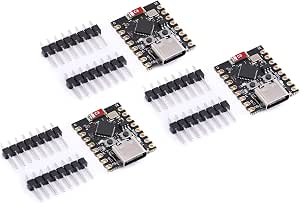 | Best Compact Multi-Board Pick | Model: ESP32-C3 | Boards included: 3 | Connectivity: Wi-Fi, Bluetooth, USB | VIEW LATEST PRICE | See Our Full Breakdown |
| 3-Pack ESP32 USB-C Development Boards with 38-Pin Breakout Boards |  | Best for GPIO Expansion | Package contents: 3 development boards and 3 breakout boards | Pins: 38 | Processor: Dual-core Tensilica LX6, up to 240 MHz | VIEW LATEST PRICE | See Our Full Breakdown |
| AITRIP ESP32 30-Pin Development Board with Wi-Fi and Bluetooth |  | Best for a Single-Board Arduino Build | Model: ESP-WROOM-32 ESP-32S | Board pins: 30 | Quantity: 1 | VIEW LATEST PRICE | See Our Full Breakdown |
| ESP32 ESP-WROOM-32 Development Board, Wi-Fi and Bluetooth, 3-Pack |  | Best for Peripheral-Rich Projects | Package quantity: 3 boards | Processor: Dual-core Tensilica LX6, up to 240 MHz | Memory: 512 KB SRAM listed; product information also reports conflicting memory details | VIEW LATEST PRICE | See Our Full Breakdown |
| ELEGOO ESP32 Development Boards, 3-Pack, ESP-WROOM-32, USB-C, Wi-Fi and Bluetooth 4.2 |  | Best USB-C Three-Pack | Model: EL-SM-012, ESP-WROOM-32 | Quantity: 3 boards | Processor: Dual-core, up to 240 MHz | VIEW LATEST PRICE | See Our Full Breakdown |
| ESP32 development board | Processor | Wireless |
|---|---|---|
| Hosyond 3-Pack ESP32-S3 N16R8 | Dual-core Xtensa 32-bit LX7, up to 240 MHz | 2.4 GHz Wi-Fi and Bluetooth 5.0 LE |
| AITRIP ESP32 Development Board | — | 2.4 GHz Wi-Fi and Bluetooth |
| AITRIP ESP32-2432S028R Develop | Dual-core ESP32-D0WDQ6, up to 240 MHz | — |
| ESP32-S3 Development Board Kit | Dual-core, up to 240 MHz | — |
| AITRIP 2-Pack ESP32 Developmen | Dual-core ESP32-D0WDQ6, up to 240 MHz | — |
| hiBCTR 6-Pack ESP32-DevKitC-32 | — | 2.4 GHz Wi-Fi and Bluetooth |
| ELEGOO ESP-32 Super Starter Ki | Espressif ESP-32, dual-core | Wi-Fi and Bluetooth 4.2 |
| AITRIP ESP32 ESP-WROOM-32 Deve | Dual-core 32-bit, 240 MHz | 2.4 GHz Wi-Fi and Bluetooth |
| LAFVIN ESP32 Basic Starter Kit | — | Wi-Fi and Bluetooth |
| Teyleten Robot ESP32-C3 Superm | — | — |
| 3-Pack ESP32 USB-C Development | Dual-core Tensilica LX6, up to 240 MHz | Wi-Fi 802.11b/g/n and Bluetooth Classic and LE |
| AITRIP ESP32 30-Pin Developmen | Dual-core, up to 240 MHz | 2.4 GHz Wi-Fi and Bluetooth |
| ESP32 ESP-WROOM-32 Development | Dual-core Tensilica LX6, up to 240 MHz | 2.4 GHz Wi-Fi 802.11b/g/n and Bluetooth Classic/LE |
| ELEGOO ESP32 Development Board | Dual-core, up to 240 MHz | 2.4 GHz Wi-Fi and Bluetooth 4.2 |
More Details on Our Top Picks
Hosyond 3-Pack ESP32-S3 N16R8 Development Boards
The Hosyond set is the strongest fit here for projects that need more working memory and flash than a standard ESP32-WROOM-32 board provides. Each of the three boards pairs an ESP32-S3 dual-core processor with 16 MB flash and 8 MB PSRAM, leaving more room for larger firmware and memory-hungry features. Two USB-C ports and USB or USB-to-serial download options give developers more flexibility when programming and debugging. Compared with the AITRIP 30-pin WROOM-32 3-pack, this set offers a newer S3 platform and substantially more stated memory, but it is less clearly suited to buyers seeking a conventional pin-layout match. The main caveats are practical: the listing gives no board dimensions or accessory details, and it states no warranty. I’d choose it for S3 capability, not for a fully documented out-of-box kit.
Pros:- Three ESP32-S3 boards in one set
- 16 MB flash and 8 MB PSRAM per board
- Dual USB-C ports with USB and USB-to-serial programming options
- Wi-Fi and Bluetooth 5.0 LE
Cons:- No warranty is specified
- Board dimensions and included accessories are not specified
- Pin count and exact layout are not provided in the product details
Best for: Makers building ESP32-S3 projects with larger firmware or memory-intensive features who want three boards for prototypes and spares.
Not ideal for: Beginners who need clearly documented dimensions, included accessories, or a stated warranty before choosing a board.
- Processor:Dual-core Xtensa 32-bit LX7, up to 240 MHz
- Flash:16 MB
- PSRAM:8 MB
- Quantity:3 boards
- Wireless:2.4 GHz Wi-Fi and Bluetooth 5.0 LE
- USB:2 USB-C ports
- Programming:USB and USB-to-serial download options
- Compatibility:Arduino IoT; Windows, macOS, and Linux
Our verdict“Choose this set when S3 processing and ample memory matter more than complete physical-board documentation.”
AITRIP ESP32 Development Boards, 3-Pack, 30-Pin USB-C with CP2102
For straightforward ESP32 prototyping, this three-pack keeps the setup familiar: 30 pins, USB-C, and a built-in CP2102 USB-to-TTL module on each board. That combination suits learners and hobbyists who want multiple boards for separate experiments without stepping up to the more memory-rich Hosyond ESP32-S3 set. Its support for MicroPython and FreeRTOS, along with AP, STA, and AP+STA wireless modes, gives it room to serve different project and network setups. The tradeoff is that the listing does not state flash capacity, PSRAM, processor speed, or the precise ESP32 variant, so buyers comparing hardware headroom cannot make a complete spec-for-spec choice. This is a practical, conventional option when basic Wi-Fi and Bluetooth development is the goal, rather than a board for documented high-memory requirements.
Pros:- Three boards for parallel projects or replacements
- USB-C interface with built-in CP2102 USB-to-TTL module
- Supports Wi-Fi and Bluetooth
- Lists MicroPython, FreeRTOS, and NodeLua support
Cons:- Flash capacity and PSRAM are not specified
- Processor speed and exact ESP32 chip variant are not stated
- The listing does not give detailed board dimensions or layout information
Best for: Students and hobbyists who want three conventional ESP32 boards for learning Wi-Fi, Bluetooth, and MicroPython or FreeRTOS projects.
Not ideal for: Developers whose project depends on known flash, PSRAM, processor-speed, or exact chip-variant specifications.
- Model:ESP32-WROOM-32
- Quantity:3 boards
- Pin count:30 pins
- USB interface:USB-C
- USB-to-TTL:CP2102
- Wireless:2.4 GHz Wi-Fi and Bluetooth
- Wireless modes:AP, STA, and AP+STA
- Supported firmware:MicroPython, FreeRTOS, and NodeLua
Our verdict“Pick this set for familiar USB-C ESP32 prototyping across several boards, but choose the Hosyond S3 set if memory specifications are a priority.”
AITRIP ESP32-2432S028R Development Board with 2.8-Inch Touchscreen
This board is for projects where the display is part of the prototype, not an add-on. Its integrated 2.8-inch, 240 × 320 touchscreen lets a developer build menus, status screens, or simple controls without separately wiring a display module. The ESP32-D0WDQ6 also provides Wi-Fi, Bluetooth, and common interfaces such as UART, SPI, I2C, PWM, ADC, and DAC; camera compatibility with OV2640 and OV7670 adds another route for interactive builds. Compared with the AITRIP two-pack touchscreen boards, this listing is the simpler choice if one unit is enough, while the two-pack offers another board for parallel testing. The concern is documentation: the product details contain inconsistent board model numbers, and the stated 4 MB storage is modest beside the Hosyond S3’s 16 MB flash. I’d favor it for display-led prototypes, not memory-heavy firmware.
Pros:- Integrated 2.8-inch, 240 × 320 TFT touchscreen
- Wi-Fi and Bluetooth connectivity
- UART, SPI, I2C, PWM, ADC, and DAC interfaces
- Compatible with OV2640 and OV7670 cameras
Cons:- Product details contain inconsistent board model numbers
- Listed storage is 4 MB, below the Hosyond S3 boards’ 16 MB flash
- Only one board is included
Best for: Arduino and IoT developers who want to prototype a touchscreen control panel or camera-compatible interface on one ESP32 board.
Not ideal for: Buyers who need consistent model documentation, multiple boards, or the larger stated flash and PSRAM of an ESP32-S3 option.
- Display:2.8-inch TFT touchscreen
- Resolution:240 × 320
- Processor:Dual-core ESP32-D0WDQ6, up to 240 MHz
- Installed RAM:520 KB
- Storage:4 MB
- Connectivity:Wi-Fi and Bluetooth
- Interfaces:UART, SPI, I2C, PWM, ADC, and DAC
- Camera compatibility:OV2640 and OV7670
Our verdict“Choose this single board when an integrated touchscreen matters more than memory capacity or a multi-board pack.”
ESP32-S3 Development Board Kit with Power Supply Expansion Board, 240 MHz Dual-Core, 16 MB Flash, 8 MB PSRAM, 44-Pin GPIO Breakout, 3-Pack
This kit stands out for wiring projects with several peripherals: its 44-pin GPIO breakout adds 1-to-2 connections, while the expansion board provides 3.3 V and 5 V outputs. That makes it more oriented toward a bench setup than the Hosyond three-pack, which offers the same stated 16 MB flash and 8 MB PSRAM but does not list a comparable power expansion board. Dual USB-C ports, a CH343P bridge chip, and Arduino IDE compatibility round out a feature set aimed at hands-on embedded and automation work. The added wiring flexibility comes with a real dependency: the expansion board’s power input requires an external 6.5–9 V DC supply. Buyers who only need compact standalone boards may find the extra hardware unnecessary, while developers connecting multiple peripherals can make better use of it.
Pros:- 44-pin GPIO breakout with 1-to-2 expansion connections
- Expansion board provides 3.3 V and 5 V outputs
- 16 MB flash and 8 MB PSRAM
- Dual USB-C ports and Arduino IDE compatibility
Cons:- Expansion-board power input requires an external 6.5–9 V DC supply
- The additional expansion hardware may be unnecessary for simple projects
- The product details do not specify wireless connectivity
Best for: Makers building Arduino-based automation or IoT prototypes that need multiple GPIO connections and separate 3.3 V and 5 V power outputs.
Not ideal for: Developers seeking a simple, self-contained ESP32-S3 board set who do not want to provide an external 6.5–9 V supply for expansion-board power.
- Processor:Dual-core, up to 240 MHz
- Flash:16 MB
- PSRAM:8 MB
- SRAM:520 KB
- GPIO:44 pins with 1-to-2 expansion
- USB:2 USB Type-C ports
- Expansion-board input:6.5–9 V DC
- Power outputs:3.3 V and 5 V
- Quantity:3 pieces
Our verdict“Choose this kit over the Hosyond S3 set when GPIO expansion and separate power outputs are more useful than a simpler board-only setup.”
AITRIP 2-Pack ESP32 Development Boards with 2.8-Inch Touchscreen
Compared with the single-board AITRIP touchscreen option, this bundle gives buyers two matching display-equipped boards for building a prototype and a separate test unit, or for trying two interface layouts in parallel. Both are listed with a 2.8-inch, 240 × 320 TFT touchscreen, dual-core ESP32-D0WDQ6 processing, Wi-Fi, Bluetooth, and a useful spread of UART, SPI, I2C, PWM, ADC, and DAC interfaces. That makes the pair more immediately useful for screen-based projects than the AITRIP 30-pin WROOM-32 pack, which does not include a display. The chief reservation is inconsistent listing data: the product details flag model and specification discrepancies, including a stated 4 GB storage capacity that is unusual alongside the related single-board listing’s 4 MB figure. I’d confirm the storage detail before choosing it for a project with firm capacity needs.
Pros:- Two boards included
- Each board has a 2.8-inch, 240 × 320 TFT touchscreen
- Wi-Fi and Bluetooth connectivity
- Supports UART, SPI, I2C, PWM, ADC, and DAC
Cons:- Listing details flag inconsistent model and specification information
- The stated 4 GB storage differs from the 4 MB figure on the related single-board listing
- Touchscreens make this a less suitable choice for projects that do not need an integrated display
Best for: Makers who want two ESP32 touchscreen boards for parallel interface development, a prototype-and-test setup, or a spare display unit.
Not ideal for: Developers who need reliable, consistent storage specifications or who would rather spend board space and project effort on external peripherals.
- Model:ESP32-2432S028R
- Quantity:2 boards
- Display:2.8-inch TFT touchscreen
- Display resolution:240 × 320
- Processor:Dual-core ESP32-D0WDQ6, up to 240 MHz
- Installed RAM:520 KB
- Storage capacity:4 GB as stated in the product data
- Connectivity:Wi-Fi, Bluetooth, and I2C
- Interfaces:UART, SPI, I2C, PWM, ADC, and DAC
Our verdict“Choose this pair over the single-board AITRIP touchscreen option when you need two display-equipped ESP32 units, after verifying the storage specification.”
hiBCTR 6-Pack ESP32-DevKitC-32 Development Boards, USB-C, 38-Pin
I’d choose the hiBCTR six-pack when a project needs several ESP32 nodes or spare boards for iterative builds. Its 38-pin layout exposes more connections than the 30-pin AITRIP ESP32 ESP-WROOM-32 board, which can help when a prototype uses several sensors or peripherals at once. USB-C and Wi-Fi plus Bluetooth cover the practical basics for connected projects, while UART, SPI, I2C, PWM, DAC, and ADC offer a broad set of interfaces.
The tradeoff is that this is a stack of boards, not a learning kit: no sensors, breadboard, or project lessons are listed. Setup may also involve driver installation and Arduino IDE configuration. I’d pick the ELEGOO ESP-32 Super Starter Kit instead for guided component-based learning; this pack is the better fit for builders who already know what they want to connect.
Pros:- Six boards support parallel builds, spares, or multiple connected nodes.
- 38-pin layout offers more connection points than common 30-pin boards.
- USB-C connector and 2.4 GHz Wi-Fi and Bluetooth support.
- UART, SPI, I2C, PWM, DAC, and ADC cover varied project interfaces.
Cons:- No sensors, breadboards, or project tutorials are listed.
- May require driver installation and Arduino IDE configuration before use.
Best for: Makers building several Wi-Fi or Bluetooth prototypes who want matching 38-pin boards and already have components and development tools.
Not ideal for: First-time electronics learners looking for included sensors, wiring, and guided projects; the boards are supplied without those learning extras.
- Chip:ESP-32D
- Boards included:6
- Pin count:38
- Connector:USB Type-C
- Wireless:2.4 GHz Wi-Fi and Bluetooth
- Interfaces:UART, SPI, I2C, PWM, DAC, ADC
Our verdict“Choose this six-pack for multi-board prototyping and expanded pin access, but choose the ELEGOO starter kit if you need parts and guided lessons.”
ELEGOO ESP-32 Super Starter Kit with Tutorial
The ELEGOO ESP-32 Super Starter Kit is the most learning-focused choice in this group: it pairs a dual-core ESP-32 board with more than 35 components and over 30 guided projects. That changes the buying decision from sourcing each sensor and module separately to following lessons that connect code with circuits. Compared with the LAFVIN ESP32 Basic Starter Kit, ELEGOO lists a larger component count and a longer project set, though its product details do not identify every included part.
The board supports Arduino IDE, Wi-Fi, and Bluetooth 4.2, so lessons can progress from basic inputs and outputs to connected builds. The tradeoff is that learning remains self-guided: buyers need to follow the tutorials and write or adapt code themselves. I’d favor the LAFVIN kit if its specifically listed OLED, DHT11, and motion sensor match a planned project; this kit suits learners who want breadth and a larger lesson library.
Pros:- Includes more than 35 modules and components for varied experiments.
- Offers over 30 guided projects with code and circuit diagrams.
- Dual-core ESP-32 supports Wi-Fi and Bluetooth 4.2 projects.
- Arduino IDE compatibility fits a widely used learning workflow.
Cons:- The full component list is not specified in the product details.
- Projects still require hands-on assembly, programming, and self-guided learning.
Best for: New Arduino learners who want a broad assortment of modules and guided projects to practice electronics, coding, and IoT.
Not ideal for: Buyers who need a precisely itemized component list or a ready-to-run project; the included parts require self-guided assembly and programming.
- Processor:Espressif ESP-32, dual-core
- RAM:520 KB SRAM
- Wireless:Wi-Fi and Bluetooth 4.2
- Wi-Fi compatibility:802.11b/g/n
- Included components:More than 35 modules and components
- Tutorial projects:More than 30
- Compatible software:Arduino IDE
Our verdict“Pick ELEGOO for a wide-ranging, tutorial-led start with ESP32; choose LAFVIN if you want its named OLED and sensor components.”
AITRIP ESP32 ESP-WROOM-32 Development Board with USB-C
For a buyer who needs one capable ESP32 board rather than a bundle, this AITRIP ESP-WROOM-32 is a practical middle ground. It combines a 240 MHz dual-core processor, USB-C, and 22 I/O ports in a 30-pin layout, with reset and programming buttons that make repeated uploads less fiddly. Its listed interfaces include UART, SPI, SDIO, I2C, I2S, IR, PWM, ADC, and DAC, giving it broader peripheral support than the simpler connectivity description of the Teyleten Robot ESP32-C3 Supermini three-pack.
That extra flexibility comes with a basic-board tradeoff: the package contains one board, so sensors, wiring, and project materials must come from elsewhere. The listed flash capacity is 32 Mbit (4 MB), and the product details also describe it as 4 MB storage. I’d choose the hiBCTR pack for several 38-pin builds, but this AITRIP makes more sense when one USB-C board and a varied interface set are enough.
Pros:- Dual-core 32-bit processor rated at 240 MHz.
- Reset and programming buttons simplify repeated setup and uploads.
- Broad interface support includes SPI, I2C, I2S, ADC, and DAC.
- USB-C connection, 22 I/O ports, and Wi-Fi and Bluetooth.
Cons:- Package contains one board and no project components.
- 30-pin layout exposes fewer pins than the hiBCTR 38-pin boards.
- Flash is specified as both 32 Mbit and 4 MB, which may confuse buyers comparing listings.
Best for: Makers who need one general-purpose ESP32 board with USB-C, convenient programming buttons, and a broad set of peripheral interfaces.
Not ideal for: Learners seeking a complete project kit or builders who need more than one board in the package.
- Module:ESP-WROOM-32
- Processor:Dual-core 32-bit, 240 MHz
- Flash:32 Mbit (listed as 4 MB)
- Pins and I/O:30 pins; 22 I/O ports
- USB interface:USB-C
- USB-to-serial chip:CP2102
- Wireless:2.4 GHz Wi-Fi and Bluetooth
- Interfaces:UART, SPI, SDIO, I2C, PWM, I2S, IR, ADC, DAC
Our verdict“Choose this AITRIP for a single, versatile USB-C ESP32 board, but look to the hiBCTR pack for more pins and multiple boards.”
LAFVIN ESP32 Basic Starter Kit with Tutorial
The LAFVIN ESP32 Basic Starter Kit earns its place by naming the parts a beginner can start wiring right away: a 0.96-inch OLED, DHT11 temperature and humidity sensor, PIR motion sensor, breadboard, LEDs, buzzer, and relay among them. That specificity helps buyers match the kit to simple display, sensing, and alert projects. Compared with the ELEGOO ESP-32 Super Starter Kit, LAFVIN gives a clearer list of key components, while ELEGOO advertises more than 35 modules and over 30 guided projects.
The included tutorial has code and lessons, but it must be downloaded, and assembly still calls for hands-on learning. The product details also do not give the ESP32 board’s pin count or processor specifications, making hardware comparisons less exact than with the AITRIP ESP-WROOM-32. I’d choose LAFVIN for a focused first set of sensor experiments, not for buyers who need extensive board specifications or a large, explicitly counted tutorial catalog.
Pros:- Includes an OLED, DHT11 sensor, PIR motion sensor, and 830-point breadboard.
- Supplies LEDs, buzzer, relay, switches, resistors, and jumper wires for basic circuits.
- Tutorial provides code and project lessons for Arduino IDE.
- ESP32 connectivity supports Wi-Fi and Bluetooth projects.
Cons:- Tutorial must be downloaded before use.
- Board pin count, processor speed, and memory are not specified.
- Assembly and programming still require hands-on effort.
Best for: Beginners who want to build Arduino projects around an OLED, temperature and humidity sensing, motion detection, and basic output components.
Not ideal for: Buyers who want a fully specified board or tutorials ready to access without downloading; the listing omits key board details and requires setup.
- Model:ESP32 Basic Starter Kit (LA043)
- Wireless:Wi-Fi and Bluetooth
- Compatible software:Arduino IDE
- Display:0.96-inch OLED
- Breadboard:830-point
- Sensors:DHT11 temperature and humidity sensor; HC-SR501 PIR motion sensor
- Other components:Obstacle avoidance module, photosensitive resistor, 5V 2-channel relay, buzzer, LEDs, switches, resistors, potentiometer, Dupont wires
- Cable:Micro USB
Our verdict“Choose LAFVIN for a clearly listed set of sensor and display parts for early Arduino projects, but choose ELEGOO for a larger stated tutorial program.”
Teyleten Robot ESP32-C3 Supermini Development Board, Wi-Fi and Bluetooth, 3-Pack
The Teyleten Robot ESP32-C3 Supermini three-pack is the compact, multi-board alternative for projects that need several small connected controllers rather than a broad set of exposed interfaces. It provides Wi-Fi and Bluetooth, USB connectivity, and accepts 3.3–6 V external power, so it can suit distributed sensors or small embedded builds. Compared with the hiBCTR ESP32-DevKitC-32 pack, its appeal is the ESP32-C3 Supermini format and external-power range; the hiBCTR boards instead list a 38-pin layout and a wider set of interfaces.
The listing does not specify pin count, processor speed, memory, or detailed peripheral support, so I would not choose it when those details drive a design. Setup has a hands-on wrinkle too: entering download mode requires a button sequence, and USB and external power cannot be connected at the same time. This makes most sense for compact builds where three boards matter more than an extensively documented feature set.
Pros:- Three boards support multiple compact builds or spare units.
- Wi-Fi and Bluetooth suit connected-device projects.
- Accepts 3.3–6 V external power.
- USB connectivity supports programming from a PC or laptop.
Cons:- Download mode requires a manual button sequence.
- USB and external power cannot be used simultaneously.
- The listing does not specify pin count, processor speed, memory, or peripheral interfaces.
Best for: Makers building several compact Wi-Fi or Bluetooth devices who can work with a manual download-mode sequence and separate USB or external power.
Not ideal for: Beginners who want detailed pin and processor specifications, or projects that need USB and external power connected simultaneously.
- Model:ESP32-C3
- Boards included:3
- Connectivity:Wi-Fi, Bluetooth, USB
- External power input:3.3–6 V
- Operating system:FreeRTOS
- Processor brand:Espressif
- Power-use restriction:Use USB or external power; not both at the same time
Our verdict“Pick this three-pack for compact ESP32-C3 builds with external-power flexibility, but choose the hiBCTR pack when pin access and interface details matter more.”
3-Pack ESP32 USB-C Development Boards with 38-Pin Breakout Boards
This kit is the clearest fit for projects where access to GPIO pins is the main constraint: it pairs three 38-pin ESP32 boards with breakout boards that split one GPIO connection into two. That can make wiring repeated modules easier than with the ELEGOO three-board kit, which lists standard interfaces but no matching GPIO breakout. Wi-Fi, Bluetooth, USB-C, and reset and boot buttons cover common prototyping needs, while AP, STA, and combined network modes give flexibility for wireless experiments. The tradeoff is board-specific fit: these breakouts are designed for narrow 38-pin boards and do not work with the ESP32 DevKit V1. Choose another kit if you need broad breakout compatibility or a documented Arduino IDE setup.
Pros:- Includes three ESP32 boards and three matching GPIO breakout boards
- Breakouts split one GPIO connection into two for easier wiring
- USB-C connectivity plus reset and boot buttons
- Supports Wi-Fi and Bluetooth
Cons:- Breakout boards fit only narrow 38-pin ESP32 boards
- Not compatible with ESP32 DevKit V1
- Lua support is listed, but Arduino IDE compatibility is not specified
Best for: Makers building several sensor or module prototypes who want three boards and matching GPIO breakouts for narrow 38-pin ESP32 boards.
Not ideal for: DevKit V1 owners or builders who need breakout boards that fit multiple ESP32 board layouts.
- Package contents:3 development boards and 3 breakout boards
- Pins:38
- Processor:Dual-core Tensilica LX6, up to 240 MHz
- RAM:512 KB
- Wireless:Wi-Fi 802.11b/g/n and Bluetooth Classic and LE
- Network modes:AP, STA, AP+STA
- Programming support:Lua
- Breakout function:Expands one GPIO pin to two
- USB:USB-C
Our verdict“Pick this kit when its narrow 38-pin GPIO breakouts match your board and wiring needs; skip it if you rely on DevKit V1 compatibility.”
AITRIP ESP32 30-Pin Development Board with Wi-Fi and Bluetooth
For a project that needs one straightforward ESP32 board rather than a multi-board bundle, this 30-pin AITRIP keeps the choice focused. It supports Arduino IDE, 2.4 GHz Wi-Fi, Bluetooth, and AP, STA, or combined network modes, making it a practical match for basic connected sensors and control projects. Compared with the three-board ESP-WROOM-32 3-pack, this listing gives you one board and less spares for parallel builds, but it may suit a buyer who wants a single unit to add to an existing setup. The main caution is documentation: its listed memory and storage figures appear inconsistent with typical ESP32 specifications. I would verify those details before choosing it for a project with strict memory requirements.
Pros:- Arduino IDE compatibility is specified
- Supports 2.4 GHz Wi-Fi and Bluetooth
- Offers AP, STA, and combined AP+STA modes
- Dual-core processor listed at up to 240 MHz
Cons:- Memory and storage specifications may be inconsistent with typical ESP32 board specifications
- Single-board quantity offers fewer spares than the three-board kits
- USB connector type is not specified
Best for: Arduino IDE users who need one 30-pin ESP32 board for a basic Wi-Fi or Bluetooth prototype and can confirm memory details before deployment.
Not ideal for: Buyers planning several simultaneous builds or projects that depend on clearly documented memory and storage capacity.
- Model:ESP-WROOM-32 ESP-32S
- Board pins:30
- Quantity:1
- Processor:Dual-core, up to 240 MHz
- Wireless:2.4 GHz Wi-Fi and Bluetooth
- Wi-Fi modes:AP, STA, AP+STA
- Memory:512 MB RAM listed
- Storage:512 KB listed
- Programming compatibility:Arduino IDE
Our verdict“Choose this AITRIP board for a single Arduino-based prototype, but confirm its memory specifications before relying on them.”
ESP32 ESP-WROOM-32 Development Board, Wi-Fi and Bluetooth, 3-Pack
This three-board set stands out for the range of peripherals explicitly listed: ADC, DAC, capacitive touch, UART, SPI, and I2C. That makes it a stronger fit for projects connecting varied sensors and modules than the AITRIP 30-pin single board, which focuses on core wireless and Arduino compatibility. The boards also offer dual-core processing up to 240 MHz, Wi-Fi, Bluetooth, and Arduino IDE support, so the set can serve repeated prototypes or separate project stages. Documentation is the weak point: the listing gives conflicting pin counts and memory details. I would treat those as unknowns until verified, especially when choosing wiring or designing around a specific memory budget. It is a flexible general-purpose bundle, but not the clearest pick for spec-sensitive builds.
Pros:- Three boards support parallel prototypes or provide spares
- Lists ADC, DAC, capacitive touch, UART, SPI, and I2C peripherals
- Arduino IDE compatibility is specified
- Includes Wi-Fi and Bluetooth with AP, STA, and AP+STA modes
Cons:- Pin count is listed inconsistently as 30 or 36
- Memory specifications conflict within the product information
- USB connector type is not specified
Best for: Arduino makers who want three boards for sensor-heavy prototypes using a mix of analog, touch, and serial peripherals.
Not ideal for: Builders who need confirmed pin counts or memory specifications before laying out wiring or selecting peripherals.
- Package quantity:3 boards
- Processor:Dual-core Tensilica LX6, up to 240 MHz
- Memory:512 KB SRAM listed; product information also reports conflicting memory details
- Wireless:2.4 GHz Wi-Fi 802.11b/g/n and Bluetooth Classic/LE
- Network modes:AP, STA, AP+STA
- Peripherals:Capacitive touch, ADC, DAC, UART, SPI, I2C
- Programming compatibility:Arduino IDE
- Dimensions:2.05 x 1.18 x 0.59 in
Our verdict“Pick this three-pack for broad peripheral experimentation if you can verify the pinout and memory details before building.”
ELEGOO ESP32 Development Boards, 3-Pack, ESP-WROOM-32, USB-C, Wi-Fi and Bluetooth 4.2
This is the most clearly specified USB-C option among these three-board kits: ELEGOO lists an ESP-WROOM-32, a CP2102 USB-to-serial chip, 4 MB storage, and a 520 KB RAM figure. That gives buyers more concrete hardware details than the conflicting pin and memory listing for the other ESP-WROOM-32 3-pack. It also brings Wi-Fi, Bluetooth 4.2, GPIO, UART, SPI, and I2C for common IoT and automation builds. Low-power modes and configurable OTA updates can help with battery-minded or remotely maintained projects, though OTA needs compatible software setup. The tradeoff is that the USB-C cable is not included, and the listing does not specify a pin count. Compared with the GPIO-breakout kit, this one is a cleaner general-purpose bundle but lacks dedicated breakout boards.
Pros:- Three ESP-WROOM-32 boards with USB-C connectivity
- CP2102 USB-to-serial chip is specified
- Lists 4 MB storage and 520 KB RAM
- Supports Wi-Fi, Bluetooth 4.2, and common GPIO interfaces
Cons:- USB-C cable is not included
- OTA updates require compatible software configuration
- Pin count is not specified
Best for: Makers who want three USB-C ESP32 boards with a specified USB-to-serial chip and storage figure for general IoT or automation prototypes.
Not ideal for: Buyers who need a bundled USB-C cable, a documented pin count, or dedicated GPIO breakout boards.
- Model:EL-SM-012, ESP-WROOM-32
- Quantity:3 boards
- Processor:Dual-core, up to 240 MHz
- RAM:520 KB
- Storage:4 MB
- Wireless:2.4 GHz Wi-Fi and Bluetooth 4.2
- Interfaces:GPIO, UART, SPI, I2C, USB-C
- USB-to-serial chip:CP2102
- USB-C cable:Not included
Our verdict“Choose the ELEGOO kit for a well-documented USB-C three-pack, provided you have a cable and do not need a stated pin count or GPIO breakouts.”
How We Picked
I ranked these boards by how well their hardware and included materials match common ESP32 projects: learning to program, building Wi-Fi or Bluetooth devices, prototyping with sensors, driving a display, and stocking multiple workstations. I looked at chip family, pin access, USB connector and programming setup, onboard display or power expansion, pack size, and whether a tutorial or starter components are part of the offer. Those details affect compatibility and setup effort more than a headline processor speed alone.
The order gives priority to versatile boards that suit a broad range of builds, then to options with a stronger niche advantage, such as a touchscreen, learning materials, compact size, or expanded power hardware. A lower position does not mean a board cannot work well; it means its narrower format, less distinctive bundle, or more specialized use makes it a less natural default. Since listings and board revisions can change, I’d confirm the exact chip, pin count, USB interface, and included accessories before ordering.
| ESP32 development board | Processor |
|---|---|
| Hosyond 3-Pack ESP32-S3 N16R8 | Dual-core Xtensa 32-bit LX7, up to 240 MHz |
| AITRIP ESP32 Development Board | — |
| AITRIP ESP32-2432S028R Develop | Dual-core ESP32-D0WDQ6, up to 240 MHz |
| ESP32-S3 Development Board Kit | Dual-core, up to 240 MHz |
| AITRIP 2-Pack ESP32 Developmen | Dual-core ESP32-D0WDQ6, up to 240 MHz |
| hiBCTR 6-Pack ESP32-DevKitC-32 | — |
| ELEGOO ESP-32 Super Starter Ki | Espressif ESP-32, dual-core |
| AITRIP ESP32 ESP-WROOM-32 Deve | Dual-core 32-bit, 240 MHz |
| LAFVIN ESP32 Basic Starter Kit | — |
| Teyleten Robot ESP32-C3 Superm | — |
| 3-Pack ESP32 USB-C Development | Dual-core Tensilica LX6, up to 240 MHz |
| AITRIP ESP32 30-Pin Developmen | Dual-core, up to 240 MHz |
| ESP32 ESP-WROOM-32 Development | Dual-core Tensilica LX6, up to 240 MHz |
| ELEGOO ESP32 Development Board | Dual-core, up to 240 MHz |
Factors to Consider When Choosing Best ESP32 Development Boards
Before choosing among these boards, I’d start with the project constraints rather than the product name. ESP32 boards can share a family label while differing in chip generation, pin layout, USB interface, and the amount of hardware included. These factors determine whether a board fits your code, enclosure, and learning plan.
Match the chip family to your software and project
ESP32-WROOM-32, ESP32-S3, and ESP32-C3 boards are not interchangeable just because they share Wi-Fi branding. Existing tutorials, libraries, and pin assignments may target a particular chip or board definition, so check those before buying a newer or smaller variant. The S3 options here include substantial flash and PSRAM on some listings, which can help with memory-heavy projects, but that does not make them a universal upgrade. The C3 Supermini is aimed at compact builds, where its smaller footprint matters more than a broad breakout layout. I’d choose based on the required peripherals, memory, and code support rather than the largest specification on the listing.
Check pin count, spacing, and board dimensions
A 30-pin board and a 38-pin board can expose different connections and may not fit the same breadboard or enclosure plan. More pins can offer extra options, but only if those pins are available for the signals your project needs and are not reserved for onboard functions. Before ordering, compare a pinout diagram against your sensor, motor driver, or display wiring. Also check the physical width and header arrangement if you plan to plug the board directly into a breadboard. A mismatch can turn a seemingly simple build into a rewiring task or require a separate breakout board.
Treat USB-C as a connector detail, not a full compatibility guarantee
USB-C describes the connector shape; it does not by itself tell you how the board handles programming, power, or serial communication. Some listings name the USB-to-serial chip, such as CP2102, while others provide less detail, so verify driver and operating-system support if a reliable upload workflow matters. Cable quality also counts: some USB-C cables carry power without data. For a classroom or shared workstation, consistent connectors and a known upload method can save more time than small differences in board specs. Confirm the exact board revision and programming interface if you rely on a particular IDE setup.
Decide whether a screen or expansion board belongs in the build
A board with an integrated touchscreen can simplify a compact interface project by combining display and touch input in one package. That convenience comes with a more specialized layout and may use pins or libraries differently from a plain development board. A power expansion board can help organize a project that needs a separate supply, but check its voltage input and output limits before attaching motors or other demanding loads. For a sensor prototype that changes often, a basic board plus separate modules may be easier to reconfigure. Pay for integrated hardware when it replaces parts you would otherwise connect and support.
Choose a kit or multipack based on what you will actually use
Multipacks make sense when you need spares, are building several units, or share boards with a group. They are less useful if the boards do not match your required pin layout or if you only need one unit for a single project. Starter kits add learning materials or components, but included parts can vary, so check the inventory against the lessons or project plans you intend to follow. A tutorial can be more valuable to a beginner than extra boards, while an experienced maker may prefer a straightforward board pack. Count the useful components, not just the number of items in the package.
Plan for power, logic levels, and the finished enclosure
Development boards are convenient for prototyping, but a working circuit still depends on appropriate power and wiring. Check the board documentation for its supported input and output conditions, and avoid assuming every pin tolerates the same voltage as a sensor or peripheral. Wi-Fi activity, displays, and attached devices can affect power needs, so size the supply for the whole build rather than the board alone. Also account for antenna clearance and USB access when placing the board inside an enclosure. These checks help prevent a prototype that works on a bench from failing after installation.
Frequently Asked Questions
Should I buy an ESP32-S3 board or a standard ESP-WROOM-32 board?
I’d start with the code and peripherals you plan to use. A standard ESP-WROOM-32 board is a straightforward choice for many established Wi-Fi and Bluetooth tutorials, while an S3 board can suit projects that benefit from its particular chip features and, on some models here, extra memory. Libraries and pin assignments can vary, so confirm your project supports the exact board before switching families. If you are following a guide written for a classic ESP32, matching its board type can save setup work. Choose the S3 for a clear project need rather than assuming a newer name guarantees compatibility.
Is a touchscreen ESP32 board a good first board?
It can be a good first board if your goal is to build an interface with on-device controls or status information. A touchscreen combines several learning topics, though, including display libraries, touch input, and pin configuration. That can make early troubleshooting less direct than using a plain board with a simple LED or sensor. If you are new to microcontrollers, I’d begin with a tutorial-led starter kit unless the screen itself is central to your first project. The touchscreen option makes more sense when you are ready to work with its specific display hardware.
How many GPIO pins do I need for a typical ESP32 project?
There is no useful universal pin count; the answer depends on the sensors, outputs, and communication buses in your build. List the required signals first, then check which pins on the specific board support those functions and whether any are reserved or awkward to use at startup. A 38-pin layout may expose more connections than a 30-pin layout, but the extra pins do not automatically make a project easier. If you expect to expand later, leave spare usable pins rather than wiring every available connection. Pinout diagrams are more helpful than the headline count.
When should I choose a starter kit instead of a multi-board pack?
I’d choose a starter kit when you need guided projects, basic components, or a structured way to learn how the board connects to sensors and outputs. A multi-board pack is a better fit when you already have components and want spares for parallel builds, classrooms, or replacement. Check the kit’s included parts and tutorial scope rather than assuming every advertised bundle teaches the same skills. If you already own a breadboard, jumpers, and common sensors, a plain board pack may avoid duplicating supplies. For a first project, clear instructions can matter more than receiving several boards.
What should I verify before buying a USB-C ESP32 board for my computer?
Check the exact board’s USB-to-serial interface, supported operating systems, and programming instructions. USB-C only identifies the connector; the cable must also support data, and the computer may need a driver for the interface chip. Confirm that your chosen development environment lists the board’s chip family and board definition. If you are buying several boards for a class or team, matching the interface across the set can make setup more consistent. Keep the listing’s board revision and pinout available when troubleshooting uploads.
Conclusion
For a broadly useful starting point, I’d pick the ELEGOO ESP32 Development Boards 3-Pack as the best overall choice, while the AITRIP ESP32 30-Pin or ESP-WROOM-32 three-board packs are strong value candidates when a simple board and spares matter more than added extras. Beginners should lean toward the ELEGOO Super Starter Kit for its tutorial-led approach; the LAFVIN Basic Starter Kit is another learning-focused route. For a premium-style feature set, the ESP32-S3 kit with power expansion and breakout is the more specialized pick, provided its layout suits the project. Choose an AITRIP touchscreen board for an integrated interface, the Teyleten Robot C3 Supermini for compact builds, or the hiBCTR 6-pack when outfitting several workstations. My final check would be the exact chip, pinout, and USB interface—not the product title alone.
Halloween Picks
halloween
As an affiliate, we earn on qualifying purchases.