
Choosing the best ASRock Taichi motherboards requires balancing chipset generation, connectivity needs, and budget constraints. The ASRock X870E Taichi stands out as the top choice for AMD enthusiasts seeking future-proof PCIe 5.0 support and robust VRM design. For Intel users, the ASRock Z890 Taichi offers the latest LGA 1851 compatibility with advanced AI features. Meanwhile, the ASRock B650E Taichi remains a strong contender for those wanting AMD performance without the extreme price tag of the X-series. This guide breaks down which board fits your specific build, highlighting key tradeoffs in power delivery, connectivity, and form factor to help you make an informed decision.

Get the latest gadgets delivered free with Prime
- Fast, free delivery on millions of items
- Prime Video, Amazon Music and more included
- Member-only deals all year
Complete the kit



Key Takeaways
- The ASRock X870E Taichi and Z890 Taichi are the only current-generation boards offering native USB4 and Wi-Fi 7, making them mandatory for future-proof high-end setups.
- Older Taichi models like the X570 and Z390 remain relevant for budget upgraders but lack PCIe 5.0 support, limiting their lifespan for next-gen GPUs.
- Third-party or ‘Taichi-compatible’ boards (like the Ayylltx Z690) often lack the rigorous BIOS support and VRM thermal management of official ASRock products, posing stability risks.
- The X670E Taichi Carrara offers a distinct white aesthetic and identical specs to the standard Taichi, catering specifically to white-themed builds without a performance penalty.
- Power delivery (VRM) quality is the primary differentiator between Taichi and cheaper ASRock models like the Steel Legend, justifying the price for heavy overclocking.
| ASRock X870E Taichi EATX Motherboard |  | Best Overall | Form Factor: EATX | Socket: AM5 | Memory Support: DDR5 up to 8200 MHz | VIEW LATEST PRICE | See Our Full Breakdown |
| ASRock X670E Taichi Carrara Motherboard |  | Best Premium Aesthetic | Form Factor: EATX | Chipset: AMD X670E | Memory Support: DDR5 up to 128 GB | VIEW LATEST PRICE | See Our Full Breakdown |
| ASRock B650E Taichi Lite AM5 ATX Motherboard |  | Best Value Entry | Form Factor: ATX | Chipset: AMD B650E | Memory Support: DDR5 up to 256 GB | VIEW LATEST PRICE | See Our Full Breakdown |
| ASRock X299 Taichi CLX LGA2066 ATX Motherboard |  | Best for Workstation Legacy | Socket: LGA 2066 | Chipset: Intel X299 | Memory Support: DDR4 up to 256 GB | VIEW LATEST PRICE | See Our Full Breakdown |
| Ayylltx Z690 Taichi Razer Edition Compatible Motherboard |  | Best for Intel Enthusiasts | Socket: LGA 1700 | Chipset: Intel Z690 | Memory Support: DDR5 up to 192 GB | VIEW LATEST PRICE | See Our Full Breakdown |
| ZXKLXYY X570 ATX Motherboard |  | Best Budget Alternative | Chipset: AMD X570 | Socket: AM4 | Max Memory: 128 GB DDR4 | VIEW LATEST PRICE | See Our Full Breakdown |
| THFKLXT X470 AM4 Motherboard |  | Best Entry-Level AM4 | Socket: AM4 | Form Factor: ATX | Max Memory: 64 GB DDR4 | VIEW LATEST PRICE | See Our Full Breakdown |
| ASRock X570 Taichi AM4 ATX Motherboard |  | Best Overall AM4 | Chipset: AMD X570 | Socket: AM4 | Max Memory: 128 GB DDR4 | VIEW LATEST PRICE | See Our Full Breakdown |
| ASRock B650E Taichi ATX Motherboard |  | Best for Future-Proofing | Socket: AMD AM5 | Chipset: AMD B650E | Max Memory: 256 GB DDR5 | VIEW LATEST PRICE | See Our Full Breakdown |
| ASRock Z390 Taichi ATX Motherboard |  | Best for Legacy Intel | CPU Socket: LGA 1151 | Chipset: Intel Z390 | Max Memory: 64 GB DDR4 | VIEW LATEST PRICE | See Our Full Breakdown |
| ASRock Z790 Taichi Carrara Motherboard | 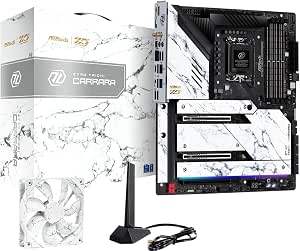 | Best for Intel 12th/13th Gen Builders | Socket: LGA 1700 | Chipset: Intel Z790 | Memory Support: DDR5, up to 128 GB | VIEW LATEST PRICE | See Our Full Breakdown |
| ASRock Z890 Taichi ATX Motherboard for Intel Core Ultra Processors |  | Best for Next-Gen Intel Overclockers | Socket: LGA 1851 | Chipset: Intel Z890 | Memory Support: DDR5, up to 256 GB | VIEW LATEST PRICE | See Our Full Breakdown |
| AMD Ryzen 9 9950X3D CPU and ASRock X870E Taichi WiFi EATX Motherboard Combo |  | Best High-Performance AMD Bundle | CPU: AMD Ryzen 9 9950X3D | Socket: AM5 | Motherboard Chipset: AMD X870E | VIEW LATEST PRICE | See Our Full Breakdown |
| asrock taichi motherboard | Socket | Chipset | Memory Support |
|---|---|---|---|
| ASRock X870E Taichi EATX Mothe | AM5 | — | DDR5 up to 8200 MHz |
| ASRock X670E Taichi Carrara Mo | — | AMD X670E | DDR5 up to 128 GB |
| ASRock B650E Taichi Lite AM5 A | — | AMD B650E | DDR5 up to 256 GB |
| ASRock X299 Taichi CLX LGA2066 | LGA 2066 | Intel X299 | DDR4 up to 256 GB |
| Ayylltx Z690 Taichi Razer Edit | LGA 1700 | Intel Z690 | DDR5 up to 192 GB |
| ZXKLXYY X570 ATX Motherboard | AM4 | AMD X570 | — |
| THFKLXT X470 AM4 Motherboard | AM4 | — | — |
| ASRock X570 Taichi AM4 ATX Mot | AM4 | AMD X570 | — |
| ASRock B650E Taichi ATX Mother | AMD AM5 | AMD B650E | — |
| ASRock Z390 Taichi ATX Motherb | — | Intel Z390 | — |
| ASRock Z790 Taichi Carrara Mot | LGA 1700 | Intel Z790 | DDR5, up to 128 GB |
| ASRock Z890 Taichi ATX Motherb | LGA 1851 | Intel Z890 | DDR5, up to 256 GB |
| AMD Ryzen 9 9950X3D CPU and AS | AM5 | — | DDR5, up to 256 GB |
More Details on Our Top Picks
ASRock X870E Taichi EATX Motherboard
This board represents the current pinnacle of the Taichi line, offering 27-phase power delivery and USB4 connectivity that outpaces the older ASRock X670E Taichi Carrara. It supports the latest AMD Ryzen 9000 series chips, ensuring future-proofing for high-end builds. The inclusion of Wi-Fi 7 and PCIe 5.0 for both graphics and storage makes it a powerhouse for enthusiasts. However, its EATX form factor demands a spacious case, unlike the more compact ASRock B650E Taichi Lite. While it lacks the extreme core counts of Intel’s workstation platforms, its efficiency and modern I/O stack make it the superior choice for most high-end AMD users.Pros:- Robust 27-phase power delivery supports heavy overclocking
- Onboard USB4 and Wi-Fi 7 offer cutting-edge connectivity
- Four M.2 sockets provide extensive high-speed storage options
- Dual PCIe 5.0 x16 slots allow for flexible GPU configurations
Cons:- EATX size requires a full-tower or large mid-tower case
- Premium pricing may be excessive for non-enthusiast users
Best for: Enthusiasts building high-end Ryzen 9000 systems who need maximum connectivity and PCIe 5.0 bandwidth.
Not ideal for: Builders with small form factor cases or those who do not require USB4 or Wi-Fi 7 capabilities.
- Form Factor:EATX
- Socket:AM5
- Memory Support:DDR5 up to 8200 MHz
- Power Delivery:27-phase, 110A SPS
- Networking:Wi-Fi 7, 5Gbps LAN
- PCIe Slots:2x PCIe 5.0 x16
Our verdict“This is the definitive choice for serious AMD enthusiasts who want the latest features and robust power delivery.”
ASRock X670E Taichi Carrara Motherboard
The X670E Taichi Carrara stands out for its distinct white-and-silver design, catering to builders prioritizing visual appeal in their rigs. While it lacks the USB4 and Wi-Fi 7 found in the newer X870E Taichi, it still delivers excellent PCIe 5.0 performance and a solid 20-phase power design. Compared to the ASRock B650E Taichi Lite, it offers significantly more connectivity and robust VRMs for sustained loads. It supports up to 128 GB of DDR5 memory, which is ample for most high-end gaming and content creation setups. This board is ideal for those who want the Taichi build quality and aesthetics without paying for the absolute latest chipset features.Pros:- Distinctive white and silver aesthetic appeals to themed builds
- Robust 20-phase power delivery handles high-core-count CPUs
- Three Hyper M.2 slots offer flexible high-speed storage
- Includes Wi-Fi 6E and 2.5G Ethernet for fast networking
Cons:- EATX form factor limits case compatibility
- Lacks USB4 ports found on newer X870E models
Best for: Content creators and gamers who prioritize a white-themed build aesthetic and require PCIe 5.0 readiness.
Not ideal for: Users who specifically need USB4 connectivity or the absolute latest Wi-Fi 7 standards.
- Form Factor:EATX
- Chipset:AMD X670E
- Memory Support:DDR5 up to 128 GB
- Networking:Wi-Fi 6E, 2.5G LAN
- M.2 Slots:3 Hyper M.2, 1 Vertical M.2
- Audio:Realtek ALC4082
Our verdict“Choose this board if you want a visually striking, high-performance platform that balances cost and premium features.”
ASRock B650E Taichi Lite AM5 ATX Motherboard
The B650E Taichi Lite strips away some premium features to offer a more accessible entry into the AM5 ecosystem. Unlike the X670E Taichi Carrara, this board is ATX form factor, fitting standard cases more easily, and it supports PCIe 5.0 for graphics, a rarity in the B650E segment. It supports up to 256 GB of DDR5 memory, matching the capacity of higher-end models. However, it lacks the extensive cooling and power phases of the X870E Taichi, making it less suitable for extreme overclocking. This model is a smart choice for gamers who want modern connectivity without the premium price tag of the full Taichi line.Pros:- Supports PCIe 5.0 for future-proof GPU upgrades
- Standard ATX size fits most mid-tower cases
- Supports up to 256 GB of DDR5 memory
- More affordable than X670E or X870E Taichi models
Cons:- Refurbished status may come with a limited warranty
- Fewer USB ports and less robust cooling than premium Taichi boards
Best for: Gamers and mainstream builders who want PCIe 5.0 support and ATX compatibility on a budget.
Not ideal for: Overclockers needing robust VRMs or users requiring extensive rear I/O connectivity.
- Form Factor:ATX
- Chipset:AMD B650E
- Memory Support:DDR5 up to 256 GB
- PCIe Support:PCIe 5.0 x16
- SATA Ports:4 SATA 3
- Warranty:90 days (refurbished)
Our verdict“This board offers the best balance of modern features and cost for standard ATX builds.”
ASRock X299 Taichi CLX LGA2066 ATX Motherboard
This motherboard targets the Intel Core X-Series platform, offering a unique niche compared to the AMD-focused Taichi boards like the X870E Taichi. It supports up to 256 GB of DDR4 memory across eight slots, making it ideal for heavy multi-threaded workloads. The inclusion of Wi-Fi 6 and an extra-large heatsink helps manage heat in high-core-count environments. However, it is limited to older LGA 2066 processors, unlike the ASRock X670E Taichi Carrara which supports newer, more efficient chips. This board is for users who already own X299 components or need massive RAM capacity for specific legacy workstation tasks.Pros:- Supports up to 256 GB DDR4 across eight DIMM slots
- Includes Wi-Fi 6 for modern wireless connectivity
- Robust cooling with extra-large aluminum heatsinks
- Excellent for multi-threaded workstation workloads
Cons:- Limited to older Intel Core X-Series processors
- DDR4 technology is less efficient than modern DDR5
Best for: Professional users with existing Intel Core X-Series investments needing high RAM capacity.
Not ideal for: Gamers or new builders who want access to modern, efficient CPUs and DDR5 memory.
- Socket:LGA 2066
- Chipset:Intel X299
- Memory Support:DDR4 up to 256 GB
- M.2 Slots:3
- Networking:Wi-Fi 6, Dual LAN
- SATA Ports:10 SATA 3
Our verdict“This is a specialized tool for workstation users who need massive memory capacity on the X299 platform.”
Ayylltx Z690 Taichi Razer Edition Compatible Motherboard
While branded as a compatible alternative, this board targets Intel Z690 users who want Thunderbolt 4 and DDR5 support. It contrasts sharply with the AMD-based X870E Taichi by focusing on Intel’s 12th-14th Gen Core processors. The 20-phase power design and advanced thermal armor suggest strong overclocking potential, similar to the X670E Taichi Carrara. However, the lack of RAID support and single LAN port are notable downsides compared to the robust networking of the X870E Taichi. This option is for Intel enthusiasts who prioritize Thunderbolt connectivity and aesthetic branding over the latest AMD platform features.Pros:- Includes dual Thunderbolt 4/USB4 Type-C ports
- Supports DDR5 memory up to 192 GB
- 20-phase power design supports stable overclocking
- Compatible with 12th, 13th, and 14th Gen Intel CPUs
Cons:- Does not support RAID configurations
- Only one onboard Ethernet port
Best for: Intel Core 12th-14th Gen users who need Thunderbolt 4 and DDR5 support for creative workflows.
Not ideal for: Users requiring RAID arrays or dual Ethernet ports for complex networking setups.
- Socket:LGA 1700
- Chipset:Intel Z690
- Memory Support:DDR5 up to 192 GB
- Power Design:20 Phase SPS Dr.MOS
- USB Ports:2x Thunderbolt 4/USB4 Type-C
- PCIe Slots:2x PCIe 5.0 x16
Our verdict“This board is a strong contender for Intel builders who prioritize Thunderbolt connectivity and DDR5 performance.”
ZXKLXYY X570 ATX Motherboard
This ZXKLXYY X570 board targets buyers seeking the X570 chipset features without the premium brand markup. It delivers PCIe 4.0 support and 128GB DDR4 capacity, matching the raw specs of established competitors. However, unlike the ASRock X570 Taichi, it lacks built-in Wi-Fi and Bluetooth, requiring separate adapters for wireless connectivity. The generic manufacturer also raises questions about long-term BIOS support and driver stability compared to major brands. While the Realtek ALC1220 audio codec is solid, the single Ethernet port limits networking flexibility for power users. This board is a functional choice for those prioritizing cost over brand assurance and integrated features.
Pros:- Supports high-speed DDR4 memory up to 4666 MHz (OC)
- Includes multiple PCIe 4.0 slots and M.2 connectors for fast storage and graphics
- Robust power delivery and cooling design suitable for gaming and heavy workloads
- Comprehensive connectivity with multiple USB 3.2 Gen2 and Gen1 ports
Cons:- Does not support RAID configurations
- Brand is a generic third-party manufacturer rather than a major established brand
- Includes only one Ethernet port, limiting wired networking options
Best for: Budget-conscious builders who prioritize raw chipset specs and are comfortable sourcing separate wireless solutions.
Not ideal for: Users who value integrated Wi-Fi 6, Bluetooth, and guaranteed long-term BIOS updates from a major manufacturer.
- Chipset:AMD X570
- Socket:AM4
- Max Memory:128 GB DDR4
- PCIe Slots:3x PCIe 4.0 x16, 2x PCIe 4.0 x1
- M.2 Slots:3x Hyper M.2 (PCIe Gen4x4 & SATA3)
- Audio Codec:Realtek ALC1220
Our verdict“A functional X570 option for budget builders who can tolerate generic branding and lack of integrated wireless.”
THFKLXT X470 AM4 Motherboard
The THFKLXT X470 offers a lower-cost entry point into the AM4 ecosystem compared to the X570 boards in this lineup. It supports Ryzen 5000 series processors and features a 16-phase power design, which is unusually robust for this price tier. However, its 100Mbps LAN speed is a significant bottleneck for modern high-bandwidth needs, contrasting sharply with the Gigabit or 2.5G connections found on the ASRock B650E Taichi. Additionally, it lacks built-in Wi-Fi, forcing reliance on wired connections or external dongles. While the dual M.2 slots provide decent storage flexibility, the limited memory capacity of 64GB may restrict heavy workstation tasks. This board suits basic gaming builds where networking speed is not a priority.
Pros:- Supports high-end Ryzen processors with a robust 16-phase power design
- Dual M.2 slots enable fast NVMe SSD storage configurations
- Dual-channel DDR4 support up to 64GB for multitasking and gaming
- Includes multiple PCIe slots for expansion cards and peripherals
Cons:- Limited to 100Mbps LAN speed, which is slow for modern high-bandwidth needs
- Lacks built-in WiFi, requiring separate adapters for wireless connectivity
- No legacy PCI slots, limiting compatibility with older expansion cards
Best for: Entry-level gamers building a Ryzen 5000 system who rely primarily on wired connections and have modest storage needs.
Not ideal for: Content creators or competitive gamers who require high-speed networking, large RAM capacities, or integrated wireless.
- Socket:AM4
- Form Factor:ATX
- Max Memory:64 GB DDR4
- M.2 Slots:2
- SATA Ports:6
- Power Phases:16
- LAN Speed:100Mbps
Our verdict“A viable low-cost AM4 option for basic builds, provided you can accept the severely limited 100Mbps networking.”
ASRock X570 Taichi AM4 ATX Motherboard
The ASRock X570 Taichi remains a strong contender for users committed to the AM4 platform, offering a balanced mix of features and reliability. It includes Wi-Fi 6 and Bluetooth 5.0, eliminating the need for external adapters unlike the ZXKLXYY X570. The three PCIe 4.0 x16 slots and three M.2 sockets provide ample expansion room for multi-GPU setups or extensive storage arrays. However, unlike the newer ASRock B650E Taichi, it does not support DDR5 or PCIe 5.0, limiting future-proofing potential. Users with Ryzen 5000 processors may need to perform a BIOS update before first boot. It is ideal for those who want premium AM4 features without jumping to the AM5 ecosystem.
Pros:- Wi-Fi 6 and Bluetooth 5.0 are built in.
- Three PCIe 4.0 x16 slots and three M.2 sockets support multiple expansion and storage options.
- Supports up to 128 GB of DDR4 memory.
- Intel Gigabit LAN provides stable wired connectivity.
Cons:- Ryzen 5000 processor compatibility may require a BIOS update.
- The ATX form factor requires a compatible case.
- Lacks DDR5 and PCIe 5.0 support found in newer AM5 boards.
Best for: Enthusiasts staying on AM4 who want integrated Wi-Fi 6, robust expansion, and reliable brand support.
Not ideal for: Builders seeking PCIe 5.0, DDR5 memory, or USB4 connectivity for next-generation peripherals.
- Chipset:AMD X570
- Socket:AM4
- Max Memory:128 GB DDR4
- Wireless:Wi-Fi 6 (802.11ax), Bluetooth 5.0
- PCIe Slots:3 PCIe 4.0 x16, 2 PCIe 4.0 x1
- M.2 Sockets:3
- Audio:7.1-channel Realtek ALC1220
Our verdict“The definitive choice for high-end AM4 builds, offering premium connectivity and expansion within the legacy platform.”
ASRock B650E Taichi ATX Motherboard
The ASRock B650E Taichi is designed for builders moving to the AM5 platform who want next-generation connectivity without the extreme cost of X670E boards. It features PCIe 5.0 for graphics and a PCIe Gen5 M.2 slot, significantly outpacing the ASRock X570 Taichi in storage and GPU bandwidth. The inclusion of USB4 and Wi-Fi 6E ensures compatibility with future peripherals and faster wireless speeds. With support for up to 256GB of DDR5 memory, it caters to heavy multitaskers. However, it lacks the second PCIe 5.0 M.2 slot found on higher-tier boards, and the ATX size demands a spacious case. It strikes a balance between premium features and reasonable value for AM5 adopters.
Pros:- Supports multiple generations of AMD AM5 Ryzen processors
- Offers PCIe 5.0 graphics and a PCIe Gen5 M.2 socket
- Includes USB4, Wi-Fi 6E, Bluetooth 5.3, and 2.5G LAN
- Four DIMM slots support up to 256 GB of DDR5 memory
Cons:- ATX dimensions require a compatible case and adequate cooler clearance
- Listed memory overclocking speeds differ between sections of the product details
- Only one PCIe 5.0 M.2 slot compared to higher-end X670E models
Best for: Users upgrading to Ryzen 7000/9000 series who want PCIe 5.0, USB4, and high-capacity DDR5 support.
Not ideal for: Budget builders or those sticking to AM4, as it requires new DDR5 RAM and a cooler mount upgrade.
- Socket:AMD AM5
- Chipset:AMD B650E
- Max Memory:256 GB DDR5
- PCIe Slots:1 PCIe 5.0 x16; 1 PCIe 4.0 x16
- M.2 Storage:1 PCIe Gen5x4 M.2, 2 PCIe Gen4x4 M.2
- Networking:Killer 2.5G LAN, Wi-Fi 6E, Bluetooth 5.3
- USB4:Rear USB4 Type-C, up to 40 Gb/s
Our verdict“The smartest AM5 choice for most enthusiasts, delivering PCIe 5.0 and USB4 without the flagship price tag.”
ASRock Z390 Taichi ATX Motherboard
The ASRock Z390 Taichi is a relic for Intel users who missed the platform transition and still rely on 8th or 9th Gen Core processors. It supports Quad CrossFireX and Quad SLI, offering multi-GPU capabilities that are rare in modern consumer boards. Compared to the ASRock B650E Taichi, it is limited to 64GB of DDR4 RAM and PCIe 3.0, which restricts its utility for modern high-bandwidth applications. However, the dual Gigabit Ethernet and built-in Wi-Fi provide solid connectivity for its era. The 3-year warranty offers peace of mind for a legacy product. This board is strictly for maintaining or building systems on older Intel hardware, not for new generations.
Pros:- Supports high-end multi-GPU setups with Quad CrossFireX and Quad SLI
- Includes built-in Wi-Fi and dual Gigabit Ethernet ports for versatile connectivity
- Offers extensive expansion with three PCIe x16 slots and multiple M.2 interfaces
- Backed by a substantial 3-year manufacturer warranty
Cons:- Limited to 64GB maximum RAM capacity, which may restrict heavy workstation use
- PCIe lanes are split when using multiple graphics cards (x8/x8 or x8/x4/x4)
- Large ATX form factor requires a compatible mid-tower or full-tower case
Best for: Intel enthusiasts maintaining 8th/9th Gen systems who require multi-GPU support or specific legacy features.
Not ideal for: Anyone building a new PC, as it supports obsolete CPUs and lacks PCIe 4.0/5.0 or DDR5 support.
- CPU Socket:LGA 1151
- Chipset:Intel Z390
- Max Memory:64 GB DDR4
- Expansion Slots:3x PCI-Express 3.0 x16, 2x PCI-Express 3.0 x1
- Multi-GPU Support:Quad CrossFireX & Quad SLI
- Networking:Wi-Fi, Dual 2GbE
- Warranty:3 Years
Our verdict“A dedicated solution for legacy Intel builds requiring multi-GPU flexibility, unsuitable for modern platforms.”
ASRock Z790 Taichi Carrara Motherboard
This board stands out for those committed to Intel LGA 1700 platforms who want premium aesthetics without the highest price tier. Compared to the newer Z890 Taichi, it offers a more affordable entry into high-end features like USB4 Type-C and extensive storage options, with five M.2 sockets. The white Carrara design is distinct, appealing to builders prioritizing visual harmony. However, it lacks the latest connectivity standards found in newer models, such as Wi-Fi 7, which may limit future-proofing. While it supports 128GB of DDR5, the high overclocking potential requires careful tuning to achieve stability. This is a solid choice for existing Intel users upgrading within the same socket generation, but not for those starting fresh with the latest chips.
Pros:- Includes USB4 Type-C ports for high-speed peripheral connectivity
- Five M.2 sockets provide extensive storage flexibility
- Distinct white Carrara design appeals to themed builds
Cons:- Lacks native Wi-Fi 7 support compared to newer Z890 models
- High DDR5 overclocking speeds require significant manual tuning
Best for: Builders using 12th or 13th Gen Intel CPUs who want a white-themed, high-IO motherboard with ample storage.
Not ideal for: New buyers seeking the latest connectivity standards or those planning to upgrade to Intel Core Ultra processors soon.
- Socket:LGA 1700
- Chipset:Intel Z790
- Memory Support:DDR5, up to 128 GB
- M.2 Slots:5 total (1 Gen5, 4 Gen4)
- USB Ports:2 USB4 Type-C
- Audio:Realtek ALC4082 with ESS SABRE9218
Our verdict“This board is the ideal choice for Intel 12th/13th Gen enthusiasts who prioritize storage capacity and aesthetic design over the absolute latest wireless standards.”
ASRock Z890 Taichi ATX Motherboard for Intel Core Ultra Processors
Designed specifically for Intel Core Ultra Series 2, this board represents the current peak of Intel platform capabilities. It surpasses the Z790 Taichi Carrara in raw connectivity, featuring Thunderbolt 4 and Wi-Fi 7 as standard, which is critical for high-bandwidth peripherals and future-proofing. The robust 20+1+2+1+1 power phase design makes it exceptionally capable for extreme overclocking, a clear advantage over mid-tier boards. However, this specialization means it is incompatible with older Intel CPUs, locking buyers into the newest ecosystem. The price point reflects this advanced feature set, and the specialized BIOS tools may overwhelm casual users who do not intend to push their hardware to the limit.
Pros:- Native Thunderbolt 4 and Wi-Fi 7 support for cutting-edge connectivity
- High-capacity VRM design supports aggressive CPU overclocking
- Supports DDR5 speeds up to 9200+ MHz for high-performance memory
Cons:- Exclusive to Intel Core Ultra Series 2, limiting CPU upgrade paths
- Advanced features may be overkill for standard productivity builds
Best for: Enthusiasts building new systems with Intel Core Ultra processors who require Thunderbolt 4 and top-tier overclocking headroom.
Not ideal for: Budget-conscious builders or those sticking with 12th/13th Gen Intel chips who cannot utilize the LGA 1851 socket.
- Socket:LGA 1851
- Chipset:Intel Z890
- Memory Support:DDR5, up to 256 GB
- Max Memory Speed:9200+ MHz (OC)
- Connectivity:2 Thunderbolt 4 Type-C, Wi-Fi 7
- Power Phase:20+1+2+1+1, 110A SPS
Our verdict“This is the definitive choice for new Intel Core Ultra builds demanding maximum connectivity and overclocking stability.”
AMD Ryzen 9 9950X3D CPU and ASRock X870E Taichi WiFi EATX Motherboard Combo
This combo pairs the Ryzen 9 9950X3D with the X870E Taichi, offering a turnkey solution for high-end AMD builds. Unlike the standalone Intel options like the Z890 Taichi, this bundle includes a powerful 16-core CPU with 3D V-Cache, ideal for gaming and heavy multitasking. The EATX form factor provides expansive layout options, though it demands a larger case. A significant tradeoff is the lack of a CPU cooler; users must budget separately for a high-end liquid cooler to manage the 170W TDP. While it offers USB4 and Wi-Fi 7, the bundle’s value hinges on whether the included motherboard matches your specific aesthetic or feature preferences, as it may not offer the same white aesthetic as the Carrara models.
Pros:- Includes Ryzen 9 9950X3D with 144MB cache for gaming performance
- X870E board supports USB4, Wi-Fi 7, and PCIe 5.0
- Simplifies compatibility concerns by bundling CPU and motherboard
Cons:- No CPU cooler included, requiring additional expenditure
- EATX form factor limits case compatibility options
Best for: Gamers and content creators who want a pre-matched, high-end AMD platform with 3D V-Cache technology.
Not ideal for: Builders with small form factor cases or those who already own a compatible X870 motherboard.
- CPU:AMD Ryzen 9 9950X3D
- Socket:AM5
- Motherboard Chipset:AMD X870E
- Memory Support:DDR5, up to 256 GB
- Expansion:2 PCIe 5.0 x16 slots
- Connectivity:Wi-Fi 7, Bluetooth 5.4, USB4
- Form Factor:EATX
Our verdict“This bundle is the most efficient path to a top-tier gaming rig for those who want AMD’s latest CPU paired with a feature-rich motherboard.”
How We Picked
I evaluated these motherboards based on four core pillars: chipset longevity, power delivery capabilities, connectivity standards, and value proposition. For the top spots, I prioritized platforms that support the latest PCIe 5.0 standards for both storage and graphics, ensuring that the board remains viable for multiple hardware generations. I also examined VRM phase counts and thermal solutions, as Taichi boards are marketed toward enthusiasts who may push CPUs to their limits.
Older models were assessed on their current relevance and upgrade paths. I distinguished between official ASRock products and third-party alternatives to highlight the importance of BIOS support and warranty security. This ranking reflects a balance between raw performance potential and practical usability for different types of PC builders.
Factors to Consider When Choosing Best Asrock Taichi Motherboards
Selecting a motherboard is about more than just matching sockets. The Taichi line spans several years and chipsets, meaning a ‘Taichi’ label alone does not guarantee compatibility with modern CPUs. Here are the critical factors to weigh before purchasing.
Chipset Generation and Socket Compatibility
The most common mistake is buying a board that matches the CPU brand but not the socket. Intel LGA 1700 boards (Z690, Z790) are distinct from the newer LGA 1851 (Z890). Similarly, AMD’s AM4 (X570) and AM5 (B650, X670, X870) sockets are incompatible. If you are building new, stick to AM5 or LGA 1851 for the best upgrade path. Older sockets like LGA 2066 (X299) are legacy platforms with no future CPU support, making them poor choices for new builds unless you already own the specific high-core-count CPUs they require.
PCIe 5.0 Support for Future-Proofing
Not all Taichi boards support PCIe 5.0 for both graphics and storage. Boards like the X670E and Z790 offer PCIe 5.0 x16 slots, which are necessary for upcoming GPUs that may require the bandwidth. In contrast, older models like the Z390 or X570 only support PCIe 4.0 or 3.0. While current GPUs do not fully saturate PCIe 4.0, investing in PCIe 5.0 support ensures you are not bottlenecked by the motherboard when upgrading your graphics card in two to three years.
VRM Quality and Overclocking Headroom
The Taichi series is positioned above the Steel Legend and Phantom Gaming lines largely due to superior VRM (Voltage Regulator Module) design. If you plan to overclock a high-end CPU like the Ryzen 9 or Core i9, the power delivery system must handle sustained high currents without thermal throttling. Compare the phase counts and heatsink mass; the X870E Taichi and Z890 Taichi feature robust 20+ phase designs, whereas older or Lite versions may have fewer phases. For stock operation, cheaper boards suffice, but for enthusiast tuning, the Taichi’s VRM is a tangible advantage.
Connectivity: USB4, Wi-Fi, and Audio
Modern Taichi boards have leapfrogged older models in connectivity. The X870E and Z890 series typically include USB4 and Wi-Fi 7, offering massive bandwidth for external storage and low-latency wireless. Older boards, even recent ones like the B650E Taichi Lite, may lack USB4 or stick to Wi-Fi 6E. If you use external SSDs or VR headsets, USB4 is a significant benefit. Additionally, check the audio codec; higher-end Taichi models often use better DACs for clearer sound, which matters if you do not use a dedicated sound card.
Form Factor and Case Compatibility
Most Taichi boards are ATX or EATX (Extended ATX). The X870E Taichi is often EATX, requiring a mid-tower or full-tower case with adequate clearance. If you are building in a compact case, verify the standoffs and GPU clearance. Some ‘Lite’ or older models may be standard ATX, offering more flexibility in case choice. Always measure your case’s motherboard tray dimensions before committing to an EATX board, as retrofitting can be impossible without changing your entire chassis.
Frequently Asked Questions
Is the ASRock Taichi series worth it over cheaper ASRock boards like Steel Legend?
The Taichi series justifies its higher cost primarily through enhanced power delivery and premium connectivity. While a Steel Legend board may run a CPU at stock speeds perfectly, the Taichi’s superior VRM phases and larger heatsinks allow for stable overclocking and sustained high-load performance. Additionally, Taichi boards often feature better audio components, more USB ports, and aesthetic elements like OLED screens or RGB headers that appeal to enthusiasts. If you are building a budget system with a mid-range CPU, the Steel Legend is the smarter buy; if you are using a flagship processor and want maximum tuning potential, the Taichi is worth the investment.
Can I use an older X570 or Z390 Taichi board for a new build in 2027?
I generally advise against using X570 (AMD AM4) or Z390 (Intel LGA 1151) boards for new builds in 2027. These platforms are end-of-life, meaning they do not support the latest CPU architectures or DDR5 memory. While they are excellent for budget upgrades if you already own a compatible CPU, they lack PCIe 5.0 support and modern connectivity features like USB4. Building on a new AM5 or LGA 1851 platform ensures you have access to current performance gains and future upgrade paths, making the older Taichi models a dead end for new construction.
What is the difference between the standard Taichi and the Taichi Lite?
The Taichi Lite versions, such as the B650E Taichi Lite, are cost-reduced variants that retain the core chipset functionality but trim non-essential features. You might notice fewer USB ports, a slightly less aggressive VRM design, or the removal of premium extras like the OLED display or specific RGB lighting zones. The performance difference in gaming or general tasks is negligible, but the Lite versions may have lower overclocking headroom for extreme scenarios. If you do not plan to push your CPU to its limits, the Lite version offers significant savings with minimal compromise on daily usability.
Are third-party ‘Taichi-compatible’ motherboards reliable?
Products labeled as ‘Taichi-compatible’ or generic brands mimicking Taichi designs are highly risky. These boards often lack the rigorous BIOS development, driver support, and thermal testing that official ASRock products undergo. They may have inconsistent VRM quality, leading to instability or shorter lifespan under load. I strongly recommend sticking to official ASRock branding for warranty protection and software support. The savings from generic alternatives are rarely worth the potential for system crashes, lack of driver updates, or inability to resolve compatibility issues with new hardware.
Which Taichi motherboard is best for a white-themed build?
For a white-themed build, the ASRock X670E Taichi Carrara and Z790 Taichi Carrara are the standout choices. The ‘Carrara’ edition features white heatsinks and PCB accents, matching white GPUs and RAM perfectly. Unlike standard black PCBs that require custom stickers or covers, the Carrara series provides a cohesive aesthetic out of the box. If you are building with AMD Ryzen 7000/9000 series, the X670E Carrara is the best fit; for Intel 13th/14th Gen, the Z790 Carrara is the equivalent. Note that these boards are EATX, so plan your case accordingly.
Conclusion
Choosing the best ASRock Taichi motherboard depends on your platform preference and performance goals. For most AMD users building a new high-end system, the ASRock X870E Taichi is the best overall pick due to its future-proof connectivity and robust power delivery. Intel enthusiasts should look to the ASRock Z890 Taichi for the latest LGA 1851 compatibility and AI-ready features. If budget is a constraint but you still want AMD AM5 performance, the ASRock B650E Taichi offers a compelling balance of features and cost. For those prioritizing aesthetics, the X670E Taichi Carrara provides a unique white design without sacrificing performance. Avoid legacy boards like the X570 or Z390 for new builds, and steer clear of unbranded ‘compatible’ alternatives to ensure system stability and support.