
For most PC backups, I’d start with the Samsung T9 2TB: it pairs useful capacity with advertised speeds up to 2,000 MB/s, though your PC needs USB 3.2 Gen 2×2 to reach its full potential. The Samsung T7 1TB is a simpler everyday choice, while the OWC Envoy Ultra 4TB suits buyers who need more room and have a compatible Thunderbolt 5 PC. The main tradeoffs are capacity, connection compatibility, and how much speed matters for your backup routine. A faster drive won’t make every backup quicker if your computer’s port or software is the bottleneck. Read on for how the ten options differ and which one fits your backup needs.

Get the latest gadgets delivered free with Prime
- Fast, free delivery on millions of items
- Prime Video, Amazon Music and more included
- Member-only deals all year
Complete the kit



Key Takeaways
- The Samsung T9 2TB is my best overall pick because it combines a practical backup capacity with advertised speeds up to 2,000 MB/s, without requiring a Thunderbolt 5 setup.
- The OWC Envoy Ultra 4TB is the specialist premium option: its Thunderbolt 5 connection and larger capacity make most sense for buyers with a compatible PC and demanding workloads.
- USB 3.2 Gen 2 drives form the practical middle ground; the Lexar ES3, Samsung T7, SanDisk 1TB, and SSK 1TB models are listed at up to 1,000–1,050 MB/s, a useful speed tier for routine backups.
- Two models share the T9’s advertised 2,000 MB/s class, but the lineup includes both 2TB and 4TB T9 versions, so capacity—not just speed—separates the more flexible choice from the higher-storage one.
- Several listings leave key details unclear: the generic 1TB NVMe drive advertises up to 2,100 MB/s, while the 500GB SSK offers less space than the 1TB alternatives, making compatibility, capacity, and listing specifications worth checking before buying.
| Samsung T9 Portable SSD, 2TB, USB 3.2 Gen 2×2, Up to 2,000 MB/s | 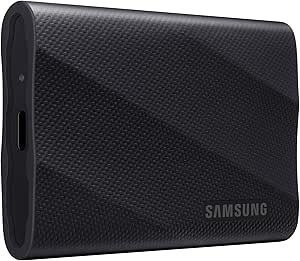 | Best Overall for Fast PC Backups | Capacity: 2 TB | Interface: USB 3.2 Gen 2×2 | Maximum read speed: Up to 2,000 MB/s | VIEW LATEST PRICE | See Our Full Breakdown |
| OWC Envoy Ultra 4TB Thunderbolt 5 Portable NVMe SSD |  | Best Premium High-Capacity Pick | Capacity: 4 TB | Drive type: NVMe solid-state drive | Interface: Thunderbolt 5 | VIEW LATEST PRICE | See Our Full Breakdown |
| SanDisk Extreme Portable SSD, 1TB, Up to 2000MB/s |  | Best Rugged Pocket Backup | Capacity: 1 TB | Interface: USB 3.0 | Connector: USB Type-C | VIEW LATEST PRICE | See Our Full Breakdown |
| SSK Portable 500GB External SSD, USB-C, Up to 1050MB/s |  | Best Simple Starter Backup | Capacity: 500 GB | Interface: USB 3.2 Gen 2 | Maximum read speed: Up to 1,050 MB/s | VIEW LATEST PRICE | See Our Full Breakdown |
| 1TB Portable External NVMe SSD, USB 3.2 Gen 2×2, up to 2100MB/s |  | Best Compact Multi-Device Backup | Capacity: 1 TB | Storage type: NVMe SSD | Interface: USB 3.2 Gen 2×2; backward compatible with USB 2.0/3.0 | VIEW LATEST PRICE | See Our Full Breakdown |
| Lexar ES3 1TB Portable SSD, Silver, USB 3.2 Gen 2 |  | Best for Lightweight, Secure Backups | Capacity: 1 TB | Interface: USB 3.2 Gen 2 | Read speed: Up to 1,050 MB/s | VIEW LATEST PRICE | See Our Full Breakdown |
| Samsung T7 Portable SSD, 1TB, Titan Gray | 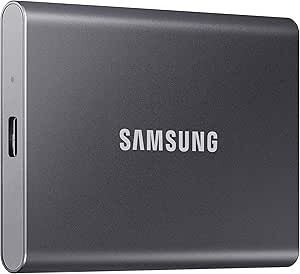 | Best for Everyday PC Backups | Capacity: 1 TB | Interface: USB 3.2 Gen 2 | Read speed: Up to 1,050 MB/s | VIEW LATEST PRICE | See Our Full Breakdown |
| SanDisk 1TB Portable SSD, Up to 1000MB/s Read Speed, Black |  | Best for Simple Plug-and-Play Backups | Capacity: 1 TB | Interface: USB 3.0 | Connector: USB Type-C | VIEW LATEST PRICE | See Our Full Breakdown |
| Samsung T9 Portable SSD 4TB, USB 3.2 Gen 2×2, Up to 2,000 MB/s | | Best High-Capacity Premium Pick | Capacity: 4 TB | Interface: USB 3.2 Gen 2×2 | Maximum read/write speed: Up to 2,000 MB/s | VIEW LATEST PRICE | See Our Full Breakdown |
| SSK 1TB Portable External SSD, USB-C, Up to 1050MB/s |  | Best for Cable Flexibility and Drive Diagnostics | Capacity: 1 TB | Interface: USB 3.2 Gen 2, USB Type-C | Read speed: Up to 1,050 MB/s | VIEW LATEST PRICE | See Our Full Breakdown |
| portable SSDs for PC backup | Capacity | Interface | Read speed | Weight |
|---|---|---|---|---|
| Samsung T9 Portable SSD | 2 TB | USB 3.2 Gen 2×2 | — | — |
| OWC Envoy Ultra 4TB Thunderbol | 4 TB | Thunderbolt 5 | Over 6,000 MB/s | — |
| SanDisk Extreme Portable SSD | 1 TB | USB 3.0 | — | 1.6 oz |
| SSK Portable 500GB External SS | 500 GB | USB 3.2 Gen 2 | — | 36.6 g |
| 1TB Portable External NVMe SSD | 1 TB | USB 3.2 Gen 2×2; backward compatible with USB 2.0/3.0 | 2,000 MB/s | 0.03 lb |
| Lexar ES3 1TB Portable SSD | 1 TB | USB 3.2 Gen 2 | Up to 1,050 MB/s | 42 g |
| Samsung T7 Portable SSD | 1 TB | USB 3.2 Gen 2 | Up to 1,050 MB/s | — |
| SanDisk 1TB Portable SSD | 1 TB | USB 3.0 | Up to 1,000 MB/s | 1.12 ounces |
| Samsung T9 Portable SSD 4TB | 4 TB | USB 3.2 Gen 2×2 | — | — |
| SSK 1TB Portable External SSD | 1 TB | USB 3.2 Gen 2, USB Type-C | Up to 1,050 MB/s | 36.6 g |
More Details on Our Top Picks
Samsung T9 Portable SSD, 2TB, USB 3.2 Gen 2×2, Up to 2,000 MB/s
The Samsung T9 is my strongest all-around choice for PC backups when the computer has a compatible USB 3.2 Gen 2×2 connection. Its 2TB capacity gives it more room for recurring system images and project archives than the 1TB SanDisk Extreme Portable SSD, while speeds of up to 2,000 MB/s can shorten large transfers on a matching setup. Thermal management, hardware encryption, and drive-health monitoring add practical safeguards for a drive that may hold important files. The tradeoff is that the headline speed depends on the host, cable, and UASP support; on a slower connection, it cannot deliver its full advantage. The OWC Envoy Ultra is far faster on Thunderbolt or USB4, but its specialized connection makes the T9 a more broadly practical PC-backup pick.
Pros:- 2TB capacity suits full-system backups and growing file libraries.
- Up to 2,000 MB/s read and write speeds with a compatible host and connection.
- Hardware encryption and drive-health monitoring support safer backup routines.
- Thermal management helps during sustained transfers.
Cons:- Reaching maximum speeds requires USB 3.2 Gen 2×2, a compatible cable, and UASP support.
- Actual host compatibility and performance can vary.
- Its capabilities may be unnecessary for basic, occasional file backups.
Best for: PC owners with a USB 3.2 Gen 2×2 port who want a roomy, fast drive for recurring backups and encrypted files.
Not ideal for: Buyers whose computers lack USB 3.2 Gen 2×2 or who mainly need an inexpensive, small-capacity drive for occasional document copies.
- Capacity:2 TB
- Interface:USB 3.2 Gen 2×2
- Maximum read speed:Up to 2,000 MB/s
- Form factor:Portable, 2.5 inches
- Security:Hardware encryption
- Thermal management:Included
- Compatible devices:Gaming consoles, Mac, PC, tablet, iPhone 15/16
Our verdict“Choose the Samsung T9 for fast, security-minded PC backups if your computer supports USB 3.2 Gen 2×2.”
OWC Envoy Ultra 4TB Thunderbolt 5 Portable NVMe SSD
For a PC with Thunderbolt or USB4, the OWC Envoy Ultra pairs generous 4TB capacity with read speeds over 6,000 MB/s, making it the performance leader in this group. That headroom is useful when backups include huge media projects or frequent large-file copies, though a routine document backup will not benefit as much. Compared with the Samsung T9, the OWC offers twice the capacity and much higher listed speed, but it depends on Thunderbolt 3, Thunderbolt 4, or USB4 compatibility rather than a more common USB-only setup. Its built-in cable avoids packing a separate lead, and IP67 protection adds reassurance for travel. The compromises are its larger 2.5-inch form factor and limited appeal to PCs without a supported high-bandwidth port.
Pros:- 4TB capacity accommodates large backup sets and project archives.
- Read speeds exceed 6,000 MB/s on compatible systems.
- IP67 protection provides dust, water, and drop resistance.
- Bus-powered design includes a built-in Thunderbolt cable and fanless aluminum cooling.
Cons:- Listed connectivity requires a compatible Thunderbolt or USB4 device.
- The 2.5-inch form factor is less compact than pocket-sized alternatives.
- Its high performance offers little practical benefit for routine small-file backups.
Best for: Thunderbolt or USB4 PC users backing up large creative projects, media libraries, or multiple machines to one high-capacity drive.
Not ideal for: PC owners with only standard USB ports, or anyone whose backup workload is mostly small files and does not call for premium transfer speeds.
- Capacity:4 TB
- Drive type:NVMe solid-state drive
- Interface:Thunderbolt 5
- Read speed:Over 6,000 MB/s
- Compatibility:Thunderbolt 3, Thunderbolt 4, USB4
- Power and cooling:Bus-powered, fanless aluminum design
- Protection:IP67 dust, drop, and weather resistance
- Included cable:Built-in Thunderbolt cable
- Warranty:5-year limited warranty
Our verdict“Pick the OWC Envoy Ultra if your PC supports Thunderbolt or USB4 and you need maximum capacity and speed for large backups.”
SanDisk Extreme Portable SSD, 1TB, Up to 2000MB/s
The SanDisk Extreme Portable SSD puts portability and physical protection ahead of backup capacity. At 1.6 ounces, it is easy to keep with a laptop, and IP65 dust and water resistance plus protection against drops up to 3 meters suit commuters who carry their backup drive regularly. Its listed read speed of up to 2,000 MB/s is competitive with the Samsung T9 on paper, although the T9 offers twice the storage and includes hardware encryption. Here, password protection uses 256-bit AES encryption, but it requires a software download and supported operating-system versions. The 1TB capacity works for selected folders or a modest PC backup, not a large collection of full system images. I would choose it over the SSK 500GB when capacity and ruggedness matter more than a simpler, lower-capacity file-transfer drive.
Pros:- Lightweight 1.6-ounce body is easy to carry with a laptop.
- IP65 rating protects against dust and water exposure.
- Drop protection is rated up to 3 meters.
- Optional 256-bit AES password protection is available.
Cons:- 1TB capacity is limited for multiple full-PC backups or large archives.
- Write speeds are lower than the maximum advertised read speed.
- Encryption requires a software download and supported Windows or macOS versions.
Best for: Laptop owners who carry a backup drive between home, work, and travel and need protection from dust, water, and drops.
Not ideal for: Users backing up several PCs or large media libraries, or buyers who want hardware encryption without installing software.
- Capacity:1 TB
- Interface:USB 3.0
- Connector:USB Type-C
- Maximum read speed:Up to 2,000 MB/s
- Dust and water resistance:IP65
- Drop protection:Up to 3 m
- Encryption:Optional 256-bit AES password protection
- Dimensions:3.35 × 2 × 0.39 in
- Weight:1.6 oz
Our verdict“Choose the SanDisk Extreme if you need a lightweight, rugged drive for carrying a modest PC backup wherever you go.”
SSK Portable 500GB External SSD, USB-C, Up to 1050MB/s
The SSK Portable 500GB SSD is the straightforward choice for a first backup drive or a focused copy of documents and personal files. Its USB 3.2 Gen 2 connection supports up to 1,050 MB/s read and 1,000 MB/s write, while the included USB-C and USB-A cables make it easier to connect to different PCs than a drive that relies on one cable type. The aluminum enclosure, S.M.A.R.T. diagnostics, and TRIM support add useful basics without chasing the specialized speeds of the Samsung T9 or OWC Envoy Ultra. Capacity is the main limit: 500GB can fill quickly if you include system images, photos, and video. SLC caching is also limited to 25% of available capacity, so sustained large transfers may not match short-burst performance.
Pros:- USB-C and USB-A cables support a range of computers and mobile devices.
- Up to 1,050 MB/s read and 1,000 MB/s write speeds suit regular file transfers.
- S.M.A.R.T. diagnostics and adaptive TRIM provide useful drive-management features.
- Compact aluminum body weighs 36.6 g.
Cons:- 500GB capacity can be restrictive for full PC backups and growing archives.
- SLC caching covers only 25% of available capacity, which can limit sustained transfers.
- Windows may show approximately 465GB because of capacity calculation differences.
Best for: First-time backup buyers who want a small drive for key folders, school files, or a single modest PC backup and need USB-A and USB-C connections.
Not ideal for: Households or professionals storing multiple full-system images, large photo libraries, or long-term video archives on one drive.
- Capacity:500 GB
- Interface:USB 3.2 Gen 2
- Maximum read speed:Up to 1,050 MB/s
- Maximum write speed:Up to 1,000 MB/s
- Included connections:USB-C and USB-A cables
- SLC cache:25% of available capacity
- Enclosure:Aluminum alloy
- Dimensions:2.6 × 1.5 × 0.5 in
- Weight:36.6 g
Our verdict“Choose the SSK 500GB for an uncomplicated, cable-flexible starter backup, but look to the Samsung T9 or SanDisk Extreme for more room.”
1TB Portable External NVMe SSD, USB 3.2 Gen 2×2, up to 2100MB/s
This 1TB portable NVMe SSD suits buyers who want one compact backup drive for a PC and other devices. At 2.85 × 1.52 inches and 0.03 pounds, it is smaller and lighter than the Samsung T9, while its listed maximum transfer speed of up to 2,100 MB/s slightly exceeds the T9’s—provided the connection supports USB 3.2 Gen 2×2 or the stated Thunderbolt 4/5 conditions. Its broad OS and device compatibility makes it more flexible for people moving between computers, phones, cameras, and consoles. The tradeoffs are a 1TB capacity and a stated usable-capacity shortfall of about 7–10%, leaving less room for long-term PC archives than the T9 or OWC 4TB. Water- and drop-proof construction and hardware encryption add useful protection, though the HDR recording feature matters mainly to video creators.
Pros:- Compact, lightweight aluminum enclosure is easy to carry.
- Up to 2,100 MB/s transfer speed under compatible connection conditions.
- Broad compatibility includes Windows, Mac, Linux, Android, and multiple device types.
- Water- and drop-proof construction, hardware encryption, and SMART monitoring are listed.
Cons:- Maximum speeds require USB 3.2 Gen 2×2 or compatible Thunderbolt 4/5 conditions.
- Usable capacity may be 7–10% below the labeled 1TB.
- Direct 4K 120fps HDR recording depends on compatible devices and professional apps.
Best for: People who back up a laptop while also moving files among phones, cameras, and consoles, and value a lightweight drive with broad system support.
Not ideal for: Anyone building a large, multi-year PC backup archive or whose computer lacks a compatible high-speed connection and would not benefit from its maximum transfer rate.
- Capacity:1 TB
- Storage type:NVMe SSD
- Interface:USB 3.2 Gen 2×2; backward compatible with USB 2.0/3.0
- Maximum transfer speed:Up to 2,100 MB/s under ideal conditions
- Read speed:2,000 MB/s
- Dimensions:2.85 × 1.52 × 0.40 in
- Weight:0.03 lb
- Protection and monitoring:Water- and drop-proof, dust resistant; SMART monitoring and hardware encryption
- Compatible operating systems:Windows, Mac, iPadOS, ChromeOS, Android, Linux
Our verdict“Choose this NVMe drive if you need a compact, cross-device backup companion, but choose a higher-capacity option for a large PC archive.”
Lexar ES3 1TB Portable SSD, Silver, USB 3.2 Gen 2
The Lexar ES3 is a strong fit for PC owners who want a compact drive for regular file backups without giving up fast USB 3.2 Gen 2 transfers. Its stated speeds reach 1,050 MB/s read and 1,000 MB/s write on a compatible connection, matching the Samsung T7 on paper. The 42 g body is lighter than the T7’s aluminum construction, while included 256-bit AES encryption software adds a privacy option for sensitive files. Lexar includes a USB-C cable, but unlike Samsung’s T7, the supplied kit does not list a USB-C-to-A cable, which may matter with older PCs. Performance will also fall back on slower host connections. Choose it for portable, encrypted backups; skip it if you need broader legacy-PC cable coverage or more than 1 TB.
Pros:- Light 42 g body is easy to carry between a desk and laptop bag.
- USB 3.2 Gen 2 supports fast transfers on compatible PCs.
- Includes Lexar DataShield 256-bit AES encryption software.
- USB Type-C cable is included for a straightforward connection.
Cons:- The listed bundle does not include a USB-C-to-USB-A cable for older PCs.
- Full speed depends on a compatible USB 3.2 Gen 2 connection.
- 1 TB may be limiting for extensive photo, video, or system-image archives.
Best for: Laptop owners who carry a lightweight 1TB backup drive and want encryption software for personal or work files.
Not ideal for: People backing up large multi-terabyte libraries or using PCs without USB-C who want a USB-A cable included.
- Capacity:1 TB
- Interface:USB 3.2 Gen 2
- Read speed:Up to 1,050 MB/s
- Write speed:Up to 1,000 MB/s
- Weight:42 g
- Thickness:10.5 mm
- Security:Lexar DataShield 256-bit AES encryption software
- Included accessory:USB Type-C cable
Our verdict“Choose the Lexar ES3 if you want a notably light 1TB backup drive with encryption software, but look elsewhere for greater capacity or an included USB-A cable.”
Samsung T7 Portable SSD, 1TB, Titan Gray
The Samsung T7 is the balanced pick here for routine PC backups: it pairs familiar USB 3.2 Gen 2 speeds with an aluminum unibody and included USB-C-to-C and USB-C-to-A cables. That two-cable setup makes it easier to use across newer laptops and older desktops than the Lexar ES3, whose listed accessory is USB-C only. Samsung rates the drive for drops up to 6 feet and includes 256-bit AES hardware encryption, giving backup files a layer of protection without relying solely on software. Its 1TB capacity and up-to-1,050/1,000 MB/s speeds suit everyday documents, photos, and moderate media libraries. The tradeoff is limited headroom for large archives; the 4TB Samsung T9 is a better match when capacity and faster supported transfers matter more than keeping the drive small.
Pros:- Includes both USB-C-to-C and USB-C-to-A cables for flexible PC connections.
- Aluminum body is rated for drops up to 6 feet.
- 256-bit AES hardware encryption provides built-in data protection.
- USB 3.2 Gen 2 supports quick transfers on compatible hosts.
Cons:- Maximum transfer speeds require a compatible USB 3.2 Gen 2 setup.
- 1TB capacity can fill quickly with large video collections or full system backups.
- Compatibility and operating system support vary by connected device.
Best for: PC owners who want a dependable 1TB backup drive that can connect to both USB-C laptops and USB-A desktops.
Not ideal for: People storing multi-terabyte media libraries or seeking the T9’s higher capacity and faster Gen 2×2 performance.
- Capacity:1 TB
- Interface:USB 3.2 Gen 2
- Read speed:Up to 1,050 MB/s
- Write speed:Up to 1,000 MB/s
- Construction:Aluminum unibody
- Drop protection:Up to 6 feet
- Encryption:256-bit AES hardware encryption
- Included cables:USB Type-C to Type-C and USB Type-C to Type-A
Our verdict“Pick the Samsung T7 for straightforward 1TB PC backups across mixed USB-C and USB-A computers; choose the T9 if you need substantially more space.”
SanDisk 1TB Portable SSD, Up to 1000MB/s Read Speed, Black
For buyers who want a backup drive with minimal setup, this SanDisk 1TB Portable SSD connects over USB-C without drivers, making it a simple choice for moving files between supported PCs and other devices. Its pocket-sized, 1.12-ounce body is notably easy to carry, and the stated drop protection reaches 2 meters. Compared with the Samsung T7, the product data lists a USB 3.0 interface and only a read-speed figure, not matching write-speed details or hardware encryption. That makes it a more basic backup option: useful for routine copies and travel, but less clearly equipped for sustained heavy writes or sensitive archives. Its 1TB capacity also trails the 4TB Samsung T9 for users maintaining larger backup sets. Choose this SanDisk for portability and simple connections, not for maximum performance detail or capacity.
Pros:- Pocket-sized body weighs 1.12 ounces.
- USB-C connection works without driver installation or setup.
- Rated for drops up to 2 meters.
- Solid-state design has no moving parts.
Cons:- The supplied product data gives no write-speed figure, making backup-write performance harder to compare.
- USB 3.0 interface is less clearly specified than the T7’s USB 3.2 Gen 2 connection.
- No encryption feature is listed for protecting sensitive backup files.
Best for: Traveling PC users who want a lightweight, driver-free drive for occasional document, photo, and file backups.
Not ideal for: People who need verified high write speeds, hardware encryption, or enough capacity for several terabytes of backup data.
- Capacity:1 TB
- Interface:USB 3.0
- Connector:USB Type-C
- Read speed:Up to 1,000 MB/s
- Drop protection:Up to 2 meters
- Weight:1.12 ounces
- Dimensions:1.77 × 3.35 × 0.39 inches
- Compatibility:Desktop, laptop, smartphone, and tablet
Our verdict“Choose this SanDisk for lightweight, uncomplicated file copies, but favor the Samsung T7 if you want listed hardware encryption and clearer high-speed specifications.”
Samsung T9 Portable SSD 4TB, USB 3.2 Gen 2×2, Up to 2,000 MB/s
The Samsung T9 4TB is the capacity-first option for PC owners who want to keep a substantial backup library on one portable drive. Its four terabytes offer far more room than the 1TB Samsung T7, while up to 2,000 MB/s read and write speeds can shorten large transfers when the PC, cable, and connection support USB 3.2 Gen 2×2. That qualification matters: on an incompatible host, the speed advantage may not be available, so this drive makes less sense for an older everyday PC. It adds AES 256-bit hardware encryption, Dynamic Thermal Guard, and a 9.8-foot drop rating, which suit frequent handling and heavier workloads. Compared with the T7, it prioritizes capacity and throughput over a basic, broadly useful 1TB backup setup.
Pros:- 4TB capacity accommodates much larger backup sets than the 1TB options.
- Up to 2,000 MB/s read and write speeds on compatible setups.
- AES 256-bit hardware encryption protects stored data.
- Drop durability is rated up to 9.8 feet, with Dynamic Thermal Guard for heat management.
Cons:- Maximum speeds require a USB 3.2 Gen 2×2 host and compatible cable.
- The stated interface and speed claims may not translate to faster transfers on many PCs.
- Its 4TB capacity may be unnecessary for users with basic document and photo backups.
Best for: PC users backing up large video, photo, or project libraries who have a USB 3.2 Gen 2×2 host and want hardware encryption.
Not ideal for: Owners of older PCs without USB 3.2 Gen 2×2, or anyone who needs only a compact, modest-capacity backup drive.
- Capacity:4 TB
- Interface:USB 3.2 Gen 2×2
- Maximum read/write speed:Up to 2,000 MB/s
- Hardware encryption:AES 256-bit
- Drop durability:Up to 9.8 feet
- Thermal management:Dynamic Thermal Guard
- Form factor:Portable, 2.4 inches
- Compatible devices:Gaming consoles, Mac, PC, tablet, and iPhone 15/16
Our verdict“Choose the T9 4TB for large PC backup collections and a Gen 2×2 connection; the T7 is a more fitting match for ordinary 1TB backups.”
SSK 1TB Portable External SSD, USB-C, Up to 1050MB/s
The SSK 1TB Portable SSD stands out for PC owners who want useful maintenance features and both common cable types in the box. Its USB-C and USB-A cables make it easier to move between newer laptops and older desktops, much like the Samsung T7’s dual-cable bundle. The SSK also lists S.M.A.R.T. diagnostics and adaptive TRIM, features aimed at drive monitoring and maintenance, plus an aluminum alloy enclosure weighing just 36.6 g. Speeds reach up to 1,050 MB/s read and 1,000 MB/s write on a compatible USB 3.2 Gen 2 connection. SLC caching supports sustained transfers within its available cache, but the cache is limited to 25% of currently available capacity, so long, very large writes may not hold peak speed. It suits mixed-device use better than a simple basic drive, but the T9 is the stronger capacity pick.
Pros:- Includes USB-C and USB-A cables for use with a wider range of PCs.
- Light 36.6 g aluminum alloy enclosure is easy to carry.
- S.M.A.R.T. diagnostics and adaptive TRIM support drive monitoring and maintenance.
- USB 3.2 Gen 2 speeds reach up to 1,050 MB/s read and 1,000 MB/s write.
Cons:- SLC cache is limited to 25% of currently available capacity, which can affect long transfers.
- 1TB capacity is modest for large PC images and growing media libraries.
- Peak speeds depend on a compatible USB 3.2 Gen 2 host and connection.
Best for: PC owners who alternate between USB-C laptops and USB-A desktops and want drive diagnostics for routine backup upkeep.
Not ideal for: People who regularly write very large files beyond the available SLC cache or need more than 1TB for their backup archive.
- Capacity:1 TB
- Interface:USB 3.2 Gen 2, USB Type-C
- Read speed:Up to 1,050 MB/s
- Write speed:Up to 1,000 MB/s
- Weight:36.6 g
- Dimensions:2.6 × 1.5 × 0.5 inches
- Enclosure:Aluminum alloy
- Included cables:USB-C and USB-A
- Drive features:S.M.A.R.T. diagnostics, adaptive TRIM, and SLC caching
Our verdict“Pick the SSK for a lightweight 1TB backup drive with both cable types and diagnostic features, but choose the Samsung T9 for larger archives.”

How We Picked
I ranked these drives around their usefulness for routine PC backups, not peak speed alone. The main factors were listed capacity, advertised transfer speed, connection type, and how readily a buyer can match the drive to a PC port. I also weighed the practical tradeoff between a familiar USB 3.2 Gen 2 option and faster USB 3.2 Gen 2×2 or Thunderbolt 5 models that need compatible hardware to deliver their advertised advantage.
Capacity and compatibility set the order: the Samsung T9 2TB leads as a balanced everyday choice, while the OWC Envoy Ultra earns a premium, specialist role rather than a universal recommendation. The standard-speed 1TB models follow as practical choices for more modest backup needs, and the 500GB SSK ranks lower because it leaves less room for file history or a growing PC library. The generic 1TB NVMe listing also ranks cautiously: its speed claim is high, but the supplied product details give buyers less context than the named alternatives.
| portable SSDs for PC backup | Interface |
|---|---|
| Samsung T9 Portable SSD | USB 3.2 Gen 2×2 |
| OWC Envoy Ultra 4TB Thunderbol | Thunderbolt 5 |
| SanDisk Extreme Portable SSD | USB 3.0 |
| SSK Portable 500GB External SS | USB 3.2 Gen 2 |
| 1TB Portable External NVMe SSD | USB 3.2 Gen 2×2; backward compatible with USB 2.0/3.0 |
| Lexar ES3 1TB Portable SSD | USB 3.2 Gen 2 |
| Samsung T7 Portable SSD | USB 3.2 Gen 2 |
| SanDisk 1TB Portable SSD | USB 3.0 |
| Samsung T9 Portable SSD 4TB | USB 3.2 Gen 2×2 |
| SSK 1TB Portable External SSD | USB 3.2 Gen 2, USB Type-C |
Factors to Consider When Choosing Portable SSDs For PC Backups
Choosing among portable SSDs for PC backups is less about chasing the biggest speed number and more about matching the drive to your backup plan. I’d check how much data you need to protect, how often it changes, and which ports your PC actually has before paying for extra performance.
Match advertised speed to your PC’s ports
A drive’s maximum speed only matters when the PC port and cable can support its connection standard. USB 3.2 Gen 2×2 models such as the T9 may be limited by a PC that lacks Gen 2×2 support, while a Thunderbolt 5 drive calls for a compatible Thunderbolt 5 connection to make its case. A fast-looking USB-C connector alone does not tell you which protocol the port uses. Check the computer’s specifications, not just the shape of its socket. If you cannot confirm support, a more widely compatible USB 3.2 Gen 2 drive may be a more sensible backup purchase. For long backup sessions, actual performance can also differ from a short advertised peak.
Size capacity for backup history, not just current files
A drive that fits today’s files may leave too little room for future backups or older versions. Estimate the space used on the PC, then decide whether you want a single current copy or multiple dated restore points. Photos, videos, game libraries, and project folders can grow faster than a document-only backup. The 500GB option in this roundup has a narrower use case than the 1TB drives, while 2TB or 4TB can offer more breathing room. Avoid filling a backup drive to its limit, since spare space makes routine updates easier. If your data set keeps expanding, plan for a second drive or a larger-capacity model rather than relying on a tight fit.
Choose a backup routine before choosing a speed tier
Whether you run backups daily, weekly, or only before major PC changes affects what you should prioritize. Frequent full copies can make transfer speed more noticeable, while scheduled incremental backups may copy only changed files after the first run. Check whether your backup software supports the schedule and restore method you want; the SSD itself does not create a backup plan. For occasional file copies, a standard USB 3.2 Gen 2 drive may be enough even if a faster model advertises a higher peak. If you need a complete system image, confirm that your chosen software can create and restore one from an external drive. A backup that is never updated is less useful than a slower drive used consistently.
Treat one external SSD as a backup copy, not the whole plan
A portable SSD can be lost, damaged, or affected by the same incident as the PC if both stay together. For important files, keep another copy in a separate location or use a separate backup method. Rotating two external drives can reduce the risk of a single device being the only copy, though it adds steps and expense. Disconnect the drive when a backup finishes if you want to limit exposure to accidental deletion or malware on the PC. Test restoring a few files before trusting a backup routine with irreplaceable data. These habits often protect data better than paying for a faster drive alone.
Check the details behind high-speed product listings
Product names and headline speeds do not always give enough information to judge a drive. Before buying, verify the stated connection standard, included cable or adapter, supported systems, warranty details, and whether the advertised speed is a read or write figure. The generic 1TB NVMe listing in this group claims up to 2,100 MB/s, but buyers should confirm the underlying interface and compatibility from the full listing. A claimed speed is not a guarantee of sustained backup performance, especially during large transfers. Named models can make specifications easier to cross-check, but they still need to match your PC. When details are sparse, prioritize a clearly stated connection and a capacity that suits your data.
Pay for premium speed only when your workflow can use it
A premium connection may be worthwhile if you regularly move large files and own a PC that supports it. For a normal scheduled backup, the time saved by a faster SSD may be small compared with the time between backup runs. Capacity can matter more than peak throughput when your aim is to retain several restore points. A larger drive can also reduce the need to prune old backups, but it does not replace a second copy. Compare the full setup—PC port, cable, backup software, and drive—before choosing a high-speed model. If one part is a bottleneck, a less specialized SSD may serve just as well.
Frequently Asked Questions
Will a USB 3.2 Gen 2×2 SSD work with a PC that has ordinary USB-C?
It may connect, but a USB-C socket does not confirm support for USB 3.2 Gen 2×2. The drive can operate at a slower rate if the PC supports a compatible fallback, but the exact behavior depends on the drive and computer. Check the PC’s port specifications and the drive’s compatibility details before buying. If you cannot verify Gen 2×2 support, do not choose a model solely for its advertised maximum speed. A standard USB 3.2 Gen 2 option may be a more predictable match.
Should I choose 1TB, 2TB, or 4TB for my PC backup?
Start with the amount of data you plan to protect, then leave room for future growth and any older backup versions you want to retain. A 1TB drive can suit a smaller data set or a backup that is updated without keeping many historical copies. The 2TB T9 offers a middle ground in this lineup, while the 4TB T9 and OWC Envoy Ultra fit larger libraries or longer retention needs. Do not assume the full listed capacity will be available for files, since formatting and system use take some space. If capacity is close, choosing more room is usually simpler than frequently deleting older copies.
Is the OWC Envoy Ultra worth choosing for backups if my PC lacks Thunderbolt 5?
The Envoy Ultra’s premium appeal is tied to its Thunderbolt 5 connection and 4TB capacity. Without a compatible Thunderbolt 5 PC, you may not benefit from the connection it is designed around, so check its supported connections and fallback behavior in the full product details. If your main need is routine file protection, a USB drive from this roundup may fit more naturally. Consider the OWC when your computer and workload can use its connection and you need its larger storage tier. Otherwise, paying for a capability your PC cannot use may not improve your backup routine.
Can one portable SSD protect my PC if it fails?
One external SSD can hold a backup, but it should not be your only copy of important data. The drive can be lost, damaged, or exposed to the same event as the computer if stored nearby. Keep another copy on a separate device or in a separate location, and disconnect the SSD when a backup finishes if practical. Test restoring files so you know the backup can be read. A simple second-copy routine adds more protection than relying on one drive’s speed or capacity.
Which option makes sense if I mainly back up documents and photos?
For documents and a moderate photo library, a 1TB USB 3.2 Gen 2 model may provide a practical balance, provided the files fit with room for updates. The Samsung T7, Lexar ES3, SanDisk 1TB, and SSK 1TB listings sit in this general speed and capacity tier. If you want more space for video, large projects, or older versions, the T9 2TB gives additional headroom. The 500GB SSK is better suited to a smaller, tightly managed collection. Check your current storage use before choosing rather than relying on file types alone.
Conclusion
For most buyers, I recommend the Samsung T9 2TB as the best overall: its capacity and advertised speed make it a balanced choice, as long as your PC supports the connection needed for its full performance. For a premium setup with compatible Thunderbolt 5 hardware and a large data set, the OWC Envoy Ultra 4TB is the specialist pick. The best value-style fit is a standard USB 3.2 Gen 2 1TB model, such as the Samsung T7, Lexar ES3, SanDisk 1TB, or SSK 1TB, chosen by the details and capacity you prefer. For beginners, I’d favor a clearly specified USB 3.2 Gen 2 drive and a simple scheduled backup routine over a speed tier their PC may not support. If you need more space without moving to Thunderbolt, the Samsung T9 4TB targets larger PC libraries; for a small, focused backup set, the SSK 500GB is the compact-capacity option. Match the drive to your port and data needs, then keep a second copy of anything you cannot afford to lose.