
TL;DR

Get the latest gadgets delivered free with Prime
- Fast, free delivery on millions of items
- Prime Video, Amazon Music and more included
- Member-only deals all year
CNET reports that compacted lint and other pocket debris can prevent a charging cable from connecting properly. A gentle clean with a wooden or plastic toothpick may help, but if charging still fails, the problem may be the cable, charger or another fault.
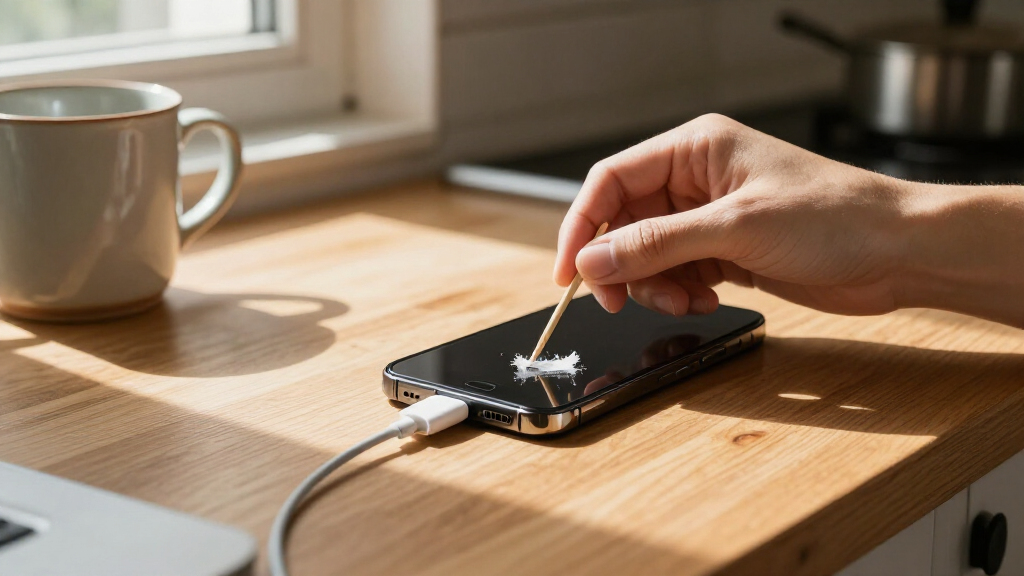
CNET has described a simple way to troubleshoot a phone that will not charge: gently remove compacted lint and debris from its charging port with a wooden or plastic toothpick. Pocket fluff can build up over time and keep a cable from seating properly, though cleaning will not fix every charging problem.
A phone’s charging port is exposed to dust and other debris, which can accumulate after repeated use. Over months or years, material carried in pockets may become compacted as charging cables are plugged in. CNET says a cable that feels loose, will not go all the way into the port or charges only when moved around may indicate that debris is obstructing the connection.
For the cleaning method, turn to a thin wooden or plastic tool, such as a cocktail stick or toothpick. Gently work inside the port to loosen material, taking care not to press hard against the connectors. The shape of the port matters: a USB-C connector sits in the middle, so debris should be worked around it rather than scraped forcefully across it. Remove loosened material and then test the charging cable.
CNET cautions that metal tools, including needles and SIM-eject tools, may work but are not the safest choice because they can damage internal parts. The article does not establish that this method is appropriate for every device or every kind of charging fault. If cleaning does not restore a secure connection or charging, CNET advises trying another cable or charger and considering other causes.
Practical tech guide · Charging trouble
How I Fixed My iPhone That Wouldn’t Charge With a Simple Trick
Compacted pocket lint can keep a charging cable from seating properly. A gentle clean may help when debris is the cause—but charging trouble can have other explanations.
“Wood or plastic is better, as it’s less likely to scrape against anything inside and potentially cause harm.”
— CNET01 / Spot the clue
Could debris be blocking the connection?
Cable won’t go all the way in
Material packed inside the port may prevent the plug from seating fully.
Connection feels loose
A cable that feels less secure than before may point to an obstruction—or another fault.
Charging starts when moved
Needing to reposition the cable can signal an unreliable connection, but does not identify its cause.
Ports are exposed to dust and lint from pockets or bags. Repeatedly plugging in a cable can press small particles together over months or years.
02 / Try a careful clean
Small movements. Light pressure.
Choose a tool
Use a thin wooden or plastic toothpick or cocktail stick.
Loosen gently
Work carefully inside the port. Avoid pressing hard on connectors.
Mind the layout
For USB‑C, work around the center connector; don’t scrape forcefully across it.
Remove and retest
Clear loosened material, reconnect the cable, and check fit and charging.
Skip metal tools: Needles and SIM-eject tools may work, but CNET says they are not the safest choice because they can damage internal parts.
03 / What the trick can—and can’t—tell you
Match the next step to the result
| What you observe | What it may mean | Practical next step |
|---|---|---|
| Cable seats securely; charging returns | ✓ Debris may have obstructed the connection | Monitor the connection; avoid forceful cleaning. |
| Cable still won’t connect or charge | ~ Cleaning may not have addressed the cause | Try a different cable and power plug. |
| Charging remains intermittent | ~ Cable, charger, port or another fault is possible | Stop escalating with tools; consider further diagnosis. |
| Visible damage or liquid exposure | ! This guidance does not diagnose that condition | Seek device-specific advice or professional assessment. |
CNET does not say how often debris causes charging failures or guarantee that cleaning will fix a particular phone.
04 / Quick answers
Key questions
What is the simple trick?
Gently loosen lint or debris with a wooden or plastic toothpick, remove the material, then test the cable again.
Can I use a needle or SIM tool?
Metal tools are not the safest choice. They may damage delicate internal parts.
How can I tell if debris may be involved?
A cable that won’t fully seat, feels loose or must be moved around can be a clue. Those symptoms do not prove debris is the cause.
What if cleaning does not help?
Try another cable or power plug. If charging still fails, the issue may need further diagnosis.
A Low-Cost First Troubleshooting Step
Charging trouble can have several causes, from a damaged cable or plug to a fault inside the phone. A port blocked by ordinary pocket debris is one comparatively simple possibility to check before buying accessories or seeking repair. The approach matters because it may resolve an intermittent connection with items many people already have at home.
There is also a risk in treating the tip as a guaranteed fix. A port contains delicate components, and using a sharp or metal object, or scraping forcefully, could cause damage. The practical takeaway is to try gentle cleaning only when debris appears to be the likely issue, then stop if the cable still does not connect properly. Persistent trouble calls for other troubleshooting rather than more force.
non-metal phone charging port cleaning tool plastic
As an affiliate, we earn on qualifying purchases.
As an affiliate, we earn on qualifying purchases.
How Debris Can Block a Port
Charging ports generally have no cover, leaving them exposed to dust and lint carried in pockets or bags. Small particles may not cause an immediate problem, but can collect and become packed into the port as a cable is inserted repeatedly. The result can be a cable that sits less securely or fails to make a reliable connection.
The guidance applies to both Lightning and USB-C ports, according to CNET, though the connector layout differs. The article also notes that charging problems are not limited to debris: a damaged plug, faulty cable or other issue can produce similar symptoms. Testing another cable or power plug is a straightforward check when cleaning does not help.
““Wood or plastic is better, as it’s less likely to scrape against anything inside and potentially cause harm.””
— CNET
wooden toothpicks for cleaning phone charging port
As an affiliate, we earn on qualifying purchases.
As an affiliate, we earn on qualifying purchases.
Cleaning May Not Solve the Fault
The article does not identify how often debris is the cause of charging failures or provide evidence that cleaning will work for a particular phone. A loose connection can also result from a damaged cable, charger or port, and the supplied guidance does not diagnose individual devices. It is also difficult to see inside a port, so users may not be able to tell whether all debris has been removed.
CNET does not specify a cleaning procedure for phones with liquid damage, a visibly damaged port or manufacturer-specific restrictions. If the device continues to charge intermittently or not at all after a gentle clean and a cable or charger check, the cause remains unresolved and may require professional assessment.
As an affiliate, we earn on qualifying purchases.
Retest Before Seeking Repair
After removing loosened debris, reconnect the cable and check whether it fits securely and charging begins. If it does not, CNET’s next suggested checks are a different cable or power plug. Continued failure after those steps means the simple port-cleaning method has not addressed the problem; further diagnosis may be needed.
The article provides no repair timetable or device-specific service instructions. Users should avoid escalating to sharper tools or forceful scraping if the port remains obstructed. The next step depends on the cause, which cannot be confirmed from the charging symptom alone.
As an affiliate, we earn on qualifying purchases.
Key Questions
What is the simple trick for a phone that will not charge?
Gently loosen and remove lint or other debris from the charging port using a wooden or plastic toothpick, then test the cable again. This may help if material is preventing the cable from connecting properly.
Can I use a needle or SIM-eject tool to clean the port?
CNET says metal tools may work but are not the safest option, since they can damage internal parts. A thin wooden or plastic tool is less likely to scrape components.
How can I tell if debris may be blocking the port?
Signs described by CNET include a cable that will not go all the way in, feels less secure than before or needs to be moved around before charging starts. These symptoms do not prove debris is the cause.
What should I try if cleaning does not work?
Test a different charging cable or power plug. If the phone still will not charge, another fault may be responsible, and the issue may need further diagnosis.
Source: CNET
Fall Picks
fall essentials
As an affiliate, we earn on qualifying purchases.