
TL;DR
Portable power banks are rechargeable batteries that store energy for charging devices away from a wall outlet. Choose by usable energy in watt-hours, compatible output in watts, port behavior, weight, and safety details; the capacity printed in mAh does not tell you exactly how many full charges you will get.
Your phone says 2%, your train platform has no outlet, and the power bank in your bag feels reassuringly solid. Then you plug in and discover that a number printed on its case does not promise the number of charges you expected. Portable power banks can be simple, reliable backup batteries, but their real performance depends on more than capacity.

Get the latest gadgets delivered free with Prime
- Fast, free delivery on millions of items
- Prime Video, Amazon Music and more included
- Member-only deals all year
This guide explains how to read capacity, match charging speed to your devices, and pick ports and cables that work together. You’ll also learn what trade-offs matter for travel, how to spot basic safety information, and why a lighter bank may be the smarter choice for everyday carry. The aim is practical: buy a battery that solves your problem without hauling around more weight than you need.
Think of a power bank as a canteen for electricity. Its label tells you how much it can hold under specified conditions; your device, cable, and charging habits affect how much reaches the phone. Once you know where that energy goes, the numbers become much easier to use.
Compare energy in Wh when possible; a 10,000 mAh label does not promise two full charges for a 5,000 mAh phone.
Match the bank’s wattage and charging standards to what your device supports.
Check port behavior, combined output, and cable rating if you charge multiple devices.
Balance capacity against weight so the bank is comfortable enough to carry regularly.
Inspect the product’s safety information and verify current airline limits before flying.
What a power bank can do when you’re away from an outlet
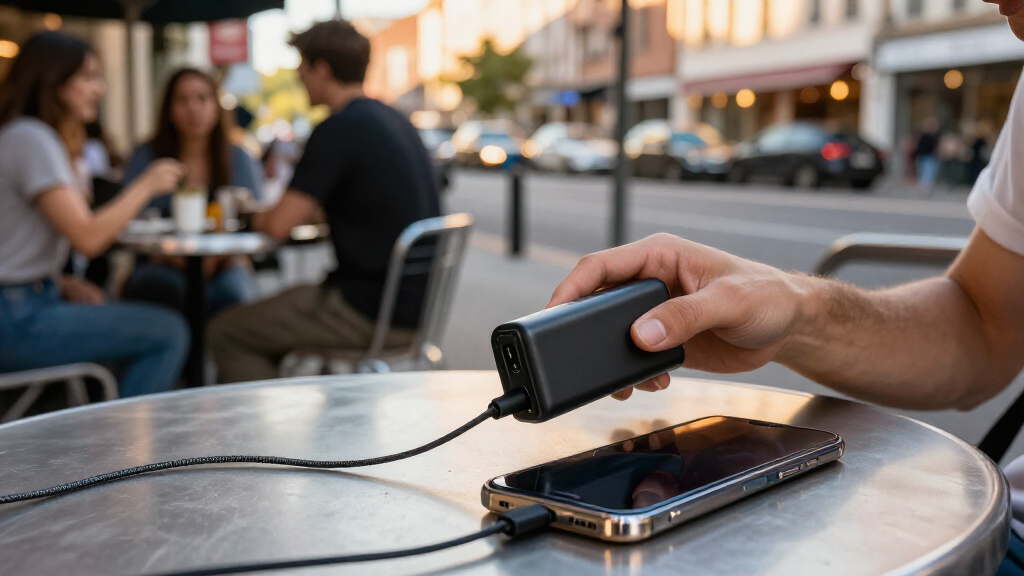
A portable power bank is a rechargeable battery that stores energy and supplies it to devices through wired or wireless charging. It can keep a phone, earbuds, camera, tablet, and some laptops running when a wall outlet is out of reach. The bank itself needs recharging later, so it shifts when and where you get power rather than creating extra energy.
Imagine a long day at a street festival: your phone handles tickets, directions, and photos, while earbuds help on the train home. A small bank in your jacket pocket can give the phone a useful top-up between bands. A larger model may suit a weekend camping trip, but its extra capacity also means extra bulk. The useful question is not simply how much energy a bank stores, but whether that energy covers the gap between opportunities to recharge. If you can plug in every evening, a compact bank may be enough; if you will be away from outlets for days, carrying more stored energy may justify the weight.
The phrase “rechargeable batteries that store energy” describes the basic idea, but a bank is more than a battery cell. It also has circuitry to manage voltage and current, ports to connect devices, and often lights or a display to estimate charge. That circuitry is why two banks with similar capacity labels can feel different in everyday use: one may deliver power more efficiently, support a faster charging standard, or provide clearer information about what remains. A display can help you decide whether to save the remaining charge for your phone, while simple indicator lights may only offer a rough estimate.
Some models send power through a cable; others use wireless charging, often with magnetic alignment for compatible phones. Wireless charging cuts the cord but can lose more energy as heat. That loss matters most when the bank has limited capacity or you need the fastest top-up. If you’re topping up a phone while walking between appointments, a cable may be more efficient; if you want a cable-free desk setup and can accept slower charging, wireless convenience may be worth the trade-off.
Products Worth Considering

Bose QuietComfort Headphones (2nd Gen), Wireless Noise-Cancelling Over-Ear Headphones, Black

Apple MacBook Air 13-inch with M5 chip, 16GB Memory, 1TB SSD, Starlight

Anker SOLIX C300 DC Portable Power Station, 288Wh, 300W
As an affiliate, we earn on qualifying purchases.
Why the mAh number won’t predict your exact number of charges
mAh measures electric charge at the battery cells’ voltage, so the printed number does not equal the energy your phone receives. Voltage conversion and heat losses use some of that stored energy along the way. A 10,000 mAh bank therefore will not typically recharge a phone with a 5,000 mAh battery exactly twice. This difference is practical, not just a technical footnote: planning around the full printed capacity can leave you short when you need a final top-up.
Picture pouring water between two bottles through a narrow funnel: a little sloshes out, and the bottle labels alone don’t tell you how much arrives. Energy also changes voltage as it moves from bank to device. A bank’s conversion electronics, cable, temperature, and whether you use the phone while charging all affect the final result. For example, streaming video or navigating during a recharge uses some of the incoming energy as it arrives, so less is left to raise the battery percentage. A bank may still be doing useful work even when the phone’s charge indicator seems to rise slowly.
Watt-hours (Wh) give you a more comparable measure of stored energy across different voltages. That makes Wh useful when you compare products with different cell designs or check aviation limits. If a bank lists only mAh, look for its rated voltage or Wh in the specifications or on the case; avoid treating an unqualified mAh comparison as a guaranteed number of phone charges. Wh helps you compare the amount of energy on offer, while the output rating and charging standard help explain how quickly it can reach your device. These answer different questions, so a large Wh figure alone does not mean fast charging.
For example, a commuter whose phone battery is nearly empty may get less benefit while streaming video and using navigation during the recharge. The phone is consuming energy as the bank supplies it. For a fair comparison, check the bank’s energy rating, your phone’s battery size, and the conditions in which you’ll charge. Think of any estimated charge count as a planning range: it can help compare models, but it cannot account for every device setting, cable, temperature, or battery’s age.
Remember: capacity tells you how much energy the bank stores on paper; real use tells you how much reaches your device.
How to match charging speed, ports, and cables
Charging speed depends on the bank and the device working together. Check the bank’s output in watts (W), the charging standards it supports, and the maximum rate your device accepts. USB Power Delivery, or USB PD, is widely used over USB-C, while some manufacturers also use their own fast-charging systems. The slowest part of the combination sets the practical limit: a powerful bank cannot make an older phone accept a newer fast-charging rate, and a suitable phone cannot draw its full rate from a bank that does not support the right standard.
- Check the device: Find its supported charging standard and maximum input. A laptop may need more power than your phone. If the bank falls short, it may charge slowly, fail to charge while the laptop is in use, or not charge it at all.
- Check the bank: Look for the maximum output on the exact port you plan to use, plus any shared-output limits. A headline wattage may apply only to one port or one connected device.
- Check the cable: Use a cable rated for the power level and charging standard you need. A cable is part of the power path, so choosing one without the required rating can limit performance even when both devices are capable.
- Check the combination: If you’ll charge two devices at once, see how the bank divides power between ports. The convenience of charging together can come with slower charging for one or both devices.
A high-wattage bank cannot force a phone to charge faster than the phone allows. If your phone accepts less power than the bank can supply, it will draw what it supports. Likewise, a capable bank paired with a cable that cannot handle the required rate may not deliver the speed you expected. Paying extra for a very high output is useful when you have devices that can use it, such as a compatible tablet or laptop; for a phone that accepts modest power, the extra rating may add cost and weight without shortening your charging time.
Port labels can hide a practical wrinkle: a USB-C port may accept power into the bank, send power out, or do both. A bank might advertise its highest output for one port, then divide power when you connect earbuds and a phone together. If you regularly charge both on a commute, check the combined output specification rather than assuming each port delivers its maximum at once. The trade-off is straightforward: charging multiple devices at the same time saves you from waiting, but a single-device connection may be faster when one device needs power urgently.
Choose a size you’ll actually want to carry
Capacity and output usually cost you space and weight. A compact bank suits small top-ups and daily errands; a larger, higher-output bank can better serve tablets or compatible laptops. The right choice depends on how often you can recharge the bank, which devices you carry, and how much weight you’ll tolerate. A bank that stays at home because it feels too heavy provides no backup when you need one, so carrying comfort is part of its usefulness.
For a light day out, imagine slipping a small bank beside your keys for an emergency phone boost. You may prefer it every day because it stays in your bag. For a photographer on a day trip, a higher-capacity bank could keep a camera and phone going between locations, even if the extra weight is noticeable by evening. The choice comes down to the cost of running short versus the inconvenience of carrying unused capacity. Frequent travelers or people who rely on a phone for work may accept more weight for a larger reserve; occasional users may get more value from a small bank they remember to bring.
Some newer designs add built-in USB-C cables, charge-level displays, or magnetic wireless charging for compatible phones. Those features can save you from rummaging through a bag for a cable. They can also add cost, and wireless charging may be less energy-efficient than a wired connection, so convenience matters most when you’ll actually use it. A built-in cable reduces what you need to pack, but it also means you cannot swap that cable if it is damaged; a display can make remaining charge easier to judge, but it does not increase the energy available.
Use the comparison below as a starting point, not a promise of a fixed number of charges. Actual output varies with conversion losses, device use, temperature, and battery condition.
| What you carry | What to prioritize | Trade-off to expect |
|---|---|---|
| Phone and earbuds | Low weight, useful everyday capacity, and a suitable USB-C output | Fewer total top-ups than a larger bank |
| Phone and tablet | More stored energy and enough output for both devices | More bulk; shared output may reduce charging speed |
| Compatible laptop | USB-C PD output that meets the laptop’s power needs | Higher weight and cost; check sustained output |
The table’s priorities reflect a balance: the devices you carry determine the output and energy you need, while your routine determines how much capacity is worth carrying. If you are unsure, consider how often you actually need a recharge away from an outlet. That gives you a more useful starting point than buying the largest number on the shelf.
Check safety details before you put it in your bag
A sound power bank should have clear specifications, protection circuitry, and basic product support. Reputable products describe safeguards against problems such as overcurrent, overheating, and short circuits. Check for a warranty and compliance with the relevant safety rules in your market, rather than relying on a dramatic “safest” claim on the packaging. Clear manufacturer and product information also matters if you need to check a recall, contact support, or find charging and storage instructions later.
Consider a bank that has spent a summer afternoon inside a hot car. Heat can be hard on rechargeable cells, so storing it in direct sun or near a heater is a poor habit. Repeated heat exposure can also reduce battery life, meaning the bank may hold less charge over time. Keep the bank cool and dry, follow its storage guidance, and avoid covering it while it charges if that could trap heat. These habits protect the product and help preserve the capacity you paid for.
Stop using a power bank if it becomes swollen, damaged, unusually hot, or subject to a recall. Don’t toss a damaged battery into ordinary rubbish; check local guidance for battery disposal or recycling. A casing that bulges like a small pillow is a visible sign to take seriously, not a cosmetic quirk. A damaged cell can behave unpredictably, so continuing to charge or carry it risks turning a convenient backup into a safety problem.
Overnight charging is generally a matter of product condition and the manufacturer’s instructions. Choose a reputable, undamaged bank, charge it on a surface that does not trap heat, and keep it clear of bedding or clutter. Those steps won’t turn a poor-quality product into a good one, but they help you use a suitable product sensibly. If the manufacturer gives a specific charging or storage limit, follow it; that guidance is more relevant to the particular device than a general rule of thumb.
Know the carry-on rules before you fly
Air-travel limits are based on watt-hours and vary by authority and airline. Many airlines allow power banks up to 100 Wh in carry-on baggage without prior approval; units from 100 to 160 Wh often need airline approval, and larger models may be prohibited. Power banks are generally carried in the cabin rather than checked baggage. These limits affect which bank you can bring, so the largest option for a camping trip may not be suitable for an aircraft even if it fits in your bag.
Suppose you’re packing a large bank for a week of travel. Check its Wh rating before you leave, then review the current rules for your airline and aviation authority. A capacity printed only in mAh may not make the limit easy to confirm, so look for Wh on the product label or ask the manufacturer for the specification. If you cannot confirm the rating, you may have trouble showing that the bank meets the limit, which can delay packing or require leaving it behind.
Rules can change, and airlines may apply requirements specific to their routes or policies. This is a fast-moving area, so treat the figures above as general guidance and confirm them for your trip before you fly. A bank that passes one airline’s rules may still need approval or face different handling on another journey. Checking the airline’s current policy is especially useful when you have a bank close to an approval threshold, because a small difference in interpretation can determine whether it can travel.
Keep the bank accessible in your cabin bag and protect its ports from loose metal objects. That makes it easier to follow crew instructions and reduces the chance of a key or coin bridging exposed contacts. If you own several banks, checking the ratings while you pack is quicker than arguing with a scale or rule at the gate. It also helps you choose which banks are worth bringing, rather than carrying extra weight that you may not be allowed to use.
Frequently Asked Questions
How many times will a power bank charge my phone?
There is no exact answer from the two mAh labels alone. Voltage conversion, heat, phone use during charging, temperature, and battery condition all affect how much energy arrives. Compare Wh where available, then treat any charge count as an estimate.
What capacity should I buy?
Choose based on the devices you plan to charge, how many top-ups you want, and how much weight you’ll carry. A compact bank can suit daily phone emergencies; a larger model may make sense for travel, tablets, or a compatible laptop. The best fit is the one you’ll bring with you.
How many watts do I need?
Match the bank’s output to your device’s supported charging rate and standard. A phone usually needs less power than a tablet or laptop, but each device has its own limits. Check both the bank’s port rating and the device specification.
Can a power bank charge a laptop?
Some can, if the laptop supports charging over USB-C and the bank supplies the required power through a compatible standard. Check the laptop’s charging needs and the bank’s sustained USB-C output. A high capacity label by itself does not confirm laptop compatibility.
Can I take a power bank on a plane?
Power banks generally belong in carry-on baggage, and airline limits commonly use watt-hours. Many airlines allow up to 100 Wh without prior approval, while 100–160 Wh often requires approval; rules vary. Confirm current requirements with your airline and aviation authority before departure.
Is wireless charging slower than wired charging?
Often, and wireless charging can lose more energy as heat. Results depend on the phone, charger, alignment, and supported standard. Wired charging is usually the more efficient pick when speed and stored energy matter most.
Conclusion
Buy for the devices you carry and the situations you face: compare Wh, output watts, port limits, cable needs, weight, and safety details. That handful of checks will tell you more than a large mAh number alone.
Then keep the bank somewhere cool, charge it before a long day, and check the airline rules before a flight. A good power bank is a quiet backup: one less blinking red battery icon between you and getting home.