The best gaming controller upgrades depend on whether you want a new gamepad or a targeted improvement to the one you own. My best overall pick is the Xbox Elite Wireless Controller Series 2 for its adjustable controls and configurable design, while the GameSir G7 Pro stands out for multi-mode play and the KontrolFreek thumbsticks and grips offer focused changes without replacing a controller. The main tradeoffs are compatibility, setup effort, and whether an accessory solves a real problem in your games. A full controller can add features but costs you the familiar feel of your current pad; small add-ons are more focused but may not suit every grip or title. Read on for the full breakdown and help matching each option to your platform and play style.

Get the latest gadgets delivered free — and shop member deals
- Fast, free delivery on millions of items
- Access to Prime Big Deal Days deals on October 6–7
- Prime Video, Amazon Music and more included
Complete the kit



Key Takeaways
- Full controllers and add-ons solve different problems: the Elite Series 2, GameSir G7 Pro, and 8BitDo Ultimate 2 replace your gamepad, while most other picks target thumbstick feel, grip, or trigger response.
- The Elite Series 2 is the broadest upgrade: its configurable design makes it the lead pick for players who want multiple control adjustments, while replacement parts and add-ons are narrower fixes.
- Platform compatibility should come before feature lists: the lineup spans Xbox, PlayStation, PC, mobile, Switch, and Steam Deck, but a product that fits one controller family may not fit another.
- Small stick changes can be a lower-commitment route: thumb grips, precision rings, and KontrolFreek kits let players adjust feel without buying a new controller, though height and resistance take some getting used to.
- Hands-on modification carries more risk than an external accessory: the eXtremeRate clicky kit and magnetic stick kits can offer a more tailored setup, but compatibility checks and installation matter more than with slip-on grips.
| AceGamer Aurora II Wireless Controller for PC, Android, Switch, iOS, and Steam Deck | 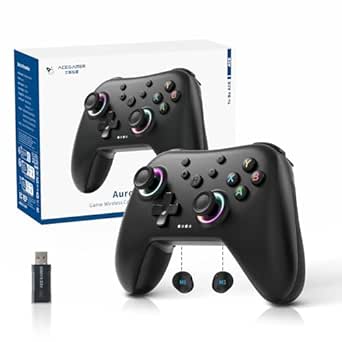 | Best Multi-Platform Wireless Upgrade | Controller type: Gamepad | Connectivity: Bluetooth and 2.4 GHz wireless receiver | Joystick technology: Hall Effect sensors | VIEW LATEST PRICE | See Our Full Breakdown |
| EasySMX X05Pro Wireless Gaming Controller | 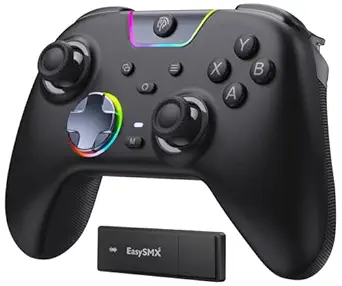 | Best for Adjustable Controls | Compatibility: Windows PC, Nintendo Switch, Switch 2, Android, iOS | Connectivity: USB-C, 2.4 GHz wireless, Bluetooth | Polling rate: 1000 Hz wired and 2.4 GHz; 125 Hz Bluetooth | VIEW LATEST PRICE | See Our Full Breakdown |
| Xbox Elite Wireless Controller Series 2 | 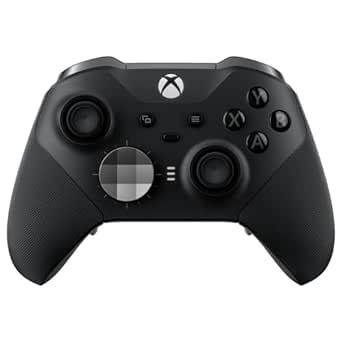 | Best Premium Xbox Upgrade | Compatibility: Xbox Series X|S, Xbox One, Windows PC, cloud gaming | Connectivity: Xbox Wireless, Bluetooth, USB-C | Battery life: Up to 40 hours | VIEW LATEST PRICE | See Our Full Breakdown |
| eXtremeRate Strong Version Whole Clicky Kit V2 for PS5 Controller (BDM-040/050/060) |  | Best PS5 Trigger-Response Mod | Compatible models: PS5 controller BDM-040, BDM-050, BDM-060 | Trigger travel: 2 mm | Switch actuation force: 1.2 N / 1.4 N | VIEW LATEST PRICE | See Our Full Breakdown |
| KontrolFreek Aim Boost Kit for Xbox One and Xbox Series X|S Controllers, Black Galaxy |  | Best Low-Complexity Aiming Upgrade | Compatible devices: Xbox One and Xbox Series X|S controllers | Included items: Performance thumbsticks and precision rings | Precision ring strengths: 3 | VIEW LATEST PRICE | See Our Full Breakdown |
| PlayStation DualSense Wireless Controller – Cosmic Red |  | Best Full-Controller Upgrade for PS5 | Brand: PlayStation | Color: Cosmic Red | Connectivity: Bluetooth, USB Type-C | VIEW LATEST PRICE | See Our Full Breakdown |
| KontrolFreek Precision Rings for Gaming Controllers, 6 Count |  | Best Cross-Platform Aiming Tweak | Brand: KontrolFreek | Unit count: 6 | Resistance levels: Soft, medium, and hard | VIEW LATEST PRICE | See Our Full Breakdown |
| 16-in-1 Performance Thumb Grips for PlayStation and Xbox Controllers |  | Best Variety Pack for Grip and Stick Height | Brand: Faysazoy | Piece count: 16 | Pairs: 8 | VIEW LATEST PRICE | See Our Full Breakdown |
| eXtremeRate 8-in-1 Magnetic Metal Thumbsticks for Xbox Series X/S, Xbox One, and PS4 Controllers – Black |  | Best Premium Swappable Thumbsticks | Brand: eXtremeRate | Material: Stainless steel | Color: Black | VIEW LATEST PRICE | See Our Full Breakdown |
| KontrolFreek Aim Boost Kit for Xbox One and Xbox Series X Controllers, Frenzy Edition |  | Best Xbox Aim-and-Comfort Bundle | Brand: KontrolFreek | Compatible devices: Xbox Series X, Xbox One | Included components: Performance thumbsticks and precision rings | VIEW LATEST PRICE | See Our Full Breakdown |
| KontrolFreek FPS Freek Galaxy Black Performance Thumbsticks for PS4 and PS5 |  | Best Low-Cost Precision Upgrade | Compatibility: PlayStation 4 and PlayStation 5 | Included: 1 high-rise and 1 mid-rise concave thumbstick | High-rise height increase: 10.0 mm | VIEW LATEST PRICE | See Our Full Breakdown |
| GameSir G7 Pro Tri-Mode Controller for Xbox, PC, and Android |  | Best Multi-Platform Feature Upgrade | Compatibility: Xbox Series X|S, Xbox One, PC, Android | Connectivity: Wired, 2.4 GHz wireless, Bluetooth | Stick technology: TMR | VIEW LATEST PRICE | See Our Full Breakdown |
| 8Bitdo Ultimate 2 Wireless Controller for PC, Apple, Steam, and Android, Black |  | Best for Low-Latency PC Play | Compatibility: PC, Apple, Steam, Android | Joystick type: TMR | Wireless technology: 8Speed 2.4G | VIEW LATEST PRICE | See Our Full Breakdown |
| 14-in-1 Metal Thumbstick and Accessory Kit for Xbox Elite Series 2 Controller, Black |  | Best Customization Kit for Elite Series 2 | Compatibility: Xbox Elite Wireless Controller Series 2 | Material: Stainless steel metal components | Thumbsticks: 6 | VIEW LATEST PRICE | See Our Full Breakdown |
| gaming controller upgrade | Color |
|---|---|
| AceGamer Aurora II Wireless Co | Midnight Black |
| EasySMX X05Pro Wireless Gaming | — |
| Xbox Elite Wireless Controller | Black |
| eXtremeRate Strong Version Who | — |
| KontrolFreek Aim Boost Kit for | Black |
| PlayStation DualSense Wireless | Cosmic Red |
| KontrolFreek Precision Rings f | Black/Purple/Green |
| 16-in-1 Performance Thumb Grip | — |
| eXtremeRate 8-in-1 Magnetic Me | Black |
| KontrolFreek Aim Boost Kit for | Purple |
| KontrolFreek FPS Freek Galaxy | Black |
| GameSir G7 Pro Tri-Mode Contro | — |
| 8Bitdo Ultimate 2 Wireless Con | — |
| 14-in-1 Metal Thumbstick and A | Black |
More Details on Our Top Picks
AceGamer Aurora II Wireless Controller for PC, Android, Switch, iOS, and Steam Deck
The AceGamer Aurora II suits players who want one wireless pad for several systems without moving into a platform-specific controller. Its Hall Effect joysticks are designed to resist stick drift, while two programmable back buttons add shortcuts without requiring a full set of rear paddles. Bluetooth and a 2.4 GHz receiver offer a choice of wireless connections, and the 1000 mAh battery supports longer sessions between charges. Compared with the EasySMX X05Pro, the Aurora II keeps customization simpler: it has two back buttons and RGB lighting, but its listed features do not include adjustable triggers or a specified polling rate. The main catch is compatibility: it does not work with Xbox, and setting up the 2.4 GHz connection requires a specific button sequence. I’d pick it for broad device coverage, not competitive trigger tuning.
Pros:- Hall Effect joysticks are designed for precise input and reduced stick drift.
- Two programmable back buttons add control options without a larger paddle setup.
- Bluetooth and 2.4 GHz receiver connectivity support multiple wireless setups.
- 1000 mAh battery supports extended play.
Cons:- Not compatible with Xbox.
- 2.4 GHz pairing requires a specific button sequence.
- Does not list adjustable triggers or a polling rate for performance comparisons.
Best for: PC, Switch, Steam Deck, and mobile players who want a single wireless controller with drift-resistant sticks and a pair of programmable rear buttons.
Not ideal for: Xbox owners or players who want adjustable triggers, clearly specified wired performance, or a plug-and-play 2.4 GHz setup.
- Controller type:Gamepad
- Connectivity:Bluetooth and 2.4 GHz wireless receiver
- Joystick technology:Hall Effect sensors
- Programmable back buttons:2
- Battery capacity:1000 mAh
- Compatible platforms:Windows 7 and later, Nintendo Switch, Switch 2, iOS, Android, Steam Deck
- Xbox compatibility:Not compatible
- Color:Midnight Black
Our verdict“Choose the Aurora II if you want a wireless, multi-platform upgrade with Hall Effect sticks and two programmable back buttons, and you do not need Xbox support.”
EasySMX X05Pro Wireless Gaming Controller
The EasySMX X05Pro stands out for players who want to tune more than just stick feel. Its dual-stage adjustable triggers and two programmable top buttons give it more control customization than the AceGamer Aurora II, while 11-bit Hall Effect joysticks target precise, drift-resistant input. A choice of USB-C, 2.4 GHz, or Bluetooth makes it adaptable to desk and couch setups; the 1000 Hz polling rate applies to wired and 2.4 GHz play, while Bluetooth runs at 125 Hz. Quiet silicone-damped buttons and a sweat-resistant grip also suit long sessions where noise and hand comfort matter. That flexibility comes with a platform limit: it does not support Xbox, PlayStation, Luna, or GeForce. Buyers focused on the fastest listed response should use wired or 2.4 GHz rather than Bluetooth.
Pros:- 11-bit Hall Effect joysticks are designed for precise, drift-resistant control.
- Dual-stage adjustable triggers and two programmable top buttons allow control tuning.
- USB-C, 2.4 GHz, and Bluetooth support varied connection preferences.
- Quiet silicone-damped buttons and a sweat-resistant grip suit extended sessions.
Cons:- Incompatible with Xbox, PlayStation, Luna, and GeForce.
- Bluetooth polling rate is 125 Hz, below the 1000 Hz wired and 2.4 GHz modes.
- Its control options may be unnecessary for players seeking a simple plug-in replacement.
Best for: PC and Switch players who want adjustable triggers, programmable buttons, quiet controls, and the option to switch between wired and wireless play.
Not ideal for: Xbox, PlayStation, Luna, or GeForce users, and Bluetooth-only players who want the controller’s highest listed polling rate.
- Compatibility:Windows PC, Nintendo Switch, Switch 2, Android, iOS
- Connectivity:USB-C, 2.4 GHz wireless, Bluetooth
- Polling rate:1000 Hz wired and 2.4 GHz; 125 Hz Bluetooth
- Joysticks:11-bit Hall Effect
- Triggers:Dual-stage adjustable
- Programmable buttons:Two top-mounted buttons
- Rumble motors:2+2
- Battery capacity:1000 mAh
Our verdict“Choose the X05Pro if you want adjustable triggers and multiple connection modes on PC or Switch, and can use wired or 2.4 GHz for its higher listed polling rate.”
Xbox Elite Wireless Controller Series 2
The Xbox Elite Wireless Controller Series 2 is the most extensive upgrade here for Xbox players who want to reshape the controller around different games. Adjustable-tension thumbsticks, shorter hair-trigger locks, interchangeable components, and four included paddles give it far more physical customization than the two-button layouts on the AceGamer Aurora II and EasySMX X05Pro. It also supports up to three saved profiles, so a player can keep separate setups ready for different genres, and the included charging dock complements its stated battery life of up to 40 hours. That breadth comes with more setup and upkeep: some remapping uses the Xbox Accessories app and specific OS versions, and its platform range is narrower than the multi-device options in this roundup. I’d choose it for a tailored Xbox or Windows setup, not for casual cross-platform use.
Pros:- Interchangeable thumbsticks, paddles, and D-pads support extensive physical customization.
- Adjustable-tension thumbsticks and hair-trigger locks allow control changes for different play styles.
- Up to 40 hours of battery life and an included charging dock support long sessions.
- Three saved custom profiles make it easier to keep distinct game setups.
Cons:- Advanced button remapping requires the Xbox Accessories app and specific OS versions.
- Compatibility is focused on Xbox, Windows PC, and cloud gaming rather than the broader range supported by the Aurora II.
- Its extensive customization may be unnecessary for players who want a basic wireless upgrade.
Best for: Xbox and Windows players who want interchangeable controls, rear paddles, adjustable stick tension, and saved configurations for different games.
Not ideal for: Players seeking a straightforward multi-platform controller, or those who do not want to use an app and compatible OS for advanced remapping.
- Compatibility:Xbox Series X|S, Xbox One, Windows PC, cloud gaming
- Connectivity:Xbox Wireless, Bluetooth, USB-C
- Battery life:Up to 40 hours
- Included components:Carrying case, charging dock, USB-C cable, 6 thumbsticks, 4 paddles, 2 D-pads, adjustment tool
- Custom profiles:Up to 3
- Audio:3.5 mm audio jack
- Color:Black
Our verdict“Pick the Elite Series 2 if you play mainly on Xbox or Windows and want deep physical and profile customization rather than broad device compatibility.”
eXtremeRate Strong Version Whole Clicky Kit V2 for PS5 Controller (BDM-040/050/060)
Unlike the complete controllers elsewhere in this roundup, the eXtremeRate Strong Version Whole Clicky Kit V2 upgrades a compatible PS5 controller you already own. It changes the feel of L1/R1 and face buttons and shortens L2/R2 trigger travel to 2 mm, a setup aimed at players who want quicker button actuation rather than new wireless features or broader platform support. Compared with the Xbox Elite Wireless Controller Series 2, this is a focused modification, not a full customization system: there are no swappable sticks or included controller. Installation requires opening the gamepad, though the kit does not require soldering, and compatibility is limited to BDM-040, BDM-050, and BDM-060 revisions. I’d recommend it to confident DIY owners who value clicky, short-travel controls; others may prefer a ready-to-use controller upgrade.
Pros:- Shortens L2/R2 trigger travel to 2 mm for a more immediate press.
- Adds clicky feedback to L1/R1 and face buttons.
- Switches are specified for more than 3 million presses.
- Includes tools and components for installation without soldering.
Cons:- Fits only PS5 controller revisions BDM-040, BDM-050, and BDM-060.
- Installation requires disassembling the controller.
- The kit does not include a controller or replacement buttons.
Best for: PS5 owners with a BDM-040, BDM-050, or BDM-060 controller who want shorter trigger travel and clicky button feedback and are comfortable with disassembly.
Not ideal for: Players with other PS5 controller revisions, anyone who wants a complete controller, or owners unwilling to open their gamepad.
- Compatible models:PS5 controller BDM-040, BDM-050, BDM-060
- Trigger travel:2 mm
- Switch actuation force:1.2 N / 1.4 N
- Switch lifespan:More than 3 million presses
- Installation:Controller disassembly required; no soldering
- Included components:FPC cable set, face button rubber pads, cross screwdriver, prying tool, spare screws
- Item weight:15 g
Our verdict“Choose this kit to modify a compatible PS5 controller for clicky buttons and shorter trigger travel if you are prepared to install it yourself.”
KontrolFreek Aim Boost Kit for Xbox One and Xbox Series X|S Controllers, Black Galaxy
The KontrolFreek Aim Boost Kit offers a lighter-touch upgrade than replacing a controller or opening one up for a hardware mod. Mixed-height performance thumbsticks change the contact points for aiming, while its three resistance strengths let players try different precision-ring feels with their Xbox One or Series X|S controller. That makes it a more targeted aiming accessory than the multi-platform AceGamer Aurora II, which replaces the whole gamepad and adds programmable back buttons rather than ring resistance. The tradeoff is that the added resistance takes adjustment, and the kit is Xbox-only. It also changes stick feel rather than button layout or trigger response, so it will not match the eXtremeRate kit’s short-travel PS5 trigger focus. I’d consider it for Xbox players who want to tune thumbstick control without changing their familiar controller.
Pros:- Mixed-height thumbsticks provide different contact points for aiming and movement.
- Three precision-ring strengths let players choose a preferred resistance feel.
- Rubber components add a grip-focused alternative to changing controllers.
- Keeps the existing Xbox controller in use rather than replacing it.
Cons:- Compatible only with Xbox One and Xbox Series X|S controllers.
- Added ring resistance may take time to get used to.
- Does not upgrade triggers, buttons, connectivity, or controller features.
Best for: Xbox One and Series X|S players who want to adjust aiming feel with mixed-height thumbsticks and selectable resistance rings while keeping their current controller.
Not ideal for: Players on PlayStation, PC, or other platforms, or anyone seeking trigger, button, or wireless upgrades instead of a change to stick feel.
- Compatible devices:Xbox One and Xbox Series X|S controllers
- Included items:Performance thumbsticks and precision rings
- Precision ring strengths:3
- Material:Rubber
- Color:Black
- Model number:6204-XBX
Our verdict“Choose the Aim Boost Kit if you want to tune thumbstick aiming on an Xbox controller without replacing it, and are willing to adapt to added resistance.”
PlayStation DualSense Wireless Controller – Cosmic Red
I’d choose the Cosmic Red DualSense when the upgrade needs to change more than thumbstick feel. Its haptic feedback and adaptive triggers add game-dependent texture and resistance, while the built-in microphone and 3.5 mm audio jack make voice chat straightforward. It also connects to PS5, PC, Mac, Android, and iOS, giving it broader device reach than the Xbox-only KontrolFreek Aim Boost Kit. That said, this is a full controller rather than a targeted aiming add-on: players happy with their current pad may get a more focused change from the Aim Boost Kit’s mixed-height sticks and resistance rings. The DualSense’s wireless convenience comes with a battery-life tradeoff, and its extra features matter most in games that support them. I’d rank it as the strongest all-around hardware refresh here, not the most specialized competitive tweak.
Pros:- Haptic feedback and adaptive triggers can add game-specific tactile cues
- Compatible with PS5, PC, Mac, Android, and iOS
- Built-in microphone and 3.5 mm audio jack support convenient voice chat
- Wireless Bluetooth and USB Type-C connectivity
Cons:- Battery life may be shorter than that of previous-generation controllers
- Costs more than a focused thumbstick or precision-ring upgrade
- The extra feedback features depend on game support
Best for: PS5 players who want immersive supported-game feedback, built-in chat, and one controller that can also connect to several other devices
Not ideal for: Players seeking only more precise aiming from an existing controller, or those who prioritize long battery life over haptics and adaptive triggers
- Brand:PlayStation
- Color:Cosmic Red
- Connectivity:Bluetooth, USB Type-C
- Compatible devices:PS5, PC, Mac, Android, iOS
- Button quantity:14
- Dimensions:7.68 x 7.48 x 2.87 inches
- Model number:CFI-ZCT2W
- Power source:Wireless
Our verdict“Choose the Cosmic Red DualSense if you want a full PS5 controller refresh with immersive feedback, rather than a lower-scope aiming accessory.”
KontrolFreek Precision Rings for Gaming Controllers, 6 Count
For players who overshoot targets at high sensitivity but want to keep their existing controller, I’d start with the KontrolFreek Precision Rings. They add thumbstick resistance, and the six-ring set includes soft, medium, and hard options so players can try different feels rather than commit to one strength. That makes the kit more adjustable than the Faysazoy 16-in-1 set, which changes grip and stick profile instead of adding resistance. Compatibility spans several PlayStation, Xbox, Switch Pro, and Scuf controllers, so this is a useful choice for households with mixed hardware. The tradeoff is direct: resistance can help steady movement, but it also makes the stick feel heavier and may slow players who prefer quick, free movement. I’d treat these as an aiming aid to experiment with, not a guaranteed accuracy improvement.
Pros:- Six rings offer soft, medium, and hard resistance options
- Adds resistance without requiring a new controller
- Compatible with a broad range of PlayStation, Xbox, Switch Pro, and Scuf controllers
- Moisture-wicking material is described as returning quickly to shape
Cons:- Added resistance may feel uncomfortable or slow for players who prefer lighter stick movement
- The rings change thumbstick feel rather than providing new grip profiles or replacement sticks
Best for: Players using a compatible controller who tend to overshoot while aiming and want to try multiple resistance strengths
Not ideal for: Players who prefer light, unrestricted thumbstick movement or whose controller is outside the listed compatibility range
- Brand:KontrolFreek
- Unit count:6
- Resistance levels:Soft, medium, and hard
- Compatible devices:PS4, PS5, Xbox One, Xbox Series X & S, Switch Pro, and Scuf controllers
- Material:Flexible rubber
- Color:Black/Purple/Green
- Model number:4005-MIX
Our verdict“Pick these rings if you want to test adjustable stick resistance on a compatible controller and are comfortable with a heavier aiming feel.”
16-in-1 Performance Thumb Grips for PlayStation and Xbox Controllers
I’d give the Faysazoy 16-in-1 set the edge for players who want to experiment with both stick height and surface grip without buying separate kits. Its three pairs of high-, mid-, and low-profile performance caps let you adjust reach, while five pairs of colorful anti-slip grips offer another way to refresh worn or slippery sticks. Unlike the KontrolFreek Precision Rings, this set does not add resistance; it changes the cap’s profile and contact surface instead. The snap-on design avoids tools, and the listed PS4, PS5, and Xbox compatibility covers common platforms. One caveat is that the product title mentions Nintendo Switch Pro, but the detailed compatibility list does not, so I wouldn’t buy it for that controller without confirming fit. The choice of profiles is useful, though the set’s many pieces may be unnecessary if you already know your preferred setup.
Pros:- Includes high-, mid-, and low-rise performance grip profiles
- Eight pairs combine performance caps and colorful anti-slip grips
- Snap-on installation requires no tools
- Can help protect original thumbsticks from wear
Cons:- Nintendo Switch Pro compatibility is mentioned in the title but omitted from the detailed compatibility list
- Does not add thumbstick resistance like the KontrolFreek Precision Rings
- A large selection may be unnecessary for players who already know their preferred profile
Best for: PS4, PS5, or Xbox players who want to compare several stick heights and grip styles while protecting their original thumbsticks
Not ideal for: Nintendo Switch Pro owners relying on the title’s compatibility claim, or players who want added stick resistance rather than alternate caps
- Brand:Faysazoy
- Piece count:16
- Pairs:8
- Performance grip profiles:High-rise, mid-rise, low-rise
- Colors:Black, white, red, purple
- Compatible controllers:PlayStation 5, PlayStation 4, Xbox Series X|S, Xbox One
- Item weight:0.86 g
- Warranty:30 days
Our verdict“Choose this set if you want an easy, tool-free way to test different grip surfaces and stick heights on a listed PlayStation or Xbox controller.”
eXtremeRate 8-in-1 Magnetic Metal Thumbsticks for Xbox Series X/S, Xbox One, and PS4 Controllers – Black
The eXtremeRate magnetic metal thumbsticks suit players who want to change stick shape often and prefer a more substantial material than snap-on grip caps. The stainless-steel set includes normal, extended, and rounded pairs, with magnetic swapping designed to make changes quick without disassembling the controller. That’s a more hardware-focused upgrade than the Faysazoy set, which provides several snap-on profiles but uses a different approach to grip and wear protection. The included T8H and cross screwdrivers are for installation; they don’t change the stated benefit of swapping the sticks magnetically afterward. Compatibility covers several Xbox generations and PS4 models, but not PS5 or Nintendo Switch Pro. I’d choose this for supported controllers when durability and shape options matter more than broad platform coverage. The controller itself is not included, and metal construction may not suit players seeking a lightweight, familiar stick feel.
Pros:- Stainless-steel construction offers a durable alternative to standard stick caps
- Normal, extended, and rounded pairs provide distinct shape choices
- Magnetic attachment allows quick changes without controller disassembly
- T8H and cross screwdrivers are included for installation
Cons:- Not listed as compatible with PS5 or Nintendo Switch Pro controllers
- Controller is not included
- Metal sticks may not suit players who prefer a lighter, stock-like feel
Best for: Xbox or PS4 players who want durable-feeling thumbsticks in several shapes and plan to swap configurations without opening the controller each time
Not ideal for: PS5 or Nintendo Switch Pro owners, and players who prefer lightweight stock-style sticks or only need inexpensive grip caps
- Brand:eXtremeRate
- Material:Stainless steel
- Color:Black
- Item weight:30 g
- Item dimensions:1.18 x 0.79 x 0.79 inches
- Model number:XOJ2009
- Compatible devices:Xbox Series X/S, Xbox One (S/X/Elite), PS4 (Slim/Pro)
- Included accessories:T8H screwdriver, cross screwdriver
Our verdict“Pick this kit for a compatible Xbox or PS4 controller if you value swappable stick shapes and stainless-steel construction over broad compatibility.”
KontrolFreek Aim Boost Kit for Xbox One and Xbox Series X Controllers, Frenzy Edition
The KontrolFreek Aim Boost Kit, Frenzy Edition combines two changes for Xbox players: mixed-height performance thumbsticks for reach and control, plus precision rings that add resistance. That makes it a more complete aiming-focused accessory set than the standalone KontrolFreek Precision Rings, which adjust resistance but don’t include performance sticks. The rings come in three strengths, giving players room to find a feel that doesn’t make the stick too heavy, while the thumbsticks are designed with comfort in mind. Those benefits depend on personal fit; added resistance can help curb overshooting, but it can also work against players who rely on quick, light stick movements. Compatibility is another firm limit: this kit is listed for Xbox One and Xbox Series X, while the AceGamer Aurora II offers a broader multi-device controller option. I’d shortlist the Frenzy kit for Xbox owners who want a paired aiming setup, not cross-platform use.
Pros:- Combines mixed-height performance thumbsticks and precision rings
- Three ring strengths let players choose among resistance levels
- Thumbsticks are designed to support comfort and reduce hand and thumb fatigue
- A more complete aiming-focused bundle than the standalone Precision Rings
Cons:- Compatibility is limited to Xbox One and Xbox Series X controllers
- Added ring resistance may feel restrictive to players who prefer fast, light stick movement
- The benefits depend on finding a stick height and resistance strength that suits the player
Best for: Xbox One and Xbox Series X players who want to combine mixed-height thumbsticks with adjustable resistance for aiming
Not ideal for: Players using PS5, PS4, Nintendo, or other unlisted controllers, and those who dislike resistance on their thumbsticks
- Brand:KontrolFreek
- Compatible devices:Xbox Series X, Xbox One
- Included components:Performance thumbsticks and precision rings
- Precision ring strengths:3
- Material:Rubber
- Color:Purple
- Model number:6106-XBX
- UPC:810052986906
Our verdict“Choose the Frenzy kit if you play on Xbox One or Xbox Series X and want both stick-height options and adjustable aiming resistance in one set.”
KontrolFreek FPS Freek Galaxy Black Performance Thumbsticks for PS4 and PS5
This is the simplest upgrade here for players who want more aiming control without replacing a controller. The mixed-height pair gives one thumb extra reach for finer camera adjustments while leaving the shorter stick available for movement, a more targeted setup than the interchangeable parts in the Xbox Elite Series 2 accessory kit. Its non-slip rubber grip is designed to ease thumb fatigue and shield the original sticks from wear. The tradeoff is scope: this adds only two caps, not new buttons, connectivity, or trigger options like the GameSir G7 Pro. Check that the included heights suit your grip and game preferences, and verify current PS4/PS5 compatibility before buying, since the packaging information may be outdated.
Pros:- Different stick heights support separate aiming and movement preferences.
- Non-slip rubber grip is designed to improve comfort during longer sessions.
- Can help protect the controller’s original thumbsticks from wear.
Cons:- Includes just one high-rise and one mid-rise thumbstick.
- Packaging may not reflect updated compatibility information, so buyers should verify fit.
Best for: PS4 and PS5 players who want a modest aiming and grip upgrade while keeping their existing controller.
Not ideal for: Players seeking extra paddles, adjustable triggers, or a complete controller replacement; this kit only adds two thumbsticks.
- Compatibility:PlayStation 4 and PlayStation 5
- Included:1 high-rise and 1 mid-rise concave thumbstick
- High-rise height increase:10.0 mm
- Mid-rise height increase:6.5 mm
- Grip material:Proprietary rubber compound
- Color:Black
Our verdict“Choose this pair for a focused PlayStation aiming and grip change, not for a broader controller feature upgrade.”
GameSir G7 Pro Tri-Mode Controller for Xbox, PC, and Android
The G7 Pro makes the most sense for players who want one controller to cover Xbox, PC, and Android, with wired, 2.4 GHz, and Bluetooth connections for different setups. TMR sticks and Hall Effect triggers target precise input and reduced reliance on conventional contact-based components, while switchable trigger stops let players favor quicker actuation or fuller travel. Compared with the 8Bitdo Ultimate 2, this model adds Xbox compatibility and a charging station, while the 8Bitdo lists a sub-1 ms latency claim and a stated 1000 Hz rate across wired and 2.4G connections. Here, 1000 Hz is specified for PC, and gyro aiming is PC-only, so Xbox buyers should not assume every feature carries across platforms. Its extras suit players who will use them; anyone wanting a simple plug-in pad may find the feature set more than they need.
Pros:- Works with Xbox, PC, and Android over wired, 2.4 GHz, or Bluetooth connections.
- TMR sticks and Hall Effect triggers offer precise input with different sensing technology from conventional controls.
- Four extra buttons and switchable trigger stops allow control customization.
- Charging station is included for the 1200 mAh battery.
Cons:- Gyroscope functionality is limited to PC.
- The 1000 Hz polling rate is specified for PC over wired or 2.4 GHz connections, not Xbox.
- Multiple modes and customization may be unnecessary for players who only want a basic replacement pad.
Best for: Players switching between Xbox, PC, and Android who want multiple connection modes, trigger adjustments, and a charging dock.
Not ideal for: Xbox-only players who want PC gyro features or the stated 1000 Hz polling rate on console; those specifications are limited to PC use.
- Compatibility:Xbox Series X|S, Xbox One, PC, Android
- Connectivity:Wired, 2.4 GHz wireless, Bluetooth
- Stick technology:TMR
- Triggers:Hall Effect analog triggers with switchable trigger stops
- Polling rate:1000 Hz on PC via wired or 2.4 GHz connection
- Gyroscope:PC only
- Customizable buttons:Four extra buttons
- Battery and charging:1200 mAh battery; smart auto start-stop charging station
- Audio jack:3.5 mm
Our verdict“Pick the G7 Pro if you want a feature-rich controller across Xbox, PC, and Android and can accept platform-specific limits.”
8Bitdo Ultimate 2 Wireless Controller for PC, Apple, Steam, and Android, Black
For PC players who prioritize responsive wireless input, the Ultimate 2 stands out with its 8Speed 2.4G connection, stated latency under 1 ms, and 1000 Hz polling rate on 2.4G and wired connections. TMR joysticks and switchable Hall Effect or tactile trigger modes give it a more configurable feel than the KontrolFreek Galaxy, which changes stick height and grip but does not replace the controller or add trigger modes. The back paddles and R4/L4 bumpers also provide extra inputs for players who want to keep their thumbs on the sticks. A dock and USB-C adapter are included, but battery life is not specified, and the advertised polling rate applies to wired or 2.4G use. Unlike the GameSir G7 Pro, this model does not list Xbox compatibility, so check that its supported platforms match your setup.
Pros:- Stated under-1 ms latency and 1000 Hz polling rate for 2.4G and wired connections.
- TMR joysticks pair with switchable Hall Effect and tactile trigger modes.
- Two back paddles, R4/L4 bumpers, and programmable controls offer extra input options.
- Charging dock and USB-C adapter are included.
Cons:- Battery life is not specified in the product data.
- The 1000 Hz polling rate is listed for 2.4G and wired connections, not every connection mode.
- Compatibility does not list Xbox, unlike the GameSir G7 Pro.
Best for: PC players who want a low-latency wireless controller with extra rear and shoulder inputs, motion controls, and a charging dock.
Not ideal for: Xbox players or buyers who need stated battery-life information before choosing a wireless controller.
- Compatibility:PC, Apple, Steam, Android
- Joystick type:TMR
- Wireless technology:8Speed 2.4G
- Wireless range:10 m
- Latency:Under 1 ms
- Polling rate:1000 Hz for 2.4G and wired connections
- Motion control:Customizable 6-axis
- Extra controls:2 back paddle buttons and extra R4/L4 bumpers
- Included accessories:Multifunctional charging dock and USB-C adapter
Our verdict“Choose the Ultimate 2 for a responsive, configurable PC-focused upgrade if its listed platform support fits your devices.”
14-in-1 Metal Thumbstick and Accessory Kit for Xbox Elite Series 2 Controller, Black
This kit is a parts upgrade, not a replacement controller: it gives Xbox Elite Series 2 owners a selection of thumbsticks, paddles, and D-pads for changing the feel or replacing worn pieces. That makes it a more targeted choice than the GameSir G7 Pro, which supplies a whole controller with multiple connection modes and electronic features. The kit’s stainless steel components and included adjustment tool support hands-on customization, while the storage case keeps the pieces together between changes. The tradeoff is strict compatibility: it is designed for the Elite Series 2, not standard Xbox controllers or PlayStation pads. The description also does not spell out the exact component configurations beyond the quantities, so check the included parts against the controls you want before ordering.
Pros:- Six thumbsticks, four paddles, and two D-pads provide multiple control configurations.
- Can refresh worn parts without replacing the entire Elite Series 2 controller.
- Stainless steel metal components offer a different material choice from stock controls.
- Includes an adjustment tool and storage case.
Cons:- Compatible only with the Xbox Elite Wireless Controller Series 2.
- The exact configuration of the included parts is not detailed beyond their quantities, so buyers should confirm it suits their needs.
Best for: Xbox Elite Series 2 owners who want alternate control parts or need to replace worn thumbsticks, paddles, or D-pads.
Not ideal for: Players with a standard Xbox controller, another Elite generation, or a PlayStation controller; compatibility is limited to Elite Series 2.
- Compatibility:Xbox Elite Wireless Controller Series 2
- Material:Stainless steel metal components
- Thumbsticks:6
- Paddles:4
- D-pads:2
- Included tools and storage:Adjustment tool and storage case
- Color:Black
- Brand:niffgaff
Our verdict“Buy this kit to customize or refresh an existing Elite Series 2, not as a standalone controller upgrade.”

How We Picked
I grouped these 14 options by the problem they address: replacing a controller, changing stick feel, improving grip, or modifying buttons and components. My ranking favors useful gains for the intended buyer, clear platform fit, practical setup, and how much control the product gives the player without adding needless complexity. A versatile controller ranks ahead when it can serve as a main gamepad; focused accessories can rank highly for buyers who want a specific change while keeping their current controller.
I also weighed tradeoffs rather than treating every upgrade as an improvement for everyone. Compatibility limits, installation demands, changes to stick height or resistance, and the need to adapt to a new layout all affect the recommendation. The order reflects breadth and ease of choosing a sensible upgrade, not a claim that one product is best for every game or hand.
| gaming controller upgrade | Color |
|---|---|
| AceGamer Aurora II Wireless Co | Midnight Black |
| EasySMX X05Pro Wireless Gaming | — |
| Xbox Elite Wireless Controller | Black |
| eXtremeRate Strong Version Who | — |
| KontrolFreek Aim Boost Kit for | Black |
| PlayStation DualSense Wireless | Cosmic Red |
| KontrolFreek Precision Rings f | Black/Purple/Green |
| 16-in-1 Performance Thumb Grip | — |
| eXtremeRate 8-in-1 Magnetic Me | Black |
| KontrolFreek Aim Boost Kit for | Purple |
| KontrolFreek FPS Freek Galaxy | Black |
| GameSir G7 Pro Tri-Mode Contro | — |
| 8Bitdo Ultimate 2 Wireless Con | — |
| 14-in-1 Metal Thumbstick and A | Black |
Factors to Consider When Choosing Best Gaming Controller Upgrades
Before choosing, decide whether your frustration comes from the controller itself or from one particular control. That distinction can prevent paying for a new gamepad when a grip or stick accessory would address the issue—or buying a small add-on when you need broader hardware changes.
1. Start With Your Platform and Controller Model
Compatibility labels can hide meaningful differences between consoles, controller generations, and connection modes. Match the exact model name and, for internal modifications, the hardware revision before ordering; similar-looking controllers may use different components. A multi-platform controller can be appealing, but check how it connects to each device and whether all advertised modes support your intended setup. Do not assume that a controller accessory made for Xbox will fit a PlayStation pad, or that a phone-compatible controller will work the same way on every mobile operating system. If you switch platforms often, broad compatibility may matter more than a specialized feature.
2. Choose Between a New Controller and a Targeted Add-On
A replacement controller makes sense when you want several changes at once, such as a different control layout, additional customization, or another connection method. An add-on is a better bet when the existing controller works well and just one part feels wrong. Think through the problem in concrete terms: slippery sticks, uncomfortable reach, or a trigger action you want to change call for different solutions. Buying a full controller for a single comfort issue can add cost and adaptation time without fixing the root cause. Conversely, stacking several small accessories may become awkward if the controller’s core ergonomics are the real issue.
3. Treat Stick Height and Resistance as Personal Fit
Taller thumbsticks can give your thumb more room to make fine movements, but they also change reach and leverage. Precision rings add resistance, which may help players seeking steadier movement, yet can feel restrictive if quick stick travel is central to their play. These changes are not universal accuracy upgrades: sensitivity settings, stick condition, game mechanics, and hand position all affect the result. Start with a reversible, low-commitment accessory before changing several controls at once. If a new feel slows your inputs or causes discomfort, remove it rather than forcing an adjustment.
4. Separate External Accessories From Internal Mods
Slip-on grips and thumbstick caps are generally easier to try and remove than kits that require opening a controller. Internal modifications can create a more tailored feel, but they demand accurate model matching, careful installation, and comfort with taking apart hardware. Check what tools are needed and whether the product changes the original button feel before committing. A modification can also make troubleshooting harder if a control stops responding afterward. For a first upgrade, prioritize accessories that do not require disassembly unless the specific change is worth that added effort.
5. Match the Upgrade to the Games You Play
Competitive shooters often reward consistent aiming and quick access to controls, while platformers and racing games can place different demands on stick travel and trigger feel. A feature that helps in one genre may be distracting in another, especially when it changes resistance or the distance your thumb must move. If you play a wide mix of games, favor adjustable or removable options over a fixed setup. For a single genre, a specialized accessory may be a more direct answer than a feature-packed controller. Decide which game or control problem matters most before comparing secondary features.
6. Pay More for Flexibility Only If You Will Use It
Premium controllers are easiest to justify when you expect to use their customization regularly across several games or setups. If you mainly want better grip or a slightly different stick feel, a focused accessory may be a better match than a more complex controller. Count setup time and learning time as part of the tradeoff: extra controls have little value if you leave them untouched. Beginners often benefit from keeping the layout familiar and changing one thing at a time. That approach also makes it easier to tell whether the upgrade itself helped.
Frequently Asked Questions
Should I buy a new controller or upgrade the one I already own?
Choose a new controller if you want several changes at once, need another platform connection, or want a different set of controls. Keep your current controller and try an accessory if the issue is limited to grip, thumbstick feel, or another specific point of contact. Before replacing anything, identify what feels wrong during play rather than shopping from a feature list. A focused accessory is less disruptive, but it cannot fix a controller layout or hardware feature you need. If the controller itself is uncomfortable, a collection of add-ons may not solve that broader fit problem.
Do thumbstick extenders and precision rings improve aiming for everyone?
No; they change the physical feel of the stick, and players differ in what feels controlled or comfortable. An extender can increase the distance available for thumb movement, while a ring adds resistance, so each affects input in a different way. Game sensitivity and your existing grip also shape the result. Try one change at a time, ideally in a low-pressure setting, and give yourself room to remove it if it hinders movement. Neither accessory guarantees better aim on its own.
How can I tell whether a controller mod will fit my exact model?
Compare the product’s compatibility list with the full controller name and, for internal kits, its hardware revision. Similar product names can cover multiple generations that use different internal parts. Check the manufacturer’s model markings or documentation rather than relying on appearance alone. For a kit that requires opening the controller, confirm the included components and tools before starting. If the exact revision is unclear, choose a reversible accessory or contact the maker before modifying the hardware.
Is a multi-platform controller a good choice if I mainly play on one device?
It can be, but multiple connection modes are valuable only if you expect to use them. If you stay on one platform, prioritize compatibility and the controls you will use there instead of paying attention to a long device list. Check whether the controller’s connection method and features work on your primary system, since support can vary across devices. Players who move between a PC, handheld, and mobile device may get more practical value from flexibility. A dedicated controller can be the simpler choice for a single-platform setup.
Are internal clicky-button or magnetic-stick kits a sensible first upgrade?
They can suit players who know exactly what control feel they want and are comfortable checking fit and handling a controller teardown. They are less suitable as a first experiment because installation introduces more steps than adding a grip or stick cap. Confirm the precise controller model and revision, then review the installation requirements before beginning. If you are unsure whether the changed feel will help, start with an external, removable option. That lets you learn what you prefer before making a more involved modification.
Conclusion
For most players seeking a broad hardware upgrade, I recommend the Xbox Elite Wireless Controller Series 2 as the best overall pick for its customizable control approach. The 8Bitdo Ultimate 2 or EasySMX X05Pro are worth comparing for buyers focused on a value-minded full-controller alternative, while the GameSir G7 Pro suits players who prioritize its tri-mode setup. Beginners should start with a removable option such as thumb grips or a KontrolFreek stick accessory, changing one thing at a time. For specific needs, choose the eXtremeRate clicky kit for a controller modification or precision rings for added stick resistance, after checking fit and installation demands. The right choice comes down to whether you need a new gamepad, a more comfortable contact point, or a targeted change to one control.
Halloween Picks
halloween
As an affiliate, we earn on qualifying purchases.