
The best Razer gaming gear depends on whether you need a competitive mouse, an all-purpose headset, or a complete setup upgrade. I’d put the Razer Viper V4 Pro first for players prioritizing a light wireless esports mouse, while the BlackShark V3 Pro stands out for premium wireless audio and noise cancellation. For MMO controls, the Naga V3 Pro offers swappable side plates that suit games with many shortcuts. The main tradeoffs across this lineup are wired versus wireless convenience, focused versus flexible controls, and premium features versus simpler gear. Read on for the full breakdown and advice on matching each option to your setup.

Get the latest gadgets delivered free with Prime
- Fast, free delivery on millions of items
- Prime Video, Amazon Music and more included
- Member-only deals all year
Complete the kit



Key Takeaways
- The Viper V4 Pro is the clearest competitive-mouse pick: its 49 g design favors fast, low-effort movement, while the Basilisk models prioritize ergonomic shape and extra controls.
- Wireless does not automatically mean the best fit: the Basilisk V3 and BlackShark V2 X keep things wired, avoiding wireless setup needs while giving up freedom of movement.
- Headsets split by purpose: the BlackShark V3 Pro adds wireless convenience and ANC, the V3 X HyperSpeed is a wireless alternative, and the V2 X and Kraken are simpler wired choices.
- Mouse pads solve different setup problems: the Goliathus Extended Chroma adds RGB and desk coverage, while the Gigantus V2 XXL focuses on a large cloth surface without the same lighting emphasis.
- Specialized controls are worthwhile only for the right games: the Naga V3 Pro suits MMO input demands and the Tartarus V2 adds programmable left-hand controls, but neither is a universal upgrade for every player.
| Razer Viper V4 Pro Wireless Esports Gaming Mouse, 49 g, Black |  | Best for Competitive Wireless Play | Connectivity: Wireless; USB Type-A to USB Type-C cable included | Weight: 49 g | Sensor: Razer Focus Pro 50K Optical Sensor Gen-3 | VIEW LATEST PRICE | See Our Full Breakdown |
| Razer Goliathus Extended Chroma RGB Gaming Mousepad, Black |  | Best RGB Extended Mousepad | Model: RZ02-02500300-R3U1 | Surface material: Micro-textured cloth | Base material: Natural-foam rubber | VIEW LATEST PRICE | See Our Full Breakdown |
| Razer Basilisk V3 Ergonomic Wired Gaming Mouse |  | Best for Button-Rich Control | Connectivity: USB wired | Buttons: 11 programmable buttons | Sensor: Optical | VIEW LATEST PRICE | See Our Full Breakdown |
| Razer Basilisk V3 Wired Ergonomic Gaming Mouse | | Best Ergonomic Scroll-Wheel Pick | Connectivity: USB wired | Design: Ergonomic with thumb rest | Hand orientation: Right-handed | VIEW LATEST PRICE | See Our Full Breakdown |
| Razer Mamba Elite Wired Gaming Mouse with 16,000 DPI Optical Sensor |  | Best for Saved Multi-Profile Setups | Connectivity: USB wired | Sensor: Optical | Maximum sensitivity: 16,000 DPI | VIEW LATEST PRICE | See Our Full Breakdown |
| Razer BlackShark V2 X Gaming Headset with 7.1 Surround Sound |  | Best Lightweight Wired Headset | Driver size: 50 mm | Driver coating: Titanium-coated | Connectivity: 3.5 mm audio jack | VIEW LATEST PRICE | See Our Full Breakdown |
| Razer Kraken Wired Gaming Headset with Retractable Microphone, Black/Blue |  | Best for In-Line Controls | Driver size: 50 mm | Connectivity: Wired, 3.5 mm headphone jack | Surround sound: Software-enabled 7.1 on Windows 10 64-bit | VIEW LATEST PRICE | See Our Full Breakdown |
| Razer BlackShark V3 X HyperSpeed Wireless Gaming Headset, Black | 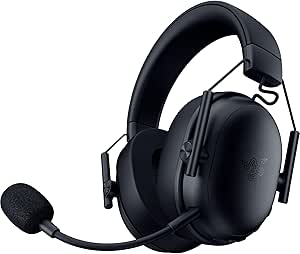 | Best Multi-Connection Wireless Headset | Driver size: 50 mm TriForce Gen-2 | Microphone: Detachable 9.9 mm HyperClear cardioid | Connectivity: 2.4 GHz wireless, Bluetooth, USB | VIEW LATEST PRICE | See Our Full Breakdown |
| Razer BlackShark V3 Pro Wireless Gaming Headset with ANC, Black |  | Best Premium Wireless Headset | Driver size: 50 mm | Microphone: Detachable HyperClear Full Band, 12 mm | Wireless latency: As low as 10 ms | VIEW LATEST PRICE | See Our Full Breakdown |
| Razer Gigantus V2 XXL Cloth Gaming Mouse Pad, Black |  | Best XXL Desk-Coverage Mouse Pad | Size: XXL | Dimensions: 16.14 x 37.01 in | Surface: Textured micro-weave cloth | VIEW LATEST PRICE | See Our Full Breakdown |
| Razer Huntsman Mini 60% Gaming Keyboard with Linear Optical Switches |  | Best Compact Gaming Keyboard | Form factor: 60%, 61 keys | Switch type: Linear optical | Actuation distance: 1.0 mm | VIEW LATEST PRICE | See Our Full Breakdown |
| Razer Basilisk V3 X HyperSpeed Wireless Gaming Mouse |  | Best Wireless Value | Connectivity: Razer HyperSpeed Wireless and Bluetooth | Controls: 9 programmable controls | Sensor: 5G Advanced optical sensor | VIEW LATEST PRICE | See Our Full Breakdown |
| Razer Tartarus V2 Left-Handed Gaming Keypad with 32 Programmable Keys | 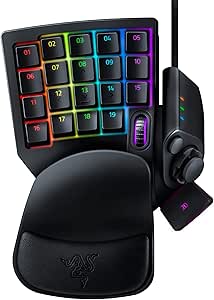 | Best for Custom One-Hand Controls | Key count: 32 programmable keys | Switch type: Mecha-Membrane | Hand orientation: Left-hand use | VIEW LATEST PRICE | See Our Full Breakdown |
| Razer Naga V3 Pro Wireless MMO Gaming Mouse with Swappable Side Plates |  | Best Premium MMO Mouse | Connectivity: Razer HyperSpeed Wireless, Bluetooth, and USB-C wired | Side plate layouts: 12-button, 6-button, and 2-button | Programmable buttons: Up to 23 | VIEW LATEST PRICE | See Our Full Breakdown |
| Razer DeathAdder Essential Ergonomic Wired Gaming Mouse, Black | 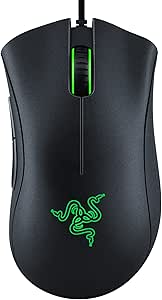 | Best Simple Wired Mouse | Connectivity: Wired | Sensor: Optical | Maximum sensitivity: 6,400 DPI | VIEW LATEST PRICE | See Our Full Breakdown |
| Razer gaming gear | Connectivity |
|---|---|
| Razer Viper V4 Pro Wireless Es | Wireless; USB Type-A to USB Type-C cable included |
| Razer Goliathus Extended Chrom | — |
| Razer Basilisk V3 Ergonomic Wi | USB wired |
| Razer Basilisk V3 Wired Ergono | USB wired |
| Razer Mamba Elite Wired Gaming | USB wired |
| Razer BlackShark V2 X Gaming H | 3.5 mm audio jack |
| Razer Kraken Wired Gaming Head | Wired, 3.5 mm headphone jack |
| Razer BlackShark V3 X HyperSpe | 2.4 GHz wireless, Bluetooth, USB |
| Razer BlackShark V3 Pro Wirele | 2.4 GHz wireless, Bluetooth 5.3, USB, 3.5 mm |
| Razer Gigantus V2 XXL Cloth Ga | — |
| Razer Huntsman Mini 60% Gaming | Wired USB-C; detachable Type-C to Type-A cable |
| Razer Basilisk V3 X HyperSpeed | Razer HyperSpeed Wireless and Bluetooth |
| Razer Tartarus V2 Left-Handed | Wired USB-A |
| Razer Naga V3 Pro Wireless MMO | Razer HyperSpeed Wireless, Bluetooth, and USB-C wired |
| Razer DeathAdder Essential Erg | Wired |
More Details on Our Top Picks
Razer Viper V4 Pro Wireless Esports Gaming Mouse, 49 g, Black
The Viper V4 Pro is the specialist pick here: its 49 g body and wireless connection suit players who make frequent, fast mouse movements and want fewer cable constraints. Its Focus Pro 50K Gen-3 sensor and up-to-8000 Hz polling offer a higher performance ceiling than the wired Basilisk V3 or Mamba Elite, though those models provide more programmable buttons for shortcuts and macros. Battery life is strongest at 1000 Hz, reaching up to 180 hours; choosing 8000 Hz cuts that figure to up to 45 hours. I’d favor this mouse for competitive aim over an all-purpose button-heavy setup, and buyers should expect to use Synapse 4 for performance customization.
Pros:- Lightweight 49 g design supports quick, low-effort repositioning.
- Focus Pro 50K Gen-3 sensor tracks up to 50,000 DPI and 930 IPS.
- Up to 180 hours of battery life at 1000 Hz.
- Wireless connectivity and polling up to 8000 Hz.
Cons:- Battery life falls to up to 45 hours at 8000 Hz.
- Performance customization requires Razer Synapse 4.
- Offers fewer programmable-button controls than the Basilisk V3 and Mamba Elite.
Best for: Competitive PC or Mac players who want a lightweight wireless mouse, high polling options, and a symmetrical shape.
Not ideal for: Players who prioritize numerous programmable controls, want to avoid software customization, or plan to use 8000 Hz polling without frequent charging.
- Connectivity:Wireless; USB Type-A to USB Type-C cable included
- Weight:49 g
- Sensor:Razer Focus Pro 50K Optical Sensor Gen-3
- Maximum DPI:50,000
- Maximum tracking speed:930 IPS
- Polling rate:Up to 8000 Hz
- Battery life:Up to 180 hours at 1000 Hz; up to 45 hours at 8000 Hz
- Switches:Razer Optical Mouse Switches Gen-4; rated for over 100 million clicks
- Compatibility:PC and Mac; Razer Synapse 4
Our verdict“Choose the Viper V4 Pro for lightweight, high-performance wireless play; pick a Basilisk instead if extra buttons matter more than agility.”
Razer Goliathus Extended Chroma RGB Gaming Mousepad, Black
The Goliathus Extended Chroma is the lineup’s pick for buyers who want a broad cloth surface with lighting built into the mat, rather than a bare, function-first pad like the Gigantus V2 XXL. Its micro-textured cloth is designed to balance speed and control, while the nonslip rubber base helps keep the surface steady during play. The practical difference is the Chroma RGB edge lighting: it adds customizable color and can sync with compatible games and devices, but those effects depend on having a compatible setup. I’d choose the Goliathus for a coordinated illuminated desk; readers who care more about an uncomplicated mouse surface than lighting should compare it with the Gigantus. The supplied details do not specify its dimensions, so check desk fit before buying.
Pros:- Micro-textured cloth surface is designed to balance speed, control, and precision.
- Customizable Chroma RGB edge lighting supports 16.8 million colors.
- Lighting can synchronize with compatible games and devices.
- Natural-foam rubber base helps keep the mat in place.
Cons:- Lighting synchronization depends on a compatible setup.
- The provided product details do not state the mat’s dimensions.
- RGB lighting adds features that buyers seeking a simple cloth pad may not need.
Best for: Razer fans building a coordinated RGB desk who want a soft cloth mouse surface and a stable rubber base.
Not ideal for: Buyers who do not want lighting software or compatibility dependencies, or who need confirmed dimensions before choosing a desk mat.
- Model:RZ02-02500300-R3U1
- Surface material:Micro-textured cloth
- Base material:Natural-foam rubber
- Lighting:Customizable Chroma RGB edge lighting
- Supported colors:16.8 million
- Shape:Rectangular
- Color:Classic Black
- Warranty:1 year
Our verdict“Pick the Goliathus for an illuminated, soft cloth surface; choose the Gigantus V2 XXL if RGB is not part of your desk setup.”
Razer Basilisk V3 Ergonomic Wired Gaming Mouse
The Basilisk V3 suits players who want a right-handed ergonomic shape and a control layout that does more than point and click. Its 11 programmable buttons give macros and shortcuts a natural home, while the thumb rest supports a more anchored grip than the lightweight, symmetrical Viper V4 Pro. The scroll wheel can switch between tactile and free-spin modes, letting users choose deliberate scrolling or faster movement through long pages and menus. That versatility comes with a wired connection and a shape that excludes left-handed users. Compared with the Mamba Elite, the Basilisk offers more programmable buttons and a dual-mode wheel; the Mamba counters with onboard storage for up to five profiles. This is the better fit for a feature-rich desk mouse, not a travel-first setup.
Pros:- 11 programmable buttons support macros and game-specific shortcuts.
- Right-handed ergonomic shape includes a thumb rest.
- Scroll wheel offers tactile and free-spin modes.
- 26,000 DPI optical sensor and 11 Chroma RGB zones.
Cons:- USB cable limits movement compared with the wireless Viper V4 Pro.
- Right-handed shape is not suited to left-handed users.
- Listed operating-system compatibility specifies Windows 10 minimum.
Best for: Right-handed PC players who use macros or shortcuts and want ergonomic support plus flexible scrolling.
Not ideal for: Left-handed players, wireless-mouse seekers, or users who need to move between computers with saved onboard profiles.
- Connectivity:USB wired
- Buttons:11 programmable buttons
- Sensor:Optical
- Maximum sensitivity:26,000 DPI
- Scroll wheel:Free-spin and tactile modes
- Lighting:11 Razer Chroma RGB zones
- Switches:Razer Optical Mouse Switches Gen-2; up to 70 million clicks
- Hand orientation:Right-handed
- Operating system:Windows 10 minimum required
Our verdict“Choose the Basilisk V3 for ergonomic, button-rich wired control; favor the Viper V4 Pro if wireless movement matters more.”
Razer Basilisk V3 Wired Ergonomic Gaming Mouse
This Basilisk V3 is a strong fit for right-handed players who value a thumb rest and a wheel that can shift between controlled tactile scrolling and faster free-spinning movement. Its 11 programmable buttons make it more adaptable for shortcuts than the Viper V4 Pro, while the Viper is the clearer choice for a lightweight wireless setup. The 26,000 DPI optical sensor and 11 Chroma zones round out a feature-heavy wired design, but those extras do not remove the cable or the right-hand-only shape. Compared with the Mamba Elite, this Basilisk offers two more programmable buttons and a dual-mode HyperScroll tilt wheel; the Mamba’s onboard storage for up to five profiles may suit players who switch configurations between PCs. The supplied details also limit operating-system compatibility to Windows 10 and 11.
Pros:- Ergonomic right-handed design includes a thumb rest.
- 11 programmable buttons offer flexible game and desktop controls.
- Dual-mode HyperScroll tilt wheel supports tactile and faster scrolling.
- 26,000 DPI optical sensor and 11 customizable Chroma zones.
Cons:- Wired USB connection restricts movement compared with the Viper V4 Pro.
- Right-handed shape rules it out for left-handed users.
- Listed operating-system compatibility is limited to Windows 10 and 11.
Best for: Right-handed Windows 10 or 11 players who want a thumb rest, programmable controls, and a dual-mode scrolling wheel.
Not ideal for: Left-handed users, players who want a wireless mouse, or buyers who rely on operating systems other than those listed.
- Connectivity:USB wired
- Design:Ergonomic with thumb rest
- Hand orientation:Right-handed
- Programmable buttons:11
- Maximum sensitivity:26,000 DPI
- Scroll wheel:Dual-mode HyperScroll tilt wheel
- RGB lighting:11 customizable Chroma zones
- Switch type:Razer Optical Mouse Switches Gen 2
- Operating system compatibility:Windows 10 and Windows 11
Our verdict“Buy this Basilisk for a comfortable, button-rich wired setup and flexible scrolling; choose the Viper V4 Pro for wireless play.”
Razer Mamba Elite Wired Gaming Mouse with 16,000 DPI Optical Sensor
The Mamba Elite stands apart from the Basilisk V3s by pairing nine programmable buttons with onboard storage for up to five profiles. That makes it a practical choice for a PC player who wants several saved configurations available without relying only on software settings. Its 16,000 DPI sensor is below the 26,000 DPI figures listed for both Basilisk V3 models and far below the Viper V4 Pro’s 50,000 DPI, but maximum sensitivity alone does not determine fit; the Mamba’s profile storage may matter more to buyers who rotate games or control schemes. The tradeoffs are a wired connection, a right-handed shape, and mechanical switches rated for up to 50 million clicks, fewer than the Basilisk V3 Gen-2 optical switches’ listed lifespan. Choose it for saved profiles, not the lineup’s highest sensor specification.
Pros:- Onboard memory stores up to five profiles.
- Nine programmable buttons support customized controls.
- Chroma RGB lighting offers customizable effects and colors.
- Mechanical switches are rated for up to 50 million clicks.
Cons:- Wired connection limits movement compared with the Viper V4 Pro.
- 16,000 DPI maximum is below the listed 26,000 DPI Basilisk V3 sensors.
- Right-handed design does not suit left-handed players.
Best for: Right-handed PC players who want multiple stored control profiles and programmable buttons in a wired mouse.
Not ideal for: Players seeking wireless movement, the highest listed sensor sensitivity, or a mouse shape that accommodates left-handed use.
- Connectivity:USB wired
- Sensor:Optical
- Maximum sensitivity:16,000 DPI
- Programmable buttons:9
- Switches:Razer Mechanical; rated for up to 50 million clicks
- Lighting:Razer Chroma RGB
- Onboard profiles:Up to 5
- Hand orientation:Right-handed
- Dimensions:4.92 x 2.75 inches
Our verdict“Choose the Mamba Elite if five onboard profiles matter more than the Basilisk V3’s extra buttons or the Viper V4 Pro’s wireless design.”
Razer BlackShark V2 X Gaming Headset with 7.1 Surround Sound
The BlackShark V2 X makes the most sense for players who want a light, straightforward headset without moving to wireless. At 240 g, it weighs less than the Kraken listed here, while its closed earcups and breathable foam cushions pair isolation with a less bulky feel. The 50 mm drivers and cardioid mic cover the basics for game audio and voice chat, and the 3.5 mm connection makes it compatible with a broad range of consoles and computers.
Its tradeoff is fewer convenience features than the Kraken: there are no listed in-line controls, and 7.1 surround sound is software-enabled on Windows 10 64-bit only. Choose this model for low-weight, cross-platform wired use; skip it if you want wireless freedom or more developed connection controls.
Pros:- Light 240 g design with breathable foam cushions
- Closed earcups help limit sound leakage
- 50 mm titanium-coated drivers with tuned highs, mids, and lows
- 3.5 mm connection supports a range of listed consoles and computers
Cons:- Software-enabled 7.1 surround sound is limited to Windows 10 64-bit
- Xbox One may require a separately purchased stereo adapter
- Wired connection restricts movement compared with the BlackShark V3 X HyperSpeed
Best for: Console and PC players who want a lightweight, closed-back wired headset that can move between devices using a 3.5 mm jack.
Not ideal for: Players who want wireless connectivity, on-headset controls, or surround sound features that work across platforms.
- Driver size:50 mm
- Driver coating:Titanium-coated
- Connectivity:3.5 mm audio jack
- Surround sound:Software-enabled 7.1 on Windows 10 64-bit
- Microphone:Razer HyperClear cardioid
- Design:Over-ear, closed earcups
- Weight:240 g
- Compatibility:PC, Mac, PS4, PS5, Xbox One, Nintendo Switch
- Warranty:2 years
Our verdict“Choose the BlackShark V2 X if low weight and simple wired compatibility matter more than wireless features or broader surround sound support.”
Razer Kraken Wired Gaming Headset with Retractable Microphone, Black/Blue
The Razer Kraken suits players who prefer quick physical controls over the BlackShark V2 X’s lighter, simpler setup. Its in-line volume and mute controls let you adjust or silence chat without hunting through software, while the retractable cardioid microphone can be tucked away between calls. Cooling gel-infused cushions and a bauxite aluminum frame give it a different comfort-and-build emphasis from the BlackShark’s 240 g lightweight design.
That added convenience comes with tradeoffs: the Kraken weighs 11.36 ounces, uses a wired 3.5 mm connection, and limits software-enabled 7.1 surround sound to 64-bit Windows 10. It is a better fit than the BlackShark V2 X if accessible controls are a priority, but a weaker match for anyone seeking minimal weight or wireless play.
Pros:- In-line volume control and microphone mute switch
- Retractable cardioid microphone helps reduce ambient noise
- Cooling gel-infused cushions are designed for extended wear
- Bauxite aluminum frame balances flexibility with a durable construction
Cons:- Wired 3.5 mm connection limits movement
- Software-enabled 7.1 surround sound is restricted to 64-bit Windows 10
- Heavier than the BlackShark V2 X
Best for: Players who want a wired headset with easy-to-reach volume and mute controls and a microphone that retracts when not in use.
Not ideal for: Wireless-focused players or those who prioritize the lightest headset; the BlackShark V2 X weighs less.
- Driver size:50 mm
- Connectivity:Wired, 3.5 mm headphone jack
- Surround sound:Software-enabled 7.1 on Windows 10 64-bit
- Microphone:Retractable cardioid noise-isolating
- Controls:In-line volume control and microphone mute switch
- Frame material:Bauxite aluminum
- Weight:11.36 ounces
- Color:Black/Blue
- Warranty:2 years
Our verdict“Pick the Kraken if convenient in-line controls and a retractable mic matter more to you than lower weight or wireless connectivity.”
Razer BlackShark V3 X HyperSpeed Wireless Gaming Headset, Black
The BlackShark V3 X HyperSpeed is the lineup’s pick for players who want to leave the cable behind without stepping up to the heavier, noise-cancelling BlackShark V3 Pro. It offers 2.4 GHz wireless, Bluetooth, and USB, giving you more ways to connect than the wired Kraken or BlackShark V2 X. The detachable cardioid microphone also makes it easier to use the headset without a boom mic in the way, while its 270 g weight keeps it lighter than the V3 Pro.
Its main limitation is less certainty around platform-specific audio features: the specs list 7.1 surround sound but do not spell out supported systems. The stated 70-hour battery life is useful for planning, though no conditions are provided. Choose it for wireless flexibility; choose the V3 Pro instead if you need ANC, a 3.5 mm option, and clearer spatial-audio details.
Pros:- Offers 2.4 GHz wireless, Bluetooth, and USB connectivity
- Detachable cardioid microphone can be removed when not needed
- 270 g weight is lighter than the BlackShark V3 Pro
- Lists up to 70 hours of battery life
Cons:- Listed 7.1 surround sound has no specified platform support
- Battery-life figure is not accompanied by usage conditions
- No ANC or 3.5 mm connection is listed
Best for: Players who switch among compatible devices and want 2.4 GHz wireless plus Bluetooth without the added weight of the BlackShark V3 Pro.
Not ideal for: Buyers who need clearly specified surround-sound platform support, active noise cancellation, or a 3.5 mm connection.
- Driver size:50 mm TriForce Gen-2
- Microphone:Detachable 9.9 mm HyperClear cardioid
- Connectivity:2.4 GHz wireless, Bluetooth, USB
- Surround sound:7.1; platform support not specified
- Weight:270 g
- Battery life:Up to 70 hours
- Compatible devices:Mac, PS5, Nintendo Switch, smartphone
- Color:Black
- Warranty:2 years
Our verdict“Choose the BlackShark V3 X HyperSpeed for flexible wireless connections and a lighter build, but favor the V3 Pro when ANC or a wired option is a priority.”
Razer BlackShark V3 Pro Wireless Gaming Headset with ANC, Black
The BlackShark V3 Pro is the most feature-rich headset in this group, aimed at players who want one device for competitive sessions, calls, and different connection setups. Its hybrid active noise cancellation sets it apart from the BlackShark V3 X HyperSpeed, while 2.4 GHz wireless, Bluetooth 5.3, USB, and 3.5 mm connections give it more flexibility than either wired model. The detachable 12 mm microphone and stated low wireless latency also make it better suited to players who prioritize voice chat and responsive wireless audio.
The cost of that feature set is a listed weight of about 367 g, well above the lighter V2 X and V3 X HyperSpeed. THX Spatial Audio is limited to supported Windows systems, so console players should not assume the same spatial features everywhere. Pick it for ANC and connection choice; skip it if lightness is your main headset requirement.
Pros:- Hybrid active noise cancellation helps reduce surrounding distractions
- Supports 2.4 GHz wireless, Bluetooth 5.3, USB, and 3.5 mm connections
- Up to 70 hours of battery life over 2.4 GHz
- Detachable 12 mm microphone and stated wireless latency as low as 10 ms
Cons:- Approximately 367 g, heavier than the BlackShark V2 X and V3 X HyperSpeed
- THX Spatial Audio is limited to supported Windows systems
- More connection and audio features may be unnecessary for players seeking a simple wired headset
Best for: Players who want ANC, low-latency wireless, and several connection options across PC, console, and mobile devices.
Not ideal for: Players sensitive to headset weight or those who need THX Spatial Audio on platforms beyond supported Windows systems.
- Driver size:50 mm
- Microphone:Detachable HyperClear Full Band, 12 mm
- Wireless latency:As low as 10 ms
- Connectivity:2.4 GHz wireless, Bluetooth 5.3, USB, 3.5 mm
- Battery life:Up to 70 hours on 2.4 GHz
- Weight:Approximately 367 g
- Frequency response:12 Hz–28 kHz
- Spatial audio:THX Spatial Audio with 7.1.4 surround on supported Windows systems
- Compatibility:PC, Mac, PlayStation, Nintendo Switch, mobile devices
Our verdict“Choose the BlackShark V3 Pro if ANC and connection flexibility justify its heavier build; choose the V3 X HyperSpeed for a lighter wireless option.”
Razer Gigantus V2 XXL Cloth Gaming Mouse Pad, Black
The Gigantus V2 XXL is the surface pick for players who want room for both mouse movement and a keyboard, rather than another headset or input device. Its 16.14 x 37.01-inch micro-weave cloth surface is designed for smooth tracking across mouse sensors, while the non-slip base helps keep the pad in place during broad movements. Compared with the other listed Razer mousepads, its defining advantage is the large, plain cloth work area; the Goliathus Extended Chroma RGB is the alternative for buyers who want lighting rather than an understated surface.
The size is also its main compromise: measure your desk before choosing it, as the XXL footprint can crowd a smaller setup. At 4 mm thick, it may feel bulkier than a thinner pad, though the high-density rubber foam is designed to lie flat on uneven surfaces. This is a practical choice for coverage, not compactness or RGB effects.
Pros:- XXL surface provides space for a keyboard and broad mouse movement
- Micro-weave cloth is designed for smooth, responsive sensor tracking
- Non-slip base helps keep the pad stable
- High-density foam is designed to lie flat on imperfect surfaces
Cons:- 37.01-inch length requires substantial desk space
- 4 mm thickness may feel bulky compared with thinner mouse pads
- No RGB lighting is listed, unlike the Goliathus Extended Chroma RGB
Best for: Players with a broad desk who want one continuous cloth surface for their mouse and keyboard and room for wide mouse movements.
Not ideal for: Small-desk users or buyers who want RGB lighting; the Goliathus Extended Chroma RGB is the lighting-focused alternative.
- Size:XXL
- Dimensions:16.14 x 37.01 in
- Surface:Textured micro-weave cloth
- Thickness:4 mm
- Material:Rubber foam
- Base:Non-slip
- Weight:2 lb
- Color:Classic Black
- Warranty:1 year
Our verdict“Choose the Gigantus V2 XXL if you want expansive, unlit cloth coverage and have the desk space to use it.”
Razer Huntsman Mini 60% Gaming Keyboard with Linear Optical Switches
The Huntsman Mini makes the most sense when reclaiming desk space matters more than keeping every key within easy reach. Its 60% layout packs 61 keys into a compact wired board, while the linear optical switches actuate at 1.0 mm for quick, direct inputs. Compared with the Razer Tartarus V2, this is a conventional keyboard rather than a one-hand command pad, so it suits general typing and gaming better; the Tartarus offers more dedicated programmable controls. The aluminum top frame and oil-resistant PBT keycaps add a sturdier feel than a barebones compact board, and Chroma lighting and macros allow customization. The tradeoff is the layout: arrows and other dedicated keys are absent, and the board is not water resistant. Buyers who rely on a full-size layout may find the space savings awkward.
Pros:- Compact 61-key layout frees desk space and is easier to pack than a full-size keyboard.
- Linear optical switches have a short 1.0 mm actuation distance.
- Doubleshot PBT keycaps resist oil, paired with an aluminum top frame.
- Individually lit Chroma RGB keys and programmable macros support customization.
Cons:- The 60% layout omits dedicated keys, so frequent use of function layers can slow familiar workflows.
- Wired USB-C connection offers less flexibility than a wireless setup.
- Not water resistant.
Best for: PC and laptop players with limited desk space who are comfortable using function layers for missing dedicated keys.
Not ideal for: Players who regularly use dedicated arrow, navigation, or number-pad keys, or who need a water-resistant keyboard.
- Form factor:60%, 61 keys
- Switch type:Linear optical
- Actuation distance:1.0 mm
- Connectivity:Wired USB-C; detachable Type-C to Type-A cable
- Backlighting:Individually backlit RGB keys
- Keycaps:Oil-resistant doubleshot PBT
- Frame:Aluminum top frame
- Dimensions:11.56 x 4.07 x 1.45 inches
Our verdict“Choose the Huntsman Mini if you want a sturdy, fast-input Razer keyboard in a small footprint and can adapt to its reduced key layout.”
Razer Basilisk V3 X HyperSpeed Wireless Gaming Mouse
The Basilisk V3 X HyperSpeed is the practical wireless pick for players who want programmable controls without committing to the modular layout of the Razer Naga V3 Pro. Its nine controls give you room for remapped actions, while the right-handed shape and 18,000 DPI optical sensor cover a broad range of everyday gaming needs. Choose HyperSpeed Wireless for a gaming-focused connection or Bluetooth when longer stated battery life matters more: up to 285 hours and 535 hours, respectively. That flexibility makes it useful beyond a single desktop setup. The compromise is that its side controls are less adaptable than the Naga’s swappable plates and up-to-23-button setup. It also runs on a replaceable AA battery rather than USB-C charging, and the right-handed design rules it out for left-handed users.
Pros:- Offers both Razer HyperSpeed Wireless and Bluetooth connectivity.
- Stated battery life reaches up to 285 hours on HyperSpeed or 535 hours on Bluetooth.
- Nine programmable controls support customized game and productivity inputs.
- 18,000 DPI optical sensor and Gen-2 mechanical switches provide capable core hardware.
Cons:- Requires an AA battery rather than charging over USB-C.
- Right-handed shape does not suit left-handed users.
- Has fewer configurable side-button options than the Razer Naga V3 Pro.
Best for: Right-handed PC or Mac players who want wireless freedom, several programmable controls, and the option to connect by Bluetooth.
Not ideal for: Left-handed players, or MMO users who want a large bank of side buttons and a rechargeable USB-C mouse.
- Connectivity:Razer HyperSpeed Wireless and Bluetooth
- Controls:9 programmable controls
- Sensor:5G Advanced optical sensor
- Maximum sensitivity:18,000 DPI
- Switches:Razer Mechanical Mouse Switches Gen-2
- Battery life:Up to 285 hours on HyperSpeed Wireless; up to 535 hours on Bluetooth
- Battery:1 AA battery, included
- Hand orientation:Right-handed
Our verdict“Pick the Basilisk V3 X if you want a flexible wireless Razer mouse with useful remapping, but not the Naga’s extensive MMO controls.”
Razer Tartarus V2 Left-Handed Gaming Keypad with 32 Programmable Keys
The Tartarus V2 is not a replacement for a standard keyboard; it is a dedicated left-hand control surface for players who want commands close to a thumb and fingertips. Its 32 programmable Mecha-Membrane keys, 8-way thumbpad, and 3-way scroll wheel can put movement, macros, and other actions in one hand. That makes it a different kind of compact setup from the Huntsman Mini, which retains a conventional typing layout but has fewer keys overall. An adjustable two-position palm rest and Chroma lighting add comfort and customization. The learning curve is the main tradeoff: this keypad asks you to map and memorize a custom control scheme, rather than simply plug in a smaller keyboard. It is also wired over USB-A, so it is less flexible to place than a wireless device.
Pros:- 32 programmable keys support extensive custom commands and macros.
- 8-way thumbpad and 3-way scroll wheel keep several controls within thumb reach.
- Two-position adjustable palm rest allows some fit adjustment.
- Chroma RGB backlighting offers 16.8 million colors.
Cons:- Designed for left-hand, single-hand use rather than standard two-hand typing.
- Wired USB-A connection limits placement flexibility.
- Custom controls require setup and may take time to learn.
Best for: PC players who want a programmable left-hand keypad for game-specific commands, macros, and thumb-controlled movement.
Not ideal for: People looking for a standard keyboard, a wireless controller, or a device that works without custom key mapping.
- Key count:32 programmable keys
- Switch type:Mecha-Membrane
- Hand orientation:Left-hand use
- Connectivity:Wired USB-A
- Additional controls:8-way thumbpad and 3-way scroll wheel
- Palm rest:Adjustable, two positions
- Backlighting:RGB, 16.8 million colors
- Dimensions:6.02 x 2.36 x 0.8 inches
Our verdict“Choose the Tartarus V2 if you want a dedicated, programmable left-hand control pad; skip it if you need a conventional keyboard.”
Razer Naga V3 Pro Wireless MMO Gaming Mouse with Swappable Side Plates
The Razer Naga V3 Pro is the most adaptable mouse in this group for players whose control needs change by game. Its three magnetic side plates switch between 12-, 6-, and 2-button layouts, with up to 23 programmable buttons overall. That range gives MMO players dense command access while letting them use a simpler side layout for other genres. Compared with the Basilisk V3 X HyperSpeed, the Naga offers far more button flexibility and a higher-spec Focus Pro 50K sensor, but it is a more specialized choice. HyperSpeed Wireless, Bluetooth, and USB-C wired connectivity offer different setup options, and the HyperScroll tilt wheel adds another customizable input. The tradeoffs are software and complexity: full Synapse customization is Windows-only, and wireless charging systems are sold separately. Buyers who only need a few side buttons may prefer a simpler mouse.
Pros:- Three magnetic side plates provide 12-, 6-, or 2-button layouts.
- Up to 23 programmable buttons support extensive in-game command mapping.
- HyperSpeed Wireless, Bluetooth, and USB-C wired modes cover several connection needs.
- Focus Pro 50K Gen-3 sensor and Gen-4 optical switches offer high-end specifications.
Cons:- Full Razer Synapse customization is available only on Windows.
- Wireless charging systems are sold separately.
- The many buttons and interchangeable plates may be unnecessary for players with simple control needs.
Best for: MMO players and multi-genre PC users who want to swap side-button layouts and assign many actions to one mouse.
Not ideal for: Players who want a simple, low-configuration mouse, or macOS users who need full Synapse customization.
- Connectivity:Razer HyperSpeed Wireless, Bluetooth, and USB-C wired
- Side plate layouts:12-button, 6-button, and 2-button
- Programmable buttons:Up to 23
- Sensor:Razer Focus Pro 50K Optical Sensor Gen-3
- Maximum sensitivity:50,000 DPI
- Tracking speed and acceleration:930 IPS; 90G
- Switches:Razer Optical Mouse Switches Gen-4, rated for over 100 million clicks
- Battery life:Up to 155 hours on HyperSpeed Wireless or 280 hours on Bluetooth
- Software:Razer Synapse; full customization on Windows, core functions and onboard settings on macOS
Our verdict“Choose the Naga V3 Pro if interchangeable side-button layouts and extensive MMO controls justify a more involved setup.”
Razer DeathAdder Essential Ergonomic Wired Gaming Mouse, Black
The DeathAdder Essential is the straightforward choice for players who want a right-handed ergonomic mouse without wireless modes or a large control array. Its five programmable buttons and 6,400 DPI optical sensor cover basic remapping and sensitivity adjustment, while the textured scroll wheel adds grip during use. Compared with the wireless Basilisk V3 X HyperSpeed, the DeathAdder gives up Bluetooth and HyperSpeed connectivity but avoids battery changes and stays connected by cable. Its 5-meter cable offers reach across a desk, though it still restricts movement compared with either wireless option. The rated switch durability of up to 10 million clicks is also lower than the Naga V3 Pro’s stated rating of over 100 million, so this is better suited to buyers prioritizing a simple control layout over high-end specifications or extensive customization.
Pros:- Ergonomic right-handed design is intended for extended use.
- Five programmable buttons support remapping and macros.
- 6,400 DPI optical sensor allows sensitivity adjustment.
- Wired connection avoids battery charging or replacement.
Cons:- The cable limits movement compared with the Basilisk V3 X HyperSpeed.
- Right-handed shape does not suit left-handed players.
- Switches are rated for up to 10 million clicks, below the Naga V3 Pro’s stated durability.
Best for: Right-handed players who want a basic wired mouse with an ergonomic shape, five programmable buttons, and no battery to manage.
Not ideal for: Left-handed users, wireless setups, or players seeking a high-sensitivity sensor and extensive controls like those on the Razer Naga V3 Pro.
- Connectivity:Wired
- Sensor:Optical
- Maximum sensitivity:6,400 DPI
- Buttons:5 programmable buttons
- Switch durability:Up to 10 million clicks
- Hand orientation:Right-handed
- Weight:0.13 kg
- Cable length:5.0 meters
Our verdict“Pick the DeathAdder Essential if you prefer a simple ergonomic wired mouse over wireless convenience and more advanced controls.”

How We Picked
I ranked these 15 products by how clearly each one serves a gaming need, then weighed its performance-oriented features against usability, comfort, build, and the setup demands it brings. For mice, I compared weight, shape, connection type, and control options; for headsets, I focused on wired or wireless use, microphone practicality, and added features such as ANC. I also looked at how each pad, keyboard, and keypad fits into a real desk setup rather than treating every peripheral as a direct substitute.
The order favors products with a clear advantage for a defined buyer, not simply the longest feature list. A lightweight esports mouse ranks above general-purpose mice for competitive play, while ergonomic wired and wireless models remain better fits for players who want a different shape or more controls. Specialized products earn a place when their focused input options solve a real problem, but their narrower appeal keeps them from outranking versatile picks. Where two listings appear to describe the same model, I treat them as close alternatives rather than inventing a meaningful difference.
Factors to Consider When Choosing Best Razer Gaming Gear
Razer’s lineup spans gear that serves different jobs, so a good choice starts with your games and setup rather than brand loyalty alone. These points can help you avoid paying for features you will not use or choosing a product that solves the wrong problem.
Match the Mouse Shape to Your Play Style
Mouse shape affects how naturally your hand rests and how easily you can make repeated movements. Lightweight designs appeal to players who make frequent, fast adjustments, while ergonomic shapes and additional controls may feel more useful for longer sessions or games with many commands. Do not choose by sensor numbers alone: grip style, hand size, and how you move the mouse can matter more to day-to-day comfort. A mouse with many buttons can reduce keyboard reaches, but those controls may be wasted if you mostly play games with a small set of inputs. If possible, compare dimensions and side-button placement before buying. The right balance is the one that supports your games without making basic aiming or movement feel awkward.
Choose Wired or Wireless Based on Your Setup
Wireless gear reduces cable clutter and gives more freedom to reposition, but it also adds charging or battery management to your routine. Wired devices are a straightforward fit for a fixed desk and avoid the need to monitor charge. Before paying for wireless, ask whether you actually move around or whether a cable would interfere with your mouse path or headset use. Check what the product listing specifies about connectivity and power rather than assuming every wireless model works the same way. For a headset, also think about whether you want to use it across several devices, since connection support can shape convenience. A reliable wired option can be the better purchase when simple setup matters more than mobility.
Treat Headset Features as Separate Needs
Audio, microphone use, comfort, and outside-noise control are different priorities, even when they appear in the same headset category. ANC can help limit distractions, but it does not replace a clear microphone or a comfortable fit for long sessions. A wired headset avoids charging, while a wireless model gives you more freedom from the PC. Consider where you play: a quiet room may not justify noise cancellation, while a shared space can make it more useful. Also check whether the microphone design suits your routine, especially if you use voice chat often. Choose the features that address your actual environment instead of treating a longer spec list as an automatic improvement.
Size the Mouse Pad to Your Desk and Movement
A large pad can give low-sensitivity players room for broad movements and help keep the mouse on a consistent surface. It can also occupy more desk space than expected, so measure the area alongside your keyboard and other equipment. Extended pads that include RGB lighting add a visual element, but lighting requires a compatible setup and may not improve tracking or comfort. A large cloth pad without lighting can be a more direct choice if usable surface is the priority. Consider how much of the desk you want covered and whether you prefer the keyboard to sit on the pad as well. The common mistake is buying the largest format without checking desk fit.
Pay for Specialized Controls Only When You Will Use Them
Side plates, programmable keys, and compact keyboard layouts can make specific games easier to control, but each asks you to adapt your habits. MMO players may benefit from extra thumb-accessible commands, while a left-hand keypad can offer a dedicated cluster of programmable inputs. Players who mostly use standard movement and ability keys may gain little from those additions. A 60% keyboard also saves desk space, but its compact layout means some familiar keys require alternate commands. Before choosing specialized gear, list the actions you want to move onto it and check that the layout supports them. Buying around a real control problem is more useful than collecting features for a game you rarely play.
Spend More for a Benefit You Can Name
Premium options make the most sense when their added features address a repeated annoyance or support a clear performance goal. Wireless freedom, noise cancellation, lighter weight, and flexible controls can each justify a step up for the right buyer. If you cannot name the problem a feature would solve, a simpler wired mouse or headset may be a better match. Think about total setup fit as well: a compact keyboard can free mouse space, while a large pad may require moving other desk items. Also compare products within the same role instead of assuming a premium headset should outrank a mouse that better suits your main game. Prioritize one meaningful upgrade at a time.
Frequently Asked Questions
Which Razer mouse is the better pick for competitive FPS play?
The Viper V4 Pro is the most focused choice here for players who value a light mouse for quick, repeated aim adjustments. The Basilisk models are more suited to ergonomic comfort and extra controls, while the DeathAdder Essential and Mamba Elite keep to wired designs. Your grip and preferred shape still matter, so the lightest option is not automatically the most comfortable. If you play several genres, compare control layout and shape against the games you spend the most time in.
Should I choose the BlackShark V3 Pro or the V3 X HyperSpeed?
Choose between them based on which headset features matter in your space, not just their shared wireless category. The BlackShark V3 Pro is the more feature-focused option in this lineup, with ANC called out in its listing. The V3 X HyperSpeed is a wireless alternative if you want to avoid a cable but do not need that specific noise-control feature. Check each model’s connection and device compatibility before buying, since wireless support can vary. If you play in a quiet room and want a simpler setup, a wired BlackShark V2 X may be enough.
Are the two Basilisk V3 listings meaningfully different?
The product names supplied for the Basilisk V3 and Basilisk V3 Wired describe the same core wired ergonomic mouse, so this roundup does not treat them as distinct performance tiers. Check the exact listing details, included accessories, and model identifiers before ordering either one. Do not assume that a naming variation means a different sensor or control layout. If you want wireless use, compare against the Basilisk V3 X HyperSpeed instead. That model is the more relevant alternative when cable-free operation is your priority.
Is the Goliathus Extended Chroma or Gigantus V2 XXL better for a large desk?
Both offer a large playing surface, but their emphasis differs: the Goliathus Extended Chroma adds RGB lighting, while the Gigantus V2 XXL is a large cloth pad without that same lighting focus. Measure your desk and account for the keyboard before choosing either size. If visual lighting matters to your setup, the Goliathus is the more fitting direction. If you mainly want broad mouse movement, the Gigantus keeps the decision centered on the surface. Neither makes sense if it leaves too little room for your other desk essentials.
Do I need an MMO mouse or a separate gaming keypad?
Neither is necessary unless your games benefit from assigning many commands to dedicated controls. The Naga V3 Pro combines a mouse with swappable side plates for players who want thumb-accessible actions, while the Tartarus V2 adds programmable left-hand inputs alongside a regular mouse. A keypad can preserve your existing mouse choice, but it takes desk space and may require time to learn. An MMO mouse consolidates controls but changes how your thumb interacts with the device. If you play mostly shooters or games with few mapped actions, a conventional mouse is likely the simpler fit.
Conclusion
For a single standout recommendation, I’d choose the Razer Viper V4 Pro as best overall for players whose priority is a lightweight wireless esports mouse. The BlackShark V3 Pro is best premium for buyers who want wireless headset convenience with ANC, while the wired BlackShark V2 X is best value-minded for a simpler audio setup. Beginners who want familiar, straightforward gear can start with the DeathAdder Essential or the wired Basilisk V3, choosing between a simpler ergonomic mouse and one with a broader control focus. For specific needs, pick the Naga V3 Pro for MMO commands, the Tartarus V2 for dedicated left-hand inputs, or the Gigantus V2 XXL for expansive cloth coverage. Match the purchase to your main game and desk before paying for features you may not use.