
The best PS5 Pro accessories solve a specific setup problem without adding clutter or compatibility guesswork. My best overall pick is the PlayStation DualSense Edge Wireless Controller for its adjustable controls, while the OIVO Adjustable Horizontal Stand suits players who want a straightforward placement option, and the PowerA Twin Charging Station keeps two controllers ready with a dedicated dock. The main tradeoff is between focused accessories that do one job well and multi-feature stands that combine charging, cooling, and ports. Compatibility, available USB connections, and your console’s orientation can matter more than a long feature list. Read on for the full breakdown of all 15 picks and how to match one to your setup.

Get the latest gadgets delivered free — and shop member deals
- Fast, free delivery on millions of items
- Access to Prime Big Deal Days deals on October 6–7
- Prime Video, Amazon Music and more included
Complete the kit



Key Takeaways
- The DualSense Edge is the control-focused standout: it adds configurable inputs and replaceable stick modules, but costs more in complexity and requires a player who will use its adjustments.
- Simple charging can beat an all-in-one stand: the PowerA Twin Charging Station serves two controllers without asking you to commit to extra cooling features or a larger console accessory.
- Multi-feature stands trade convenience for fit and clutter: several options combine fans, charging, and USB ports, so compare layout and connection needs rather than choosing by feature count alone.
- PS5 Pro compatibility needs checking at the accessory level: faceplates, underlays, stands, and console add-ons may fit only named models or editions; verify the exact console version before buying.
- Not every upgrade improves gameplay: HDMI cables, Bluetooth adapters, dust protection, and USB expansion address distinct setup needs, so the best choice depends on the problem you actually have.
| UGREEN USB-C Bluetooth Audio Adapter for PS5 and Other Devices |  | Best for Wireless Headphone Users | Brand: UGREEN | Model: 45008 | Connector: USB Type-C | VIEW LATEST PRICE | See Our Full Breakdown |
| HORI Ultra High-Speed HDMI Cable for PlayStation 5 |  | Best HDMI Replacement | Brand: HORI | Model: SPF-014U | Length: 6.5 feet | VIEW LATEST PRICE | See Our Full Breakdown |
| Rysker PS5, PS5 Slim, and PS5 Pro Cooling and Charging Stand with RGB Lights |  | Best All-in-One Stand | Brand: Rysker | Model number: VG-P5328 | Manufacturer part number: RY-P5296 | VIEW LATEST PRICE | See Our Full Breakdown |
| NEWDERY Dual Charging Station for PS5 and DualSense Edge Controllers |  | Best Simple Dual Controller Charger | Compatibility: PS5 DualSense and DualSense Edge controllers | Charging capacity: 2 controllers | Full charge time: About 2.5 hours with a 5V/3A adapter | VIEW LATEST PRICE | See Our Full Breakdown |
| PlayStation DualSense Edge Wireless Controller | 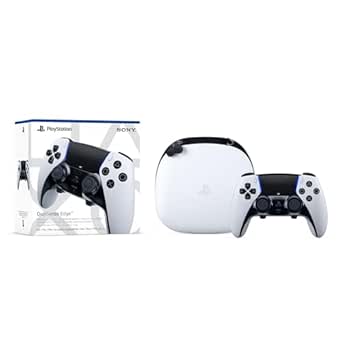 | Best Premium Controller Upgrade | Compatible device: PlayStation 5 | Controller type: Gamepad | Connectivity: Wireless and USB | VIEW LATEST PRICE | See Our Full Breakdown |
| MIKNEKE Matte Faceplates for PS5 Pro Digital Edition, Black |  | Best for a Matte Console Refresh | Compatibility: PS5 Pro Digital Edition only; not compatible with Disc Edition | Material: ABS | Finish: Matte | VIEW LATEST PRICE | See Our Full Breakdown |
| KUSTOMAZING PS5 Slim and PS5 Pro Console Underlay Stickers with DualSense Controller Decal |  | Best for Retro-Style Customization | Compatibility: PS5 Slim Disc/Digital Edition, PS5 Pro, and DualSense controller | Quantity: 2 console sticker packs and 1 controller decal pack | Materials: Resin and vinyl | VIEW LATEST PRICE | See Our Full Breakdown |
| PowerA Twin Charging Station for PlayStation 5 DualSense Controllers |  | Best Simple DualSense Charger | Compatible devices: PlayStation 5 DualSense controllers | Capacity: 2 controllers | Power source: Corded electric | VIEW LATEST PRICE | See Our Full Breakdown |
| GRAUGEAR Cooling & Dust Protection Upgrade for PS5 Pro / PS5 Slim (M.2 SSD Heatsink Cover with Fan Dust Filter and Port Plugs) |  | Best for Dust Protection and SSD Coverage | Compatibility: PS5 Pro and PS5 Slim | Heatsink cover material: Metal | Included components: M.2 SSD heatsink cover, 4 fan dust filters, silicone port plugs, brush, screwdriver, and cloth | VIEW LATEST PRICE | See Our Full Breakdown |
| PS5 Cooling Stand with Controller Charging Station and 3 USB Ports |  | Best All-in-One Console Stand | Compatibility: PS5 Slim, Standard, and Pro; Disc and Digital editions | Cooling fan: Three speeds: high, medium, and low | Controller charging: Two controllers; approximately 3 hours to fully charge | VIEW LATEST PRICE | See Our Full Breakdown |
| PS5, PS5 Slim, and PS5 Pro Stand with Cooling Fan and Dual Controller Charging |  | Best All-in-One Organizer | Compatible consoles: PS5, PS5 Slim, PS5 Pro | Cooling fan: Three speeds; 3100–3500 RPM | Controller charging: Two controllers simultaneously; approximately 2.5 hours | VIEW LATEST PRICE | See Our Full Breakdown |
| USB Hub for PS5 Pro Console, 5-Port USB Expansion Adapter with 3 USB 2.0 Ports and 2 Type-C Ports, Plug and Play USB Splitter for Controllers, Headsets, Keyboard, Mouse and Gaming Accessories |  | Best for Expanding PS5 Pro Connections | Compatible device: PS5 Pro | Total ports: Five | USB 2.0 ports: Three | VIEW LATEST PRICE | See Our Full Breakdown |
| Tokluck Horizontal PS5 Stand with Cooling Fan and Dual Controller Charger |  | Best Horizontal Cooling-and-Charging Stand | Compatible consoles: PS5 Disc and Digital, PS5 Slim Disc and Digital, PS5 Pro | Form factor: Horizontal tabletop stand | Cooling fan: Three adjustable speeds | VIEW LATEST PRICE | See Our Full Breakdown |
| OIVO Adjustable Horizontal Stand for PS5, PS5 Slim, and PS5 Pro |  | Best Simple, Stable Base | Compatible consoles: PS5, PS5 Slim, PS5 Pro; disc and digital editions | Orientation: Horizontal | Material: ABS | VIEW LATEST PRICE | See Our Full Breakdown |
| KEPLUG PS5 Pro Cooling Fan with USB 3.0 Hub |  | Best PS5 Pro-Specific Cooling Add-On | Model: DSP-885 | Compatibility: PS5 Pro Disc and Digital Editions | Fans: Four hydraulic fans | VIEW LATEST PRICE | See Our Full Breakdown |
| PS5 Pro accessorie | Compatibility |
|---|---|
| UGREEN USB-C Bluetooth Audio A | — |
| HORI Ultra High-Speed HDMI Cab | PlayStation 5 |
| Rysker PS5 | PS5, PS5 Slim, and PS5 Pro |
| NEWDERY Dual Charging Station | PS5 DualSense and DualSense Edge controllers |
| PlayStation DualSense Edge Wir | — |
| MIKNEKE Matte Faceplates for P | PS5 Pro Digital Edition only; not compatible with Disc Edition |
| KUSTOMAZING PS5 Slim and PS5 P | PS5 Slim Disc/Digital Edition, PS5 Pro, and DualSense controller |
| PowerA Twin Charging Station f | — |
| GRAUGEAR Cooling & Dust Protec | PS5 Pro and PS5 Slim |
| PS5 Cooling Stand with Control | PS5 Slim, Standard, and Pro; Disc and Digital editions |
| PS5 | — |
| USB Hub for PS5 Pro Console | — |
| Tokluck Horizontal PS5 Stand w | — |
| OIVO Adjustable Horizontal Sta | — |
| KEPLUG PS5 Pro Cooling Fan wit | PS5 Pro Disc and Digital Editions |
More Details on Our Top Picks
UGREEN USB-C Bluetooth Audio Adapter for PS5 and Other Devices
The UGREEN USB-C Bluetooth Audio Adapter is the most targeted pick here: it adds wireless audio to a compatible PS5 without replacing the console’s other accessories. Support for aptX Low Latency and aptX HD gives compatible headphones more codec options than a basic transmitter, while the stated delay is under 100 ms. That benefit depends on the headphones supporting the same codec, so check compatibility before choosing it. Compared with the HORI Ultra High-Speed HDMI Cable, this adapter changes how you hear games rather than how video reaches your display. Its drawbacks are specific: it is not compatible with PS4, PS5 Portal, Linux, or AirPods Pro 2, and calling mode can reduce audio quality. I’d pick it for supported Bluetooth headphones, not as a universal audio fix.
Pros:- Adds Bluetooth audio to compatible USB-C devices without drivers or software
- Supports aptX Low Latency, aptX Adaptive, aptX HD, and SBC
- Stated audio delay is under 100 ms
- LED indicators show operating status
Cons:- Headphones need to support the same codec to access that codec’s benefits
- Not compatible with PS4, PS5 Portal, Linux, or AirPods Pro 2
- Bluetooth calling mode can reduce audio quality
Best for: PS5 Pro owners with Bluetooth headphones that support one of the adapter’s listed codecs and who want wireless game audio.
Not ideal for: AirPods Pro 2 owners, PS5 Portal or PS4 users, Linux users, and anyone whose headphones do not support a matching codec.
- Brand:UGREEN
- Model:45008
- Connector:USB Type-C
- Supported codecs:aptX, aptX Adaptive Low Latency, aptX Adaptive High Quality, aptX HD, SBC
- Audio latency:Under 100 ms
- Compatible systems:Windows and macOS; not compatible with Linux
- PS5 audio device name:UGREEN-BT501
- Calling mode:Enabled by double-clicking the multifunction button
Our verdict“Choose this adapter if your Bluetooth headphones support a listed codec; skip it if you need broad compatibility or use AirPods Pro 2.”
HORI Ultra High-Speed HDMI Cable for PlayStation 5
The HORI Ultra High-Speed HDMI Cable is a straightforward fit for a PS5 Pro setup when you need a replacement or want a more durable cable. Its 48 Gbps transfer rate and stated 4K and 8K support make it suited to high-bandwidth video connections, but the console, display, and other connected equipment must support the features you want. The 6.5-foot braided construction and metal housing distinguish it from the more specialized UGREEN Bluetooth adapter: HORI serves the display connection, while UGREEN addresses wireless audio. This cable does not add capabilities to an incompatible display, and the product data does not specify water resistance. I’d choose it for a tidy, sturdy indoor setup where its length works, rather than expecting a cable alone to improve picture quality.
Pros:- Supports data transfer rates up to 48 Gbps
- Rated for 4K and 8K video with compatible equipment
- Nylon mesh braid and metal housing offer a more substantial cable build
- Officially licensed by Sony
Cons:- Full video features depend on the console, display, and connected equipment
- The 6.5-foot length may not suit distant components
- No water-resistance rating is specified
Best for: PS5 Pro owners replacing a short or worn HDMI lead who have a compatible high-bandwidth display and need a 6.5-foot cable.
Not ideal for: Buyers who need a longer cable, want wireless audio, or expect 4K or 8K features without compatible connected equipment.
- Brand:HORI
- Model:SPF-014U
- Length:6.5 feet
- Connector:HDMI male-to-male
- Data transfer rate:Up to 48 Gbps
- Video support:4K and 8K with compatible equipment
- Outer material:Nylon mesh braid
- Housing:Metal
- Compatibility:PlayStation 5
Our verdict“Pick the HORI cable for a durable, appropriately sized HDMI replacement, but choose the UGREEN adapter instead if your priority is wireless audio.”
Rysker PS5, PS5 Slim, and PS5 Pro Cooling and Charging Stand with RGB Lights
The Rysker Cooling and Charging Stand earns its place by bringing several desk-side tasks together: it supports PS5 Pro, charges a standard DualSense and a DualSense Edge, and adds three USB hubs for charging or data transfer. That makes it a broader organizing choice than the NEWDERY Dual Charging Station, which focuses on storing and charging two controllers. Rysker also includes a fan and RGB lighting, but the available product details give no measured cooling performance or noise level, so I would treat the fan as an added feature rather than a proven temperature solution. Controller charging times are stated at about 3.5 hours for a PS5 controller and 2.5 hours for an Edge. Its wider feature set suits a crowded setup, though buyers seeking only a simple charger may not need the extra hardware.
Pros:- Compatible with PS5, PS5 Slim, and PS5 Pro
- Charges both original PS5 and DualSense Edge controllers
- Three USB hubs support charging and data transfer
- Includes overcharge, overcurrent, and overtemperature protection
Cons:- No measured cooling performance is provided
- No fan-noise level is specified
- Broader stand features may be unnecessary for buyers who only need controller charging
Best for: PS5 Pro owners who want one station for console-side controller charging, extra USB connections, and accessory storage.
Not ideal for: Buyers who only need a compact two-controller charger or who require verified cooling performance and fan-noise figures.
- Brand:Rysker
- Model number:VG-P5328
- Manufacturer part number:RY-P5296
- Compatibility:PS5, PS5 Slim, and PS5 Pro
- Fans:1
- USB hubs:3
- Controller charging time:About 3.5 hours for PS5 controller; about 2.5 hours for PS5 Edge controller
- Warranty:2 years
Our verdict“Choose Rysker for an organized PS5 Pro setup with charging and USB expansion; choose NEWDERY if a simpler dual-controller dock is enough.”
NEWDERY Dual Charging Station for PS5 and DualSense Edge Controllers
The NEWDERY Dual Charging Station is the focused alternative to Rysker’s feature-heavy stand: it stores and charges two DualSense or DualSense Edge controllers, with LED indicators to show charging status. Its stated full-charge time is about 2.5 hours when paired with a 5V/3A adapter, making it a convenient choice for players who want both controllers ready between sessions. The included USB-C cable gives you some placement flexibility, but the required power adapter is not included. Unlike the Rysker stand, NEWDERY does not add a fan or USB hubs; that keeps the purpose clear, though it offers less console-side organization. Controllers with cases or skins need those removed before charging, a practical limitation for owners who prefer protective covers.
Pros:- Charges two DualSense or DualSense Edge controllers at once
- Stores controllers with anti-slip mats
- LED indicators distinguish charging from full or standby status
- Includes a 3.3-foot USB-C cable
Cons:- Requires a separate 5V/3A power adapter
- Controller cases or skins must be removed before charging
- Does not add the fan or USB hubs found on the Rysker stand
Best for: PS5 Pro households with two DualSense or DualSense Edge controllers that need a dedicated charging and storage spot.
Not ideal for: Players who want USB expansion, a cooling stand, or to charge controllers without removing their cases or skins.
- Compatibility:PS5 DualSense and DualSense Edge controllers
- Charging capacity:2 controllers
- Full charge time:About 2.5 hours with a 5V/3A adapter
- Power requirement:5V/3A adapter
- Cable:3.3-foot USB-C charging cable
- Charging indicator:Flashing blue while charging; steady blue when fully charged or on standby
- Included items:Charging station, USB-C cable, and user manual
Our verdict“Choose NEWDERY if you want a dedicated dual-controller dock without the extra features of the Rysker stand.”
PlayStation DualSense Edge Wireless Controller
The DualSense Edge is the most consequential upgrade in this group for players who want to change how a PS5 Pro game feels, rather than add storage or convenience around the console. Its mappable back buttons, adjustable stick settings, and trigger travel let players tailor controls to different games, then save and switch profiles. That level of control goes beyond the accessory roles of the NEWDERY charger or HORI HDMI cable, but it is only useful if you will spend time setting up profiles and making adjustments. Replaceable stick modules can extend the controller’s service options, though the modules are sold separately. Haptic feedback and adaptive triggers remain dependent on game support. I’d favor this model for players who value customization; for casual play, a standard DualSense may be the more sensible fit.
Pros:- Mappable back buttons and saved control profiles support game-specific layouts
- Adjustable stick sensitivity, dead zones, and trigger travel
- Interchangeable stick caps and replaceable stick modules
- Includes haptic feedback and adaptive triggers in supported games
Cons:- Replacement stick modules are sold separately
- Haptic feedback and adaptive triggers depend on game support
- The customization options may be unnecessary for players who prefer standard controls
Best for: PS5 Pro players who regularly tune control layouts, stick response, and trigger travel for different games.
Not ideal for: Casual players satisfied with a standard DualSense, or buyers unwilling to pay separately for replacement stick modules.
- Compatible device:PlayStation 5
- Controller type:Gamepad
- Connectivity:Wireless and USB
- Power source:Battery powered
- Weight:2.6 pounds
- Dimensions:8 x 8 x 4.5 inches
- Color:White
- Replaceable stick modules:Available separately
Our verdict“Choose the DualSense Edge if you will use its adjustable controls and profiles; stick with a standard controller if those changes are not part of how you play.”
MIKNEKE Matte Faceplates for PS5 Pro Digital Edition, Black
For PS5 Pro Digital Edition owners who want a different look without adding a stand or wiring, these four matte ABS faceplates offer a direct swap for the original panels. The finish gives the console a subdued black appearance, while the panels retain access to its buttons and ports and help shield the surface from scratches and dust. Compared with the KUSTOMAZING retro-look decals, this is a full faceplate replacement rather than a decorative layer; that makes it the more substantial visual change, but it also requires removing and replacing panels. The included instructions are intended to make installation and removal manageable. The key limitation is model fit: these are for the PS5 Pro Digital Edition only, so buyers with the Disc Edition should skip them. They also change the console’s appearance, not its gaming performance.
Pros:- Four replacement faceplates provide a complete matte black panel change
- Designed to keep console buttons and ports accessible
- ABS panels help protect against scratches and dust
- Includes installation instructions and a one-year warranty
Cons:- Not compatible with the PS5 Pro Disc Edition
- Changes appearance and surface protection but does not add gaming or cooling features
Best for: PS5 Pro Digital Edition owners who want matte black replacement panels and basic surface protection without adding accessories to their setup
Not ideal for: PS5 Pro Disc Edition owners, or buyers seeking cooling, charging, or other functional upgrades
- Compatibility:PS5 Pro Digital Edition only; not compatible with Disc Edition
- Material:ABS
- Finish:Matte
- Color:Black
- Number of faceplates:4
- Dimensions:10.2 in W × 15.2 in H
- Included:4 faceplates and 1 user manual
- Warranty:1 year
Our verdict“Choose these if you own a PS5 Pro Digital Edition and want replacement panels rather than the lighter-touch look of KUSTOMAZING decals.”
KUSTOMAZING PS5 Slim and PS5 Pro Console Underlay Stickers with DualSense Controller Decal
The KUSTOMAZING set is the simplest pick here for adding a classic retro-look to a PS5 Pro: it uses vinyl decals rather than replacement panels, and includes a matching PS Logo sticker pack for a DualSense controller. That makes it a less involved appearance change than the MIKNEKE faceplates, which replace the PS5 Pro Digital Edition’s panels but fit no Disc Edition. These decals are compatible with PS5 Pro and PS5 Slim models, including the Slim Disc and Digital versions, so they suit buyers who may swap between compatible consoles. The domed resin-and-vinyl feel and scratch-resistant design add some surface character, while the stickers are designed to lift without sticky residue. The tradeoff is that they are single-use: removal may be clean, but you cannot reposition and reuse them as a lasting customization option.
Pros:- Compatible with PS5 Pro and PS5 Slim Disc and Digital models
- Includes a matching DualSense controller decal pack
- Retro-look vinyl adds style without replacing console panels
- Designed to resist scratches and remove without sticky residue
Cons:- Single-use stickers cannot be reused after removal
- Decorative only, with no charging, cooling, or storage function
Best for: PS5 Pro or PS5 Slim owners who want a retro-inspired console and matching DualSense detail without replacing the console panels
Not ideal for: Buyers who want reusable decals, a plain finish, or a functional upgrade such as charging or cooling
- Compatibility:PS5 Slim Disc/Digital Edition, PS5 Pro, and DualSense controller
- Quantity:2 console sticker packs and 1 controller decal pack
- Materials:Resin and vinyl
- Color:Black
- Style:Classic retro-look
- Additional feature:Scratch resistant
- Reusability:Single use
Our verdict“Pick these over the MIKNEKE faceplates if you want retro decals that fit PS5 Pro Disc and Slim models, and accept that the stickers are single-use.”
PowerA Twin Charging Station for PlayStation 5 DualSense Controllers
If charging is the main problem to solve, the PowerA station keeps the setup focused: it charges and displays two DualSense controllers on a tabletop dock, with an indicator to show when they are fully charged. Its included AC adapter means it does not rely on a console USB port, unlike a USB accessory such as the UGREEN Bluetooth Audio Adapter, but it does need a nearby power outlet. Compared with the Kammkonb PS5 Cooling Stand, this is a smaller-purpose option: it does not add a fan, accessory storage, or extra USB ports. That narrower design suits players who want a dedicated charging spot rather than an all-in-one console base. It is officially licensed for PlayStation 5 and comes with a two-year limited warranty. Compatibility is also narrow: it is for DualSense controllers, not a general-purpose charger for other controller types.
Pros:- Charges two DualSense controllers at once
- Charging indicator shows when controllers are fully charged
- Includes an AC adapter for a dedicated power connection
- Officially licensed for PlayStation 5 and backed by a two-year limited warranty
Cons:- Compatible with DualSense controllers only
- Requires a corded power connection and does not add console cooling or storage
Best for: PS5 Pro households with two standard DualSense controllers that want a dedicated tabletop charging and display dock
Not ideal for: Players using DualSense Edge controllers, those seeking console cooling or accessory storage, or setups without a convenient power outlet
- Compatible devices:PlayStation 5 DualSense controllers
- Capacity:2 controllers
- Power source:Corded electric
- Wattage:10 W
- Connector type:2-pin
- USB ports:1
- Mounting type:Tabletop
- Item weight:9.76 oz
- Warranty:Two-year limited warranty
Our verdict“Choose the PowerA dock over the Kammkonb stand when dedicated DualSense charging matters more than a fan, extra ports, and accessory storage.”
GRAUGEAR Cooling & Dust Protection Upgrade for PS5 Pro / PS5 Slim (M.2 SSD Heatsink Cover with Fan Dust Filter and Port Plugs)
GRAUGEAR suits owners who want to address dust around the console while covering the M.2 SSD area. Its kit combines a metal SSD heatsink cover with four mesh fan filters, silicone port plugs, and the tools and cloth for installation. That is a more maintenance-focused upgrade than the Kammkonb stand: Kammkonb adds an adjustable fan and controller docks, while GRAUGEAR puts its emphasis on filters and coverage rather than external cooling or charging. The mesh is designed to allow airflow while catching dust, though filters and plugs add parts that may call for periodic cleaning. The metal cover is intended to help manage SSD heat; the supplied information does not establish a guaranteed reduction in console or SSD temperatures. Compatibility covers PS5 Pro and PS5 Slim, but not the original PS5, so check your model before buying.
Pros:- Combines an SSD heatsink cover, four fan filters, and silicone port plugs
- Mesh filters are designed to protect against dust while maintaining airflow
- Includes a brush, screwdriver, and cloth for installation and upkeep
- Metal heatsink cover provides a protective covering for the M.2 SSD area
Cons:- Not compatible with the original PS5
- Filters and port plugs add parts that may need cleaning or removal
- Does not provide controller charging or an external cooling fan
Best for: PS5 Pro and PS5 Slim owners who want fan dust filters, port plugs, and an SSD cover in one kit and are comfortable installing panel-mounted accessories
Not ideal for: Original PS5 owners, or buyers looking for a stand that adds controller charging, USB ports, and accessory storage
- Compatibility:PS5 Pro and PS5 Slim
- Heatsink cover material:Metal
- Included components:M.2 SSD heatsink cover, 4 fan dust filters, silicone port plugs, brush, screwdriver, and cloth
- Mounting type:Panel mount
- Dimensions:3.9 × 0.9 × 0.4 in
- Weight:70 g
- Model:G-PS5M2F-DF+
- Warranty:12 months
Our verdict“Choose GRAUGEAR over the Kammkonb stand if dust filtering and SSD-area coverage matter more than an adjustable fan and controller charging.”
PS5 Cooling Stand with Controller Charging Station and 3 USB Ports
Among these five accessories, the Kammkonb stand does the most for a PS5 Pro setup: it combines a three-speed fan, charging docks for two controllers, three USB ports, and space for a headset, remote, and up to 13 game discs. Its fit spans PS5 Slim, Standard, and Pro consoles in Disc or Digital editions, making it more flexible than the model-specific MIKNEKE faceplates. Compared with the PowerA Twin Charging Station, it takes on far more jobs and can consolidate accessories around the console, but it also occupies the role of a larger stand rather than a focused tabletop charger. The fan speed is adjustable, although the product details do not quantify temperature reductions. Buyers should also note that DualSense Edge controllers are not supported, and the console and stored accessories are not included.
Pros:- Fits PS5 Pro, PS5 Slim, and Standard PS5 in Disc and Digital editions
- Three-speed fan offers high, medium, and low settings
- Charges two controllers and includes three USB ports
- Adds storage for up to 13 game discs, a headset, and a media remote
Cons:- Not compatible with DualSense Edge controllers
- Larger all-in-one design may be unnecessary for buyers who only need charging
- Console and accessories shown for storage are not included
Best for: PS5 Pro owners who want one stand for adjustable fan operation, two standard DualSense controllers, USB accessories, and game-disc storage
Not ideal for: DualSense Edge owners, buyers who want only a compact charger, or players who do not need extra ports and storage
- Compatibility:PS5 Slim, Standard, and Pro; Disc and Digital editions
- Cooling fan:Three speeds: high, medium, and low
- Controller charging:Two controllers; approximately 3 hours to fully charge
- USB ports:3
- Disc storage:Up to 13 game discs
- Package contents:Cooling stand, headset holder, attached PS5 panel, and screw
- DualSense Edge compatibility:Not compatible
Our verdict“Pick the Kammkonb stand over the PowerA dock if you want cooling, extra connections, and storage alongside charging for two standard DualSense controllers.”
PS5, PS5 Slim, and PS5 Pro Stand with Cooling Fan and Dual Controller Charging
This stand is the most useful pick here for a setup that needs more than a place to rest the PS5 Pro: it combines three-speed cooling, charging for two controllers, and storage for up to 14 game discs. Compared with the Tokluck Horizontal PS5 Stand, it adds disc storage, a headset holder, a remote holder, and three USB ports, making it better suited to a crowded entertainment area. Its fan runs at 3100–3500 RPM, though the product details don’t quantify how much cooling it provides, so I wouldn’t choose it on fan performance alone. Charging is also conditional: it may not start when a controller battery is above 70%. The description doesn’t clarify which accessories are included, either. I’d pick it for consolidated storage, not for buyers seeking a simple, low-profile stand.
Pros:- Combines console support, three-speed fan, and dual-controller charging
- Stores up to 14 game discs and includes headset and remote holders
- Three extra USB ports add connections for nearby accessories
- Lists protection against overcharging, overheating, overvoltage, and short circuits
Cons:- Controller charging may not start when the battery is above 70%
- The description does not specify which accessories are included
- Its bundled features make it a less pared-back choice than a basic stand such as the OIVO Adjustable Horizontal Stand
Best for: PS5 Pro owners who want one stand to organize controllers, discs, a headset, and a remote alongside the console
Not ideal for: Minimalist setups or buyers who only need a stable horizontal base; this stand adds several storage and charging features they may not use
- Compatible consoles:PS5, PS5 Slim, PS5 Pro
- Cooling fan:Three speeds; 3100–3500 RPM
- Controller charging:Two controllers simultaneously; approximately 2.5 hours
- USB ports:Three extra ports
- Game storage:Up to 14 discs
- Safety protections:Overcharging, overheating, overvoltage, and short circuits
- Item dimensions:4.02 × 1.02 × 4.33 inches
- Item weight and color:907 g; white
Our verdict“Choose this stand if you want to consolidate PS5 Pro cooling, charging, and accessory storage in one unit, and skip it if a simple base is all you need.”
USB Hub for PS5 Pro Console, 5-Port USB Expansion Adapter with 3 USB 2.0 Ports and 2 Type-C Ports, Plug and Play USB Splitter for Controllers, Headsets, Keyboard, Mouse and Gaming Accessories
If the PS5 Pro’s available connections are the pinch point in your setup, this compact adapter adds five USB ports without a separate power supply or driver installation. Its mix of three USB 2.0 ports and two Type-C ports gives you more options for accessories than the KEPLUG PS5 Pro Cooling Fan with USB 3.0 Hub, which offers just one USB 3.0 passthrough port. The tradeoff is speed: this hub’s stated data rate is 480 Mbps, so I’d reserve it for peripherals such as controllers, keyboards, and headsets rather than frequent large data transfers. The listed current is also limited to 500 mA per USB 2.0 port and 1000 mA per Type-C port. It’s a focused connection fix, not a charger or cooling accessory.
Pros:- Adds five ports, including two Type-C connections
- Designed specifically for the PS5 Pro
- Plug-and-play operation requires no drivers or external power
- Compact form helps keep accessory connections grouped together
Cons:- USB 2.0 data transfer is limited to 480 Mbps
- The five-port total may not cover a setup with many connected accessories
- Listed current is limited to 500 mA per USB 2.0 port and 1000 mA per Type-C port
Best for: PS5 Pro players who need several extra ports for low-demand peripherals such as a headset, keyboard, mouse, and controller
Not ideal for: Players who regularly move large files or need more than five added connections; the USB 2.0 data rate and port count may fall short
- Compatible device:PS5 Pro
- Total ports:Five
- USB 2.0 ports:Three
- Type-C ports:Two
- Data transfer rate:480 Mbps
- USB 2.0 port current:500 mA each
- Type-C port current:1000 mA each
- Setup:Plug and play; no external power or drivers required
Our verdict“Pick this hub to connect several everyday peripherals to a PS5 Pro, but choose a faster or externally powered option if file transfers or power-hungry devices matter.”
Tokluck Horizontal PS5 Stand with Cooling Fan and Dual Controller Charger
For a PS5 Pro setup that needs to stay horizontal, the Tokluck pairs a three-speed cooling fan with charging docks for two original or Edge controllers. That makes it a more feature-packed tabletop choice than the OIVO Adjustable Horizontal Stand, which focuses on support and airflow rather than charging or active fan control. The Tokluck’s LED indicators make it easier to check charging status at a glance, and its fit across standard, Slim, and Pro models gives it flexibility if your console changes. The tradeoffs are practical: charging takes a stated 3–3.5 hours, it draws power through the PS5 using the included cable, and setup requires screws and model-specific EVA foam. I’d choose it for an organized horizontal gaming station, not for a no-assembly stand or faster charging.
Pros:- Compatible with PS5, Slim, and Pro models across disc and digital editions
- Combines three fan speeds with charging for two controllers
- Works with original PS5 and Edge controllers
- LEDs distinguish charging from full or standby status
Cons:- Controller charging takes a stated 3–3.5 hours
- Powered through the PS5 using the included cable
- Requires assembly with screws and model-specific EVA foam
Best for: PS5 Pro owners who keep the console horizontal and want a combined fan and charging dock for original or Edge controllers
Not ideal for: Buyers who want a simple, tool-free stand or need a charging dock that does not draw power through the console
- Compatible consoles:PS5 Disc and Digital, PS5 Slim Disc and Digital, PS5 Pro
- Form factor:Horizontal tabletop stand
- Cooling fan:Three adjustable speeds
- Controller compatibility:Original PS5 and Edge controllers
- Controller charging:Two controllers; 3–3.5 hours
- Charging indicators:Red while charging; green when fully charged or on standby
- Installation:Includes EVA foam and screws
- Color:White
Our verdict“Choose the Tokluck if your PS5 Pro sits horizontally and you want fan control and dual-controller charging in one tabletop stand.”
OIVO Adjustable Horizontal Stand for PS5, PS5 Slim, and PS5 Pro
The OIVO is the straightforward choice for PS5 Pro owners who want a horizontal base without adding electronics or charging docks. Its adjustable support rods, screw fastening, and non-slip pads help secure different PS5 versions, while the open layout leaves room for airflow. That makes it a simpler fit than the Tokluck Horizontal PS5 Stand, which adds active cooling and dual-controller charging but also requires a more feature-heavy setup. The OIVO’s lighter 350 g ABS construction and included pieces for disc and digital editions suit a basic console shelf. There are limits: assembly and screw fastening take more effort than placing the console directly on a surface, and the EVA foam pads are specified for digital editions. I’d pick it for stable horizontal positioning, not for extra convenience features.
Pros:- Adjustable support rods accommodate PS5, Slim, and Pro versions
- Securing screw and non-slip pads help keep the console stable
- Open design allows airflow around the console
- Includes parts for disc and digital editions
Cons:- Requires assembly and screw fastening
- EVA foam pads are specified for digital editions
- Does not include active cooling, controller charging, or accessory storage like the Tokluck stand
Best for: PS5 Pro owners who want a lightweight, adjustable horizontal stand with basic stability and airflow
Not ideal for: Players looking for controller charging, active cooling, or an accessory organizer; this stand provides none of those features
- Compatible consoles:PS5, PS5 Slim, PS5 Pro; disc and digital editions
- Orientation:Horizontal
- Material:ABS
- Color:White
- Item weight:350 g
- Included components:Two stands, three support rods, two EVA foam pads, one screw
- Fastening:Screw
Our verdict“Choose the OIVO if you want a basic, adjustable horizontal base for your PS5 Pro and don’t need charging or fan features.”
KEPLUG PS5 Pro Cooling Fan with USB 3.0 Hub
Unlike the multi-model stands in this roundup, the KEPLUG is built specifically for the PS5 Pro: it clips onto the console without tools and uses four fans with temperature-triggered speed settings. Low mode is listed at 39°C and Turbo at 43°C, so its cooling response is more targeted than the always-available three-speed controls on the Tokluck Horizontal PS5 Stand. A USB 3.0 passthrough also adds a connection without turning the fan into a full hub. The tradeoff is narrow compatibility: it does not fit the 2020 PS5 or PS5 Slim, unlike the Tokluck or OIVO stands. Warranty information conflicts, too—the description states three years, while item details list two. I’d consider it for a Pro-only setup that wants a clip-on cooling accessory, while treating the warranty term as something to verify.
Pros:- Four hydraulic fans use temperature-based speed settings
- Clip-on installation requires no tools
- USB 3.0 passthrough adds a connection
- Manual speed memory is listed as a feature
Cons:- Compatible only with PS5 Pro Disc and Digital Editions, not the 2020 PS5 or Slim
- Warranty duration conflicts between the description and item details
- Adds cooling but does not provide the charging and storage features of the all-in-one stand
Best for: PS5 Pro owners seeking a tool-free, console-mounted fan with temperature-based speed settings and a USB passthrough
Not ideal for: Households with a 2020 PS5 or PS5 Slim, or buyers who need a clearly stated warranty term before choosing
- Model:DSP-885
- Compatibility:PS5 Pro Disc and Digital Editions
- Fans:Four hydraulic fans
- Temperature settings:Low at 39°C; Turbo at 43°C
- Maximum rotational speed:4500 RPM
- Noise level:28 dB
- USB connection:USB power connector; USB 3.0 passthrough
- Material and warranty:ABS plastic; warranty listed as two years in item details and three years in description
Our verdict“Choose the KEPLUG for a PS5 Pro-only setup that favors a clip-on, temperature-controlled fan over a multifunctional stand.”

How We Picked
I ranked these accessories by how directly they solve a common PS5 Pro setup need: control, charging, console placement, connectivity, audio, or cosmetic customization. I gave more weight to clear purpose, useful compatibility information, and practical usability than to bundles of features that may add size or require more connections. For stand-and-cooling products, the relevant question is whether their combined functions suit the player’s space and routine, not whether a fan is included.
The order reflects differences in audience and versatility, not a claim that one accessory is right for every console owner. A dedicated controller upgrade ranks ahead for players seeking greater control, while focused charging or placement picks make more sense for simpler needs. Compatibility across PS5, PS5 Slim, and PS5 Pro matters throughout: I would check the precise model and edition, port layout, console orientation, and included connection method before choosing. Products with overlapping roles are separated by how narrowly or broadly they serve a setup.
Factors to Consider When Choosing Best PS5 Pro Accessories
Before adding an accessory, I’d identify the friction point in my current setup: controller downtime, a lack of ports, awkward placement, or a specific control preference. That short list helps prevent paying for bundled features that duplicate equipment already on hand.
Start With the Problem, Not the Feature List
Write down the one or two annoyances you want to fix before comparing products. A charging dock addresses controller readiness; a USB hub addresses limited connections; a controller upgrade changes how you play. Multi-purpose stands can appear to solve everything, but their extra functions may go unused and take up room. Avoid buying a cooling fan solely because it is included: first check whether your console has a clear, unobstructed location and whether noise or airflow is an actual concern. Focused accessories often make a cleaner setup when you need only one function. If you have several needs, compare the combined accessory’s footprint and connection demands with buying separate pieces.
Check Exact PS5 Pro Fit Before Ordering
Accessory names that mention multiple PlayStation models do not automatically guarantee a fit for every revision, edition, or orientation. Faceplates and underlays are especially dependent on console shape, while stands and add-ons may attach at particular points or sit against specific panels. Check whether the listing names your exact PS5 Pro version and whether the product replaces, covers, or attaches to existing parts. Also confirm what happens to access around vents, buttons, ports, and disc areas. A product that fits a PS5 Slim may not fit a PS5 Pro simply because both are called PlayStation 5 consoles. When compatibility details are vague, I would favor an accessory with a clearly stated model match.
Count Ports and Check What They Connect To
USB accessories can solve a real shortage, but the number of sockets alone does not show whether the layout suits your devices. Check the mix of USB-A and USB-C ports, their stated speeds, and whether the adapter uses a console port you already need. A hub with several lower-speed ports may suit basic peripherals but is not automatically the right connection for every storage device or high-bandwidth use. Bluetooth audio adapters also introduce a separate compatibility question: confirm which headsets or audio devices they support and how pairing works. Leave room for plugs, dongles, and cables so neighboring ports remain accessible. Think about the devices you connect at the same time, rather than buying extra ports on speculation.
Choose Charging Around Your Controller Routine
Decide how many controllers need a regular charging place and whether you want charging built into a console stand. A twin dock is useful for households or players who rotate between two controllers; a single-controller routine may not benefit from the larger footprint of a combined station. Check how controllers sit in the dock, how charging status is indicated, and whether the design supports the controller model you own. The DualSense Edge is a distinct case, so a station listing for standard DualSense controllers should not be assumed to fit it. Consider whether the charger occupies a console USB port or connects another way. A dedicated dock can keep the console area tidier, while a cable may be simpler if you charge only occasionally.
Pay More Only for Features You Will Use
Premium features matter when they change a repeated part of your gaming routine. Adjustable controls can be worthwhile for players who want tailored inputs, while cosmetic plates mainly serve a style preference and do not improve game performance. Bundled stands may save space if you genuinely need charging, cooling, and additional ports together, but each added component can bring more cabling and a larger footprint. Compare the full setup cost in effort and space, not just the number of functions listed. For occasional use, a basic cable or charging dock may be the more sensible choice. Spend extra when a feature solves a recurring problem, not just because a product has a longer spec list.
Keep Placement, Airflow, and Maintenance in Mind
Console accessories live in a space that collects dust, heat, and cable clutter, so placement should shape the decision. Leave room for the PS5 Pro’s ventilation and avoid arranging add-ons in a way that blocks airflow or makes ports hard to reach. Dust filters and port plugs can reduce exposure to debris, but they add parts that may need periodic cleaning or removal. A horizontal stand can suit a low shelf, while a vertical setup may be more convenient elsewhere; check stability and the available surface before choosing. Fan-equipped stands are not a substitute for a clear console location. Pick an arrangement that stays accessible enough for cleaning, cable changes, and routine use.
Frequently Asked Questions
Do accessories listed for PS5 or PS5 Slim always fit the PS5 Pro?
No. Compatibility depends on the accessory: a cable or USB adapter may work across models, while faceplates, console underlays, and fitted stands rely on the console’s shape and attachment points. Check that the product specifically names your PS5 Pro model and edition. Also look for notes about disc and digital versions, since exterior parts may differ. If a listing only names PS5 or PS5 Slim, I would not assume it fits the Pro without clear confirmation.
Should I choose a cooling stand or a separate stand and charger?
Choose based on the functions you will use and the space available around the console. A combined stand can reduce the number of separate items, but it may take up more room and add cables or features you do not need. Separate accessories let you choose charging and placement independently, which can make upgrades easier later. Either option still needs to leave the console’s vents unobstructed. If your main need is controller charging, a dedicated dock may be a simpler fit than a fan-equipped stand.
Will a USB hub let me connect every PS5 Pro accessory at once?
Not necessarily. A hub’s port count does not guarantee that every connected device will work as intended, since port type, speed, power needs, and the hub’s connection to the console all matter. Check the listed specifications against the devices you plan to use, especially for storage and audio equipment. Keep in mind that the hub itself occupies a console port, and its shape can affect access to nearby connections. I would map out your regular devices first and choose a hub that matches those needs rather than the largest port count.
Is the DualSense Edge a good choice for every PS5 Pro owner?
No. It makes the most sense for players who value adjustable controls and will use its customization options regularly. If you are happy with a standard DualSense and do not need configurable inputs, a charging station or a more targeted setup accessory may offer more practical value. Also check accessory compatibility before pairing it with a charging dock, since stations designed for standard DualSense controllers may not support the Edge. The right choice depends on how much control customization matters to you, not on the console model alone.
Do I need a new HDMI cable for my PS5 Pro?
Not automatically. If your existing cable and display connection already support the video features you want, replacing the cable may not change your setup. Check the cable’s specifications and the requirements of your TV or monitor before buying another one. A replacement is more relevant if your current cable is damaged, too short, or does not support the connection capabilities you need. For players troubleshooting display issues, check the display settings and connection chain before assuming the cable is the cause.
Conclusion
For the broadest control upgrade, I’d choose the PlayStation DualSense Edge as the best overall pick, provided you will use its adjustments. The PowerA Twin Charging Station is my best value-style choice for players who simply want two standard controllers charged and organized, while the Edge is also the best premium option for control-focused players. Beginners who want an uncomplicated setup should start with a clearly compatible stand or dedicated charger rather than a multi-feature cooling bundle. For specific needs, choose the UGREEN Bluetooth Audio Adapter for compatible wireless audio, the USB hub for more connections, or the MIKNEKE faceplates for a cosmetic change. Match the accessory to a real setup problem, and verify PS5 Pro fit before making the final choice.
Fall Picks
fall essentials
As an affiliate, we earn on qualifying purchases.