The best AI PCs pair a capable processor with enough memory for the AI work you plan to run locally. My best overall pick is the GMKtec EVO-X2 with Ryzen AI Max+ 395, 128GB of memory, and a 2TB SSD, a strong fit for demanding workloads that need generous capacity. The MINISFORUM AI X1 Pro-370 stands out as a more moderate-memory option, while the HP OmniDesk Business Desktop suits buyers who prefer a conventional business desktop. The main tradeoff is between high-memory mini PCs for heavier local work and simpler systems that may be easier to fit into everyday or office setups. Read on for the full breakdown of how these 15 options differ and which buyer each one suits.

Get the latest gadgets delivered free with Prime
- Fast, free delivery on millions of items
- Prime Video, Amazon Music and more included
- Member-only deals all year
Complete the kit



Key Takeaways
- 128GB configurations define the high-capacity group: Several Ryzen AI Max+ 395 systems pair that memory with 2TB storage, making them the lineup’s clearest candidates for memory-hungry local workloads.
- Repeated configurations are not automatically different choices: The BOSGAME M5 pair and the two GMKtec EVO-X3 listings have closely matching stated specifications, so verify the exact model and configuration before buying.
- Processor names alone do not settle the choice: The lineup includes Ryzen AI Max+ 395, Ryzen AI 9 HX 370, and several Intel Core Ultra tiers; memory, storage, and intended workload matter alongside the chip.
- Memory capacity separates lightweight from ambitious use: The GEEKOM IT13 MAX and GT13 MAX list 16GB, whereas several workstation-style mini PCs offer 128GB, a major difference for buyers planning to run larger local models.
- Mini PCs are not the only form factor here: The HP OmniDesk and Dell Pro Micro provide business-desktop alternatives, while the Ryzen AI Halo and several compact workstation listings need configuration details checked before a confident comparison.
| GEEKOM IT15 Mini PC, Intel Core Ultra 9 285H, 32GB DDR5 RAM, 1TB SSD |  | Best for Multi-Display AI Work | Processor: Intel Core Ultra 9 285H | AI performance: 99 TOPS total: 13 TOPS NPU, 77 TOPS Arc GPU, 9 TOPS CPU | Graphics: Intel Arc 140T | VIEW LATEST PRICE | See Our Full Breakdown |
| BOSGAME M5 Mini PC, AMD Ryzen AI Max+ 395, 128GB LPDDR5X RAM, 2TB NVMe SSD |  | Best for High-Memory Local AI | Processor: AMD Ryzen AI Max+ 395, 16 cores and 32 threads, up to 5.1GHz | AI performance: 50 TOPS NPU; up to 126 TOPS total | Graphics: Integrated AMD Radeon 8060S, 40 RDNA 3.5 compute units | VIEW LATEST PRICE | See Our Full Breakdown |
| GEEKOM IT13 MAX Mini PC, Intel Core Ultra 9 185H, 16GB DDR5 RAM, 1TB SSD |  | Best for Linux-Friendly Compact Computing | Processor: Intel Core Ultra 9 185H | Processor TDP: 65W | Memory: 16GB DDR5 | VIEW LATEST PRICE | See Our Full Breakdown |
| BOSGAME M5 AI Mini PC with AMD Ryzen AI Max+ 395 and 128GB LPDDR5X RAM | | Best for Configurable GPU Memory | Processor: AMD Ryzen AI Max+ 395, 16 cores and 32 threads, up to 5.1GHz | Memory: 128GB LPDDR5X, 8000MT/s | Maximum allocatable VRAM: Up to 96GB | VIEW LATEST PRICE | See Our Full Breakdown |
| HP OmniDesk Business Desktop PC, Intel Core Ultra 7 265, 32GB DDR5 RAM, 1TB SSD |  | Best for Business-Ready Setup | Processor: Intel Core Ultra 7 265, 20 cores, up to 5.2GHz | Memory: 32GB DDR5, 5600MHz | Storage: 1TB PCIe Gen 4 NVMe SSD | VIEW LATEST PRICE | See Our Full Breakdown |
| GMKtec EVO-X2 AI Mini PC, Ryzen AI Max+ 395, 128GB LPDDR5X, 2TB SSD |  | Best for High-Memory Local AI | Processor: AMD Ryzen AI Max+ 395, 16 cores, up to 5.1 GHz | Graphics: AMD Radeon RX 8060S integrated GPU, 40 RDNA 3.5 compute units | Memory: 128GB LPDDR5X, up to 8000 MT/s | VIEW LATEST PRICE | See Our Full Breakdown |
| MINISFORUM AI X1 Pro-370 Mini PC with AMD Ryzen AI 9 HX 370, 32GB DDR5 RAM, and 1TB SSD | 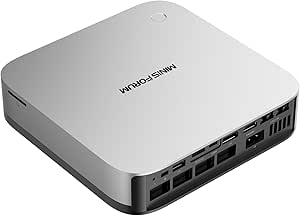 | Best for Upgrade Flexibility | Processor: AMD Ryzen AI 9 HX 370, 12 cores and 24 threads, up to 5.1 GHz | Graphics: AMD Radeon 890M | Memory: 32GB DDR5-5600, removable; expandable up to 128GB | VIEW LATEST PRICE | See Our Full Breakdown |
| Dell Pro Micro QCM1250 Mini Business Desktop, Intel Core Ultra 5 235T, Windows 11 Pro |  | Best for Compact Business Desks | Processor: Intel Core Ultra 5 235T, 14 cores, up to 5 GHz | Graphics: Integrated Intel Graphics | Memory: Configurable 8GB to 64GB DDR5 | VIEW LATEST PRICE | See Our Full Breakdown |
| GMKtec EVO-X3 Mini PC with AMD Ryzen AI Max+ 395, 128GB LPDDR5X RAM, and 2TB PCIe 4.0 SSD |  | Best for OCuLink GPU Expansion | Processor: AMD Ryzen AI Max+ 395, 16 cores and 32 threads, up to 5.1 GHz | Graphics: AMD Radeon 8060S, 40 compute units, up to 2900 MHz | AI performance: Up to 126 TOPS; XDNA 2 NPU up to 50 TOPS | VIEW LATEST PRICE | See Our Full Breakdown |
| GEEKOM GT13 MAX Mini PC, Intel Core Ultra 9 185H, 16GB DDR5 RAM, 1TB SSD |  | Best for Intel-Focused Multi-Display Setups | Processor: Intel Core Ultra 9 185H, 16 cores, up to 5.1 GHz | Graphics: Intel Arc Graphics, 8 Xe cores | AI NPU: Up to 11 TOPS | VIEW LATEST PRICE | See Our Full Breakdown |
| AMD Ryzen AI Halo Personal AI Desktop Computer |  | Best for Linux AI Development | Operating system: Linux | Processor: AMD Ryzen AI Max+ 395, 16 cores / 32 threads, up to 5.1GHz | Graphics: AMD Radeon 8060S integrated graphics, 40 RDNA 3.5 compute units | VIEW LATEST PRICE | See Our Full Breakdown |
| GMKtec EVO-X2 Mini PC with AMD Ryzen AI Max+ 395, 128GB LPDDR5X, and 1TB SSD |  | Best for Multi-Display Setups | Processor: AMD Ryzen AI Max+ 395, 16 cores / 32 threads, up to 5.1GHz | Graphics: AMD Radeon 8060S, 40 RDNA 3.5 compute units | NPU: Up to 50 TOPS | VIEW LATEST PRICE | See Our Full Breakdown |
| MINISFORUM MS-S1 MAX Mini AI Workstation PC, AMD Ryzen AI Max+ 395, 128GB LPDDR5x RAM, 2TB SSD |  | Best for Rack Deployment and Clustering | Processor: AMD Ryzen AI Max+ 395, 16 cores / 32 threads, up to 5.1GHz | Graphics: Integrated AMD RDNA 3.5 graphics | NPU: 50 TOPS | VIEW LATEST PRICE | See Our Full Breakdown |
| GEEKOM A9 Mega AI Workstation Mini PC, Ryzen AI Max+ 395, 128GB RAM, 2TB SSD |  | Best Warranty Coverage | Processor: AMD Ryzen AI Max+ 395, 16 Zen 5 cores | Graphics: AMD Radeon 8060S | Memory: 128GB LPDDR5X, 8000 MT/s | VIEW LATEST PRICE | See Our Full Breakdown |
| GMKtec EVO-X3 Mini PC with AMD Ryzen AI Max+ 395, 128GB LPDDR5X, and 2TB PCIe 4.0 SSD |  | Best for External GPU Expansion | Processor: AMD Ryzen AI Max+ 395, 16 cores / 32 threads, up to 5.1GHz | Graphics: Integrated AMD Radeon RX 8060S, 40 RDNA 3.5 compute units | Memory: 128GB LPDDR5X, up to 8000 MT/s | VIEW LATEST PRICE | See Our Full Breakdown |
| AI PC | Processor | Graphics | Memory | Storage |
|---|---|---|---|---|
| GEEKOM IT15 Mini PC | Intel Core Ultra 9 285H | Intel Arc 140T | 32GB DDR5, upgradeable to 128GB | 1TB NVMe Gen 4 SSD |
| BOSGAME M5 Mini PC | AMD Ryzen AI Max+ 395, 16 cores and 32 threads, up to 5.1GHz | Integrated AMD Radeon 8060S, 40 RDNA 3.5 compute units | 128GB LPDDR5X-8000 unified memory | 2TB PCIe 4.0 NVMe SSD; second M.2 2280 PCIe 4.0 slot |
| GEEKOM IT13 MAX Mini PC | Intel Core Ultra 9 185H | Integrated Intel Arc Graphics | 16GB DDR5 | 1TB SSD |
| BOSGAME M5 AI Mini PC with AMD | AMD Ryzen AI Max+ 395, 16 cores and 32 threads, up to 5.1GHz | Integrated AMD Radeon 8060S | 128GB LPDDR5X, 8000MT/s | SSD; capacity not specified |
| HP OmniDesk Business Desktop P | Intel Core Ultra 7 265, 20 cores, up to 5.2GHz | Integrated Intel Graphics | 32GB DDR5, 5600MHz | 1TB PCIe Gen 4 NVMe SSD |
| GMKtec EVO-X2 AI Mini PC | AMD Ryzen AI Max+ 395, 16 cores, up to 5.1 GHz | AMD Radeon RX 8060S integrated GPU, 40 RDNA 3.5 compute units | 128GB LPDDR5X, up to 8000 MT/s | 2TB SSD |
| MINISFORUM AI X1 Pro-370 Mini | AMD Ryzen AI 9 HX 370, 12 cores and 24 threads, up to 5.1 GHz | AMD Radeon 890M | 32GB DDR5-5600, removable; expandable up to 128GB | 1TB PCIe 4.0 SSD; supports up to three SSDs and 12TB total |
| Dell Pro Micro QCM1250 Mini Bu | Intel Core Ultra 5 235T, 14 cores, up to 5 GHz | Integrated Intel Graphics | Configurable 8GB to 64GB DDR5 | Configurable 256GB to 2TB M.2 NVMe PCIe SSD |
| GMKtec EVO-X3 Mini PC with AMD | AMD Ryzen AI Max+ 395, 16 cores and 32 threads, up to 5.1 GHz | AMD Radeon 8060S, 40 compute units, up to 2900 MHz | 128GB LPDDR5X, up to 8000 MT/s | 2TB PCIe 4.0 SSD |
| GEEKOM GT13 MAX Mini PC | Intel Core Ultra 9 185H, 16 cores, up to 5.1 GHz | Intel Arc Graphics, 8 Xe cores | 16GB DDR5, expandable to 96GB | 1TB SSD, expandable to 6TB |
| AMD Ryzen AI Halo Personal AI | AMD Ryzen AI Max+ 395, 16 cores / 32 threads, up to 5.1GHz | AMD Radeon 8060S integrated graphics, 40 RDNA 3.5 compute units | 128GB LPDDR5x unified memory, 8000 MT/s; maximum listed capacity 192GB | 2TB M.2 SSD |
| GMKtec EVO-X2 Mini PC with AMD | AMD Ryzen AI Max+ 395, 16 cores / 32 threads, up to 5.1GHz | AMD Radeon 8060S, 40 RDNA 3.5 compute units | 128GB LPDDR5X-8000 unified memory | 1TB M.2 2280 PCIe 4.0 NVMe SSD |
| MINISFORUM MS-S1 MAX Mini AI W | AMD Ryzen AI Max+ 395, 16 cores / 32 threads, up to 5.1GHz | Integrated AMD RDNA 3.5 graphics | 128GB LPDDR5x-8000 listed; product details also contain conflicting 64GB references | 2TB SSD listed; product details also contain conflicting storage references |
| GEEKOM A9 Mega AI Workstation | AMD Ryzen AI Max+ 395, 16 Zen 5 cores | AMD Radeon 8060S | 128GB LPDDR5X, 8000 MT/s | 2TB PCIe Gen4 NVMe SSD; upgrade support listed up to 8TB |
| GMKtec EVO-X3 Mini PC with AMD | AMD Ryzen AI Max+ 395, 16 cores / 32 threads, up to 5.1GHz | Integrated AMD Radeon RX 8060S, 40 RDNA 3.5 compute units | 128GB LPDDR5X, up to 8000 MT/s | 2TB PCIe 4.0 SSD |
More Details on Our Top Picks
GEEKOM IT15 Mini PC, Intel Core Ultra 9 285H, 32GB DDR5 RAM, 1TB SSD
The IT15 is the most balanced compact pick here for buyers who want a capable Intel-based system without stepping up to the BOSGAME M5’s 128GB of unified memory. Its Core Ultra 9 285H, 32GB of upgradeable DDR5, and stated 99 TOPS of total AI performance give it room for multitasking, development, and supported local AI workloads. That memory can grow to 128GB, a useful path if projects expand later. Four-display support and Wi-Fi 7 plus 2.5GbE also suit desk setups that rely on several screens or fast wired networking. The tradeoff is that its integrated Arc graphics and 13 TOPS NPU are not equivalent to a dedicated GPU or a guarantee of fast performance in every AI application. Display-resolution details are inconsistent, too, so I would verify output needs before buying. Compared with the more office-focused HP OmniDesk, this mini PC offers stronger connectivity and more display flexibility, but less conventional desktop expandability.
Pros:- Core Ultra 9 285H and stated 99 TOPS total AI performance
- 32GB DDR5 memory can be upgraded to 128GB
- Supports up to four displays and external GPU expansion
- Wi-Fi 7, Bluetooth 5.4, and 2.5GbE Ethernet
Cons:- Integrated graphics may fall short of a discrete GPU for demanding rendering or AI work
- Listed display-resolution specifications are inconsistent
- The 13 TOPS NPU figure is more limited than the system’s total AI-performance figure may suggest
Best for: Developers and creative professionals who need a compact Intel mini PC, several displays, and the option to expand memory later.
Not ideal for: Buyers running memory-heavy local AI models that need 128GB immediately, or anyone whose display setup depends on the conflicting resolution claims being exact.
- Processor:Intel Core Ultra 9 285H
- AI performance:99 TOPS total: 13 TOPS NPU, 77 TOPS Arc GPU, 9 TOPS CPU
- Graphics:Intel Arc 140T
- Memory:32GB DDR5, upgradeable to 128GB
- Storage:1TB NVMe Gen 4 SSD
- Display support:Up to four displays
- Connectivity:Wi-Fi 7, Bluetooth 5.4, 2.5Gbps Ethernet
- Warranty:3 years
Our verdict“Choose the IT15 if you want a compact, upgradeable Intel AI PC with broad display and networking support, rather than a maximum-memory workstation.”
BOSGAME M5 Mini PC, AMD Ryzen AI Max+ 395, 128GB LPDDR5X RAM, 2TB NVMe SSD
For buyers whose priority is fitting large workloads into a compact system, the BOSGAME M5 has the strongest memory case in this group: 128GB of unified LPDDR5X paired with a 16-core Ryzen AI Max+ 395. That shared memory also serves the integrated Radeon 8060S, making the configuration more suitable for some AI and graphics tasks than a typical mini PC with modest system memory. Its 2TB SSD and second M.2 slot offer a useful combination of ready-to-use capacity and room to add storage. Against the GEEKOM IT15, this is the more ambitious choice for memory-intensive work, while the IT15 offers upgradeable memory and a lower-power, simpler configuration. The M5’s stated 240-watt power consumption is a meaningful drawback for a compact desktop, and integrated graphics still are not a substitute for a dedicated GPU when software depends on one. I’d pick it for capacity, not low energy use.
Pros:- 128GB LPDDR5X unified memory for memory-intensive workloads
- 16-core, 32-thread Ryzen AI Max+ 395 processor
- 2TB PCIe 4.0 SSD plus a second M.2 expansion slot
- Four-display support, Wi-Fi 7, and 2.5GbE
Cons:- Listed power consumption of 240 watts is high for a compact PC
- Integrated graphics share system memory rather than using a separate graphics card
- LPDDR5X memory is not described as upgradeable
Best for: AI developers, creators, and power users who need substantial shared memory for local models, large projects, or graphics-heavy multitasking.
Not ideal for: Buyers seeking a low-power mini PC, or professionals whose workflows require a separate graphics card or dedicated GPU memory.
- Processor:AMD Ryzen AI Max+ 395, 16 cores and 32 threads, up to 5.1GHz
- AI performance:50 TOPS NPU; up to 126 TOPS total
- Graphics:Integrated AMD Radeon 8060S, 40 RDNA 3.5 compute units
- Memory:128GB LPDDR5X-8000 unified memory
- Storage:2TB PCIe 4.0 NVMe SSD; second M.2 2280 PCIe 4.0 slot
- Operating system:Windows 11 Pro
- Display support:Up to four displays; up to 8K at 60Hz
- Connectivity:Dual USB4, HDMI 2.1, DisplayPort 1.4, Wi-Fi 7, Bluetooth 5.4, 2.5GbE, SD 4.0
Our verdict“Choose the BOSGAME M5 when 128GB of shared memory and storage expansion matter more than minimizing power use or having discrete graphics.”
GEEKOM IT13 MAX Mini PC, Intel Core Ultra 9 185H, 16GB DDR5 RAM, 1TB SSD
The IT13 MAX is the straightforward choice for a compact desktop that needs to handle office work, development, and lighter creative tasks without the memory ambitions of the BOSGAME M5. Its Core Ultra 9 185H and 1TB SSD provide a solid starting configuration, while support for Windows and major Linux distributions gives it broader OS flexibility than the Windows 11 Pro HP OmniDesk. It can also drive up to four displays, a practical advantage for developers who want a small machine at the center of a multi-screen desk. The main limit is its 16GB of DDR5: that is less headroom than the IT15’s 32GB and a poor match for large local AI models or heavy simultaneous creative workloads. IceBlast 3.0 cooling and a 65W processor are part of the design, but the supplied information does not independently substantiate quiet operation or performance gains. This is the simpler, lighter-duty pick, not a compact AI workstation.
Pros:- Core Ultra 9 185H processor in a compact mini PC
- Supports Windows and major Linux distributions
- Can drive up to four displays
- Includes a 1TB SSD and a three-year warranty
Cons:- 16GB of memory limits demanding AI and creative workloads
- Integrated Intel Arc graphics do not provide dedicated GPU resources
- Cooling and performance claims are not independently verified in the provided details
Best for: Linux users, developers, and office workers who want a small four-display PC for everyday tasks and moderate creative workloads.
Not ideal for: Local AI users and creators who need more than 16GB of memory for large models, demanding edits, or heavy multitasking.
- Processor:Intel Core Ultra 9 185H
- Processor TDP:65W
- Memory:16GB DDR5
- Storage:1TB SSD
- Graphics:Integrated Intel Arc Graphics
- Operating system support:Linux, Windows, and major Linux distributions
- Display support:Up to four displays; maximum resolution 7680 × 4320
- Cooling and warranty:IceBlast 3.0; 3-year warranty
Our verdict“Choose the IT13 MAX for a compact Linux-capable daily desktop, but step up to the IT15 or BOSGAME M5 for heavier AI workloads.”
BOSGAME M5 AI Mini PC with AMD Ryzen AI Max+ 395 and 128GB LPDDR5X RAM
This BOSGAME M5 configuration is aimed at a narrower use case than the GEEKOM IT15: workloads that can benefit from assigning a large share of system memory to graphics. Its 128GB unified memory can allocate up to 96GB as VRAM, giving local AI and graphics applications more room than the IT15’s 32GB starting point. The Ryzen AI Max+ 395, dual 40Gbps USB4, and support for up to four 8K displays also make it a capable hub for a demanding desk. Compared with the other BOSGAME M5 listing in this roundup, the key distinction is the stated 120-watt power consumption and the configurable VRAM figure; that other version specifies a 2TB SSD and a second M.2 slot, details missing here. Storage capacity is unspecified, so buyers should confirm what is included before choosing it. Integrated Radeon graphics also remain a limitation for software that requires a discrete professional GPU.
Pros:- 128GB LPDDR5X unified memory with up to 96GB allocatable as VRAM
- Ryzen AI Max+ 395 with 16 cores and 32 threads
- Dual 40Gbps USB4 and support for up to four 8K displays
- Windows 11 Pro and Ubuntu support
Cons:- SSD capacity is not specified
- Integrated Radeon graphics may not suit workflows requiring a separate professional GPU
- Memory is listed as LPDDR5X without an upgrade path
Best for: AI developers and graphics-focused users who want a large configurable memory pool and need high-speed USB4 connectivity.
Not ideal for: Buyers who need confirmed out-of-box storage capacity, a discrete GPU, or the more clearly specified 2TB configuration of the other BOSGAME M5 listing.
- Processor:AMD Ryzen AI Max+ 395, 16 cores and 32 threads, up to 5.1GHz
- Memory:128GB LPDDR5X, 8000MT/s
- Maximum allocatable VRAM:Up to 96GB
- Graphics:Integrated AMD Radeon 8060S
- Storage:SSD; capacity not specified
- Display support:Up to four 8K displays at 60Hz
- Connectivity:Wi-Fi 7, Bluetooth 5.4, 2.5GbE, SD 4.0
- Operating systems:Windows 11 Pro; Ubuntu support
- Power consumption:120 watts
Our verdict“Pick this M5 configuration for its large configurable graphics-memory pool, but confirm storage details before buying.”
HP OmniDesk Business Desktop PC, Intel Core Ultra 7 265, 32GB DDR5 RAM, 1TB SSD
The OmniDesk is the conventional desktop choice for buyers who want business-ready Windows rather than a mini PC built around maximum AI capacity. Its Core Ultra 7 265, 32GB of DDR5, and 1TB NVMe SSD make a practical combination for office multitasking, and Windows 11 Pro plus a wired keyboard and mouse reduce setup friction. Compared with the GEEKOM IT15, it offers a familiar desktop format and a ready-to-use peripheral bundle, but the IT15 has Wi-Fi 7, 2.5GbE, and more flexible multi-display support. The OmniDesk lists integrated Intel Graphics, so it is not the pick for graphics-heavy AI work or GPU-intensive creation. Wi-Fi 6 is also a generation behind the Wi-Fi 7 offered by both BOSGAME M5 models. Its listed weight is inconsistent, another reason to verify the exact configuration if moving or placement matters.
Pros:- 20-core Intel Core Ultra 7 265 processor
- 32GB DDR5 memory and a 1TB PCIe Gen 4 NVMe SSD
- Windows 11 Pro and wired keyboard and mouse included
- Includes HDMI, DisplayPort 1.4, USB-C, USB-A, and Ethernet ports
Cons:- Integrated Intel Graphics limits suitability for demanding AI and graphics workloads
- Wi-Fi 6 is less advanced than the Wi-Fi 7 connectivity on the BOSGAME M5 models
- Product details list conflicting weights
Best for: Small-business staff and home-office users who want Windows 11 Pro, ample memory for office multitasking, and a keyboard and mouse in the box.
Not ideal for: AI developers and creators who need a powerful GPU, advanced local-model capacity, or Wi-Fi 7 and high-speed networking.
- Processor:Intel Core Ultra 7 265, 20 cores, up to 5.2GHz
- Memory:32GB DDR5, 5600MHz
- Storage:1TB PCIe Gen 4 NVMe SSD
- Graphics:Integrated Intel Graphics
- Operating system:Windows 11 Pro
- Wireless connectivity:Wi-Fi 6 and Bluetooth 5.4
- Ports:USB-A, USB-C, HDMI, DisplayPort 1.4, RJ-45 Ethernet, audio
- Included accessories:Wired keyboard and mouse
Our verdict“Choose the OmniDesk for a conventional Windows business PC with useful included peripherals, not for graphics-heavy or high-memory AI computing.”
GMKtec EVO-X2 AI Mini PC, Ryzen AI Max+ 395, 128GB LPDDR5X, 2TB SSD
The GMKtec EVO-X2 pairs a 16-core Ryzen AI Max+ 395 with 128GB of onboard LPDDR5X, making it a strong fit for local AI models and creative projects that need a large shared memory pool. Its Radeon RX 8060S integrated graphics and selectable power modes also give it more headroom for graphics-heavy work than the MINISFORUM AI X1 Pro-370, which has upgradeable conventional DDR5 but a less powerful integrated GPU. Four-display support, Wi-Fi 7, and USB4 make the EVO-X2 versatile as a compact workstation. The tradeoff is flexibility: its memory cannot be replaced or expanded, so buyers need to choose this capacity upfront. Three fans help manage higher power modes, but add another source of noise in a small workspace.
Pros:- 128GB of fast LPDDR5X supports memory-intensive AI and creative workloads.
- Ryzen AI Max+ 395 combines 16 CPU cores with Radeon RX 8060S integrated graphics.
- Up to four displays, USB4, Wi-Fi 7, and 2.5GbE suit a multi-device workstation.
- Selectable 54W, 85W, and 140W modes let users trade performance for power and cooling demands.
Cons:- Onboard memory is not user-upgradeable.
- Three-fan cooling may be audible, particularly at the highest performance setting.
Best for: Local AI developers and creative professionals who need a large shared memory pool in a compact desktop.
Not ideal for: Buyers who want to upgrade memory later, or who need a quiet system for a noise-sensitive workspace.
- Processor:AMD Ryzen AI Max+ 395, 16 cores, up to 5.1 GHz
- Graphics:AMD Radeon RX 8060S integrated GPU, 40 RDNA 3.5 compute units
- Memory:128GB LPDDR5X, up to 8000 MT/s
- Storage:2TB SSD
- Display support:Up to four displays via HDMI 2.1, DisplayPort 1.4, and dual USB4
- Networking:2.5GbE, Wi-Fi 7, Bluetooth 5.4
- Performance modes:Quiet 54W, Balanced 85W, Performance 140W
- Cooling:Three fans and three heat pipes
Our verdict“Choose the EVO-X2 if your AI or creative workload benefits from 128GB of shared memory and you can live with fixed RAM.”
MINISFORUM AI X1 Pro-370 Mini PC with AMD Ryzen AI 9 HX 370, 32GB DDR5 RAM, and 1TB SSD
The MINISFORUM AI X1 Pro-370 is the flexible choice for buyers who want an AI-capable mini PC they can expand over time. Its removable DDR5 memory can grow from the included 32GB to 128GB, and the system supports up to three SSDs, unlike the fixed-memory GMKtec EVO-X2. The Ryzen AI 9 HX 370 and Radeon 890M suit everyday productivity, development, and lighter graphics work; they are not a substitute for the EVO-X2’s more powerful Radeon RX 8060S when demanding GPU tasks are central. OCuLink adds a path to external graphics, while dual 2.5GbE and four-display support make it useful in a connected office. Its main compromise is that higher memory and storage capacity require separate upgrades.
Pros:- Removable DDR5 memory can be expanded up to 128GB.
- Supports up to three SSDs and 12TB of total storage.
- OCuLink and dual USB4 provide useful expansion options.
- Dual 2.5GbE, Wi-Fi 7, and support for four displays suit demanding desk setups.
Cons:- The Radeon 890M is integrated graphics, not a dedicated GPU.
- The included 32GB RAM and 1TB SSD fall short of the maximum supported capacities.
Best for: Developers and power users who want a compact AI PC they can upgrade with more memory, storage, or external graphics.
Not ideal for: Buyers who need high-end integrated graphics or want a fully equipped high-capacity setup without adding components.
- Processor:AMD Ryzen AI 9 HX 370, 12 cores and 24 threads, up to 5.1 GHz
- Graphics:AMD Radeon 890M
- Memory:32GB DDR5-5600, removable; expandable up to 128GB
- Storage:1TB PCIe 4.0 SSD; supports up to three SSDs and 12TB total
- Display support:Up to four displays, maximum resolution 7680 × 4320
- Ports:Two USB4, HDMI 2.1, DisplayPort 2.0, OCuLink
- Networking:Dual 2.5GbE, Wi-Fi 7, Bluetooth 5.4
- Security:Fingerprint recognition
Our verdict“Pick the AI X1 Pro-370 if future upgrades matter more than matching the EVO-X2’s stronger integrated graphics out of the box.”
Dell Pro Micro QCM1250 Mini Business Desktop, Intel Core Ultra 5 235T, Windows 11 Pro
The Dell Pro Micro QCM1250 is the business-focused pick here: a lightweight desktop with Windows 11 Pro, configurable memory and storage, and support for two 4K displays. Its Core Ultra 5 235T and integrated graphics are aimed at office workloads rather than local AI development or graphics-heavy projects, so it is a different kind of AI PC from the GMKtec EVO-X2 or MINISFORUM AI X1 Pro-370. Those machines offer substantially more memory or expansion for demanding workloads; Dell’s appeal is a small footprint and familiar business-oriented setup. Buyers should check the exact memory and SSD configuration, since both can vary, and note that this unit has been resealed for upgrades. Its seller-backed one-year warranty is also distinct from a manufacturer warranty.
Pros:- Compact 2.56-pound chassis fits space-constrained desks.
- Windows 11 Pro suits business environments.
- Configurable DDR5 memory and NVMe storage allow a range of setups.
- USB-C, five USB-A ports, Ethernet, and two-display support cover common office needs.
Cons:- Integrated Intel graphics are not suited to demanding gaming or GPU-heavy AI work.
- The unit has been resealed, and memory and storage configurations may vary.
- Warranty is provided by the seller for one year.
Best for: Office teams and small businesses that need a compact Windows 11 Pro desktop for everyday work and two 4K monitors.
Not ideal for: Local AI developers, gamers, and creative users who need powerful graphics, large fixed memory, or more than two external displays.
- Processor:Intel Core Ultra 5 235T, 14 cores, up to 5 GHz
- Graphics:Integrated Intel Graphics
- Memory:Configurable 8GB to 64GB DDR5
- Storage:Configurable 256GB to 2TB M.2 NVMe PCIe SSD
- Operating system:Windows 11 Pro
- Display support:Two external displays, up to 4K at 60Hz
- Connectivity:Wi-Fi 6E, Bluetooth, Ethernet
- Ports:USB-C, five USB-A, DisplayPort, HDMI, headset jack
- Weight:2.56 lb
Our verdict“Choose this Dell for a compact business desktop and dual-monitor office work, not for workloads that depend on a powerful AI GPU.”
GMKtec EVO-X3 Mini PC with AMD Ryzen AI Max+ 395, 128GB LPDDR5X RAM, and 2TB PCIe 4.0 SSD
The GMKtec EVO-X3 combines the Ryzen AI Max+ 395 with 128GB of LPDDR5X, giving local AI and creative workloads a substantial shared memory pool. Its key distinction from the similarly configured GMKtec EVO-X2 is OCuLink, which allows a compatible external GPU connection and gives this model a more explicit upgrade route for graphics. It also offers USB4, Wi-Fi 7, 2.5G LAN, and dual-display output up to 8K. The RX 8060S-class integrated graphics and high memory capacity make it capable as a self-contained workstation, but OCuLink peripherals must be connected or disconnected while the PC is powered off. Memory is onboard, and performance relies on triple-fan active cooling, so this is less appealing to buyers who prioritize easy internal upgrades or quiet operation.
Pros:- Ryzen AI Max+ 395 and Radeon 8060S graphics support demanding local workloads.
- 128GB of LPDDR5X provides a large, fast shared memory pool.
- OCuLink enables external GPU expansion.
- USB4, Wi-Fi 7, 2.5G LAN, and dual-display output support a capable workstation setup.
Cons:- OCuLink devices must be connected or disconnected with the PC powered off.
- Onboard memory cannot be upgraded.
- Triple-fan cooling is required to manage performance in the compact chassis.
Best for: AI developers and creative users who want 128GB of shared memory now and the option to add a compatible OCuLink external GPU.
Not ideal for: Buyers who need upgradeable system memory, hot-pluggable eGPU connections, or a particularly quiet mini PC.
- Processor:AMD Ryzen AI Max+ 395, 16 cores and 32 threads, up to 5.1 GHz
- Graphics:AMD Radeon 8060S, 40 compute units, up to 2900 MHz
- AI performance:Up to 126 TOPS; XDNA 2 NPU up to 50 TOPS
- Memory:128GB LPDDR5X, up to 8000 MT/s
- Storage:2TB PCIe 4.0 SSD
- Display output:Dual displays via HDMI 2.1 and USB4, up to 8K
- Connectivity:USB4 up to 40Gbps, Wi-Fi 7, Bluetooth 5.4, 2.5G LAN, OCuLink PCIe Gen4 x4
- Cooling:Triple-fan cooling with three copper pipes
Our verdict“Choose the EVO-X3 over the EVO-X2 if OCuLink eGPU expansion is a priority and you accept fixed memory and powered-off connections.”
GEEKOM GT13 MAX Mini PC, Intel Core Ultra 9 185H, 16GB DDR5 RAM, 1TB SSD
The GEEKOM GT13 MAX suits buyers who want a high-core-count Intel mini PC with broad display connectivity and room to expand. Its Core Ultra 9 185H, Intel Arc graphics, and AI Boost NPU cover productivity and compatible creative or local AI applications, while five display outputs support up to four monitors. Compared with the MINISFORUM AI X1 Pro-370, the GT13 MAX starts with less memory and has less capable graphics for demanding workloads, but its three-year limited warranty and varied video connections may better fit a fixed desk setup. The included 16GB DDR5 is the main constraint: buyers planning larger AI models or heavier multitasking should budget for a memory upgrade. Advertised AI functions also depend on software and workload compatibility.
Pros:- 16-core Core Ultra 9 processor includes an AI Boost NPU.
- Supports up to four displays through a broad mix of video outputs.
- Memory can be expanded to 96GB and storage to 6TB.
- Three-year limited warranty is longer than the one-year coverage listed for several alternatives.
Cons:- Included 16GB of RAM may constrain demanding AI workloads and multitasking.
- The 11-TOPS NPU does not make every AI application run locally; software support matters.
- Integrated Intel Arc graphics are not a dedicated GPU.
Best for: Intel-oriented professionals who need a compact four-display workstation and plan to upgrade memory for heavier workloads.
Not ideal for: Buyers who want a large memory pool out of the box or need the stronger integrated graphics and expansion options of the AI X1 Pro-370.
- Processor:Intel Core Ultra 9 185H, 16 cores, up to 5.1 GHz
- Graphics:Intel Arc Graphics, 8 Xe cores
- AI NPU:Up to 11 TOPS
- Memory:16GB DDR5, expandable to 96GB
- Storage:1TB SSD, expandable to 6TB
- Display outputs:Dual USB4, dual HDMI 2.0, Mini DisplayPort 1.4; supports up to four displays
- Connectivity:Wi-Fi 7, Bluetooth 5.4, dual 2.5G LAN
- Cooling:IceBlast 2.0 air cooling
- Warranty:Three-year limited warranty
Our verdict“Pick the GT13 MAX for an Intel-based multi-display setup if you are prepared to expand its starting memory for serious AI work.”
AMD Ryzen AI Halo Personal AI Desktop Computer
The Ryzen AI Halo is the clearest fit here for developers who want a compact Linux system built around local model work rather than a general-purpose mini PC. Its 128GB of unified memory and stated support for models up to 200 billion parameters give it a larger local-workload focus than the GMKtec EVO-X2, which emphasizes display flexibility and selectable power modes. Preloaded development tools and ROCm support also reduce some setup work for an AI development workflow. The tradeoff is a more specialized software environment: buyers who need a familiar Windows desktop or broad out-of-box app compatibility may prefer another system. Its 2TB SSD and 10GbE are useful additions, but the listed 192GB maximum memory is not the installed capacity; this configuration comes with 128GB.
Pros:- 128GB unified memory is suited to memory-intensive local AI workloads.
- Listing states support for models up to 200 billion parameters.
- Linux, ROCm support, and preloaded AI development tools target a developer workflow.
- Compact chassis combines 10GbE, Wi-Fi 7, and a 2TB SSD.
Cons:- Linux may require extra setup for buyers whose software and workflow are Windows-focused.
- The installed 128GB is below the listed 192GB maximum; upgrade details are not provided.
- A one-year limited warranty offers less coverage than the GEEKOM A9 Mega’s listed three-year warranty.
Best for: Linux developers and AI researchers who want a compact workstation for local inference and model experimentation.
Not ideal for: Windows-first users, or buyers who need an easily expandable memory configuration rather than the installed 128GB unified pool.
- Operating system:Linux
- Processor:AMD Ryzen AI Max+ 395, 16 cores / 32 threads, up to 5.1GHz
- Graphics:AMD Radeon 8060S integrated graphics, 40 RDNA 3.5 compute units
- NPU:AMD XDNA 2, up to 50 TOPS
- Memory:128GB LPDDR5x unified memory, 8000 MT/s; maximum listed capacity 192GB
- Storage:2TB M.2 SSD
- Networking:10GbE LAN, Wi-Fi 7, Bluetooth 5.4
- Dimensions:6 × 6 × 2 inches
Our verdict“Choose the Ryzen AI Halo if Linux-based local AI development matters more than Windows convenience or a clearly upgradeable memory configuration.”
GMKtec EVO-X2 Mini PC with AMD Ryzen AI Max+ 395, 128GB LPDDR5X, and 1TB SSD
The GMKtec EVO-X2 suits buyers who want a high-memory AI desktop that can also anchor a multi-screen workstation. Its four-display support, including HDMI, DisplayPort, and two USB4 connections, gives it more specified screen flexibility than the Linux-focused Ryzen AI Halo. The shared Ryzen AI Max+ 395 platform and 128GB unified memory put it in the same broad class for local AI workloads, while selectable 54W, 85W, and 120W modes let owners favor quieter, lower-power operation or higher performance. The compromises are practical: its 1TB SSD is smaller than the Halo’s 2TB drive, and the onboard memory is not described as user-upgradable. Extra SSDs can be added, but they are separate purchases.
Pros:- 128GB unified memory and Ryzen AI Max+ 395 platform suit demanding local workloads.
- Supports up to four displays through HDMI, DisplayPort, and dual USB4.
- Selectable 54W, 85W, and 120W power modes accommodate different workload priorities.
- Dual M.2 expansion, Wi-Fi 7, and 2.5GbE add useful flexibility.
Cons:- The included 1TB SSD is smaller than the 2TB drives in the Ryzen AI Halo and MINISFORUM MS-S1 MAX.
- Onboard memory is not described as user-upgradable.
- Additional SSDs must be purchased separately.
Best for: AI developers and creative professionals who need a compact high-memory PC connected to several monitors.
Not ideal for: Buyers who want 2TB of storage included or expect to replace or upgrade system memory themselves.
- Processor:AMD Ryzen AI Max+ 395, 16 cores / 32 threads, up to 5.1GHz
- Graphics:AMD Radeon 8060S, 40 RDNA 3.5 compute units
- NPU:Up to 50 TOPS
- Memory:128GB LPDDR5X-8000 unified memory
- Storage:1TB M.2 2280 PCIe 4.0 NVMe SSD
- Display outputs:HDMI 2.1, DisplayPort 1.4, and two USB4; up to four displays
- Networking:Wi-Fi 7, Bluetooth 5.4, 2.5GbE
- Power modes:Silent 54W, Balanced 85W, Performance 120W
Our verdict“Pick the EVO-X2 if driving up to four displays is a priority and you can work with its 1TB included SSD and fixed memory.”
MINISFORUM MS-S1 MAX Mini AI Workstation PC, AMD Ryzen AI Max+ 395, 128GB LPDDR5x RAM, 2TB SSD
The MINISFORUM MS-S1 MAX is the most workstation-oriented pick in this group for buyers building a rack or linking systems into an AI cluster. Its 2U rack support, dual 10GbE, and PCIe x16 slot go beyond the desk-focused connectivity of the GMKtec EVO-X2, making network throughput and expansion part of the decision rather than afterthoughts. The 128GB unified memory, Ryzen AI Max+ 395, and 50 TOPS NPU also give it a capable base for local inference and demanding creative workloads. That infrastructure focus comes with a cost in complexity: its six-heat-pipe, dual-fan cooling system may become audible under load, and the listing has conflicting memory and storage details, including references to 64GB alongside the stated 128GB and 2TB configuration. I would verify the exact configuration before buying.
Pros:- Supports 2U rack deployment and multi-unit AI clustering.
- Dual 10GbE and a PCIe x16 slot offer more workstation expansion than the EVO-X2.
- 128GB LPDDR5x unified memory and a 50 TOPS NPU target demanding AI workloads.
- Dual M.2 slots support up to 16TB in RAID 0 or RAID 1.
Cons:- The listing gives conflicting memory and storage details, including 64GB values alongside the stated 128GB and 2TB configuration.
- High-load cooling may produce fan noise.
- Its rack and clustering features may add complexity without much benefit for a basic desktop setup.
Best for: AI teams and technically experienced buyers planning rack deployment, high-speed networking, or multi-unit clustering.
Not ideal for: Quiet home-office users or buyers who need listing details to clearly confirm the exact memory and storage configuration.
- Processor:AMD Ryzen AI Max+ 395, 16 cores / 32 threads, up to 5.1GHz
- Graphics:Integrated AMD RDNA 3.5 graphics
- NPU:50 TOPS
- System AI performance:126 TOPS
- Memory:128GB LPDDR5x-8000 listed; product details also contain conflicting 64GB references
- Storage:2TB SSD listed; product details also contain conflicting storage references
- Expansion:PCIe x16 slot; dual M.2 PCIe 4.0 slots, up to 16TB RAID 0/1
- Networking and form factor:Dual 10GbE, Wi-Fi 7; supports 2U rack deployment
Our verdict“Choose the MS-S1 MAX for rack-ready networking and expansion, but confirm the supplied memory and storage configuration before ordering.”
GEEKOM A9 Mega AI Workstation Mini PC, Ryzen AI Max+ 395, 128GB RAM, 2TB SSD
The GEEKOM A9 Mega is a strong fit for buyers who want a high-memory AI mini PC with a clearly stated warranty advantage. Its three-year limited warranty gives it a defined support distinction over the one-year coverage listed for the GMKtec EVO-X3 and Ryzen AI Halo. The 128GB LPDDR5X pool, with up to 96GB allocatable as VRAM, is geared toward local AI and graphics-heavy work, while dual HDMI and dual USB4 make four-display use practical. Unlike the MINISFORUM MS-S1 MAX, it is not presented as a rack or clustering platform; its appeal is a more conventional workstation desk setup. The main limits are fixed, non-upgradeable memory as described and the absence of independent benchmarks for the listing’s performance claims.
Pros:- 128GB LPDDR5X memory with up to 96GB allocatable as VRAM.
- Supports up to four displays, including 8K output.
- Dual USB4 and dual 2.5GbE provide flexible peripheral and network connections.
- Listing states a three-year limited warranty.
Cons:- Memory is described as LPDDR5X without an upgrade option.
- The listing provides no independent benchmarks for its local AI performance claims.
- Less suited to rack deployment and clustering than the MINISFORUM MS-S1 MAX.
Best for: Professionals who want a compact local-AI workstation, multiple display outputs, and longer stated warranty coverage.
Not ideal for: Buyers who need user-upgradeable memory, documented independent performance results, or rack and clustering features.
- Processor:AMD Ryzen AI Max+ 395, 16 Zen 5 cores
- Graphics:AMD Radeon 8060S
- Memory:128GB LPDDR5X, 8000 MT/s
- Allocatable VRAM:Up to 96GB
- Storage:2TB PCIe Gen4 NVMe SSD; upgrade support listed up to 8TB
- AI compute:126 TOPS total; 50 TOPS NPU
- Display support:Up to four displays, up to 8K; dual USB4 and dual HDMI 2.1
- Warranty:Three-year limited
Our verdict“Choose the A9 Mega if warranty coverage and a multi-display desk setup matter more than memory upgrades or rack features.”
GMKtec EVO-X3 Mini PC with AMD Ryzen AI Max+ 395, 128GB LPDDR5X, and 2TB PCIe 4.0 SSD
The GMKtec EVO-X3 stands apart for buyers who want the option to add graphics hardware later. Its OCuLink PCIe 4.0 x4 connection offers an external GPU route that the GEEKOM A9 Mega does not list, giving creators and AI developers a way to extend graphics capacity without replacing the whole mini PC. As configured, the EVO-X3 already pairs the Ryzen AI Max+ 395 and integrated Radeon graphics with 128GB of memory and a 2TB SSD, matching the larger storage capacity of the A9 Mega and MINISFORUM MS-S1 MAX. The tradeoff is that OCuLink is only an expansion path: a separate dock and graphics card are required, and the memory is onboard. Its one-year limited warranty is also shorter than GEEKOM’s stated coverage.
Pros:- OCuLink PCIe 4.0 x4 supports an external GPU connection.
- 128GB LPDDR5X memory and Ryzen AI Max+ 395 suit local AI and creative workloads.
- Includes a 2TB PCIe 4.0 SSD and supports two M.2 drives up to 16TB total.
- Wi-Fi 7, 2.5GbE, and Bluetooth 5.4 provide current connectivity.
Cons:- External GPU use requires a separate dock and graphics card.
- Onboard LPDDR5X memory is not described as user-upgradable.
- One-year limited warranty is shorter than the GEEKOM A9 Mega’s listed three-year coverage.
Best for: AI developers and creators who want 128GB of unified memory now and a practical route to external GPU expansion later.
Not ideal for: Buyers seeking a ready-to-use discrete GPU setup, upgradeable system memory, or longer stated warranty coverage.
- Processor:AMD Ryzen AI Max+ 395, 16 cores / 32 threads, up to 5.1GHz
- Graphics:Integrated AMD Radeon RX 8060S, 40 RDNA 3.5 compute units
- Memory:128GB LPDDR5X, up to 8000 MT/s
- Storage:2TB PCIe 4.0 SSD
- Additional storage support:Dual M.2 2280 PCIe 4.0 x4 slots; up to 16TB total
- AI performance:Up to 126 TOPS
- External GPU expansion:OCuLink PCIe 4.0 x4
- Networking and warranty:2.5GbE, Wi-Fi 7, Bluetooth 5.4; one-year limited warranty
Our verdict“Pick the EVO-X3 if external GPU expansion is part of your plan and you are comfortable supplying the dock and graphics card separately.”

How We Picked
I compared the 15 listings through the lens of an AI PC buyer: the processor family, stated memory capacity, storage, form factor, and how clearly the configuration fits a particular kind of use. For local AI tasks, memory can set a practical ceiling on model size and multitasking, so I gave substantial weight to the 128GB configurations while also recognizing that many buyers do not need that much. I treated missing or incomplete specifications as uncertainty rather than assuming an unlisted feature.
The ranking favors systems with a clear balance of AI-oriented processor, generous memory, and useful storage, then separates them by likely audience and format. That puts a clearly specified 128GB, 2TB mini PC ahead of lower-memory general-purpose choices for demanding local workloads, without implying that it is the right fit for every buyer. Near-duplicate listings are not treated as meaningfully distinct on specs alone, and office desktops rank for their business-oriented role rather than competing directly with high-memory AI workstations.
Factors to Consider When Choosing Best AI PCs
Choosing an AI PC is less about picking the biggest processor name and more about matching the machine to the work you expect it to do. I would start with the applications and models you plan to run, then check memory, software support, physical constraints, and upgrade options before comparing closely named configurations.
Match Memory to the Models and Workloads You Plan to Run
Memory capacity affects how much data and how many workloads a PC can keep available at once. A 128GB system gives more headroom for larger local models and parallel tasks than a 16GB configuration, but it is unnecessary for many everyday AI features and office applications. Do not assume that a large memory figure guarantees a particular model will run well; model format, software support, and available memory after the operating system all matter. Check whether the memory is user-upgradeable, since compact PCs often use designs that limit later changes. If you are unsure, prioritize a configuration with a realistic amount of headroom rather than paying for capacity you will not use. Match your choice to the memory requirements published by the tools you expect to run.
Separate On-Device AI Features From Local Model Work
The phrase “AI PC” can describe a system with hardware acceleration for built-in features or a machine intended to run demanding models on the computer itself. Those are different needs, and a processor’s AI branding does not tell you how well a particular third-party application will work. Check whether your chosen software uses the CPU, integrated graphics, a neural processing unit, or another accelerator. Ask whether the model must stay on the device for privacy or can use a cloud service instead. A cloud-based workflow may reduce the need for very large memory, while offline work raises the value of local capacity. Confirm operating-system and application compatibility before choosing hardware around a feature name.
Read the Exact Configuration, Not Just the Product Family
Product names can cover systems with different processors, memory, and storage, and this roundup includes listings with very similar or repeated specifications. Compare the complete model identifier and the configuration shown by the seller rather than treating two names as proof of different hardware. Check whether the listed storage is one drive or a combined capacity, and whether the memory is replaceable or fixed. A difference such as 1TB versus 2TB can matter if you keep models and project files locally, but it may matter less if most work is stored on a network or external drive. Look for clear details on ports, wireless connectivity, and included power supply as well. If a listing leaves an important specification unclear, count that as a buying risk.
Choose the Form Factor Around Your Desk and Work Pattern
Mini PCs save desk space, but compact size can limit internal expansion and can make cooling and noise more relevant under sustained workloads. A conventional desktop may be easier to service or connect to office peripherals, though its larger footprint may not suit a small workspace. Think about whether the system will run long model jobs, sit in a shared room, or be carried between locations. Check the number and type of display outputs and USB ports against your actual setup, including docks and external storage. Do not choose solely by chassis size if you need room for future drives or expansion cards. For a fixed office workstation, reliable connectivity and service options may matter more than a particularly compact case.
Check Power, Cooling, and Sustained Performance
A processor can deliver different results during a brief task and a long-running workload, especially in a small chassis. Cooling design and power limits affect how consistently a system can operate, so seek independent sustained-load information when that work matters to you. A high-memory specification does not answer questions about fan noise, thermal behavior, or performance under continuous use. For occasional prompts and office work, those limits may be less noticeable than they would be during extended local inference or rendering. Compare warranty and support terms as well, since a compact workstation can be harder to repair than a standard desktop. Treat these details as part of the system choice, not as minor extras.
Pay for Capacity You Can Use, Not the Largest Specification
High-capacity systems make sense when your models, datasets, or concurrent applications need the extra resources. For light AI-assisted writing, meetings, and everyday productivity, a lower-memory system may be a better fit than a 128GB workstation-class mini PC. Before paying for more storage, estimate how many models and working files you plan to keep on-device and whether external or network storage is suitable. Also check whether the machine can be expanded later; an upgradeable system can make a modest starting configuration more flexible. The best value is the configuration that meets your workload without leaving most of its capacity unused. Compare complete specifications and support, not just processor tier.
Frequently Asked Questions
Do I need 128GB of memory to run AI locally?
No. The right amount depends on the model, software, and other work you run at the same time. The 128GB systems in this roundup are aimed at buyers who want substantial headroom for demanding local workloads, while a lighter workflow may be served by a smaller configuration. Check the memory guidance for your specific model and leave room for the operating system and other applications. If the memory is soldered or otherwise not upgradeable, choose more carefully at purchase.
Are the two GMKtec EVO-X3 listings different PCs?
The supplied specifications for both EVO-X3 entries identify a Ryzen AI Max+ 395, 128GB LPDDR5X, and a 2TB PCIe 4.0 SSD. That information does not establish a meaningful hardware difference between them. Before choosing, compare the full model number, seller listing, included accessories, warranty, and any details omitted from the shared specification. If those details match too, treat them as duplicate options rather than separate performance choices.
Should I choose a high-memory mini PC or a business desktop?
Choose based on the work and setup, not the category label. A high-memory mini PC is a better match when you want a compact system with substantial capacity for local workloads. A business desktop such as the HP OmniDesk or Dell Pro Micro may make more sense when office compatibility, deployment, and a familiar desktop format take priority. Verify each system’s exact memory, ports, support terms, and software fit before deciding, since the supplied Dell listing does not specify its memory or storage configuration.
Can I compare Ryzen AI and Intel Core Ultra PCs by the processor name alone?
No. The chip family is useful context, but it does not tell you how much memory is available, how the system performs in your software, or how well it handles sustained work. This roundup includes different Ryzen AI tiers as well as Intel Core Ultra systems, with substantial variation in stated memory and storage. Check independent results for the applications you plan to use, and confirm which accelerator those applications support. A well-matched configuration can be a better purchase than a higher-tier chip paired with too little memory.
What should I verify before buying a listing with incomplete specifications?
Confirm the exact processor, memory capacity and type, SSD capacity, operating system, ports, and warranty for the specific configuration being sold. This matters especially for listings such as the Ryzen AI Halo desktop, where the supplied details do not give a full configuration, and the Dell Pro Micro, where memory and storage are not stated. Do not assume that a product family name guarantees the specifications shown in another listing. Check whether memory and storage can be upgraded and whether the seller identifies the exact model number. If the details needed for your workload remain unclear, compare it only after getting clarification.
Conclusion
For a capable all-around choice among the clearly specified high-memory systems, I would start with the GMKtec EVO-X2 with Ryzen AI Max+ 395, 128GB memory, and 2TB SSD; it combines substantial local-workload headroom with useful storage. The best value direction is a 1TB, 128GB Ryzen AI Max+ 395 configuration such as the GMKtec EVO-X2 listing, provided that capacity meets your needs and the seller confirms the exact specification. For a premium workstation-style setup, compare the MINISFORUM MS-S1 MAX and GEEKOM A9 Mega, then verify their ports, cooling, service, and exact configuration before choosing. Beginners who mainly want AI-assisted everyday work should favor a clearly specified, lower-complexity system such as the HP OmniDesk over paying for workstation-level memory they may not use. For a business micro-desktop, the Dell Pro Micro is the form-factor pick, but confirm its memory and storage first; for buyers seeking a middle ground between 16GB entry configurations and 128GB systems, the MINISFORUM AI X1 Pro-370 is the listed option to compare.
Fall Picks
fall essentials
As an affiliate, we earn on qualifying purchases.