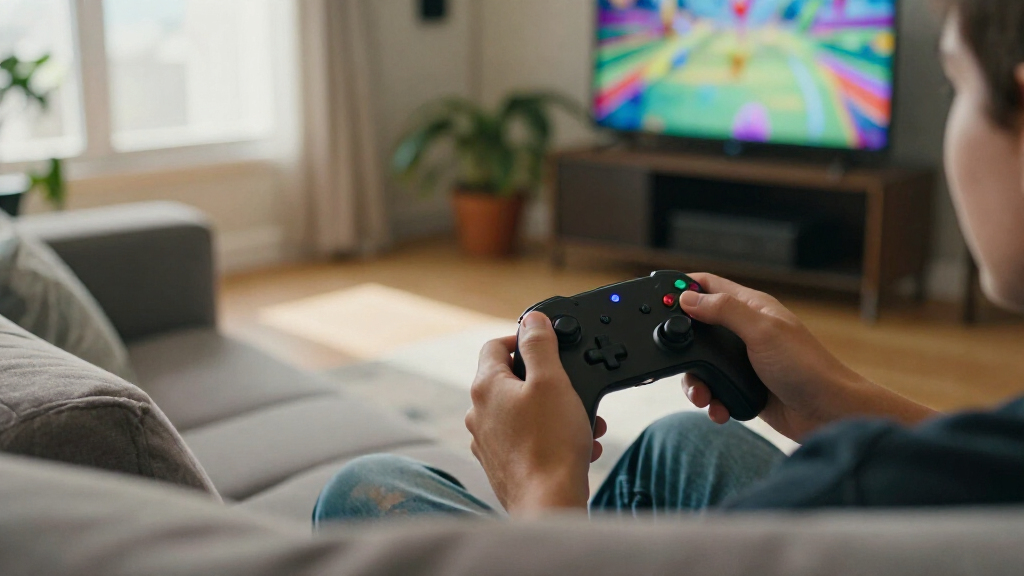

The best wireless gaming controllers balance responsive controls, reliable connections, and compatibility with the devices you actually play on. My best overall pick is the 8BitDo Ultimate 2 Wireless, a versatile option for PC and several other platforms; the Xbox Wireless Controller models suit players who prioritize familiar Xbox-style controls, while the 8BitDo Ultimate 2C stands out for PC and Android players seeking Hall Effect sticks and remappable bumpers. The main tradeoffs are platform support, connection options, comfort, and whether extra features matter enough to justify a more specialized controller. A model that works across several devices may not offer the same platform-specific convenience as a dedicated choice. Read on for the full comparison, buying advice, and recommendations by player type.

Get the latest gadgets delivered free with Prime
- Fast, free delivery on millions of items
- Prime Video, Amazon Music and more included
- Member-only deals all year
Complete the kit



Key Takeaways
- Cross-platform flexibility separates the 8BitDo Ultimate 2 from the Xbox picks: it lists PC, Apple, Steam, and Android support, while the Xbox models are the clearest fit for players centered on Xbox.
- The 8BitDo Ultimate 2C models focus on PC and Android rather than broad platform coverage: their Hall Effect controls and remappable L4/R4 bumpers make them feature-led alternatives, but buyers should check compatibility before choosing one for console or mobile play.
- Xbox Special Edition, Shock Blue, Deep Pink, and Velocity Green share a familiar controller family: color and edition styling distinguish them more than the platform-centered feature differences seen across the wider roundup.
- Several lower-cost-oriented alternatives emphasize different needs: ManbaOne adds an interactive screen, VOYEE adds RGB lighting, and EasySMX and GameSir models advertise support spanning multiple platforms, so usability and device fit matter more than appearance alone.
- Wireless does not mean universal compatibility: the listed platforms vary by model, and a controller designed for Windows and Android is not automatically the right choice for Switch, iOS, or Xbox.
| 8BitDo Ultimate 2 Wireless Controller – Black (PC, Apple, Steam, Android) |  | Best for Competitive PC Play | Connection: 2.4 GHz wireless, USB-C wired | Latency: Under 1 ms | Polling rate: 1000 Hz | VIEW LATEST PRICE | See Our Full Breakdown |
| ManbaOne Wireless Gaming Controller with Interactive Screen, Black | 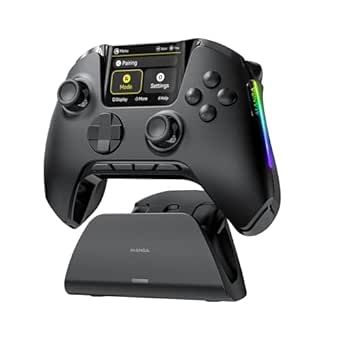 | Best for On-Controller Customization | Display: 2-inch interactive screen | Compatible platforms: Nintendo Switch, Switch 2, iOS, Android, Windows PC | Connection modes: Wired, Bluetooth, wireless dongle | VIEW LATEST PRICE | See Our Full Breakdown |
| VOYEE Wireless Switch Controller with RGB Lightning LED | 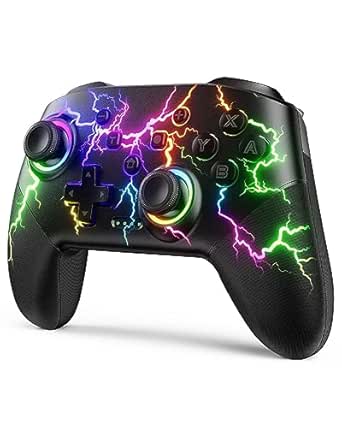 | Best for Switch Players Who Want Lighting | Compatible devices: Nintendo Switch, Switch Lite, Switch OLED, PC | PC connection: Wired | Battery runtime: 10–15 hours | VIEW LATEST PRICE | See Our Full Breakdown |
| Xbox Wireless Gaming Controller – Ice Breaker Special Edition |  | Best for Xbox and Cross-Device Play | Compatible devices: Android, iOS, Windows, Xbox One, Xbox Series S, Xbox Series X | Connectivity: Bluetooth, USB-C, Xbox Wireless | Battery life: Up to 40 hours | VIEW LATEST PRICE | See Our Full Breakdown |
| 8Bitdo Ultimate 2C Wireless Controller for Windows PC and Android, with 1000 Hz Polling Rate, Hall Effect Joysticks and Triggers, and Remappable L4/R4 Bumpers (Purple) | 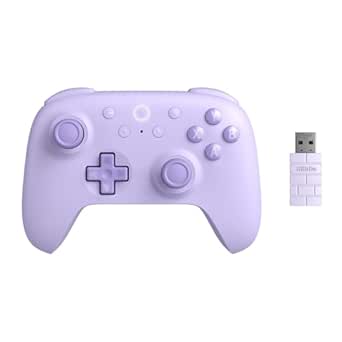 | Best Value for PC and Android | Compatible devices: Android, Windows | Connectivity listed: USB; wireless feature also listed | Polling rate: 1000 Hz | VIEW LATEST PRICE | See Our Full Breakdown |
| Xbox Wireless Gaming Controller – Shock Blue |  | Best Overall Wireless Controller | Controller Type: Gamepad | Connectivity Technology: Bluetooth, USB-C | Additional Features: Ergonomic, Headphone Jack, Wireless | VIEW LATEST PRICE | See Our Full Breakdown |
| EasySMX X05Pro Wireless Gaming Controller for PC, Switch, Android/iOS |  | Best for Multi-Platform Compatibility | Controller Type: Gamepad | Connectivity Technology: Bluetooth, USB C, 2.4G wireless | Additional Features: Ergonomic, Multiuse, Rumble, Silent Buttons, Hall Effect Joysticks, Programmable Triggers | VIEW LATEST PRICE | See Our Full Breakdown |
| EasySMX X15 Wireless Gaming Controller for PC, Steam, Switch, Android, and iOS | 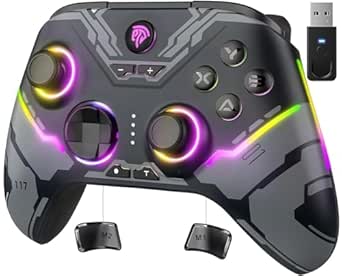 | Best for Advanced Features and Aesthetic Appeal | Controller type: Gamepad | Compatible devices: Windows PC, Steam, Nintendo Switch, Android, iOS | Connectivity: 2.4G wireless, Bluetooth, USB-C | VIEW LATEST PRICE | See Our Full Breakdown |
| Xbox Wireless Gaming Controller – Storm Breaker Special Edition |  | Best Premium Edition with Extended Battery Life | Controller type: Gamepad | Compatible devices: Android, iOS, Windows, Xbox One, Xbox Series S/X | Connectivity: Bluetooth, Xbox Wireless, USB-C | VIEW LATEST PRICE | See Our Full Breakdown |
| 8Bitdo Ultimate 2C Wireless Controller for Windows PC and Android (Transparent Black) |  | Best for Customization and Precision | VIEW LATEST PRICE | See Our Full Breakdown | |||
| GameSir Nova Lite 2 Wireless PC Controller with Hall Effect Sticks |  | Best for Multi-Platform Customization | Compatible devices: PC, Nintendo Switch, Nintendo Switch 2, Android, iOS | Connectivity: Bluetooth, wired, 2.4 GHz wireless dongle | Stick technology: Hall Effect | VIEW LATEST PRICE | See Our Full Breakdown |
| Xbox Wireless Gaming Controller, Deep Pink |  | Best for Xbox and Everyday Compatibility | Compatible devices: Android, iOS, Windows, Xbox Series S, Xbox Series X | Connectivity: Bluetooth, Xbox Wireless, USB-C | Buttons: 19 | VIEW LATEST PRICE | See Our Full Breakdown |
| 8Bitdo Ultimate 2C Wireless Controller for Windows PC and Android |  | Best for Responsive Windows and Android Play | Compatible devices: Windows, Android | Connectivity listed: USB; wireless support is stated, but the wireless method is not specified | Polling rate: 1000 Hz | VIEW LATEST PRICE | See Our Full Breakdown |
| Xbox Wireless Gaming Controller – Velocity Green |  | Best for Xbox-Style Simplicity | Compatible devices: Android, iOS, Windows, Xbox Series S, Xbox Series X | Connectivity: Bluetooth, USB-C, Xbox Wireless | Buttons: 11 | VIEW LATEST PRICE | See Our Full Breakdown |
| wireless gaming controller | Compatible devices | Power source |
|---|---|---|
| 8BitDo Ultimate 2 Wireless Con | — | — |
| ManbaOne Wireless Gaming Contr | — | — |
| VOYEE Wireless Switch Controll | Nintendo Switch, Switch Lite, Switch OLED, PC | — |
| Xbox Wireless Gaming Controlle | Android, iOS, Windows, Xbox One, Xbox Series S, Xbox Series X | AA batteries |
| 8Bitdo Ultimate 2C Wireless Co | Android, Windows | — |
| Xbox Wireless Gaming Controlle | — | Battery Powered |
| EasySMX X05Pro Wireless Gaming | — | Wireless |
| EasySMX X15 Wireless Gaming Co | Windows PC, Steam, Nintendo Switch, Android, iOS | — |
| Xbox Wireless Gaming Controlle | Android, iOS, Windows, Xbox One, Xbox Series S/X | — |
| 8Bitdo Ultimate 2C Wireless Co | — | — |
| GameSir Nova Lite 2 Wireless P | PC, Nintendo Switch, Nintendo Switch 2, Android, iOS | Battery |
| Xbox Wireless Gaming Controlle | Android, iOS, Windows, Xbox Series S, Xbox Series X | AA batteries |
| 8Bitdo Ultimate 2C Wireless Co | Windows, Android | Battery |
| Xbox Wireless Gaming Controlle | Android, iOS, Windows, Xbox Series S, Xbox Series X | AA batteries |
More Details on Our Top Picks
8BitDo Ultimate 2 Wireless Controller – Black (PC, Apple, Steam, Android)
The 8BitDo Ultimate 2 suits players who want fast wireless response and more ways to control a game than a standard pad provides. Its 2.4 GHz connection is specified at under 1 ms latency, and the included dock keeps charging simple between sessions. Switchable trigger modes let you choose a linear pull or a tactile response, while rear paddles and extra bumpers offer more inputs without taking your thumbs off the sticks. Compared with the 8BitDo Ultimate 2C, this model adds a dock, motion controls, and a more involved button layout; that makes it the more feature-rich choice, but also a less straightforward one. The extra controls can take time to learn, and casual players may not need them. Its listed compatibility spans PC, Apple devices, Steam, and Android, rather than consoles such as Xbox or PlayStation.
Pros:- Sub-1 ms response and 1000 Hz polling rate are suited to fast-paced play.
- Switchable linear Hall-effect and tactile trigger modes offer different control feels.
- Rear paddles and extra bumpers add inputs without requiring thumb movement from the sticks.
- Charging dock and USB-C adapter are included.
Cons:- The extra paddles and bumpers may take time to learn and configure.
- Its extensive controls may be unnecessary for casual or simple games.
- Listed compatibility does not include Xbox or PlayStation consoles.
Best for: PC and Android players who want low-latency 2.4 GHz play, customizable trigger feel, and extra controls for action or competitive games.
Not ideal for: Casual players who prefer a simple, familiar layout, or console owners who need Xbox or PlayStation compatibility.
- Connection:2.4 GHz wireless, USB-C wired
- Latency:Under 1 ms
- Polling rate:1000 Hz
- Wireless range:Up to 10 m
- Trigger modes:Switchable linear Hall-effect and tactile
- Motion control:Customizable 6-axis
- Extra controls:2 rear paddles and extra R4/L4 bumpers
- Compatibility:PC, Apple devices, Steam, Android
- Charging:Multifunctional charging dock included
Our verdict“Choose the Ultimate 2 for responsive PC-focused play and a broad set of programmable controls, but pick the simpler Ultimate 2C if you do not need its added features.”
ManbaOne Wireless Gaming Controller with Interactive Screen, Black
The ManbaOne is the pick for players who want to adjust controller settings directly on the device rather than rely on a phone or desktop app. Its 2-inch interactive screen handles settings for controls, lighting, and vibration, while four programmable rear buttons support macros. Hall-effect sticks and triggers add a durable, precise control option, and the included charging station gives it a more complete setup than the VOYEE Wireless Switch Controller. The ManbaOne also covers more connection choices, with wired, Bluetooth, and dongle modes across Switch, mobile, and Windows PC. The tradeoffs are meaningful: it does not support waking a Switch or Switch 2, Bluetooth on PC is described as less stable than the dongle, and the listed compatibility excludes Xbox, PlayStation, and GeForce Now. Its screen and extra controls will suit tinkerers better than players who want a basic pad.
Pros:- Interactive screen changes settings without requiring an app.
- Hall-effect joysticks and triggers provide precise control.
- Four programmable rear buttons include macro support.
- Wired, Bluetooth, and wireless dongle connections plus an included charging station.
Cons:- Does not support wake-up on Switch or Switch 2.
- Not compatible with Xbox, PlayStation, or GeForce Now.
- Bluetooth connection to PC is described as less stable than the wireless dongle.
Best for: Switch, mobile, and Windows PC players who regularly adjust control, lighting, or vibration settings and want programmable rear buttons.
Not ideal for: Xbox or PlayStation owners, GeForce Now users, and Switch players who expect to wake the console from the controller.
- Display:2-inch interactive screen
- Compatible platforms:Nintendo Switch, Switch 2, iOS, Android, Windows PC
- Connection modes:Wired, Bluetooth, wireless dongle
- Battery capacity:1,800 mAh
- Joystick and trigger technology:Hall effect
- Back buttons:4 programmable buttons with macro support
- Wired polling rate:800 Hz or higher
- Motion control:6-axis gyroscope
- Charging:Smart charging station included
Our verdict“Choose the ManbaOne if on-controller setup and multi-platform flexibility matter more to you than Switch wake-up support or broad console compatibility.”
VOYEE Wireless Switch Controller with RGB Lightning LED
The VOYEE Wireless Switch Controller gives Switch players a straightforward mix of wireless play, motion controls, programmable buttons, and customizable lighting. Its 10–15-hour runtime and four vibration levels make it a practical option for regular handheld or docked play, while adjustable turbo speeds suit games that benefit from repeated inputs. Compared with the more configurable ManbaOne, VOYEE keeps its feature set simpler and adds nine lighting colors and four lighting modes; it lacks the ManbaOne’s on-controller screen and Hall-effect sticks and triggers. The biggest limitation is PC connectivity: the product supports PC only by cable, so it is not a strong choice for a wireless computer setup. Charging takes three to four hours, which also means planning ahead if the battery runs low. Its listed Switch support includes Switch Lite and Switch OLED.
Pros:- Works wirelessly with Nintendo Switch, Switch Lite, and Switch OLED.
- Programmable M1/M2 buttons and three turbo speeds add control options.
- Six-axis motion sensing and four vibration levels support motion and feedback features.
- Offers 10–15 hours of use per charge with customizable lighting.
Cons:- PC play requires a wired connection.
- A full charge takes three to four hours.
- The listed specs do not identify Hall-effect sticks or triggers.
Best for: Nintendo Switch, Switch Lite, and Switch OLED players who want wireless play, motion sensing, adjustable turbo, and customizable RGB lighting.
Not ideal for: PC players who need wireless connectivity, or buyers who prioritize Hall-effect sticks and triggers or a fast charging turnaround.
- Compatible devices:Nintendo Switch, Switch Lite, Switch OLED, PC
- PC connection:Wired
- Battery runtime:10–15 hours
- Charging time:3–4 hours
- Motion control:6-axis gyroscope
- Vibration:Dual motors, 4 levels
- Turbo speeds:5, 12, or 20 shots per second
- Lighting:9 colors and 4 modes
- Dimensions:5.9 × 2.57 × 4.17 inches
Our verdict“Pick the VOYEE for feature-packed wireless Switch play and lighting customization, but choose the ManbaOne if you need wireless PC options and Hall-effect controls.”
Xbox Wireless Gaming Controller – Ice Breaker Special Edition
The Xbox Wireless Gaming Controller – Ice Breaker Special Edition is the most natural fit here for players centered on Xbox who also want to use one controller with a PC or mobile device. Its Xbox Wireless, Bluetooth, and USB-C options cover different setups, while textured triggers and rubberized grips support a secure hold during longer sessions. A dedicated Share button and Xbox Accessories app mapping make it more familiar and simpler to set up than the more control-heavy 8BitDo Ultimate 2. The stated battery life reaches up to 40 hours, but that comes from AA batteries rather than a built-in rechargeable pack, so ongoing power depends on having replacements or compatible rechargeables. Unlike the 8BitDo models, the listed compatibility includes Xbox One and Series X|S. Buyers seeking Hall-effect controls, rear paddles, or a rechargeable dock should compare alternatives before choosing this one.
Pros:- Connects through Xbox Wireless, Bluetooth, or USB-C.
- Compatible with Xbox One, Xbox Series X|S, Windows, Android, and iOS.
- Rubberized grips and textured triggers support comfort and control.
- Dedicated Share button and customizable mapping through the Xbox Accessories app.
Cons:- Uses AA batteries rather than including a built-in rechargeable battery.
- Battery life can vary with connected headsets or accessories.
- Lacks the rear paddles and extra bumper controls offered by the 8BitDo Ultimate 2.
Best for: Xbox One and Series X|S players who want a familiar controller that can also connect to Windows, iOS, and Android devices.
Not ideal for: Buyers who want a built-in rechargeable battery, Hall-effect sticks, or rear paddles and extra bumpers for expanded inputs.
- Compatible devices:Android, iOS, Windows, Xbox One, Xbox Series S, Xbox Series X
- Connectivity:Bluetooth, USB-C, Xbox Wireless
- Battery life:Up to 40 hours
- Power source:AA batteries
- Button quantity:19
- Weight:14.08 ounces
- Dimensions:6.91 × 5.61 × 2.76 inches
- Color:Ice
Our verdict“Choose the Ice Breaker for straightforward Xbox-first play across console, PC, and mobile, but skip it if a rechargeable battery or advanced rear controls are priorities.”
8Bitdo Ultimate 2C Wireless Controller for Windows PC and Android, with 1000 Hz Polling Rate, Hall Effect Joysticks and Triggers, and Remappable L4/R4 Bumpers (Purple)
The 8Bitdo Ultimate 2C focuses on responsive play and useful control upgrades without the more elaborate setup of the Ultimate 2. Its 1000 Hz polling rate, Hall-effect sticks and triggers, and remappable L4/R4 bumpers make it a strong match for Windows PC and Android players who want precision with a relatively lean layout. Button mapping works without software, which gives it an easier setup path than the ManbaOne, whose screen and macro controls suit buyers who want more on-controller customization. The Ultimate 2C is the simpler pick, but its listed connectivity is USB and the product data does not spell out a wireless connection method. It also uses separate batteries rather than a built-in rechargeable pack, unlike the ManbaOne with its charging station. Its compatibility is limited to Windows and Android, so it is not a general-purpose console controller.
Pros:- 1000 Hz polling rate is suited to responsive control.
- Hall-effect joysticks and triggers provide precise input.
- Remappable L4/R4 bumpers add controls beyond the standard layout.
- Button mapping is available without software.
Cons:- Requires separate batteries rather than including a built-in rechargeable battery.
- The listed compatibility is limited to Windows and Android.
- The product data lists USB connectivity but does not specify a wireless method.
Best for: Windows PC and Android players who want Hall-effect sticks and triggers, fast polling, and remappable extra bumpers without software setup.
Not ideal for: Players who need broad console compatibility, a built-in rechargeable battery, or clearly specified wireless connection options.
- Compatible devices:Android, Windows
- Connectivity listed:USB; wireless feature also listed
- Polling rate:1000 Hz
- Joystick and trigger technology:Hall effect
- Extra controls:Remappable L4/R4 bumpers
- Button mapping:Custom mapping without software
- Button quantity:13
- Weight:0.33 kg
- Color:Purple
Our verdict“Choose the Ultimate 2C for a compact, feature-focused PC or Android controller, but pick the ManbaOne for a built-in charging station and more clearly defined connection modes.”
Xbox Wireless Gaming Controller – Shock Blue
This Xbox controller stands out for its versatile connectivity options, including Bluetooth, USB-C, and Xbox Wireless, making it compatible with a wide range of devices. Its ergonomic design with textured grips ensures comfort during long gaming sessions, while customizable controls via the Xbox Accessories app add a level of personalization that few competitors offer. Compared to the Storm Breaker Special Edition, the Shock Blue’s longer battery life and broader compatibility make it the most adaptable choice. However, its reliance on AA batteries or rechargeable packs can be a drawback for those seeking a fully integrated rechargeable solution. Overall, this pick makes the most sense for gamers who want a reliable, multi-platform controller with extensive customization options.
Pros:- Ergonomic design with textured grips for comfortable long sessions
- Supports Bluetooth, USB-C, and Xbox Wireless for maximum compatibility
- Customizable controls via Xbox Accessories app
Cons:- Battery life varies with usage and accessories
- Requires AA batteries or rechargeable batteries (not included)
Best for: Players who want a durable, versatile controller compatible with Xbox, PC, and mobile devices, and who value customization.
Not ideal for: Casual gamers or those preferring built-in rechargeable batteries, as it requires AA batteries or separate rechargeable packs.
- Controller Type:Gamepad
- Connectivity Technology:Bluetooth, USB-C
- Additional Features:Ergonomic, Headphone Jack, Wireless
- Button Quantity:19
- Hardware Platform:Xbox Series X
- Power Source:Battery Powered
- Compatible Video Game Console Models:Microsoft Xbox Series S, Xbox Series X
- Item Weight:13.6 ounces
- Item Dimensions:6.91 x 5.61 x 2.76 inches
Our verdict“This controller is ideal for gamers seeking a highly adaptable, customizable experience across multiple devices.”
EasySMX X05Pro Wireless Gaming Controller for PC, Switch, Android/iOS
The EasySMX X05Pro excels in supporting a wide range of devices, including PC, Switch, and mobile platforms, making it a flexible choice for gamers who switch between hardware. Its combination of silent buttons and Hall Effect joysticks offers precise, drift-free control, which is a significant advantage over standard controllers like the Xbox Shock Blue. Adjustable triggers and programmable buttons further enhance gameplay customization, though it’s limited in compatibility—excluding Xbox consoles—and relies on Bluetooth or USB-C, which might not suit users seeking plug-and-play simplicity. Compared with the X15, the X05Pro’s multi-platform focus and quiet controls make it ideal for competitive or stealth gaming. This makes it a strong pick for gamers who prioritize versatility and control fidelity across devices.
Pros:- Supports PC, Switch, Android, and iOS with multiple connection options
- Silent buttons and Hall Effect joysticks for drift-free, quiet control
- Adjustable triggers and programmable buttons for enhanced performance
Cons:- Not compatible with Xbox consoles
- Requires Bluetooth or USB-C connection, which may be less convenient for some
Best for: Players who game across multiple platforms and want a quiet, precise controller with customization features.
Not ideal for: Xbox console owners seeking native compatibility, as it lacks Xbox-specific support and features.
- Controller Type:Gamepad
- Connectivity Technology:Bluetooth, USB C, 2.4G wireless
- Additional Features:Ergonomic, Multiuse, Rumble, Silent Buttons, Hall Effect Joysticks, Programmable Triggers
- Button Quantity:2
- Power Source:Wireless
- Color:Black
Our verdict“This controller is perfect for multi-device gamers who want precision and quiet operation across various platforms.”
EasySMX X15 Wireless Gaming Controller for PC, Steam, Switch, Android, and iOS
The EasySMX X15 combines multiple connection options—2.4G wireless, Bluetooth, and USB-C—with features like Hall effect joysticks and triggers, making it suitable for gamers who prioritize both performance and style. Its RGB lighting and programmable back buttons cater to those who enjoy customizing their setup, while the 1000mAh battery provides up to 20 hours of gameplay. Compared with the X05Pro, the X15’s design includes aesthetic flair and extra features like turbo mode, but it doesn’t support Xbox or include a microphone jack or gyro sensor. The 20-hour battery life and multi-connection modes make it ideal for extended gaming sessions. This controller makes sense for players who want a feature-rich device with eye-catching design and versatility.
Pros:- Supports multiple devices via 2.4G, Bluetooth, and USB-C
- Hall effect joysticks and triggers prevent drift for precise control
- RGB lighting, turbo mode, and dual vibration enhance gameplay experience
Cons:- No microphone jack or gyro sensor
- Design may be less comfortable for prolonged use compared to simpler controllers
Best for: Gamers seeking a stylish, feature-packed controller with multi-platform support and long battery life.
Not ideal for: Players who need Xbox console compatibility or built-in microphone support, as it lacks these features.
- Controller type:Gamepad
- Compatible devices:Windows PC, Steam, Nintendo Switch, Android, iOS
- Connectivity:2.4G wireless, Bluetooth, USB-C
- Joysticks and triggers:Hall effect
- Battery capacity:1000mAh
- Battery life:Up to 20 hours
- Additional features:RGB lighting, turbo, dual vibration
Our verdict“This controller suits gamers who want a stylish, highly customizable device with extensive features and multi-platform support.”
Xbox Wireless Gaming Controller – Storm Breaker Special Edition
The Storm Breaker Special Edition offers a refined aesthetic with textured triggers and rubberized rear grips, making it a comfortable option for extended gaming. Its compatibility with Xbox Wireless, Bluetooth, and USB-C ensures broad device support, matching the flexibility of the Shock Blue but with a more stylish design. Its impressive 40-hour battery life with AA batteries surpasses many competitors, including the X15, which offers a shorter runtime. The inclusion of a dedicated Share button and a 3.5 mm headset jack adds convenience for social and multiplayer gaming. Yet, reliance on AA batteries can be a downside for players preferring integrated rechargeable solutions. Overall, this controller makes a good choice for dedicated Xbox users and those who value premium aesthetics and long-lasting power.
Pros:- Supports Xbox Wireless, Bluetooth, and USB-C for broad compatibility
- Up to 40 hours of battery life with AA batteries
- Textured triggers, rubberized grips, and Share button for comfort and convenience
Cons:- Requires AA batteries or separate rechargeable packs
- AA batteries and USB-C cable may need to be purchased separately
Best for: Serious Xbox gamers and users who prioritize battery longevity and premium feel in their controller.
Not ideal for: Casual or mobile gamers wanting a fully rechargeable device or those who dislike AA batteries.
- Controller type:Gamepad
- Compatible devices:Android, iOS, Windows, Xbox One, Xbox Series S/X
- Connectivity:Bluetooth, Xbox Wireless, USB-C
- Battery life:Up to 40 hours
- Button quantity:19
- Additional features:Headphone jack, Share button, textured triggers
Our verdict“Ideal for players who want a stylish, durable controller with exceptional battery life for prolonged sessions.”
8Bitdo Ultimate 2C Wireless Controller for Windows PC and Android (Transparent Black)
The 8Bitdo Ultimate 2C emphasizes precision and customization, with Hall Effect joysticks and triggers that resist drift better than standard analogs. Its 1000 Hz polling rate over both wireless and wired connections ensures responsive gameplay, rivaling the performance of the X15 and EasySMX controllers. Its remappable L4/R4 bumpers and turbo function cater to advanced players who want tailored control schemes without relying on software. Unlike the Xbox controllers, it doesn’t support console integration, limiting its use to PC and Android devices. Its minimalist design and focus on high-performance features make it ideal for players who prioritize control accuracy and customization over aesthetic flair or multi-platform support. It’s the most specialized choice in this lineup for dedicated PC and Android gamers.
Pros:- Hall Effect joysticks and triggers resist drift for high accuracy
- High polling rate (1000Hz) for responsive control over wireless and wired
- Remappable L4/R4 bumpers and turbo function for advanced customization
Cons:- Limited device support—no console compatibility
- Design may lack aesthetic appeal for some users
Best for: Advanced players who want a highly customizable controller with excellent precision for PC and Android gaming.
Not ideal for: Casual gamers or those seeking broad console compatibility, as it doesn’t support Xbox or PlayStation consoles.
Our verdict“This controller suits serious gamers demanding top-tier precision and customization primarily for PC and Android platforms.”
GameSir Nova Lite 2 Wireless PC Controller with Hall Effect Sticks
The GameSir Nova Lite 2 suits players who want one controller for several devices and more control over how it responds. Its Bluetooth and 2.4 GHz dongle options support wireless play, while a wired connection adds flexibility at a desk. Hall Effect sticks and triggers are designed to resist the drift associated with conventional contact-based components, and adjustable trigger modes let players choose between fuller travel and quicker actuation. Compared with the 8Bitdo Ultimate 2C, this model supports more platforms and offers two macro-capable back buttons; the 8Bitdo is a simpler fit for Windows and Android users. The Nova Lite 2’s tradeoffs are less clear battery expectations and reliance on GameSir apps for some adjustments, so it may be less appealing to players who prefer a ready-to-use setup.
Pros:- Bluetooth, 2.4 GHz dongle, and wired connectivity provide flexible ways to connect.
- Hall Effect sticks and triggers are designed to resist wear-related drift.
- Two remappable back buttons support macro recording.
- Trigger locks and app-based dead-zone and vibration adjustments allow tailored control.
Cons:- Battery life is not specified in the supplied product details.
- Some customization features require GameSir apps.
- Its extra control options may be unnecessary for players seeking a straightforward gamepad.
Best for: Players who switch among PC, Switch, mobile devices, and want remappable back buttons plus adjustable controls.
Not ideal for: Buyers who want published battery-life guidance or prefer to avoid companion apps for controller customization.
- Compatible devices:PC, Nintendo Switch, Nintendo Switch 2, Android, iOS
- Connectivity:Bluetooth, wired, 2.4 GHz wireless dongle
- Stick technology:Hall Effect
- Polling rate:1000 Hz
- Back buttons:2, remappable with macro recording
- Trigger features:Two-way trigger lock and hair trigger mode
- Weight:0.24 kg
- Power source:Battery
Our verdict“Choose the Nova Lite 2 if you want broad device support and configurable controls, and skip it if app-free setup or clear battery-life information matters more.”
Xbox Wireless Gaming Controller, Deep Pink
The Xbox Wireless Gaming Controller is the straightforward pick for players who want familiar Xbox controls across console, Windows, and mobile devices. Its sculpted shape, textured grips, hybrid D-pad, and 3.5 mm headset jack cover practical everyday needs without leaning on specialist features. Bluetooth, Xbox Wireless, and USB-C give it broader connection choices than the Windows-and-Android-focused 8Bitdo Ultimate 2C, while the Share button makes capturing gameplay easy to reach. The tradeoff is power: this controller uses AA batteries, not an included built-in rechargeable pack, though the listed runtime is up to 40 hours with standard AAs. I’d favor it over the GameSir Nova Lite 2 for a familiar Xbox-style setup, but not for Hall Effect components or extra rear controls.
Pros:- Works with Xbox Series S and X, Windows, Android, and iOS using supported connections.
- Textured grips and sculpted surfaces support a secure, familiar hold.
- Hybrid D-pad, Share button, and 3.5 mm headset jack cover useful everyday functions.
- Listed battery life is up to 40 hours with standard AA batteries.
Cons:- Requires separately sold AA batteries.
- USB-C button mapping on Windows requires a compatible cable sold separately.
- Does not list Hall Effect sticks or rear buttons like the GameSir Nova Lite 2.
Best for: Xbox owners who also play on Windows or mobile and want familiar controls, a headset jack, and a dedicated Share button.
Not ideal for: Players who want a rechargeable battery included, Hall Effect sticks, or remappable rear buttons.
- Compatible devices:Android, iOS, Windows, Xbox Series S, Xbox Series X
- Connectivity:Bluetooth, Xbox Wireless, USB-C
- Buttons:19
- Power source:AA batteries
- Battery life:Up to 40 hours with standard AA batteries
- Audio:3.5 mm headset jack
- Weight:13.6 ounces
- Dimensions:6.91 x 5.61 x 2.76 inches
Our verdict“Pick this Xbox controller for familiar cross-device play and built-in headset connectivity, provided AA power suits your setup.”
8Bitdo Ultimate 2C Wireless Controller for Windows PC and Android
The 8Bitdo Ultimate 2C focuses on responsive play for Windows and Android rather than serving as a universal controller. Its 1000 Hz polling rate is aimed at quick input updates, while Hall Effect sticks and triggers offer a design intended to resist drift and wear. Remappable buttons and a turbo function add useful control options without the more expansive multi-platform pitch of the GameSir Nova Lite 2, which also supports Switch and offers Bluetooth, wired, and 2.4 GHz connections. The 8Bitdo is the more targeted choice if your play stays on Windows or Android, but the supplied connectivity details are sparse: they identify USB without clarifying the wireless method, and battery life is not listed. Its limited platform support also rules it out for console-focused buyers.
Pros:- 1000 Hz polling rate is geared toward frequent input updates.
- Hall Effect joysticks and triggers are designed to resist wear-related drift.
- Remappable buttons and turbo function allow control adjustments.
- Lightweight 280 g build suits desktop and laptop gaming.
Cons:- Compatible-device listing is limited to Windows and Android.
- Supplied connectivity information lists USB but does not specify the wireless method.
- Battery life is not specified.
Best for: Windows PC and Android players who prioritize fast input response, Hall Effect controls, and remappable buttons.
Not ideal for: Console players or anyone needing confirmed compatibility beyond Windows and Android, or clear connection and battery details.
- Compatible devices:Windows, Android
- Connectivity listed:USB; wireless support is stated, but the wireless method is not specified
- Polling rate:1000 Hz
- Stick and trigger technology:Hall Effect
- Buttons:14
- Additional features:Remappable buttons, turbo function
- Power source:Battery
- Weight:280 g
Our verdict“Choose the Ultimate 2C for a focused Windows or Android setup with responsive Hall Effect controls, but not for broad device compatibility.”
Xbox Wireless Gaming Controller – Velocity Green
The Velocity Green Xbox Wireless Controller is a familiar, no-frills choice for players who value Xbox ergonomics over specialist controls. Sculpted surfaces and textured grips support comfortable handling, while the hybrid D-pad and 3.5 mm headphone jack make it practical for console and PC sessions. It connects through Bluetooth, USB-C, or Xbox Wireless and works with Xbox Series S and X, Windows, Android, and iOS. Compared with the GameSir Nova Lite 2, it offers the recognizable Xbox layout and headset connection but lacks listed Hall Effect sticks, trigger locks, and remappable rear buttons. Like the Deep Pink Xbox controller, it also runs on AA batteries rather than including a built-in rechargeable battery. Its main appeal is dependable familiarity, not advanced customization.
Pros:- Supports Xbox Wireless, Bluetooth, and USB-C connectivity.
- Compatible with Xbox Series S and X, Windows, Android, and iOS.
- Sculpted surfaces and textured grips are suited to extended play.
- Hybrid D-pad and 3.5 mm headphone jack provide practical everyday features.
Cons:- Requires AA batteries; no built-in rechargeable battery is included.
- Full button remapping depends on the Xbox Accessories app and compatible operating-system versions.
- Compared with the GameSir Nova Lite 2, it has no listed Hall Effect sticks or remappable rear buttons.
Best for: Xbox players who want a familiar controller that can also connect to Windows and mobile devices.
Not ideal for: Buyers seeking an included rechargeable battery, Hall Effect components, or extra remappable rear controls.
- Compatible devices:Android, iOS, Windows, Xbox Series S, Xbox Series X
- Connectivity:Bluetooth, USB-C, Xbox Wireless
- Buttons:11
- Audio:3.5 mm headphone jack
- Power source:AA batteries
- Weight:13.6 ounces
- Dimensions:5.61 x 6.91 x 2.76 inches
- Color:Velocity Green
Our verdict“Choose the Velocity Green model for familiar Xbox controls across supported devices, but look elsewhere for rechargeable power or advanced input customization.”
How We Picked
I ranked these controllers around the decisions that matter most when buying wireless: platform compatibility, control features, connection practicality, and everyday usability. I gave more weight to models whose stated device support matches a range of common setups, then compared specialized features such as Hall Effect sticks, remappable controls, screens, and lighting against the limits of their intended platforms. Build and comfort are relevant, but the supplied product details do not support claims about measured durability, latency, battery life, or hands-on feel, so I do not treat those as proven advantages.
The ranking gives the top spot to the 8BitDo Ultimate 2 Wireless for its broad listed compatibility across PC, Apple, Steam, and Android. The Ultimate 2C follows as a more focused feature pick for Windows PC and Android, while Xbox Wireless models rank well for players who want that controller family and can confirm their target device supports it. The remaining picks offer narrower differentiators—an interactive screen, RGB lighting, or stated multi-platform support—but sit lower when the product information leaves more questions about fit or offers less distinct value for a broad wireless-controller shortlist.
| wireless gaming controller | Power source |
|---|---|
| 8BitDo Ultimate 2 Wireless Con | — |
| ManbaOne Wireless Gaming Contr | — |
| VOYEE Wireless Switch Controll | — |
| Xbox Wireless Gaming Controlle | AA batteries |
| 8Bitdo Ultimate 2C Wireless Co | — |
| Xbox Wireless Gaming Controlle | Battery Powered |
| EasySMX X05Pro Wireless Gaming | Wireless |
| EasySMX X15 Wireless Gaming Co | — |
| Xbox Wireless Gaming Controlle | — |
| 8Bitdo Ultimate 2C Wireless Co | — |
| GameSir Nova Lite 2 Wireless P | Battery |
| Xbox Wireless Gaming Controlle | AA batteries |
| 8Bitdo Ultimate 2C Wireless Co | Battery |
| Xbox Wireless Gaming Controlle | AA batteries |
Factors to Consider When Choosing Best Wireless Gaming Controllers
Choosing a wireless controller starts with the device it must work with, not the longest feature list. I would narrow the field by platform, connection method, and the controls you will use often; then weigh extras against fit and setup needs. These points help prevent a common mismatch: buying a controller that looks versatile but does not support the specific console, phone, or PC connection you rely on.
Match Compatibility to Your Actual Devices
Write down every device you expect to use before comparing features, including its operating system and whether you play through a PC storefront or directly on a console. Product listings can name PC, Steam, Android, Apple, iOS, or Switch separately, and those labels are not interchangeable guarantees. A controller that supports Windows and Android may still be a poor choice for a Switch-only setup. Also check whether support applies to your exact device generation and connection method, since compatibility can vary across hardware and software versions. If you only need one platform, favor a clear, direct match over a broader-sounding list of unverified use cases. For a shared controller used across devices, prioritize explicit support for every device you plan to switch between.
Check How Wireless Connection Works
Wireless controllers can connect through different methods, and the word wireless alone does not tell you how setup will work. Check whether the controller uses Bluetooth, a dedicated USB receiver, or both, and confirm that your host device can use the included method. A receiver can be convenient for a desktop without dependable Bluetooth, while Bluetooth may suit a phone or tablet that has no USB port available. If you plan to play at a desk and on a TV, think about whether the connection remains practical from both positions. Look for clear details on pairing, reconnecting, and supported devices rather than assuming every wireless mode works on every platform. When a listing is vague, count the connection as an open question rather than a benefit.
Decide Whether Hall Effect Controls Matter to You
Hall Effect sticks and triggers use magnetic sensing, a design buyers often seek when they want a different approach to detecting movement than traditional contact-based controls. Their presence can be a useful differentiator, as on the listed 8BitDo Ultimate 2C models and GameSir Nova Lite 2, but it does not alone prove better feel or long-term reliability. Think about the games you play: fine aiming and frequent stick use may make stick design more relevant than extra lights or cosmetic finishes. Check whether Hall Effect applies to both sticks, triggers, or only one control type, since listings can use the term in different ways. Avoid paying attention to the label without confirming the rest of the controller’s platform support and button layout. A well-matched basic controller can be a better fit than a feature-rich model that does not work with your setup.
Prioritize Controls You Will Actually Use
Extra bumpers, remappable buttons, and onboard menus are useful only when they fit your games and habits. The Ultimate 2C listing identifies remappable L4/R4 bumpers, which may help players who want extra inputs without moving a hand from the main controls. An interactive screen, as advertised on ManbaOne, may appeal to players who prefer adjustments or information on the controller itself, but check what the screen actually controls before treating it as a practical advantage. RGB lighting mainly changes appearance and may matter less than button placement or compatibility during long sessions. Make a short list of the actions you want to map, then confirm that the controller supports those actions and that setup is available on your chosen platform. This keeps feature count from distracting from playability.
Choose Between a Familiar Layout and Specialized Features
Players who already know the Xbox controller layout may find it easier to stay with that style than to adapt to a different arrangement or button naming scheme. The Xbox models in this roundup provide several color and edition choices, while 8BitDo, EasySMX, ManbaOne, VOYEE, and GameSir offer alternatives with different feature emphasis. Familiarity is especially useful if you move between games often or share a controller with someone who expects a common layout. A distinctive look does not necessarily mean a different control experience, so compare the actual buttons and compatibility rather than choosing by finish alone. If you are buying your first controller, a recognizable layout may simplify the learning curve. If you already know what you want to remap, a specialized design could serve you better.
Treat Battery and Maintenance Claims as Questions to Verify
Battery type and charging arrangements can affect how convenient a wireless controller is day to day, yet the product details supplied for this roundup do not establish battery life or charging performance for each model. Before choosing, check whether the controller uses replaceable batteries, an internal rechargeable battery, or another arrangement, and whether charging accessories are included. Replaceable batteries can be easy to swap during a session, while rechargeable designs may reduce routine battery changes but require charging time. Also look for information on firmware support and replacement parts if you plan to keep the controller for years. Do not infer longer play time from a larger-looking shell or extra features. Treat missing battery and maintenance details as a reason to verify the listing or manufacturer information before purchase.
Frequently Asked Questions
Will a controller listed for PC and Android work with my Xbox or Switch?
Not automatically: compatibility labels apply to the platforms named for that particular model, and PC or Android support does not confirm Xbox or Switch support. In this roundup, the 8BitDo Ultimate 2C listings name Windows PC and Android, while the Ultimate 2 lists PC, Apple, Steam, and Android; neither description alone establishes support for every console. Check the manufacturer’s compatibility list for your exact console and model before buying. Also verify whether support requires a specific receiver, adapter, or firmware. If a platform is not clearly named, treat compatibility as unconfirmed.
Should I choose Hall Effect sticks over a controller with more listed platforms?
That depends on whether control design or device flexibility is the bigger need. Hall Effect sticks may appeal if you focus on stick-heavy games or want that sensing design, while a controller with broader stated support can be more useful in a multi-device household. The 8BitDo Ultimate 2C models emphasize Hall Effect controls and PC/Android use; the Ultimate 2 lists a broader set of platforms. A feature label does not establish better comfort, accuracy, or lifespan by itself. Choose the platform match first, then weigh stick design against the games you play.
Are the different Xbox Wireless Controller colors different controllers?
The Xbox options listed here are distinct color or edition variants: Ice Breaker, Shock Blue, Storm Breaker, Deep Pink, and Velocity Green. The supplied names do not establish a major functional difference between those variants, so I would treat styling as the main visible distinction unless a specific listing states otherwise. Compare the exact model details before buying, especially if a special edition includes a feature or accessory not mentioned in another listing. If you are choosing among them for platform fit, confirm that each exact product version supports your device. Pick the finish you prefer only after that compatibility check.
Is an interactive screen or RGB lighting worth choosing over remappable buttons?
Choose based on the job the feature does for you, not how striking it sounds in a listing. Remappable bumpers can add useful inputs for players who want custom controls, while a screen may help if its menu or information is something you expect to use regularly. RGB lighting mostly serves appearance unless the controller gives it a practical function you value. The ManbaOne, VOYEE, and 8BitDo Ultimate 2C emphasize these different ideas, so they are not direct substitutes on features alone. Check how each feature is configured and whether it works on your platform before giving it much weight.
What should I verify before using a wireless controller with a phone?
Confirm support for your phone’s operating system and the controller’s connection method, then check whether your games accept controller input. The listings in this roundup name Android for several models and Apple or iOS for some others, but those terms do not guarantee that every phone, game, or operating-system version will work. Check whether a clip or stand is included if you plan to mount the phone; do not assume one comes with the controller. Also consider how you will recharge the controller and whether its shape suits handheld play. A controller can pair successfully yet still be inconvenient for the games you want to play.
Conclusion
For the broadest stated platform mix in this group, my best overall recommendation is the 8BitDo Ultimate 2 Wireless; buyers should still verify support for their exact device. The 8BitDo Ultimate 2C is my best value-style pick for PC and Android players who want Hall Effect controls and remappable L4/R4 bumpers, while the Xbox Wireless Controller family is the best familiar-layout choice for players whose setup supports it. For beginners, I would start with an Xbox model or another controller whose layout and platform support are easy to confirm, then choose a finish you like. For specific needs, consider ManbaOne if its screen features suit your routine, VOYEE if RGB styling is a priority, or an EasySMX or GameSir option after checking its exact device support. The product details here do not establish a clear best premium controller, so I would not pay extra for a premium label alone; choose based on verified compatibility and features you will use.
Fall Picks
fall essentials
As an affiliate, we earn on qualifying purchases.