
The best gaming tablets pair responsive screens with enough performance for the games you play, without making portability or everyday use an afterthought. My best overall pick is the HONOR MagicPad2, which stands out for its 12GB of RAM and large, high-refresh-rate display. For handheld play, the Razer Edge has a 144Hz AMOLED screen and an included controller, while the Lenovo Idea Tab Pro offers a bigger 3K screen and a more versatile tablet setup. The main tradeoffs are screen size versus comfort, gaming-focused controls versus general-purpose flexibility, and advertised specs versus the importance of a capable processor. Read on for the full breakdown of where each tablet fits and which compromises may matter most to you.

Get the latest gadgets delivered free with Prime
- Fast, free delivery on millions of items
- Prime Video, Amazon Music and more included
- Member-only deals all year
Complete the kit



Key Takeaways
- The HONOR MagicPad2 leads this lineup for balanced tablet gaming: its 12GB of RAM and 12.3-inch display make it a stronger all-round candidate than the entry-level and accessory-heavy options, though its large form is less suited to handheld play.
- The Razer Edge is the clearest pick for gaming on the go: its 6.8-inch 144Hz AMOLED screen and bundled Kishi V2 Pro controller are purpose-built for handheld sessions, but its small display is less useful for broad tablet tasks.
- The Lenovo Idea Tab Pro puts screen space and versatility first: its 12.7-inch 3K display, Dimensity 8300, pen, and folio case suit gaming alongside study and media, while its size can feel cumbersome for long handheld sessions.
- Refresh-rate claims do not tell the whole performance story: the TECLAST T65 and HNVHNV S90Pro list 120Hz displays, but buyers should weigh processor capability and software support rather than treating a high refresh rate as proof of smooth gameplay.
- Bundled accessories and rugged construction serve different needs: the TABWEE and BESTTAB include keyboard, mouse, and stylus bundles, while the AGM PAD P2 Active prioritizes protection; neither feature set automatically makes a tablet better at demanding games.
| Samsung Galaxy Tab A11+ Tablet, 8GB RAM, 256GB Storage, Gray |  | Best Balanced Everyday Gaming Pick | Display: 11 inches | Refresh rate: Up to 90Hz | Memory: Up to 8GB RAM | VIEW LATEST PRICE | See Our Full Breakdown |
| Lenovo Idea Tab Pro Student Tablet – 12.7″ 3K LCD, 8GB RAM, 128GB Storage, MediaTek Dimensity 8300, with Pen and Folio Case |  | Best Large-Screen Gaming and Study Tablet | Display: 12.7-inch 3K LCD | Processor: MediaTek Dimensity 8300 | Memory: 8GB RAM | VIEW LATEST PRICE | See Our Full Breakdown |
| Lenovo Idea Tab 11-Inch 2.5K 90Hz Tablet, MediaTek Dimensity 6300, 8GB RAM, 256GB Storage, Pen and Folio Case | 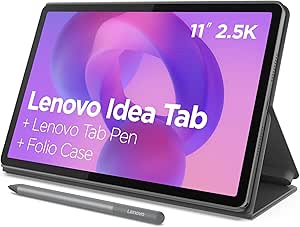 | Best Value for Casual Gaming and Everyday Use | Display: 11-inch 2.5K IPS touchscreen | Refresh rate: 90Hz | Processor: MediaTek Dimensity 6300 | VIEW LATEST PRICE | See Our Full Breakdown |
| HONOR MagicPad2 12.3-inch AI Tablet (12GB RAM, 256GB Storage, White) |  | Best Premium Gaming Display | Display: 12.3-inch 3K OLED (3000 × 1920) | Refresh rate: 144Hz | Processor: Snapdragon 8s Gen 3 | VIEW LATEST PRICE | See Our Full Breakdown |
| TABWEE T60 12.2-inch Android 16 Tablet with Keyboard, Mouse, Stylus, and Case |  | Best Gaming-and-Productivity Bundle | Display: 12.2-inch 2.5K QHD; 99% sRGB; anti-glare | Processor: Unisoc octa-core | Memory: 48GB total (12GB physical RAM + 36GB virtual memory) | VIEW LATEST PRICE | See Our Full Breakdown |
| Samsung Galaxy Tab S7 11-inch Android Tablet 128GB Wi‑Fi with S Pen Mystic Black |  | Best Overall for Gaming and Everyday Use | Display: 11-inch TFT LCD | Processor: Qualcomm Snapdragon 865 octa-core, up to 3.09 GHz | Storage: 128GB | VIEW LATEST PRICE | See Our Full Breakdown |
| TECLAST T65 13.4-Inch Android 16 Tablet, 128GB, 120Hz, 4G LTE |  | Best Big-Screen Pick with Cellular | Display: 13.4-inch 1920 × 1200 IPS touchscreen | Refresh rate: 120Hz | Processor: T7280 A75-based octa-core, up to 2.2GHz | VIEW LATEST PRICE | See Our Full Breakdown |
| Razer Edge Wi-Fi Gaming Tablet with Snapdragon G3X Gen 1, 6.8-Inch 144Hz AMOLED Display, and Kishi V2 Pro Controller (Renewed) |  | Best Dedicated Handheld Gaming Pick | Display: 6.8-inch FHD+ AMOLED touchscreen | Refresh rate: 144Hz | Processor: Snapdragon G3X Gen 1 | VIEW LATEST PRICE | See Our Full Breakdown |
| BESTTAB T60 12.2-Inch Android 16 Tablet, 2.4K 90Hz Display, 48GB RAM, 256GB Storage, Keyboard, Mouse and Stylus |  | Best Gaming-and-Productivity Bundle | Display: 12.2-inch, 2400 × 1600 | Refresh rate: 90Hz | Processor: Unisoc T7280 octa-core, up to 2.2GHz | VIEW LATEST PRICE | See Our Full Breakdown |
| HNVHNV S90Pro 13.4-Inch Android 16 Tablet, 120Hz Display, T7300 Octa-Core, 36GB RAM, 256GB Storage |  | Best for Large-Screen Gaming and Streaming | Display: 13.4-inch 1920 × 1200 IPS | Refresh rate: 120Hz | Processor: Unisoc T7300 octa-core | VIEW LATEST PRICE | See Our Full Breakdown |
| AGM PAD P2 Active Rugged Android 14 Tablet, 11-Inch 90Hz FHD Display, 8GB RAM, 256GB Storage, Protective Case |  | Best Rugged Gaming Tablet | Operating system: Android 14 | Display: 11-inch FHD IPS, 90Hz, 480 nits | Processor: MediaTek Helio G99 | VIEW LATEST PRICE | See Our Full Breakdown |
| gaming tablet | Display | Storage | Processor | Memory |
|---|---|---|---|---|
| Samsung Galaxy Tab A11+ Tablet | 11 inches | Up to 256GB | — | Up to 8GB RAM |
| Lenovo Idea Tab Pro Student Ta | 12.7-inch 3K LCD | 128GB | MediaTek Dimensity 8300 | 8GB RAM |
| Lenovo Idea Tab 11-Inch 2.5K 9 | 11-inch 2.5K IPS touchscreen | 256GB | MediaTek Dimensity 6300 | 8GB RAM |
| HONOR MagicPad2 12.3-inch AI T | 12.3-inch 3K OLED (3000 × 1920) | 256GB | Snapdragon 8s Gen 3 | 12GB RAM |
| TABWEE T60 12.2-inch Android 1 | 12.2-inch 2.5K QHD; 99% sRGB; anti-glare | 256GB UFS, expandable up to 2TB via TF card | Unisoc octa-core | 48GB total (12GB physical RAM + 36GB virtual memory) |
| Samsung Galaxy Tab S7 11-inch | 11-inch TFT LCD | 128GB | Qualcomm Snapdragon 865 octa-core, up to 3.09 GHz | — |
| TECLAST T65 13.4-Inch Android | 13.4-inch 1920 × 1200 IPS touchscreen | 128GB; expandable up to 2TB | T7280 A75-based octa-core, up to 2.2GHz | 6GB physical RAM plus 20GB virtual RAM |
| Razer Edge Wi-Fi Gaming Tablet | 6.8-inch FHD+ AMOLED touchscreen | — | Snapdragon G3X Gen 1 | — |
| BESTTAB T60 12.2-Inch Android | 12.2-inch, 2400 × 1600 | 256GB; expandable up to 2TB via MicroSD | Unisoc T7280 octa-core, up to 2.2GHz | 12GB physical RAM plus 36GB virtual expansion |
| HNVHNV S90Pro 13.4-Inch Androi | 13.4-inch 1920 × 1200 IPS | 256GB; expandable up to 2TB with TF card | Unisoc T7300 octa-core | 6GB physical RAM plus 30GB virtual RAM |
| AGM PAD P2 Active Rugged Andro | 11-inch FHD IPS, 90Hz, 480 nits | 256GB internal; microSD expansion up to 2TB | MediaTek Helio G99 | 8GB physical RAM + 8GB virtual RAM |
More Details on Our Top Picks
Samsung Galaxy Tab A11+ Tablet, 8GB RAM, 256GB Storage, Gray
The Galaxy Tab A11+ is the most balanced choice here for casual and mid-level gaming: its 11-inch display reaches 90Hz, while up to 8GB of memory and 256GB of storage leave room for games and downloads. That refresh rate can make supported games and scrolling look smoother than on a standard 60Hz screen, though the listing does not specify display resolution or the chipset model, so I can’t judge its detail or gaming power as confidently as the HONOR MagicPad2 with its named Snapdragon processor and 144Hz OLED panel. Quad speakers with Dolby Atmos add an advantage for playing without headphones. Fast charging and a long-lasting battery are claimed, but neither is quantified. I’d choose this Samsung for flexible everyday use, not for demanding games where known high-end hardware matters more.
Pros:- Up to 90Hz refresh rate can make supported games and interface movement look smoother.
- Up to 8GB RAM and 256GB storage provide room for apps and game downloads.
- Quad speakers with Dolby Atmos support immersive play without headphones.
- Long-lasting battery and fast charging are listed for extended, more convenient use.
Cons:- The chipset model is not provided, making gaming performance difficult to compare with the HONOR MagicPad2.
- Display resolution is not specified, limiting confidence about image detail.
- Battery life and charging speed have no stated figures.
Best for: Players who want an 11-inch tablet for casual gaming, streaming, and everyday apps, with ample listed memory and storage.
Not ideal for: Competitive players or buyers choosing mainly by graphics performance, since the chipset and display resolution are not specified.
- Display:11 inches
- Refresh rate:Up to 90Hz
- Memory:Up to 8GB RAM
- Storage:Up to 256GB
- Audio:Quad speakers with Dolby Atmos
- Battery:Long-lasting battery; capacity and runtime not specified
- Charging:Fast charging; speed not specified
- Color:Gray
Our verdict“Choose the Galaxy Tab A11+ for balanced everyday gaming and media, but pick the HONOR MagicPad2 if you want better-documented premium gaming hardware.”
Lenovo Idea Tab Pro Student Tablet – 12.7″ 3K LCD, 8GB RAM, 128GB Storage, MediaTek Dimensity 8300, with Pen and Folio Case
The Idea Tab Pro puts its emphasis on screen size and capable hardware: the 12.7-inch 3K LCD gives games, video, and split-screen apps more room than the 11-inch Lenovo Idea Tab. Its MediaTek Dimensity 8300 and 8GB RAM also give this model a clearer performance case than tablets in this group with unspecified or entry-level processors. A 360Hz touch sampling rate can help touch input register quickly, while the stated 90fps refresh rate supports smoother motion in compatible content. I’d still place the HONOR MagicPad2 ahead for display-led gaming, thanks to its 144Hz OLED, but the Lenovo includes a pen and folio that add practical value for study and everyday use. Its LCD lacks OLED contrast, and the 128GB storage is half the Lenovo Idea Tab’s listed capacity.
Pros:- 12.7-inch 3K display offers a spacious, detailed view for games and split-screen use.
- MediaTek Dimensity 8300 and 8GB RAM provide a more clearly specified performance platform than models with unnamed chips.
- 360Hz touch sampling rate supports responsive touch input.
- Tab Pen Plus and folio case are included for study, drawing, and carrying.
Cons:- LCD technology offers less contrast than the HONOR MagicPad2’s OLED panel.
- 128GB storage is less than the 256GB listed for the Lenovo Idea Tab and several alternatives.
- The stated 11-hour battery life is for video playback and may be shorter during gaming.
Best for: Students and casual-to-moderate gamers who want a large, detailed screen, a named midrange processor, and included note-taking accessories.
Not ideal for: Buyers who prioritize OLED contrast, higher refresh rates, or generous built-in storage for a large game library.
- Display:12.7-inch 3K LCD
- Processor:MediaTek Dimensity 8300
- Memory:8GB RAM
- Storage:128GB
- Refresh rate:90fps
- Touch sampling rate:360Hz
- Audio:Quad JBL speakers with Dolby Atmos
- Battery and charging:Up to 11 hours of video playback; 45W Quick Charge
- Included accessories:Lenovo Tab Pen Plus and folio case
Our verdict“Pick the Idea Tab Pro if you want a large, sharp gaming-and-study screen with a named Dimensity processor and included accessories, rather than OLED contrast or maximum storage.”
Lenovo Idea Tab 11-Inch 2.5K 90Hz Tablet, MediaTek Dimensity 6300, 8GB RAM, 256GB Storage, Pen and Folio Case
The Lenovo Idea Tab is the practical pick for casual gaming when a sharp, smooth screen and useful extras matter more than a higher-tier processor. Its 11-inch 2.5K IPS display with 90Hz refresh offers more detail and motion smoothness than the specs provided for the Galaxy Tab A11+, and it comes with 8GB RAM, 256GB storage, a pen, and a folio case. The Dimensity 6300 is a more modest gaming platform than the Idea Tab Pro’s Dimensity 8300, so I’d favor this model for lighter games and general play rather than demanding titles at high settings. Quad Dolby Atmos-tuned speakers and a battery rated for up to 12 hours of YouTube playback make it a flexible media tablet, but that video figure is not a gaming-runtime estimate, and charging is limited to a listed 20W charger.
Pros:- 2.5K IPS resolution and 90Hz refresh rate pair sharp visuals with smoother motion in supported games.
- 256GB storage and 8GB RAM provide useful space and capacity for everyday multitasking.
- Pen and folio case are included for writing, drawing, and hands-free viewing.
- Quad Dolby Atmos-tuned speakers and a stated 12-hour video-playback battery rating suit media use.
Cons:- Dimensity 6300 is a less powerful listed processor than the Idea Tab Pro’s Dimensity 8300.
- The 12-hour battery figure is based on YouTube playback, not gaming.
- The included 20W charger has no stated charging-time figure.
Best for: Casual gamers, students, and families who want a detailed 90Hz screen, 256GB storage, and included pen and folio for everyday use.
Not ideal for: Players who run demanding games or want the stronger listed processor and larger display of the Lenovo Idea Tab Pro.
- Display:11-inch 2.5K IPS touchscreen
- Refresh rate:90Hz
- Processor:MediaTek Dimensity 6300
- Memory:8GB RAM
- Storage:256GB
- Graphics:Integrated Arm Mali-G57 MC2
- Battery:Up to 12 hours of YouTube playback; 7,216mAh
- Audio:Quad Dolby Atmos-tuned speakers
- Included accessories:Lenovo Tab Pen and folio case
Our verdict“Choose this Lenovo for casual gaming, a sharp 90Hz screen, and bundled everyday accessories; step up to the Idea Tab Pro for more demanding play.”
HONOR MagicPad2 12.3-inch AI Tablet (12GB RAM, 256GB Storage, White)
For buyers who care most about screen quality and a stronger performance platform, the HONOR MagicPad2 makes the clearest premium case in this group. Its 12.3-inch 3K OLED panel at 144Hz combines deep contrast with a faster listed refresh rate than the 90Hz Galaxy Tab A11+ and both Lenovo tablets. The Snapdragon 8s Gen 3 and 12GB RAM give it a more robust hardware foundation for demanding games and multitasking than the Dimensity 6300 in the Lenovo Idea Tab. That does not guarantee every game will run at 144Hz, but compatible titles can make better use of the panel. The 10,050mAh battery is substantial by capacity, though no runtime or charging speed is supplied. Unlike the Lenovo Idea Tab Pro, it does not include a pen or folio, and its Wi-Fi-only connectivity and unlisted storage expansion may limit some buyers.
Pros:- 3K OLED display with 144Hz refresh rate offers higher contrast and faster listed motion than the 90Hz alternatives.
- Snapdragon 8s Gen 3 and 12GB RAM provide the strongest specified processor-and-memory combination in this batch.
- 256GB storage provides more listed capacity than the Lenovo Idea Tab Pro.
- 10,050mAh battery capacity and Wi-Fi 6 support extended use and modern wireless networking.
Cons:- No battery-runtime or charging-speed figure is provided.
- No cellular connectivity or expandable storage is listed.
- No pen or folio is included, unlike the Lenovo Idea Tab Pro and Lenovo Idea Tab.
Best for: Gamers who prioritize a high-refresh OLED screen, a named upper-tier processor, and substantial memory for demanding titles and multitasking.
Not ideal for: Buyers who need cellular connectivity, expandable storage, or included accessories such as the Lenovo Idea Tab Pro’s pen and folio.
- Display:12.3-inch 3K OLED (3000 × 1920)
- Refresh rate:144Hz
- Processor:Snapdragon 8s Gen 3
- Memory:12GB RAM
- Storage:256GB
- Operating system:Android 14 with MagicOS 8.0.1
- Battery:10,050mAh
- Connectivity:Wi-Fi 6, Bluetooth 5.3, USB Type-C
- Color:White
Our verdict“Choose the MagicPad2 for the most gaming-focused display and strongest specified hardware here, provided you do not need cellular service or bundled accessories.”
TABWEE T60 12.2-inch Android 16 Tablet with Keyboard, Mouse, Stylus, and Case
The TABWEE T60 is less convincing as a performance-first gaming tablet than the HONOR MagicPad2, but it has a distinct appeal for buyers who want one device for casual games and desk-style productivity. The 12.2-inch 2.5K display, anti-glare treatment, and included keyboard, mouse, stylus, and case create a versatile package for browsing, streaming, and lighter games. Its 10,000mAh battery and expandable storage up to 2TB also suit travel and large media libraries. The headline 48GB memory figure includes 36GB of virtual memory, not 48GB of physical RAM; the listed 12GB physical RAM and Unisoc octa-core processor are more useful signals, and they do not match the MagicPad2’s Snapdragon 8s Gen 3 for demanding gaming. I’d choose this for accessories and flexibility, not high-end frame rates.
Pros:- 12.2-inch 2.5K display includes anti-glare technology and a stated 99% sRGB color gamut.
- Keyboard, mouse, stylus, and protective case are included for flexible productivity use.
- 256GB UFS storage can be expanded by up to 2TB via TF card.
- 10,000mAh battery and four-year warranty offer useful travel capacity and extended coverage.
Cons:- The 48GB total memory figure includes 36GB virtual memory; physical RAM is 12GB.
- Unisoc octa-core processor is a weaker gaming proposition than the HONOR MagicPad2’s Snapdragon 8s Gen 3.
- No refresh rate or gaming-performance figures are provided.
Best for: Casual gamers who also want a large-screen tablet for travel, media, and productivity, with keyboard, mouse, stylus, and case included.
Not ideal for: Players focused on demanding games or dependable high frame rates, since its Unisoc processor is less clearly suited to heavy gaming than the MagicPad2’s Snapdragon chip.
- Display:12.2-inch 2.5K QHD; 99% sRGB; anti-glare
- Processor:Unisoc octa-core
- Memory:48GB total (12GB physical RAM + 36GB virtual memory)
- Storage:256GB UFS, expandable up to 2TB via TF card
- Operating system:Android 16
- Battery:10,000mAh lithium polymer
- Included accessories:Magnetic keyboard, mouse, stylus pen, protective case
- Connectivity and media:GPS, Widevine L1, GMS
- Warranty:Four years: two-year standard plus two-year extended upon registration
Our verdict“Choose the TABWEE T60 for its accessory bundle, expandable storage, and casual gaming flexibility, not for demanding titles or a verified high-refresh experience.”
Samsung Galaxy Tab S7 11-inch Android Tablet 128GB Wi‑Fi with S Pen Mystic Black
The Galaxy Tab S7 is the most balanced gaming pick here: its Snapdragon 865 and 11-inch display suit Android games, while quad AKG speakers make play and video more immersive without headphones. Compared with the Razer Edge, it gives you more room for touch controls and a larger canvas for work, but it lacks the Razer’s built-in gamepad and 144Hz AMOLED screen. Its included low-latency S Pen and DeX mode also make it more useful beyond gaming, though a keyboard is a separate purchase. The Wi-Fi-only model is a poor fit for gaming away from hotspots, and demanding play can drain the battery faster. I’d choose it for a versatile tablet first and a dedicated gaming handheld second.
Pros:- Snapdragon 865 supports demanding Android games and multitasking.
- 11-inch display offers more space for games and touch controls than the Razer Edge.
- Quad AKG speakers with Dolby Atmos provide immersive sound.
- Included low-latency S Pen and DeX mode add useful productivity options.
Cons:- Wi-Fi-only connectivity limits play away from hotspots.
- Keyboard accessory is sold separately.
- Battery life can fall with heavy gaming.
Best for: Players who want a capable Android gaming tablet that also supports note-taking, streaming, and productivity.
Not ideal for: Mobile gamers who need cellular data or a controller built into the device, or buyers prioritizing the highest refresh rate.
- Display:11-inch TFT LCD
- Processor:Qualcomm Snapdragon 865 octa-core, up to 3.09 GHz
- Storage:128GB
- Operating system:Android
- Connectivity:Wi-Fi and Bluetooth
- Battery:8000mAh; USB-C fast charging
- Audio:Quad AKG speakers with Dolby Atmos
- Included stylus:S Pen, 9ms latency
Our verdict“Choose the Galaxy Tab S7 if you want one well-rounded tablet for gaming, entertainment, and productivity rather than a dedicated handheld.”
TECLAST T65 13.4-Inch Android 16 Tablet, 128GB, 120Hz, 4G LTE
The TECLAST T65 puts screen size and connectivity ahead of compact gaming. Its 13.4-inch, 120Hz display gives strategy games, streaming, and split-screen use plenty of room, while 4G LTE lets you play or watch when Wi-Fi is out of reach. That combination sets it apart from the Wi-Fi-only Samsung Galaxy Tab S7, though the Samsung’s Snapdragon 865 is a better-defined performance proposition for demanding games. The T65’s T7280 processor is listed at up to 2.2GHz, so I’d treat its fast-refresh screen as a smoother interface advantage, not proof that every game will run at high frame rates. At 720g, it is also much less comfortable to hold for long sessions. Expandable storage and a headphone jack are practical bonuses, but the advertised 20GB of extended RAM is virtual, not physical memory.
Pros:- 13.4-inch 120Hz screen offers a spacious view for games and media.
- 4G LTE supports connectivity away from Wi-Fi networks.
- Storage can be expanded up to 2TB.
- Includes GPS, stereo speakers, and a 3.5mm headphone jack.
Cons:- At 720g, it is heavy for extended handheld gaming.
- 20GB of advertised extended RAM is virtual rather than physical.
- T7280 performance may be a limitation for demanding games.
Best for: Players who want a large gaming and streaming screen with LTE for travel, commuting, or places without reliable Wi-Fi.
Not ideal for: Handheld-focused gamers or buyers who prioritize strong performance in demanding games over screen size and mobile connectivity.
- Display:13.4-inch 1920 × 1200 IPS touchscreen
- Refresh rate:120Hz
- Processor:T7280 A75-based octa-core, up to 2.2GHz
- Memory:6GB physical RAM plus 20GB virtual RAM
- Storage:128GB; expandable up to 2TB
- Connectivity:4G LTE and dual-band Wi-Fi
- Battery:8000mAh
- Weight:720g
Our verdict“Pick the T65 if a large high-refresh display and LTE matter more to you than a lightweight design or a clearly stronger gaming processor.”
Razer Edge Wi-Fi Gaming Tablet with Snapdragon G3X Gen 1, 6.8-Inch 144Hz AMOLED Display, and Kishi V2 Pro Controller (Renewed)
The Razer Edge is the clearest choice here for gaming first: its Snapdragon G3X Gen 1, 144Hz AMOLED display, and included Kishi V2 Pro controller put the controls and screen in a handheld format, without the extra controller purchase required by a general tablet. HyperSense haptics add tactile feedback, and support for Android, PC, Xbox, and cloud gaming gives it a broader play role than the Galaxy Tab S7. The tradeoff is its 6.8-inch screen, which is far less suited to tablet-style touch gaming, reading, or productivity than Samsung’s 11-inch panel. This is also a renewed Wi-Fi model, not a cellular device, and its 90-day limited warranty is shorter than what many buyers may want. I’d favor it for portable controller-based play, not as an all-purpose tablet.
Pros:- Snapdragon G3X Gen 1 is purpose-suited to gaming.
- 144Hz AMOLED display offers a fast refresh rate and vivid image.
- Kishi V2 Pro controller is included, with HyperSense haptics.
- Supports Android, PC, Xbox, and cloud gaming.
Cons:- 6.8-inch screen is much smaller than the Galaxy Tab S7 and the other large tablets.
- Wi-Fi connectivity is specified; cellular support is not listed.
- Renewed condition and 90-day limited warranty may not suit buyers seeking longer coverage.
Best for: Players who want a compact Android gaming handheld with a physical controller included and access to cloud or remote gaming.
Not ideal for: Buyers who want a large screen for touch games, work, or media, or who need cellular connectivity and longer warranty coverage.
- Display:6.8-inch FHD+ AMOLED touchscreen
- Refresh rate:144Hz
- Processor:Snapdragon G3X Gen 1
- Operating system:Android
- Controller:Razer Kishi V2 Pro gamepad
- Connectivity:Wi-Fi
- Condition:Renewed
- Warranty:90-day limited warranty
Our verdict“Choose the Razer Edge for portable controller-based gaming, but skip it if you need a large-screen multipurpose tablet.”
BESTTAB T60 12.2-Inch Android 16 Tablet, 2.4K 90Hz Display, 48GB RAM, 256GB Storage, Keyboard, Mouse and Stylus
The BESTTAB T60 makes sense for buyers who want a tablet bundle for casual gaming, streaming, and school or home tasks. Its 12.2-inch 2.4K display is sharper than the 1920 × 1200 panels on the TECLAST T65 and HNVHNV S90Pro, while the included keyboard, mouse, stylus, case, and screen protector add utility without relying on separate listed accessories. The 90Hz refresh rate is below those rivals’ 120Hz, and its Unisoc T7280 is not presented as a high-end gaming chip, so I would not pick it for competitive play or demanding titles. The claimed 48GB RAM includes 36GB virtual expansion; the physical 12GB is the more useful figure when judging multitasking. Its 10,000mAh battery and expandable storage support longer, varied use, but there is no cellular connectivity.
Pros:- 2400 × 1600 display is sharper than the T65 and S90Pro panels.
- Includes keyboard, mouse, stylus, case, and screen protector.
- 10,000mAh battery supports extended mixed use.
- 256GB storage can be expanded up to 2TB with MicroSD.
Cons:- 90Hz refresh rate is lower than the 120Hz TECLAST T65 and HNVHNV S90Pro.
- 36GB of the advertised 48GB RAM is virtual rather than physical.
- No cellular connectivity is listed.
Best for: Students and casual gamers who want a sharper large display and bundled accessories for gaming, streaming, and everyday tasks.
Not ideal for: Competitive gamers seeking high refresh rates, cellular play, or a tablet built around a high-performance gaming processor.
- Display:12.2-inch, 2400 × 1600
- Refresh rate:90Hz
- Processor:Unisoc T7280 octa-core, up to 2.2GHz
- Memory:12GB physical RAM plus 36GB virtual expansion
- Storage:256GB; expandable up to 2TB via MicroSD
- Battery:10,000mAh
- Connectivity:Wi-Fi, Bluetooth 5.0, and GPS
- Included accessories:Bluetooth keyboard, wireless mouse, stylus, case, and screen protector
Our verdict“Choose the BESTTAB T60 if you want a high-resolution casual-gaming tablet with a useful accessory bundle, not a dedicated competitive gaming device.”
HNVHNV S90Pro 13.4-Inch Android 16 Tablet, 120Hz Display, T7300 Octa-Core, 36GB RAM, 256GB Storage
The HNVHNV S90Pro is aimed at players who prefer a roomy screen for casual games, split-screen apps, and streaming. Its 13.4-inch 120Hz display matches the TECLAST T65 for size and refresh rate, while the S90Pro adds 256GB of built-in storage and a 10,000mAh battery. Widevine L1 supports HD streaming on compatible services, making it a stronger fit for entertainment alongside gaming. The listed Unisoc T7300 is an octa-core chip, but the product data does not establish it as a high-end gaming processor; buyers seeking dedicated gaming hardware should look at the Razer Edge instead. The 36GB memory figure includes 30GB virtual RAM, leaving 6GB physical RAM. No cellular connectivity is listed, and storage expansion needs a separate TF card.
Pros:- 13.4-inch 120Hz display provides a large, smooth interface for games and video.
- Widevine L1 supports HD streaming on compatible services.
- 256GB built-in storage and a 10,000mAh battery suit extended entertainment use.
- Includes a protective case and charging kit.
Cons:- Only 6GB of the advertised 36GB RAM is physical.
- No cellular connectivity is listed.
- TF card for storage expansion is sold separately.
Best for: Casual gamers and streaming viewers who want a large, high-refresh screen, ample built-in storage, and split-screen features.
Not ideal for: Competitive or performance-focused gamers who need a dedicated gaming chipset, cellular data, or substantial physical RAM.
- Display:13.4-inch 1920 × 1200 IPS
- Refresh rate:120Hz
- Processor:Unisoc T7300 octa-core
- Memory:6GB physical RAM plus 30GB virtual RAM
- Storage:256GB; expandable up to 2TB with TF card
- Battery:10,000mAh
- Wireless connectivity:2.4GHz/5GHz Wi-Fi; Bluetooth 5.4
- Streaming certification:Widevine L1
Our verdict“Pick the S90Pro for casual large-screen gaming and HD streaming, but choose the Razer Edge if gaming performance and controller-focused play come first.”
AGM PAD P2 Active Rugged Android 14 Tablet, 11-Inch 90Hz FHD Display, 8GB RAM, 256GB Storage, Protective Case
The AGM PAD P2 Active suits gaming where a tablet may face dust, splashes, or accidental drops. Its IP68/IP69K protection and stated 1.8-meter drop resistance give it a durability advantage over entertainment-focused options such as the HONOR MagicPad2, while the included protective case adds practical protection out of the box. The 11-inch 90Hz FHD screen can make scrolling and supported games look smoother, though it does not match the sharper 3K display on the Lenovo Idea Tab Pro.
The Helio G99 is a midrange processor, so I’d choose this for casual and moderately demanding games rather than expecting the performance of the gaming-focused Razer Edge. Its advertised 16GB RAM includes 8GB of virtual memory, not just physical RAM, and the 11-inch body is less convenient to carry than a compact device. Choose it for resilience and expandable storage, not maximum graphics performance.
Pros:- IP68/IP69K water resistance, dust protection, and stated drop resistance up to 1.8 meters
- 11-inch FHD display with a 90Hz refresh rate
- 256GB internal storage with microSD expansion up to 2TB
- Protective case included, along with GPS, compass, and OTG support
Cons:- Helio G99 is a midrange chip, not a strong fit for demanding games at high settings
- Only 8GB of the advertised 16GB RAM is physical memory
- The 11-inch size is less portable than a compact gaming tablet
Best for: Casual gamers, families, and students who want an 11-inch tablet that can handle rougher settings, spills, and expandable game storage.
Not ideal for: Players focused on demanding games, high graphics settings, or pocketable play; the Helio G99 and large tablet form factor are less suited to those needs than the Razer Edge.
- Operating system:Android 14
- Display:11-inch FHD IPS, 90Hz, 480 nits
- Processor:MediaTek Helio G99
- Memory:8GB physical RAM + 8GB virtual RAM
- Storage:256GB internal; microSD expansion up to 2TB
- Battery:8000mAh
- Protection:IP68 and IP69K water resistance; 360° dustproof; drop resistance up to 1.8 meters
- Included accessory:Protective case
Our verdict“Choose the AGM PAD P2 Active if durability and expandable storage matter more to you than high-end gaming performance or compact size.”
How We Picked
I ranked these tablets by how well their stated hardware and design align with real gaming priorities: processor class, display size and refresh rate, memory, controls, portability, and practical versatility. A high-refresh display can make supported games feel more responsive, but it cannot compensate for a processor that struggles with demanding titles. I also considered whether the form factor suits touch controls, controller play, or longer sessions, and whether included accessories add useful flexibility or mostly add bulk.
The ranking favors clear gaming strengths over inflated-looking specifications or accessory counts. That places the HONOR MagicPad2 first as a balanced large-screen option, the Razer Edge high for dedicated handheld play, and the Lenovo Idea Tab Pro among the strongest multipurpose picks. Tablets with less clearly established gaming performance, oversized bodies, or specs that need careful verification rank lower; ruggedness and bundled keyboards still count, but only for buyers whose needs match those strengths.
Factors to Consider When Choosing Best Gaming Tablets
Choosing a gaming tablet is less about finding the biggest number on a spec sheet and more about matching hardware to how and where you play. These factors can help you avoid paying for features that do not improve your sessions.
Match the Processor to Your Games
Game requirements vary widely, so decide whether you mainly play casual titles, competitive games, or graphics-heavy releases. The processor has a larger effect on demanding-game performance than a large advertised RAM figure, and memory cannot make up for a weak chipset. If a listing names a specific processor, compare its class and generation with reliable device specifications before buying. Also check whether your games are available and supported on the tablet’s operating system. A tablet intended for streaming games may need less graphics power than one expected to run demanding games locally. When the processor information is vague, treat headline RAM and storage claims cautiously rather than assuming they signal strong gaming performance.
Choose a Screen Size You Can Hold
A larger display gives games, maps, and touch controls more room, but it also adds weight and makes one-handed play harder. Compact devices are easier to carry and use with a controller, while 11- to 13-inch tablets often work better on a stand or held with both hands. Think about where your hands will sit during a typical session, not just how impressive the screen looks on a desk. A high refresh rate can make compatible games feel smoother, but the game must support it and the hardware must sustain it. Resolution also affects sharpness and the amount of work placed on the processor. For long sessions, comfort and screen brightness can matter more than chasing the highest listed resolution.
Decide Whether You Need a Built-In Controller
Touch controls suit many casual games, but action and platform games can feel more precise with physical buttons and sticks. A tablet with a bundled controller can reduce setup friction, though it may be less flexible for other tasks or harder to replace if the controller wears out. For a standard tablet, check compatibility with the controller you already own and whether the connection method leaves charging or audio access available. Controller use also changes the ideal screen size: a small display can feel natural in handheld play, while a larger tablet is easier to prop up. Cloud gaming adds another wrinkle because a stable network connection can matter more than raw local graphics power. Choose controls around your favorite genres rather than buying accessories simply because they are included.
Check Storage, Updates, and Expandability
Modern games can consume substantial storage, and several large installations can fill a small drive quickly. Estimate space for games, updates, screenshots, and offline media before selecting a capacity. If a tablet supports expandable storage, verify which card types it accepts and whether games can actually be installed there; not every app allows that. Also check the manufacturer’s update policy and the age of the device, since software support affects security, compatibility, and access to newer features. Older models can still suit lighter games, but their remaining update runway may be shorter. Keeping room for updates avoids the frustration of deleting a game whenever a new release arrives.
Treat Bundles and Rugged Builds as Use-Case Features
A keyboard, mouse, pen, or case can make a tablet more useful for school, work, or travel, but accessories do not automatically improve gaming speed. Bundles also add pieces to carry and may not match the quality of separately chosen peripherals. Rugged construction can be worthwhile for outdoor use, shared family devices, or workplaces where drops and dust are real risks. That protection may come with extra bulk, which is a poor trade if the tablet mostly stays on a couch or bedside table. Check whether the case blocks ports, changes access to buttons, or makes controller attachment awkward. Pay extra attention to warranty and replacement support when a device comes from a less familiar brand.
Set Expectations for Battery and Connectivity
Gaming drains batteries faster than reading or video playback, so a tablet’s general-use endurance may not reflect a long gaming session. Look for credible battery details and charging specifications, and think about whether you can play near an outlet. Wi-Fi gaming and cloud streaming depend on a stable connection; cellular support can help away from home but does not guarantee low latency or unlimited data. For competitive online play, connection quality and router placement can matter more than a small difference in screen refresh rate. Headphone support, charging while using a controller, and heat during extended play are practical details that are easy to overlook. Pick connectivity for your actual gaming locations, not for a feature you may rarely use.
Frequently Asked Questions
Is a 120Hz or 144Hz tablet screen worth prioritizing for gaming?
A high refresh rate can make supported games and interface movement look smoother, but it is not a guarantee of better performance. The game must offer a matching frame-rate option, and the processor needs enough headroom to sustain it. A strong processor paired with a lower-refresh display may deliver a better experience in demanding games than a weaker device advertising 120Hz. Higher refresh settings can also use more battery. I would treat refresh rate as a useful advantage after checking the chipset, game compatibility, and comfort of the screen.
Should I buy a tablet with a keyboard bundle for gaming?
A keyboard bundle helps if the tablet will also serve for schoolwork, messaging, or light productivity, but it usually adds little to touch-based gaming. Some games work well with a keyboard or mouse, while others are designed around touch or controller input. Check whether the accessories are detachable and whether they make the tablet awkward to carry or hold. A bundled set should not outweigh a weaker processor or unclear software support. If gaming is the main purpose, choose performance and controls first, then add accessories that suit your titles.
Can an older or renewed gaming tablet still be a sensible choice?
It can be, particularly if its processor and display fit the games you play and the device remains compatible with your apps. The tradeoff is a shorter period of software support and potentially more wear on the battery or included accessories. For renewed hardware, check the seller’s condition description, return terms, and warranty before relying on it for daily gaming. Confirm that the controller or other bundled parts are included and compatible with your setup. A newer general-purpose tablet may be a better long-term choice if you need current updates and broad everyday use.
Do advertised RAM totals tell me how well a tablet will run games?
RAM matters for keeping games and background apps running, but it is only one part of performance. Some product listings combine physical memory with virtual or expanded memory in a headline figure, so the number may not represent installed RAM. The processor, graphics hardware, cooling, and software optimization have a more direct effect on demanding games. Check the exact chipset and the manufacturer’s memory specifications before comparing models. When those details are unclear, avoid using an unusually large RAM claim as your main reason to buy.
Is a large tablet better than a compact one for gaming?
A large tablet gives games more screen space and can be comfortable when propped up, but it is less convenient to hold for long periods. Compact devices are easier to carry and can pair naturally with handheld controls, though small screens may make touch buttons and text harder to see. The best size depends on whether you play in your hands, on a stand, or with a separate controller. Consider weight and grip as carefully as screen measurements. If you split time between gaming and study or media, a larger tablet may earn its space; for commuting and quick sessions, compactness can matter more.
Conclusion
For most buyers who want a large-screen tablet that can handle gaming alongside everyday use, I recommend the HONOR MagicPad2 as the best overall choice in this lineup. The Lenovo Idea Tab Pro is my best value for versatility if its included pen and folio suit your study or media needs, while the Razer Edge is the best premium-style pick for dedicated handheld gaming thanks to its integrated controller setup and compact, high-refresh display. Beginners who want one device for casual play and general tablet tasks should start with the Lenovo Idea Tab 11-Inch, but should not expect its Dimensity 6300 to match stronger chipsets in demanding games. For specific needs, choose the AGM PAD P2 Active for a tougher build, or consider the TECLAST T65 if a very large 120Hz screen and LTE matter more than easy handheld comfort. I would put the keyboard-bundle models and less-established options lower on the list unless their accessories, size, or stated features directly match your priorities.