
Building a high-performance machine requires more than just picking the most expensive parts; it demands a balanced ecosystem where each component complements the others. The AMD Ryzen 7 9800X3D stands out as the best overall CPU choice, offering unmatched gaming throughput thanks to its advanced 3D V-Cache technology. For those prioritizing aesthetics and airflow, the HYTE Y70 Touch Infinite redefines mid-tower design with its panoramic glass and integrated control screen. Meanwhile, the Corsair RM1000e provides the power stability needed for future-proof builds, ensuring your system handles the latest GPU demands without hiccups. The main tradeoff most builders face is balancing raw processing power against case size and thermal management. Continue reading for a detailed breakdown of these ten essential components and how they fit into various build scenarios.

Get the latest gadgets delivered free with Prime
- Fast, free delivery on millions of items
- Prime Video, Amazon Music and more included
- Member-only deals all year
Complete the kit



Key Takeaways
- 3D V-Cache technology in AMD‘s X3D chips remains the dominant force for pure gaming frame rates, outperforming higher-core-count alternatives in most titles.
- ATX 3.1 power supplies with native 12V-2×6 connectors are becoming the standard for high-wattage builds, eliminating the need for risky adapter cables.
- Mid-tower cases with panoramic glass views, like the HYTE Y70, are shifting the aesthetic standard away from traditional side-panel windows toward 360-degree visibility.
- Entry-level AM5 motherboards like the ASUS B650-A offer sufficient connectivity for 90% of gamers, making expensive X670 boards unnecessary for most users.
- Budget cases like the MUSETEX Y6 provide exceptional value by bundling multiple ARGB fans, reducing the upfront cost of cooling components.




More Details on Our Top Picks
AMD Ryzen 5 9600X 6-Core 12-Thread Unlocked Desktop Processor
This processor stands out for its exceptional price-to-performance ratio in pure gaming scenarios. While the Ryzen 7 9800X3D offers superior cache advantages, the Ryzen 5 9600X delivers over 100 FPS in popular titles without the premium cost. Its 5.4 GHz boost clock ensures snappy responsiveness in CPU-bound games, making it ideal for high-refresh-rate monitors. Compared to older generations, the Zen 5 architecture provides a tangible efficiency gain, though it lacks the raw multi-threaded power of higher-tier chips. Note that no cooler is included, adding a small hidden cost to the build.
Pros:- Excellent single-core speed for gaming responsiveness
- Supports DDR5-5600 and PCIe 5.0 for future upgrades
- Unlocked multiplier allows for custom tuning
- Low 65W TDP keeps system temperatures manageable
Cons:- No stock cooler included, requiring additional purchase
- Fewer cores than Ryzen 7 models for productivity workloads
Best for: Gamers building mid-range systems targeting 1440p or 1080p high-refresh rates who want future-proof AM5 compatibility.
Not ideal for: Content creators or streamers who need heavy multi-threaded performance for rendering or encoding tasks.
- Cores/Threads:6 Cores / 12 Threads
- Base/Boost Clock:3.9 GHz / 5.4 GHz
- Architecture:Zen 5
- Socket:AM5
- TDP:65 Watts
- Memory Support:DDR5-5600
Our verdict“Choose this if you prioritize gaming frame rates and platform longevity over heavy multi-tasking capabilities.”
MUSETEX Y6 PC Case with 7 Infinity Mirror PWM ARGB Fans, ATX Mid Tower
This case is designed for builders who want maximum visual impact without sourcing fans separately. The seven pre-installed infinity-mirror fans create a striking look that rivals custom loops, while the 270° dual tempered glass showcases components clearly. Compared to the HYTE Y70 Touch, this option is far more accessible but lacks the integrated touchscreen interface. It supports large GPUs up to 410 mm, ensuring compatibility with modern high-end cards. However, the focus on aesthetics means airflow optimization is secondary to the lighting display, which may require careful fan curve tuning.
Pros:- Seven ARGB fans included out of the box
- Extensive component visibility with dual glass panels
- Supports 360mm radiators and long GPUs
- Includes modern Type-C front I/O
Cons:- Heavy due to extensive glass usage
- No power supply or motherboard included
Best for: Enthusiasts who prioritize a flashy, light-filled build and want pre-installed ARGB cooling solutions.
Not ideal for: Users seeking a minimalist, silent, or compact build, as the heavy glass panels add significant weight.
- Case Type:Mid Tower
- Motherboard Support:ATX, Micro-ATX, Mini-ITX
- Included Fans:7x 120mm ARGB PWM
- Max GPU Length:410 mm
- Max Radiator Size:360 mm
- Front I/O:1x Type-C, USB 3.0
Our verdict“This is the go-to choice for builders who want a stunning, fully-lit showcase chassis without extra accessories.”
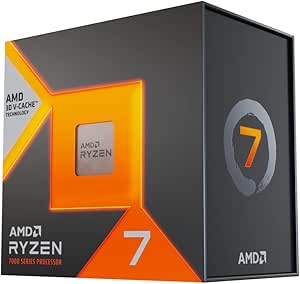
AMD Ryzen 7 9800X3D 8-Core 16-Thread Desktop Processor
This CPU is widely regarded as the king of gaming processors due to its massive 96 MB L3 cache. The 3D V-Cache technology drastically reduces latency, providing higher frame rates in complex titles than any other consumer chip. While the Ryzen 5 9600X offers great value, the 9800X3D delivers a tangible performance ceiling that enthusiasts demand. It operates efficiently for its power class, though the 140 W TDP necessitates a robust cooling solution. Unlike the Ryzen 7 7800X3D, this newer generation offers improved thermal management and higher base clocks.
Pros:- Industry-leading gaming performance via 3D V-Cache
- High boost clock of 5.2 GHz
- Drop-in compatibility with existing AM5 boards
- Efficient Zen 5 architecture
Cons:- No cooler included in the box
- Premium price tag compared to non-X3D models
Best for: Hardcore gamers who want the absolute highest frame rates and lowest latency in CPU-bound titles.
Not ideal for: Budget-conscious builders, as the premium price point is hard to justify for casual gaming.
- Cores/Threads:8 Cores / 16 Threads
- Base/Boost Clock:4.7 GHz / 5.2 GHz
- L3 Cache:96 MB
- Architecture:Zen 5 with 3D V-Cache
- TDP:140 Watts
- Socket:AM5
Our verdict“If budget is no object and you want the best possible gaming experience, this is the definitive choice.”
AMD Ryzen 7 7800X3D 8-Core, 16-Thread Desktop Processor
The Ryzen 7 7800X3D remains a formidable contender, offering the same 96 MB cache advantage as its successor but at a lower thermal output. With a 120 W TDP, it is easier to cool than the Ryzen 7 9800X3D, making it attractive for compact builds. While the Ryzen 5 9600X is cheaper, the 7800X3D provides a significant jump in gaming consistency and frame stability. It lacks the raw IPC gains of the Zen 5 architecture, but for many gamers, the price-performance gap makes it a smarter long-term investment.
Pros:- Excellent gaming performance with 3D V-Cache
- Lower 120W TDP than the 9800X3D
- Strong multitasking with 8 cores and 16 threads
- AM5 platform longevity
Cons:- Requires an aftermarket cooler for best results
- Older Zen 4 architecture compared to newer rivals
Best for: Gamers who want top-tier cache performance but prefer a cooler-running chip than the latest generation.
Not ideal for: Those who need the absolute latest architecture features or highest single-thread clock speeds.
- Cores/Threads:8 Cores / 16 Threads
- Base/Boost Clock:4.2 GHz / 5.0 GHz
- L3 Cache:96 MB
- Architecture:Zen 4 with 3D V-Cache
- TDP:120 Watts
- Socket:AM5
Our verdict“This is a smart alternative for those who want near-flagship gaming performance with lower heat output.”
Corsair RM1000e (2025) 1000W ATX 3.1 Fully Modular Power Supply
Powering a system with a Ryzen 7 9800X3D and a high-end GPU demands reliable, clean energy. The Corsair RM1000e meets this need with ATX 3.1 compliance and a native 12V-2×6 connector, eliminating the need for adapters. Its Fully Modular design ensures clean cable management, which is critical in cases like the MUSETEX Y6 where visibility is key. While 1000W may seem excessive for mid-range builds, it provides ample headroom for transient spikes in next-generation graphics cards. The seven-year warranty reflects Corsair’s confidence in its industrial-grade components.
Pros:- Native 12V-2×6 connector for modern GPUs
- Fully modular cabling for easy installation
- Cybenetics Gold efficiency rating
- Seven-year manufacturer warranty
Cons:- Includes obsolete PATA connectors
- Overkill wattage for mid-range systems
Best for: Builders using high-end GPUs and CPUs who need native ATX 3.1 support and clean cable management.
Not ideal for: Entry-level builds with under 500W total load, where this wattage is unnecessarily large and costly.
- Wattage:1000W
- Modularity:Fully Modular
- Standards:ATX 3.1, PCIe 5.1
- Fan Size:120mm
- Warranty:7 Years
Our verdict“This unit is the reliable backbone for high-performance rigs requiring next-gen power standards.”
MSI MAG A750GL PCIE5 750W Fully Modular Gaming Power Supply
This unit stands out for its native ATX 3.1 compliance, meaning it includes the new 12V-2×6 connector required by modern high-power GPUs without needing messy adapters. Compared to the Corsair RM1000e, the MSI MAG A750GL offers a more compact footprint, which is ideal for mid-tower builds where cable clutter is a concern, though it lacks the 1000W headroom needed for extreme overclocking. The 10-year warranty provides peace of mind that rivals premium brands, while the fully modular design ensures you only use the cables you need. However, the 12cm fan can become audible under sustained heavy loads, a tradeoff for its smaller size. It is the logical choice for builders who want next-gen compatibility without paying for excess wattage.
Pros:- Native ATX 3.1 and PCIe 5.1 support eliminates adapter cables
- Fully modular design simplifies cable management in tight cases
- 10-year limited warranty offers long-term reliability assurance
- Compact size fits easily into standard mid-tower chassis
Cons:- 12cm fan may produce noticeable noise under heavy load
- 750W capacity limits upgrade path to higher-end GPUs
Best for: Gamers building mid-range systems with RTX 4070 or RX 7800 XT class cards who need native ATX 3.1 support.
Not ideal for: Enthusiasts planning for multi-GPU setups or future high-end GPUs that require 1000W+ headroom.
- Wattage:750W
- Form Factor:ATX
- Modularity:Fully Modular
- Standards:ATX 3.1 & PCIe 5.1 Ready
- Cooling:12cm Air Fan
- Dimensions:12 x 9 x 5 inches
- Warranty:10 Year Limited
Our verdict“A smart, future-proof choice for mid-range gaming builds that prioritizes clean cable management and native next-gen connectivity.”
HYTE Y70 Touch Infinite ATX Mid-Tower PC Case – Snow White
The HYTE Y70 Touch Infinite redefines the case category by integrating a 14.9-inch 2.5K LCD touchscreen directly into the side panel, offering dynamic customization that static glass cannot match. Unlike the MUSETEX K2, which focuses on raw cooling capacity and value, the HYTE prioritizes visual impact with its panoramic glass and dual-chamber layout. While it supports massive cooling with dual 360mm radiators, the front I/O is surprisingly sparse, offering only two USB 2.0 ports, which feels dated for a premium chassis. This case is not just a housing; it is a centerpiece. It demands a high-end build to justify its presence, making it less suitable for budget-conscious builders who prioritize function over form.
Pros:- Integrated 14.9″ 2.5K LCD touchscreen enables unique system monitoring
- Panoramic glass and dual-chamber design maximize hardware visibility
- Included PCIe 4.0 riser allows for stylish vertical GPU mounting
- Supports up to 10 fans and dual 360mm radiators for extreme cooling
Cons:- Front I/O limited to only two USB 2.0 ports
- Large physical footprint requires significant desk space
- Premium pricing reflects the integrated LCD technology
Best for: High-end PC builders who want a showpiece with integrated LCD customization and premium white aesthetics.
Not ideal for: Builders on a budget or those who need extensive front-panel connectivity for frequent peripheral swapping.
- Case Type:Mid Tower
- Color:Snow White
- Display:14.9″ 2.5K LCD Touchscreen
- Touch Capability:10-point multi-touch
- Cooling Capacity:Up to 10 fans, Dual 360mm radiators
- GPU Support:Vertical mount, 4 slots
- Riser Cable:PCIe 4.0 x16 included
- USB Ports:2x USB 2.0
Our verdict“A visually stunning flagship case for enthusiasts who treat their PC as a piece of art and desire integrated screen customization.”
MUSETEX ATX PC Case 7 PWM ARGB Fans Pre-Installed, Type-C Mid Tower Computer Case with Full-View Dual Tempered Glass, Gaming PC Case, Black(K2)
If the HYTE Y70 is about luxury, the MUSETEX K2 is about raw utility and value. It comes with seven pre-installed PWM ARGB fans, a configuration that would cost significantly more to assemble separately in other cases. The 270° panoramic glass design offers a wider field of view than traditional single-pane cases, allowing users to showcase components from multiple angles. While it lacks the integrated LCD of premium competitors, its cooling potential is exceptional, supporting up to 360mm radiators and 400mm GPUs. The build quality is solid for the price point, though the plastic materials feel less dense than high-end aluminum chassis. This is the go-to option for gamers who want maximum airflow and lighting out of the box without breaking the bank.
Pros:- Includes 7 pre-installed PWM ARGB fans for immediate cooling and lighting
- 270° panoramic tempered glass provides superior hardware visibility
- Supports large GPUs (up to 400mm) and 360mm liquid coolers
- Includes modern Type-C front I/O port for fast data transfer
Cons:- Plastic construction feels less premium than aluminum alternatives
- Seven fans may create significant noise if not tuned carefully
Best for: Value-conscious builders who want extensive pre-installed cooling and lighting without buying extra fans.
Not ideal for: Users seeking premium metal construction or minimalist aesthetics without RGB lighting.
- Case Type:Mid Tower
- Color:Black
- Included Fans:7 PWM ARGB Fans
- GPU Clearance:Up to 400 mm
- CPU Cooler Clearance:Up to 165 mm
- Radiator Support:Up to 360 mm
- Front I/O:Type-C, 2x USB 3.0
- Glass Type:Dual Tempered Glass (270° view)
Our verdict“An excellent value proposition for gamers who prioritize cooling capacity and visual flair right out of the box.”
ARCTIC MX-4 (4 g) – Premium Performance Thermal Paste
Thermal paste is often overlooked, but the ARCTIC MX-4 remains the benchmark for reliability and ease of use. Its carbon microparticle formula delivers high thermal conductivity without the electrical conductivity risks associated with liquid metals, making it safe for beginners and experts alike. Unlike cheaper pastes that dry out within a year, MX-4 boasts a durability of up to eight years, meaning you likely won’t need to reapply it for the life of your current build. While premium enthusiast pastes might offer slightly lower temperatures for extreme overclockers, the performance gap is negligible for standard gaming scenarios. It is the default recommendation for any PC builder installing a CPU cooler, whether you are pairing it with an AMD Ryzen 7 7800X3D or a high-end Intel chip.
Pros:- High thermal conductivity using carbon microparticles
- Non-electrically conductive formula prevents short-circuit risks
- Long-lasting durability of up to eight years
- Ideal viscosity makes application easy and mess-free
Cons:- Slightly higher price per gram than basic silicone pastes
- Overkill for low-power office PCs with stock coolers
Best for: All PC builders, from beginners to enthusiasts, seeking a safe, long-lasting, and high-performance cooling solution.
Not ideal for: Extreme overclockers seeking the absolute lowest temperatures via liquid metal compounds.
- Type:Thermal Paste
- Weight:4 g
- Composition:Carbon Microparticles
- Conductivity:Non-Electrically Conductive
- Durability:Up to 8 Years
- Application:CPU and GPU
- Viscosity:Easy Application
Our verdict“The standard-setting choice for thermal interface material, balancing safety, longevity, and top-tier performance.”
ASUS ROG Strix B650-A Gaming WiFi AMD B650 AM5 Ryzen™ Desktop 9000 8000 & 7000 ATX motherboard
The ASUS ROG Strix B650-A strikes a compelling balance between features and price for AMD AM5 builds. It provides robust 12+2 power stages capable of handling Ryzen 7 and even Ryzen 9 processors, offering headroom that budget boards lack. Compared to entry-level B650 options, this board includes WiFi 6E and a PCIe 5.0 M.2 slot, future-proofing storage and networking. The massive VRM heatsinks ensure stable performance during extended gaming sessions, a critical advantage over boards with minimal cooling. While it lacks the extensive USB connectivity and dual PCIe 5.0 slots found on expensive X670E boards, those features are rarely necessary for gamers. It is the sweet spot for those building a high-performance gaming rig without paying for workstation-level connectivity.
Pros:- Robust 12+2 power stages support high-end Ryzen CPUs
- Includes WiFi 6E and 2.5G LAN for fast wireless and wired networking
- PCIe 5.0 M.2 slot with heatsink for next-gen storage speeds
- Effective VRM thermal design maintains stability under load
Cons:- Only one PCIe 5.0 M.2 slot (others are PCIe 4.0)
- USB port count is lower than premium X670E alternatives
Best for: Gamers building AMD Ryzen 7000 or 9000 series systems who need reliable power delivery and modern connectivity.
Not ideal for: Workstation users requiring massive USB expansion or multiple PCIe 5.0 devices.
- Socket:AM5
- Chipset:AMD B650
- Memory Support:DDR5 up to 128GB
- Power Phases:12 + 2 Stages
- Networking:WiFi 6E, 2.5G LAN
- M.2 Slots:1x PCIe 5.0, 2x PCIe 4.0
- Form Factor:ATX
- USB Ports:USB 3.2 Gen 2×2 Type-C
Our verdict“The ideal foundation for a high-performance AMD gaming PC, offering essential modern features without unnecessary premium costs.”
How We Picked
I evaluated these components based on their impact on real-world gaming performance, thermal efficiency, and long-term platform viability. For processors, I looked beyond core counts to focus on cache architecture and single-threaded performance, which dictate frame rates in competitive and AAA titles. Power supplies were judged on their ATX 3.1 compliance and transient spike handling, ensuring they can support modern GPUs without shutting down under load.
Case selection prioritized airflow potential and cable management ease, as poor chassis design often throttles otherwise powerful hardware. I also considered the ecosystem compatibility of each part, ensuring that the motherboard, CPU, and PSU recommendations work harmoniously together. This approach ensures that every recommendation serves a specific role in a balanced build, rather than just listing high-spec items in isolation.
Factors to Consider When Choosing Best Gaming Pc Components
Selecting the right parts requires understanding how they interact. Here are the critical factors to weigh before purchasing.
CPU Selection: Cache vs. Core Count
Many beginners mistakenly assume more cores equal better gaming performance, but this is rarely true in 2027. Games rely heavily on single-core speed and low latency, which is why 3D V-Cache technology in chips like the Ryzen 7 9800X3D dominates. A 6-core processor with massive cache often outperforms a 16-core chip in gaming scenarios. Unless you are also streaming or rendering video, prioritize cache size and clock speed over raw core counts. This distinction saves money that can be better spent on your graphics card.
Power Supply Standards and Headroom
Modern GPUs can draw sudden, massive spikes in power that trip older power supplies. You need an ATX 3.1 compliant PSU that handles these transient loads gracefully. Choosing a unit with at least 20% more wattage than your system requires provides safety headroom and keeps the fan quieter under load. For example, a 750W unit is sufficient for mid-range builds, but 1000W is safer for high-end cards. Always check for native 12V-2×6 connectors to avoid using unreliable adapters.
Case Airflow and Thermal Dynamics
A beautiful case that suffocates your components is a poor investment. Look for chassis with mesh front panels and support for multiple intake fans rather than sealed glass fronts. The MUSETEX Y6 and HYTE Y70 both excel here, but they serve different aesthetic goals. Ensure the case supports your CPU cooler height and GPU length before buying. Poor airflow leads to thermal throttling, where your expensive CPU slows down to protect itself, negating its performance benefits.
Motherboard Connectivity and Future-Proofing
You do not need the most expensive motherboard for gaming. A B650 chipset board offers all the features a gamer needs, including PCIe 4.0 slots and DDR5 support. Higher-end X670 boards add extra lanes for multi-GPU setups or extensive storage arrays, which most gamers never utilize. Focus on the number of M.2 slots for storage and the quality of the VRMs for CPU stability. Overpaying for unused features detracts from your GPU budget, which has a far greater impact on frame rates.
The Value of Thermal Paste and Accessories
While often overlooked, thermal paste quality affects sustained performance during long gaming sessions. Pre-applied pastes on stock coolers are adequate, but aftermarket options like Arctic MX-4 offer better conductivity for custom cooling loops or tower coolers. This small component ensures efficient heat transfer from the CPU to the cooler. Do not skimp on this detail, as a 5-degree difference can determine whether your system remains quiet or becomes noisy during peak loads.
Frequently Asked Questions
Is it worth buying the Ryzen 7 9800X3D over the 7800X3D for a new build?
The Ryzen 7 9800X3D offers improved architecture and higher clock speeds compared to the 7800X3D, resulting in better performance in both gaming and productivity tasks. However, if the 7800X3D is significantly cheaper, it remains an excellent choice for pure gaming. The 9800X3D makes more sense if you want the absolute highest frame rates or if you plan to use the PC for content creation alongside gaming. For most gamers, the performance gap is noticeable but not always worth the price premium unless you are chasing maximum settings at high refresh rates.
Do I really need an ATX 3.1 power supply for a mid-range build?
Yes, even for mid-range builds, an ATX 3.1 power supply is recommended because it handles transient power spikes better than older ATX 2.0 units. Modern GPUs, even mid-range ones, can draw double their rated power for microseconds, which can trip older protections. Using a compliant PSU ensures system stability and prevents unexpected shutdowns during intense gaming sessions. Additionally, these units often come with native connectors for newer GPUs, improving cable management and reducing fire risks associated with adapters.
Can I use a budget case like the MUSETEX Y6 with high-end components?
You can physically fit high-end components in the MUSETEX Y6, but you must verify clearance for your specific GPU and CPU cooler. The case comes with multiple fans, which helps with airflow, but its build quality and sound dampening are lower than premium options. If you prioritize performance and silence, a higher-end case might be better. However, for a budget-focused build where every dollar counts, the MUSETEX Y6 provides adequate cooling and space, making it a viable option for mid-to-high-end systems if you manage cable routing carefully.
Is the ASUS ROG Strix B650-A motherboard sufficient for overclocking?
The ASUS ROG Strix B650-A is capable of handling mild to moderate overclocking on unlocked Ryzen processors, thanks to its robust 12+2 power stage design. It does not offer the extreme overclocking headroom of X670E boards, but that level of tweaking is rarely needed for gaming. For most users, enabling EXPO for memory and letting the CPU boost automatically is sufficient. This board strikes a good balance between features and price, providing stable performance for daily gaming without the complexity of high-end enthusiast boards.
How does the HYTE Y70 Touch Infinite compare to traditional cases for gaming?
The HYTE Y70 Touch Infinite prioritizes visibility and aesthetics over traditional airflow-focused designs. Its panoramic glass view allows for a stunning showcase of components, which is ideal for builders who enjoy custom lighting and displays. However, glass panels can trap heat more than mesh fronts, so you must ensure positive pressure with adequate intake fans. It is better suited for users who value visual impact and have controlled ambient temperatures, whereas traditional mesh cases are better for maximizing raw cooling performance in hot environments.
Conclusion
Choosing the right components depends on your specific priorities and budget. For the best overall performance, the AMD Ryzen 7 9800X3D paired with the Corsair RM1000e provides a stable, high-frame-rate foundation. If you are building on a budget, the AMD Ryzen 5 9600X and MUSETEX Y6 case offer exceptional value without sacrificing core gaming capabilities. For those seeking premium aesthetics, the HYTE Y70 Touch Infinite combined with the ASUS ROG Strix B650-A creates a visually striking and technically sound rig. Beginners should start with the AMD Ryzen 7 7800X3D and MSI MAG A750GL for a balanced, easy-to-assemble system that handles modern titles with ease. Always prioritize the GPU and CPU synergy, as these two components dictate your gaming experience more than any other part.