
TL;DR
The article matches five AI workloads to hardware: cloud model agents and small private assistants can run on a Mac mini, while very large open models need more memory, such as the Mac Studio’s top configuration. Nvidia PCs suit CUDA-first tools, and cloud APIs remain the route to leading closed models. The recommendations are based on published specifications and software documentation, not comparative performance tests.
The guide’s central distinction is whether the model runs locally. An agent that calls a cloud model mainly needs a computer to keep its workflow, files and tools running. Apple lists the base Mac mini’s idle power at 4 watts, making it a compact option for an always-on agent. But the guide cautions that the model and prompts still go to the cloud, and an agent may act with the user’s account access.

Get the latest gadgets delivered free with Prime
- Fast, free delivery on millions of items
- Prime Video, Amazon Music and more included
- Member-only deals all year
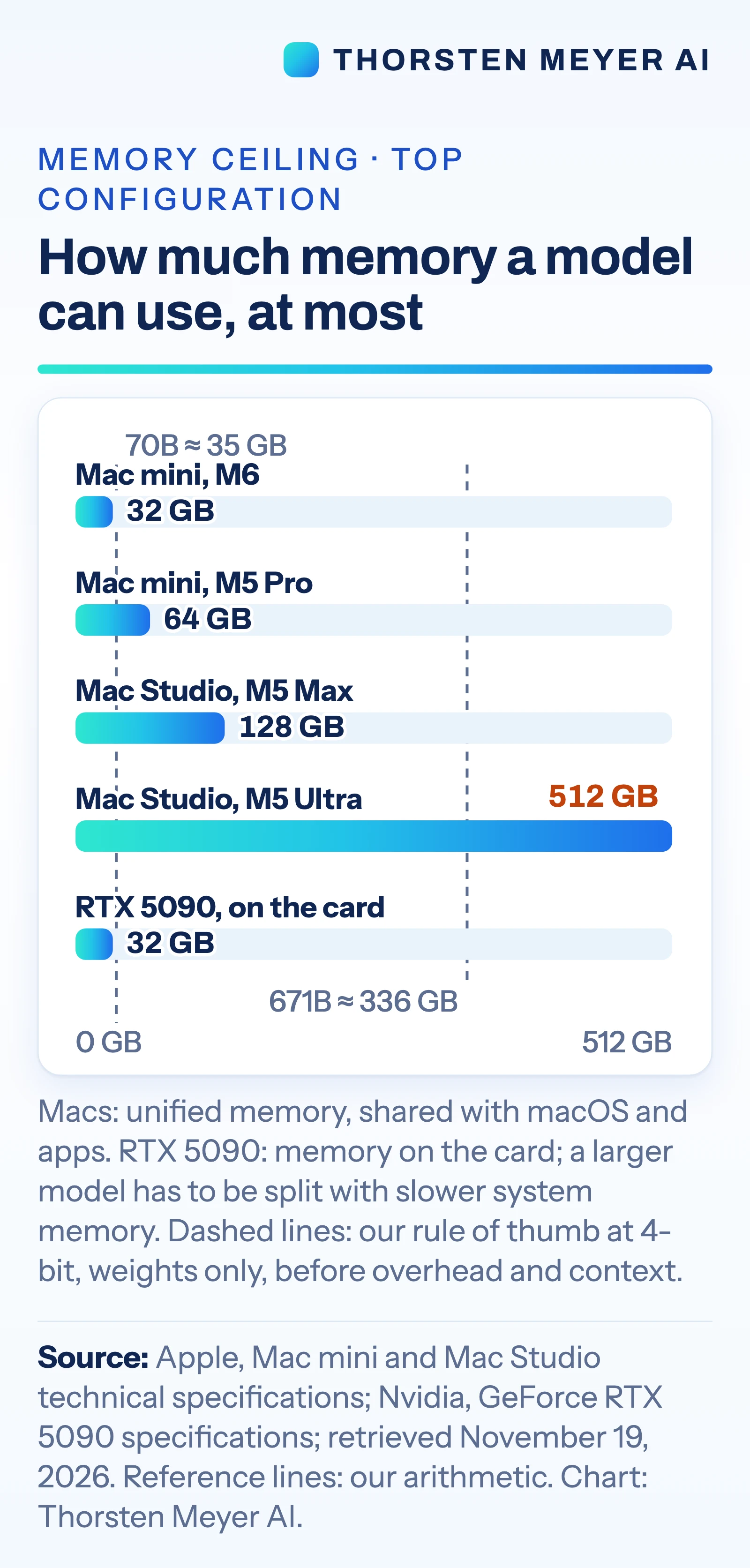
For local models, the guide puts memory first. It says the Mac mini supports up to 64 GB of unified memory; the Mac Studio supports up to 128 GB with M5 Max or 512 GB with M5 Ultra. Nvidia’s GeForce RTX 5090 has 32 GB of on-card memory. As a rough estimate for weights alone, the article uses about half a gigabyte per billion parameters at 4-bit precision: roughly 35 GB for a 70-billion-parameter model and 336 GB for a 671-billion-parameter model. Actual memory needs also include overhead and conversation context.
The guide assigns Nvidia PCs to tools optimized for CUDA, including serving workloads and larger fine-tunes. It says vLLM provides CUDA binaries and points Apple silicon users to a community-maintained plugin. For smaller fine-tunes, it cites Apple MLX support for LoRA and QLoRA and PyTorch’s GPU support on Mac. It also notes the practical tradeoffs: the RTX 5090 card is rated at 575 watts, and Nvidia recommends a 1,000-watt system power supply; Apple lists up to 385 watts for the M5 Ultra Mac Studio system.
Hardware Choice Depends on the Workload
The comparison matters because the phrase “run AI locally” covers very different jobs. An always-on agent that sends requests to a cloud model does not need the same memory or graphics hardware as a private local assistant, while serving many users or using CUDA-first software points toward a different setup again. Choosing for the actual workload can avoid paying for capacity that an agent does not use, or buying a machine whose memory cannot hold a desired model.
There are tradeoffs beyond model size. Local inference can keep a small open model and its inputs on the machine, but the guide says answers may be slower than those from large cloud services. With a cloud API, users can access leading closed models, but incur per-token charges and send prompts and data off-device. The article frames these as decision factors rather than a single best machine for everyone.
Power and setup also affect the choice. The quoted power figures are not directly equivalent measurements: one is the maximum draw of an entire Mac Studio system, while 575 watts is the RTX 5090 card’s rating. The guide says clustering Macs is possible but requires Thunderbolt 5 connections between each pair and a macOS Recovery setting; the base M6 Mac mini has Thunderbolt 4. That makes a multi-Mac setup a project, not a simple extension of one desktop.
Products Worth Considering

Bose QuietComfort Ultra Headphones (2nd Gen), Wireless Noise-Cancelling Over-Ear Headphones, Driftwood Sand

Sony WH-1000XM6 Wireless Noise-Cancelling Headphones – Midnight Blue

Jackery HomePower 3000 Portable Power Station, 3072Wh, 3600W
As an affiliate, we earn on qualifying purchases.
From Mac Mini to Cloud API
The article follows an earlier piece, published three days before November 19, about what a Mac mini with 16 to 64 GB of memory might run. It broadens that discussion into a job-by-job comparison that includes Mac Studio systems, Nvidia graphics cards and cloud services. The source says its hardware figures came from Apple and Nvidia specification pages and documentation for the software tools, checked on November 19, 2026.
Apple introduced its new Mac mini on August 25, 2026, according to the source. It quotes Apple’s launch description calling the computer “the leading desktop for always-on agentic computing.” That is Apple’s characterization; the article’s workload matches are its own reading of specifications and documentation, and it explicitly says they are not buying recommendations.
The guide estimates model weight memory using a 4-bit rule of thumb, but weights are only part of what a running model needs. It also notes that memory on these Macs is fixed at purchase. For very large models, it presents the M5 Ultra’s 512 GB pool as a capacity option, while cautioning that it has no independent speed tests at that scale. The listed U.S. starting price for that configuration’s Mac Studio is $5,499, as of November 19.
“Memory first”
— The article’s author
Performance and Costs Need Testing
The source provides specifications and software documentation, but no independent speed comparisons for these machine and workload pairings. It says there are no independent speed tests for running models of hundreds of billions of parameters on the cited Mac Studio configuration. Response speed, throughput and practical capacity will depend on the model, quantization, context length, software and workload; the memory estimates cover weights only.
The guide does not quantify cloud API bills, electricity costs, setup effort or the performance difference between local and hosted models. Nor does it establish that a given configuration will meet a particular user’s privacy or security needs. Its statement that leading closed models are available only through the cloud describes the options covered by the article; no named models or service terms are detailed.
Specifications and product availability can change after the stated November 19 check. The article also gives no independent test of the community-maintained Apple silicon plugin for vLLM or of multi-Mac clustering performance. Those details leave actual results and total ownership costs open.
Test Against Your Own AI Tasks
The source does not announce a follow-up test or a scheduled product milestone. Its practical next step is to match hardware to a specific workload, then try that workload on the intended setup: identify whether the model is local or cloud-based, estimate memory for weights plus context, and check whether the software relies on CUDA or supports Apple silicon.
Before making a purchase, readers would need current prices and specifications, along with direct tests using their own models, documents and expected user load. For cloud services, that means checking current per-token pricing and data handling terms; for local systems, it means measuring speed, memory use, power and setup demands. The guide’s comparisons should be treated as a starting point until those results are available.
Key Questions
Which machine does the guide suggest for an always-on agent that uses a cloud model?
It points to a Mac mini or an existing Mac, because the computer mainly runs the agent workflow while the model runs in the cloud. The prompts and model requests still leave the machine.
How much memory does the guide list for the Mac Studio and RTX 5090?
It lists up to 512 GB of unified memory for a Mac Studio with M5 Ultra, and 32 GB of on-card memory for Nvidia’s GeForce RTX 5090. These figures describe different hardware arrangements and do not establish comparative speed.
Does the article show that a Mac Studio is faster than an Nvidia PC?
No. It draws workload matches from published specifications and tool documentation, and reports no independent speed tests for very large models on the cited Mac Studio. Real performance depends on the model, software and task.
Why choose a cloud API?
The guide says cloud APIs provide access to the strongest leading closed models discussed in the article. They involve per-token charges, and prompts and data are sent off the local machine.
Can a Mac be used for fine-tuning?
The source says Apple’s MLX tools support LoRA and QLoRA, and PyTorch supports GPU training on Mac. It describes small fine-tunes as possible, while noting that fine-tuning needs more memory than running the same model.
Source: Thorsten Meyer AI