
TL;DR
Wireless charging stations transfer energy through coils, so you can charge compatible devices without plugging a cable into each one. For dependable charging, match the station’s standard and power to your device, place it carefully, and keep an eye on heat. A tidy charging spot can save daily hassle, though wired charging is often faster and more energy efficient.
Your phone lands on a charging pad, the screen lights up, and you walk away. Later, you pick it up to find the battery barely moved. That small annoyance captures the promise and the catch of wireless charging stations: they can make charging feel effortless, but only when the device and charging setup work well together.

Get the latest gadgets delivered free with Prime
- Fast, free delivery on millions of items
- Prime Video, Amazon Music and more included
- Member-only deals all year
This guide explains how a station sends power through the air gap between two coils, why Qi compatibility and placement matter, and when heat or a bulky case can slow things down. You’ll also get a practical way to compare single-device pads, multi-device stands, and newer Qi2 magnetic chargers before buying.
The goal is simple: help you choose a charger that fits your desk, bedside table, or travel routine. You’ll learn what to check so you can let people charge compatible devices without plugging a cable into every phone or pair of earbuds—and know when a cable still makes more sense.
Check your phone’s Qi or Qi2 support and its accepted power level before buying a station.
Treat advertised maximum wattage as a ceiling for supported setups, not a promise of your phone’s charging speed.
Keep the charging surface clear and remove thick cases, metal objects, or accessories if charging stops.
Use a firm, ventilated spot; stop if your phone or charger becomes unusually hot or damaged.
Choose wireless for an easy daily landing spot and wired charging when speed or energy efficiency matters more.
How a wireless charging station sends power to your phone
A wireless charging station transfers energy between coils in the charger and device using electromagnetic induction. The station’s coil creates a magnetic field; a nearby coil in your phone turns that energy into electricity. In practice, your phone needs to sit close to the charging surface, with the coils lined up well enough to transfer power.
Think of the pad as a small landing zone. Set a compatible phone on it and you can skip plugging a cable into the phone itself. But unlike a wide-open cable connection, the pad has a sweet spot. On a flat, round pad, shifting the phone a couple of centimeters may move its coil away from the charger’s coil; a stand often makes the target easier to hit.
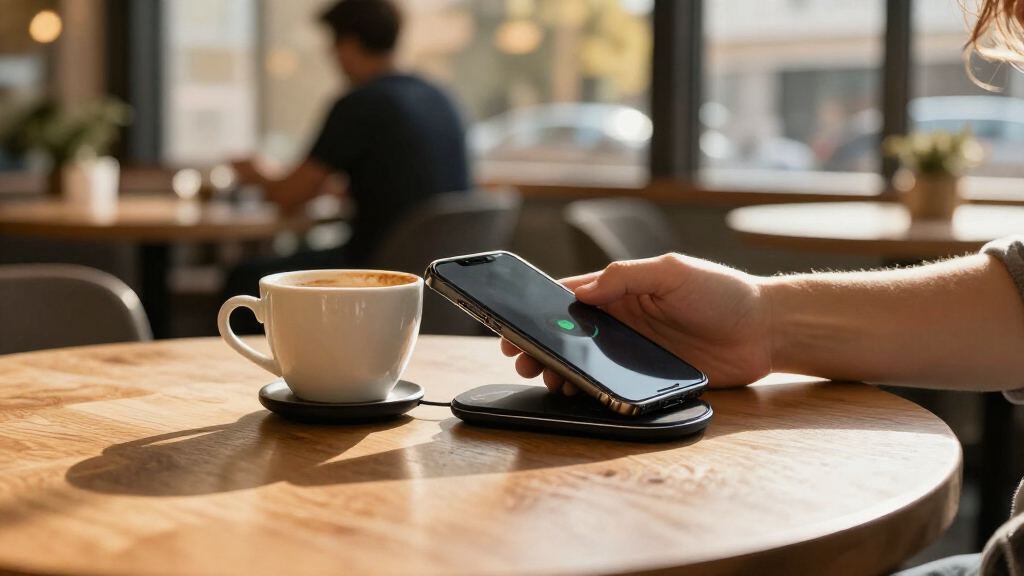
For instance, imagine putting your phone on a dark bedside pad before sleep. If the charging symbol appears, the coils have connected well enough to start. If it doesn’t, slide the phone gently until the screen responds. A faint vibration or charging icon is useful feedback, but check the battery later if the phone has a thick case or the pad feels unusually warm.
Wireless charging stations use a standard called Qi for many phones and accessories, though a matching standard alone doesn’t guarantee identical speed. The station and device negotiate how much power to use, and the phone can lower that rate if it detects heat. Wireless charging means fewer daily cable connections; it doesn’t mean that power transfer happens without contact, alignment, or limits.
Products Worth Considering
DJI Mic 3 (2 TX + 1 RX + Charging Case), Wireless Microphone

Bose Smart Ultra Dolby Atmos Soundbar with Voice Control, HDMI eARC, Black

DJI Osmo 360 Road Cycling First-Person Combo Action Camera
As an affiliate, we earn on qualifying purchases.
Check these compatibility details before you buy
A wireless charging station works with your device only when both support a compatible charging standard and power level. Many phones and accessories use Qi, while newer Qi2 products add magnetic alignment for compatible devices. Before ordering, check the device maker’s specifications and the station’s supported devices rather than relying on a product photo or a large wattage number.
The advertised maximum describes what a charger can supply under supported conditions; it does not promise your phone will accept that much. Your phone may support a lower rate, or it may require a particular adapter to reach its fastest wireless speed. Some manufacturers also use proprietary charging features, so a general-purpose station can still charge the phone but at a slower rate.
Here’s a familiar shopping trap: you see a three-in-one stand that claims high output and assume your phone, earbuds, and watch will all charge at that speed. Each spot may support a different device type and power level, and some watches need a brand-specific charger. Look at the fine print for each charging area, the included power adapter, and the maker’s current compatibility guidance.
Qi2 magnetic alignment can help a compatible phone settle into the right position instead of sliding off-center. That convenience depends on both the phone and charger supporting the feature; a magnetic ring or case alone does not establish compatibility or guarantee a particular speed. Product generations and certification listings change, so verify current details when you shop.
Practical check: Match the device, charging standard, and supported power level first. Treat the station’s maximum wattage as a ceiling for compatible setups, not a promise for every phone.
Choose a pad or stand that fits your everyday routine
The right wireless charging station is the one that makes your regular charging spot easier to use. A flat pad suits a desk where your phone can lie beside your keyboard; an upright stand keeps the screen visible for calls or a clock. A multi-device station can tidy a bedside table by giving your phone, earbuds, and watch separate places to land.
That tidiness has tradeoffs. A station with several charging areas can still limit which devices fit each area, and its available power may be divided or managed across devices. A compact travel pad takes little space but may be fussier about alignment. A large home stand can feel like a command center, though it needs enough room and a suitable adapter to power every position.
Use this quick sequence before you buy:
- List the devices you want to charge and check each one’s standard and power needs.
- Choose a form that suits where you’ll use it: flat for a desk, angled for a nightstand, or multi-device for a shared charging spot.
- Check the adapter and confirm whether it comes in the box or you need to supply one with the required output.
- Review case and placement guidance, especially if your phone case has a thick back, metal stand, or magnetic accessory.
For instance, if you use your phone as an alarm, an upright stand lets you glance at the time without fumbling through a charging cable. If you share a hallway shelf with a partner, a two-phone station may reduce cable clutter, but only if both phones can use its charging areas. Convenience comes from a station that suits the spot you’ll use every day.
Keep placement, cases, and accessories from slowing charging
Wireless charging stations work best when the device and pad coils sit close together without anything interfering between them. Misalignment, a thick case, metal parts, and some accessories can slow charging or stop it altogether. If the phone won’t charge, check the position and remove anything between the phone and pad before assuming the station has failed.
A thin case may work without a second thought, while a case with a metal kickstand can block or disrupt charging. A wallet attachment can have the same effect, and a coin left on a pad can interfere with the charging area. Move small metal objects away from the surface and follow the device maker’s guidance on cases. When in doubt, try charging with the case off to see whether it changes the result.
Picture a phone placed on a desk pad beneath a thick wallet case. The screen gives no sign of charging, so you lift the phone, remove the wallet, and set it down again. If the charging icon appears, you’ve found the obstruction; if it doesn’t, check the adapter, cable to the pad, and compatibility information. That simple sequence often saves a needless replacement purchase.
Magnetic alignment helps compatible Qi2 devices settle into position, which can make a stand feel more forgiving than a plain flat pad. Still, magnets don’t solve every fit problem: the phone and charger must support the relevant feature, and bulky or unsuitable accessories can get in the way. Keep a clear patch on the charging surface and use the same placement each time.
Understand the tradeoffs in speed, heat, and electricity
Wireless charging is often slower and less energy efficient than wired charging, though the difference depends on your specific devices and conditions. Some energy becomes heat during transfer, and the phone may reduce charging speed if the charger or battery gets too warm. A high-power station cannot override a phone’s charging limits or make poor alignment disappear.
For example, you place your phone on a pad during a video call, then notice it feels warm and the battery percentage creeps upward. The screen is using power while the charger works, and the phone may be limiting the rate to manage temperature. Try letting the phone rest, moving it off a soft blanket, and using a ventilated, firm surface. If the charger or phone becomes unusually hot, stop using it and follow the maker’s guidance.
Wireless charging also typically draws more electricity from the outlet than the device ultimately stores because energy transfer has losses. The amount varies by station and charging conditions. That may be a reasonable trade for a bedside spot where cable convenience matters, but if you need to refill a nearly empty phone quickly before leaving, a wired charger often suits the job better.
| What matters | Wireless station | Wired charger |
|---|---|---|
| Daily convenience | Set the device down; no phone cable to plug in | Connect a cable to the device |
| Typical speed | Often slower; varies with device, alignment, and heat | Often faster, depending on charger and device |
| Energy transfer | Typically has more losses as heat | Usually more efficient |
Neither option wins for every moment. A wireless station can be a calm landing pad for overnight top-ups, while a cable can be the better tool for a fast boost. If you’re comparing products, look for clear speed and power details rather than assuming that wireless automatically means fast.
Use your station safely at home, work, or in public
A reputable wireless charging station should describe its supported devices and include appropriate safety protections, but your setup still matters. Keep the charger on a firm, ventilated surface, follow the manufacturer’s instructions, and stop using it if it is damaged or unusually hot. Don’t cover the pad with fabric or leave small metal objects on the charging area.
Overnight charging is a common use, and many people prefer a pad because they can put their phone down without hunting for a cable in the dark. Set it on a clear bedside table, use a compatible adapter, and confirm that the phone actually starts charging. If you wake to a hot phone or a charger that smells or looks damaged, unplug the station and stop using it until you can follow the maker’s safety guidance.
Public charging surfaces in cafés, cars, hotels, or shared desks can feel handy when your battery is low. They may be built into furniture or a vehicle and provide less information than your own charger about power, compatibility, or condition. Check that your device responds and monitor it if it gets warm. If a public pad doesn’t work with your phone, a cable or your own charger may be more reliable.
Wireless charging itself does not inherently damage a battery. Heat and time spent at a high charge level can affect battery aging, so temperature management matters. A phone’s built-in charging controls help manage that process, but a hot, poorly ventilated setup is still worth fixing. Keep the station clean, use equipment from a reputable maker, and replace a frayed power cable or damaged charger.
Frequently Asked Questions
Will a wireless charging station work with my phone?
Check your phone’s specifications for Qi or Qi2 support, then compare its supported power level with the station. A compatible standard means it may charge, but it doesn’t guarantee the station will provide the phone’s fastest wireless speed.
Can I charge my phone through its case?
Often, yes, if the case is not too thick and has no metal parts or accessory that interferes with the coils. If charging fails, remove the case and try again to see whether it is the cause.
Is wireless charging slower than using a cable?
Often, but the difference varies with the phone, charger, adapter, alignment, and temperature. A cable is usually the better choice when you need a quick boost; a station can be more convenient for routine top-ups.
Does wireless charging damage a phone battery?
Wireless charging does not inherently damage a battery. Heat can affect battery aging, so use a ventilated surface and stop if your phone or charger becomes unusually hot.
Can one wireless station charge my phone, earbuds, and watch?
Some multi-device stations support all three, but each charging area may have its own compatibility and power limits. Check the maker’s device list, especially for smartwatches that may require a specific charger.
Conclusion
Choose a wireless charging station by matching it to your devices, your daily charging spot, and the speed you actually need. Check compatibility and adapter details, then keep the surface clear and the phone cool.
The best station is the one your phone can find without a daily game of inch-by-inch adjustment—a small, reliable landing pad that makes charging one less thing to think about.