
🔍 Read the full analysis: 10 Best AI Gaming Laptops For Every Type Of Player To Consider In 2027 on ThorstenMeyerAI.com

Get the latest gadgets delivered free with Prime
- Fast, free delivery on millions of items
- Prime Video, Amazon Music and more included
- Member-only deals all year
TL;DR
A buyer’s guide from ThorstenMeyerAI.com compares 10 gaming-laptop listings for different player needs, including models with RTX 5070, RTX 5060 and lower-tier graphics. Its recommendations rely on listed specifications, not reported benchmark testing, and several configurations need verification before purchase.
ThorstenMeyerAI.com has published a 10-model gaming-laptop guide for players weighing graphics performance, screen quality, memory and portability. It names an ASUS ROG Strix G16 configuration with a Ryzen 9 9955HX, RTX 5060, 64GB of RAM and 1TB SSD as its best overall pick, but the recommendations are based on listed specifications rather than published benchmark results.
The guide’s strongest graphics-and-display combination is the MSI Katana 15 HX, listed with an RTX 5070 and QHD+ screen. That pairing is aimed at players seeking sharper visuals and demanding graphics, though the source cautions that a larger, performance-oriented laptop may be less appealing to people who prioritize portability. It does not provide game-by-game frame rates or the laptop’s GPU power limit.
The Acer Nitro V 16S AI is presented as a more balanced option, with an RTX 5060, 32GB of memory, 1TB SSD and 180Hz WUXGA display. A second ROG Strix G16 listing has an Intel Core i7 and 16GB of RAM, illustrating why buyers should compare the exact configuration rather than relying on a shared model name.
The source also includes the MSI Katana 17 HX, a second Katana 15 HX configuration, the Acer Predator Helios Neo 18, HP Victus, KAIGERR LX16PRO, Acer Nitro V 16S AI and the ASUS ROG Strix G16 in both Ryzen and Intel configurations. It flags the Victus listing’s RTX 3050, the KAIGERR listing’s lack of a named discrete GPU and sparse details for a customized Predator Helios Neo 18. The source provides no prices, full model identifiers or independent testing to establish how these listings compare in actual performance or value.
The 10 picks
- 1
 Acer Predator Helios Neo 18 AI Gaming Laptop (Delca Customized)View on Amazon →
- 2
 ASUS ROG Strix G16 Gaming Laptop, 16" WUXGA 165Hz, AMD Ryzen 9 9955HX, NVIDIA…View on Amazon →
- 3
 MSI Katana 15 HX Gaming Laptop (15.6" QHD+ 165Hz, Intel Core i9-14900HX, NVID…View on Amazon →
- 4
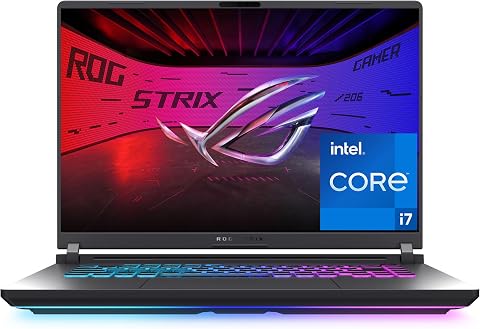 ASUS ROG Strix G16 (2025) Gaming Laptop, 16-inch FHD+ 165Hz, Intel Core i7-14…View on Amazon →
- 5
 GIGABYTE AERO X16 16-Inch Laptop with AMD Ryzen AI 7 350 and GeForce RTX 5070View on Amazon →
- 6
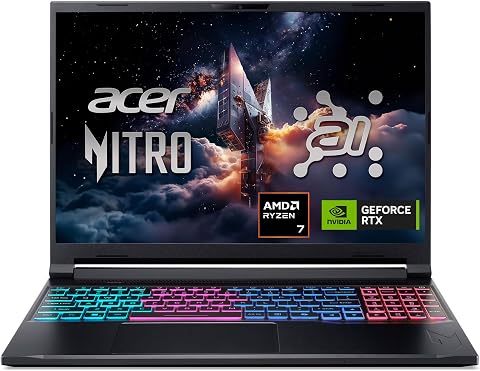 Acer Nitro V 16S AI Gaming Laptop, Ryzen 7 260, RTX 5060, 16-inch WUXGA 180Hz…View on Amazon →
- 7
 MSI Cyborg 17 17.3-inch FHD 144Hz Gaming Laptop, Intel Core 7-240H, NVIDIA Ge…View on Amazon →
- 8
 Alienware 16 Aurora Gaming Laptop, RTX 5050, Intel Core 7 240HView on Amazon →
- 9
 HP Victus 15.6" Full HD 144Hz Gaming Laptop, Intel Core i5-12450H, NVIDIA GeF…View on Amazon →
- 10
 KAIGERR LX16PRO 16-inch Gaming Laptop with AMD Ryzen 7, 16GB RAM, 512GB SSD,…View on Amazon →
Matching Hardware to Player Needs
The guide’s value is less a definitive performance verdict than a reminder that GPU, resolution and refresh rate must be considered together. A QHD+ display can show more detail, but it asks more of the graphics chip than WUXGA; a high refresh rate is most useful when a system can produce enough frames in the games a buyer plays.
Memory and storage also shape the purchase. The source treats 32GB of RAM and a 1TB SSD as a convenient starting point for many players, while noting that 64GB may be more than gaming alone requires. For shoppers, incomplete listings matter: an unnamed graphics chip or unclear upgrade options make a fair comparison difficult and can add uncertainty to the eventual cost.
Products Worth Considering

Samsung Galaxy Tab A9+ 11-Inch Android Tablet, 64GB, Graphite

Bose TV Speaker Compact Soundbar with Bluetooth and HDMI-ARC, Black

Apple Watch SE 3 GPS 40mm Smartwatch
As an affiliate, we earn on qualifying purchases.
How the Guide Compares Configurations
The source says it compared listed processors, graphics chips, memory, storage, screen size, resolution and refresh rate, then judged how those specifications suit common gaming needs. It favors a balance of hardware and out-of-box readiness, rather than ranking laptops by processor names alone.
Its own buying advice urges readers to check independent reviews for the exact configuration, especially for gaming performance, cooling, fan noise and sustained temperatures. A graphics chip’s name does not establish identical performance across laptops: power limits and cooling can differ, and the source says those details may be absent from product listings.
“The Ryzen 9 ROG Strix G16 leads on listed memory: its 64GB RAM and RTX 5060 make it the most generously provisioned all-rounder here, though the display is WUXGA rather than QHD+.”
— ThorstenMeyerAI.com, in its buying guide
Specs and Performance Still Unverified
The source does not state that it tested the laptops or provide benchmark data, prices, battery results or measured display quality. It is also unclear whether every listed configuration is currently available in the exact form described, or whether specifications vary by retailer or region.
Several decisions therefore remain open for buyers: the KAIGERR listing does not name a discrete GPU, and the customized Predator Helios Neo 18 entry has limited configuration detail. The source also does not give the GPU power limits, cooling results or upgrade and warranty terms needed to judge sustained performance and future costs. Its recommendations should be treated as specification-based guidance, not verified performance rankings.
Verify Listings Before Buying
Before purchasing, readers should confirm the full model number and component list with the retailer or manufacturer, including the GPU, memory, storage and display. They should then compare independent reviews of the same configuration for performance in their preferred games, noise, temperatures and battery life.
The guide identifies tradeoffs, but no later test results, price updates or retailer availability checks are included in the source. Those details would be needed to determine which of the 10 options offers the best value for a particular player in 2027.
Key Questions
Which laptop does the guide rank first?
It names the ASUS ROG Strix G16 with Ryzen 9 9955HX, RTX 5060, 64GB of RAM and 1TB SSD as its best overall pick. Its listed display is WUXGA rather than QHD+.
Which listed option has the highest graphics tier?
The guide lists the MSI Katana 15 HX with an RTX 5070 and QHD+ screen as its standout for demanding graphics and sharper visuals. It provides no benchmark results to quantify performance.
Are these laptops tested performance rankings?
No testing or game benchmarks are included in the source material. The rankings compare listed specifications and their apparent tradeoffs; buyers should consult independent reviews of the exact configuration.
Which listings need extra checking?
The guide flags the HP Victus with an RTX 3050, the KAIGERR LX16PRO listing that does not name a discrete GPU, and a customized Predator Helios Neo 18 listing with limited configuration details.
Source: ThorstenMeyerAI.com