
The best Razer gaming peripherals depend on whether you value wireless freedom, specialist controls, or straightforward performance. I’d make the Razer Basilisk V3 Pro my best overall pick for its versatile wireless design and customizable controls; the Viper V4 Pro stands out for competitive players, while the Naga V2 Pro suits MMO players who need more buttons. Those strengths come with tradeoffs: premium features can add complexity, wired models limit movement, and specialist layouts may not suit every game. Read on for how the 14 options compare and which one fits your setup.

Get the latest gadgets delivered free with Prime
- Fast, free delivery on millions of items
- Prime Video, Amazon Music and more included
- Member-only deals all year
Complete the kit



Key Takeaways
- The Basilisk V3 Pro is the broadest all-rounder in this lineup, while the Viper V4 Pro is the more focused choice for players who prioritize a competitive mouse design.
- The Naga models serve a different purpose from the general-purpose mice: their extra controls favor MMO commands, but can be excessive for players who mainly need a simple pointer.
- Wireless is not automatically the better fit. Wired choices such as the Cobra and BlackWidow V4 Pro avoid charging routines, while wireless models offer a cleaner, less tethered setup.
- Headset selection hinges on priorities, not just the name. The BlackShark V3 Pro adds wireless and ANC features, while the BlackShark V2 X and Kraken are simpler wired alternatives.
- Razer’s range includes both full keyboards and focused input devices. The BlackWidow V4 Pro suits broad typing and gaming needs; the Tartarus V2 is a left-hand keypad for players who want dedicated programmable controls.
| Razer Basilisk V3 Wired Ergonomic Gaming Mouse |  | Best Wired Ergonomic Mouse | Connectivity: USB wired | Hand orientation: Right-handed | Buttons: 11 programmable | VIEW LATEST PRICE | See Our Full Breakdown |
| Razer BlackWidow V4 Pro Mechanical Gaming Keyboard with Green Tactile Switches |  | Best for Macro-Heavy Setups | Switch type: Green tactile and clicky mechanical switches | Connectivity: Wired | Layout: QWERTY | VIEW LATEST PRICE | See Our Full Breakdown |
| Razer BlackShark V3 X HyperSpeed Wireless PC Gaming Headset | 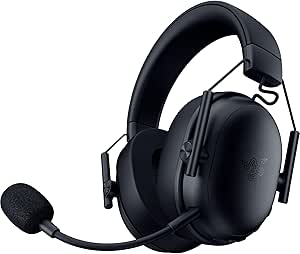 | Best Lightweight Wireless Headset | Driver size: 50 mm TriForce Gen-2 | Microphone: Detachable 9.9 mm HyperClear cardioid | Connectivity: 2.4 GHz wireless, Bluetooth, USB | VIEW LATEST PRICE | See Our Full Breakdown |
| Razer Naga V2 Pro Wireless MMO Gaming Mouse |  | Best for MMO Button Flexibility | Connectivity: 2.4 GHz wireless, Bluetooth, USB | Sensor: Focus Pro 30K optical sensor | Maximum sensitivity: 30,000 DPI | VIEW LATEST PRICE | See Our Full Breakdown |
| Razer BlackShark V3 Pro Wireless Gaming Headset with ANC, Black |  | Best Premium Noise-Cancelling Headset | Driver size: 50 mm | Microphone: Detachable 12 mm HyperClear Full Band | Connectivity: 2.4 GHz wireless, Bluetooth 5.3, USB, 3.5 mm | VIEW LATEST PRICE | See Our Full Breakdown |
| Razer Basilisk V3 X HyperSpeed Wireless Gaming Mouse |  | Best for Wireless Versatility | Connectivity: Razer HyperSpeed Wireless and Bluetooth | Controls: 9 programmable controls | Sensor: 5G Advanced optical sensor, up to 18,000 DPI | VIEW LATEST PRICE | See Our Full Breakdown |
| Razer Cobra Wired Gaming Mouse, Black |  | Best Lightweight Wired Pick | Connection: Wired | Weight: 58 g | Switches: Gen-3 optical | VIEW LATEST PRICE | See Our Full Breakdown |
| Razer DeathAdder Essential Ergonomic Wired Gaming Mouse, Black | 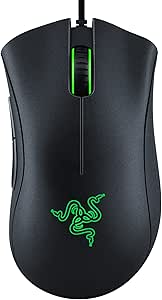 | Best for Ergonomic Simplicity | Connectivity: Wired | Sensor: Optical, up to 6,400 DPI | Buttons: 5 programmable buttons | VIEW LATEST PRICE | See Our Full Breakdown |
| Razer Kraken Wired Gaming Headset for Console and PC, Black/Blue |  | Best Multi-Platform Wired Headset | Connectivity: Wired, 3.5 mm headphone jack | Driver size: 50 mm | Surround sound: Software-enabled 7.1 on Windows 10 64-bit | VIEW LATEST PRICE | See Our Full Breakdown |
| Razer Viper V4 Pro Wireless Esports Gaming Mouse |  | Best Premium Esports Mouse | Weight: 49 g | Connectivity: Razer HyperSpeed Wireless Gen-2; USB Type-A to USB Type-C cable included | Maximum polling rate: 8000 Hz | VIEW LATEST PRICE | See Our Full Breakdown |
| Razer Naga V3 Pro Wireless MMO Gaming Mouse with Swappable Side Plates |  | Best for MMO Players | Side plate layouts: 12, 6, or 2 buttons | Programmable buttons: Up to 23 | Sensor: Razer Focus Pro 50K Optical Sensor Gen-3 | VIEW LATEST PRICE | See Our Full Breakdown |
| Razer Tartarus V2 Left-Handed Gaming Keypad with 32 Programmable Keys | 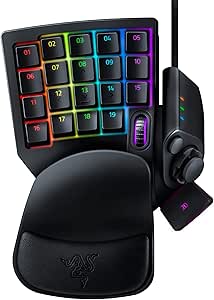 | Best for Custom Keybinds | Number of keys: 32 | Switch type: Mecha-Membrane | Connectivity: USB-A wired | VIEW LATEST PRICE | See Our Full Breakdown |
| Razer Basilisk V3 Pro Customizable RGB Wireless Gaming Mouse, Black |  | Best Premium All-Rounder Mouse | Sensor: Focus Pro 30K Optical Sensor | Programmable buttons: 11 | Connectivity: 2.4GHz Wireless, Bluetooth, USB | VIEW LATEST PRICE | See Our Full Breakdown |
| Razer BlackShark V2 X Gaming Headset |  | Best Multi-Platform Wired Headset | Driver size: 50 mm | Weight: 240 g | Connection: 3.5 mm audio jack | VIEW LATEST PRICE | See Our Full Breakdown |
| Razer gaming peripheral | Connectivity | Compatibility | Battery life |
|---|---|---|---|
| Razer Basilisk V3 Wired Ergono | USB wired | — | — |
| Razer BlackWidow V4 Pro Mechan | Wired | Windows | — |
| Razer BlackShark V3 X HyperSpe | 2.4 GHz wireless, Bluetooth, USB | PC, Mac, PS5, Nintendo Switch, smartphone | Up to 70 hours |
| Razer Naga V2 Pro Wireless MMO | 2.4 GHz wireless, Bluetooth, USB | — | Up to 150 hours on HyperSpeed; up to 300 hours on Bluetooth |
| Razer BlackShark V3 Pro Wirele | 2.4 GHz wireless, Bluetooth 5.3, USB, 3.5 mm | PC, Mac, PlayStation, Nintendo Switch, mobile devices | Up to 70 hours |
| Razer Basilisk V3 X HyperSpeed | Razer HyperSpeed Wireless and Bluetooth | — | Up to 285 hours on HyperSpeed Wireless; up to 535 hours on Bluetooth |
| Razer Cobra Wired Gaming Mouse | — | — | — |
| Razer DeathAdder Essential Erg | Wired | Gaming console, laptop, and personal computer | — |
| Razer Kraken Wired Gaming Head | Wired, 3.5 mm headphone jack | PC, PS4, PS5, Nintendo Switch, Xbox One, Xbox Series X|S, and mobile | — |
| Razer Viper V4 Pro Wireless Es | Razer HyperSpeed Wireless Gen-2; USB Type-A to USB Type-C cable included | PC and Mac with Razer Synapse 4 | Up to 180 hours at 1000 Hz; up to 45 hours at 8000 Hz |
| Razer Naga V3 Pro Wireless MMO | Razer HyperSpeed Wireless, Bluetooth, USB-C wired | — | Up to 155 hours on HyperSpeed Wireless or 280 hours on Bluetooth |
| Razer Tartarus V2 Left-Handed | USB-A wired | — | — |
| Razer Basilisk V3 Pro Customiz | 2.4GHz Wireless, Bluetooth, USB | Windows, macOS; PC | Up to 150 hours on Bluetooth, 110 hours on HyperSpeed Wireless, or 32 hours with HyperPolling dongle and dock |
| Razer BlackShark V2 X Gaming H | — | PC, Mac, PS4, Xbox One, Nintendo Switch | — |
More Details on Our Top Picks
Razer Basilisk V3 Wired Ergonomic Gaming Mouse
The Basilisk V3 is the most natural fit here for right-handed players who want a supportive shape and quick access to many commands without moving to an MMO-specific layout. Its thumb rest and 11 programmable buttons make it more versatile than the simpler Cobra Wired Gaming Mouse, while the dual-mode tilt wheel can switch between controlled scrolling and faster navigation. The 26,000 DPI optical sensor offers plenty of sensitivity adjustment, though maximum DPI alone does not determine aim quality. Unlike the wireless Basilisk V3 X HyperSpeed, this model stays tethered, so it avoids wireless charging concerns but gives up cable-free movement. I’d choose it for a desk-based setup where ergonomics and configurable controls matter more than a wireless connection. Its Windows-only listed compatibility is another limit for mixed-platform households.
Pros:- Ergonomic right-handed shape includes a thumb rest for supported grip.
- Eleven programmable buttons suit games and workflows that benefit from shortcuts.
- Dual-mode tilt wheel offers both controlled and faster scrolling.
- Eleven-zone Chroma RGB lighting allows detailed desktop customization.
Cons:- The USB cable can restrict movement compared with the Basilisk V3 X HyperSpeed.
- Listed operating system compatibility is limited to Windows 10 and Windows 11.
- The right-handed shape is not suited to left-handed users.
Best for: Right-handed PC players who want an ergonomic thumb-rest shape, programmable controls, and a wired connection.
Not ideal for: Players who need wireless freedom, left-handed ergonomics, or listed compatibility beyond Windows 10 and Windows 11.
- Connectivity:USB wired
- Hand orientation:Right-handed
- Buttons:11 programmable
- Maximum sensitivity:26,000 DPI
- Scroll wheel:Dual-mode HyperScroll tilt wheel
- RGB lighting:11 Chroma zones
- Switches:Gen 2 optical switches
- Listed operating systems:Windows 10, Windows 11
Our verdict“Choose the Basilisk V3 if you want a feature-rich, ergonomic wired mouse and do not need wireless movement.”
Razer BlackWidow V4 Pro Mechanical Gaming Keyboard with Green Tactile Switches
The BlackWidow V4 Pro is the keyboard pick for players who want dedicated controls close at hand rather than a restrained, standard layout. Its eight macro keys and programmable command dial offer more direct customization than a conventional keyboard, while clicky Green switches give each press distinct tactile and audible feedback. That character suits players who like a pronounced keystroke, but it is a poor match for shared rooms or quiet late-night sessions. Per-key Chroma lighting and the included cushioned wrist rest with underglow make the setup more visually elaborate than the simpler controls on the Basilisk V3 mouse, though they also add bulk to an already full-size, wired board. I’d rank it for macro use and desk customization, not as a universal keyboard recommendation.
Pros:- Eight dedicated macro keys provide direct access to custom commands.
- Programmable command dial adds an extra control point for supported tasks.
- Green switches deliver distinct tactile and audible feedback.
- Per-key RGB and wrist-rest underglow support extensive lighting customization.
Cons:- Clicky switches can be disruptive in shared rooms or voice chats.
- Wired-only connectivity limits desk flexibility.
- The large, 3.6-pound design takes substantial desk space and is not water resistant.
Best for: PC gamers and streamers who want dedicated macro keys, a command dial, and clicky tactile feedback at a fixed desk.
Not ideal for: People in shared or quiet spaces, anyone seeking a wireless keyboard, or buyers who need a water-resistant model.
- Switch type:Green tactile and clicky mechanical switches
- Connectivity:Wired
- Layout:QWERTY
- Keycaps:Doubleshot ABS
- Lighting:Per-key Chroma RGB and three-sided wrist-rest underglow
- Macro keys:8 dedicated keys
- Additional controls:Programmable command dial
- Dimensions:18.36 x 6.01 x 1.73 inches
- Compatibility:Windows
Our verdict“Pick the BlackWidow V4 Pro if macro access and clicky feedback matter more to you than quiet operation or a compact setup.”
Razer BlackShark V3 X HyperSpeed Wireless PC Gaming Headset
The BlackShark V3 X HyperSpeed suits players who want a lighter wireless headset without stepping up to the noise-cancelling BlackShark V3 Pro. At 270 g, it is the lighter of these two BlackShark options, and its 2.4 GHz wireless connection, Bluetooth, and USB give it more ways to connect than a basic wired headset such as the Razer Kraken. The detachable cardioid microphone is practical for players who switch between voice chat and casual listening, while 7.1 surround sound is aimed at positional awareness on supported setups. The tradeoff is a lack of active noise cancellation: it cannot match the V3 Pro’s ability to reduce surrounding noise. I’d favor this model for long sessions and flexible device switching, provided blocking outside sound is not a priority.
Pros:- 270 g weight is lighter than the BlackShark V3 Pro listed in this roundup.
- 2.4 GHz wireless, Bluetooth, and USB support flexible connection choices.
- Detachable cardioid microphone can be removed when voice chat is not needed.
- Listed 70-hour battery life supports extended use between charges.
Cons:- No active noise cancellation for reducing ambient sound.
- 7.1 surround sound support may depend on the device and software setup.
- The feature set prioritizes lightness over the V3 Pro’s hybrid ANC.
Best for: PC and multi-device players who prioritize a lightweight fit, detachable mic, and wireless or USB connection options.
Not ideal for: Players who need active noise cancellation or want the heavier feature set and noise control of the BlackShark V3 Pro.
- Driver size:50 mm TriForce Gen-2
- Microphone:Detachable 9.9 mm HyperClear cardioid
- Connectivity:2.4 GHz wireless, Bluetooth, USB
- Surround sound:7.1
- Weight:270 g
- Battery life:Up to 70 hours
- Compatibility:PC, Mac, PS5, Nintendo Switch, smartphone
- Warranty:2 years
Our verdict“Choose the BlackShark V3 X HyperSpeed for lightweight, multi-connection gaming audio if ANC is not on your list.”
Razer Naga V2 Pro Wireless MMO Gaming Mouse
The Naga V2 Pro is the most adaptable mouse in this group for players whose preferred button layout changes with the game. Its magnetic 12-, 6-, and 2-button side plates let one mouse serve MMO, action, and everyday use more readily than the fixed-button Basilisk V3. Up to 20 programmable buttons and a 30,000 DPI Focus Pro sensor make it a high-control option, but its appeal depends on actually using the extra inputs; players who want a simple pointer are better served by the Basilisk. Wireless operation is flexible, with 2.4 GHz, Bluetooth, and USB connections, and the stated battery life reaches 150 hours on HyperSpeed or 300 hours on Bluetooth. The tradeoff is a right-handed, feature-dense design, while wireless charging requires separately purchased accessories.
Pros:- Three swappable side plates provide 12-, 6-, or 2-button layouts.
- Up to 20 programmable buttons support command-heavy games.
- 2.4 GHz, Bluetooth, and USB connectivity accommodate different setups.
- Listed battery life reaches up to 300 hours over Bluetooth.
Cons:- Right-handed shape excludes left-handed users.
- Wireless charging dock and puck are sold separately.
- The large number of controls may be unnecessary for players who favor a simple layout.
Best for: Right-handed MMO players who want swappable side-button layouts and wireless connections across different game genres.
Not ideal for: Left-handed users, players who prefer a light and simple mouse, or buyers who expect wireless charging accessories to be included.
- Connectivity:2.4 GHz wireless, Bluetooth, USB
- Sensor:Focus Pro 30K optical sensor
- Maximum sensitivity:30,000 DPI
- Programmable buttons:Up to 20
- Side plates:12-button, 6-button, and 2-button
- Battery life:Up to 150 hours on HyperSpeed; up to 300 hours on Bluetooth
- Hand orientation:Right-handed
- Wireless range:10 meters
Our verdict“Pick the Naga V2 Pro if you want one wireless mouse with adjustable side controls for MMO and non-MMO play.”
Razer BlackShark V3 Pro Wireless Gaming Headset with ANC, Black
The BlackShark V3 Pro is the headset to choose when reducing outside noise matters as much as wireless gaming audio. Its hybrid active noise cancellation separates it from the lighter BlackShark V3 X HyperSpeed, which has no ANC, while low-latency 2.4 GHz audio is aimed at responsive play. Bluetooth 5.3, USB, and 3.5 mm connections also give it more flexibility than a single-connection headset such as the wired Razer Kraken. A detachable 12 mm microphone and up to 70 hours of battery life add everyday utility. The tradeoff is weight: at approximately 367 g, it is substantially heavier than the V3 X HyperSpeed’s 270 g. THX Spatial Audio is also limited to supported Windows systems, so its software benefits do not carry equally across every platform.
Pros:- Hybrid active noise cancellation helps reduce surrounding sound.
- Low-latency 2.4 GHz wireless audio is suited to gaming.
- Bluetooth 5.3, USB, and 3.5 mm connections offer multiple setup options.
- Detachable microphone and up to 70 hours of battery life support varied use.
Cons:- Approximately 367 g weight may feel heavy during long sessions, especially beside the 270 g V3 X HyperSpeed.
- THX Spatial Audio is limited to supported Windows systems.
- The ANC-focused model is less suited to buyers whose main priority is a lightweight headset.
Best for: Players in noisy rooms who want wireless gaming audio, ANC, and several wired and wireless connection choices.
Not ideal for: Buyers who prioritize the lightest possible headset, or non-Windows users seeking THX Spatial Audio features.
- Driver size:50 mm
- Microphone:Detachable 12 mm HyperClear Full Band
- Connectivity:2.4 GHz wireless, Bluetooth 5.3, USB, 3.5 mm
- Wireless latency:As low as 10 ms
- Battery life:Up to 70 hours
- Weight:Approximately 367 g
- Frequency response:12 Hz–28 kHz
- Compatibility:PC, Mac, PlayStation, Nintendo Switch, mobile devices
- Warranty:2 years
Our verdict“Choose the BlackShark V3 Pro if ANC and connection flexibility outweigh its heavier fit and Windows-limited THX features.”
Razer Basilisk V3 X HyperSpeed Wireless Gaming Mouse
The Basilisk V3 X HyperSpeed is the flexible pick for right-handed players who want programmable controls without staying tethered to a desk. Its nine controls give it more room for remapped actions than the DeathAdder Essential, while HyperSpeed and Bluetooth let you switch between a gaming setup and another device. The stated battery life—up to 285 hours on HyperSpeed or 535 hours on Bluetooth—also makes it a better fit for buyers who would rather use a replaceable AA battery than recharge frequently.
The tradeoff is that it is less suited to competitive players chasing the lightest, fastest mouse: the Viper V4 Pro weighs just 49 g and offers a much higher polling rate. The Basilisk’s right-handed shape also excludes some grips, and battery life varies with use and lighting. Choose it for adaptable everyday gaming, not esports minimalism.
Pros:- HyperSpeed Wireless and Bluetooth support switching between compatible devices
- Nine programmable controls provide more remapping options than the DeathAdder Essential
- Stated battery life reaches up to 285 hours on HyperSpeed or 535 hours on Bluetooth
- Customizable Chroma RGB lighting
Cons:- Right-handed shape may not suit left-handed players or every grip style
- Battery life varies with usage conditions and lighting
- Less focused on low weight and high polling performance than the Viper V4 Pro
Best for: Right-handed PC or Mac players who want wireless flexibility, multiple programmable controls, and long intervals between battery changes
Not ideal for: Left-handed users and competitive players prioritizing an ultralight mouse or high polling rates
- Connectivity:Razer HyperSpeed Wireless and Bluetooth
- Controls:9 programmable controls
- Sensor:5G Advanced optical sensor, up to 18,000 DPI
- Switches:Gen-2 mechanical, rated for up to 60 million clicks
- Battery life:Up to 285 hours on HyperSpeed Wireless; up to 535 hours on Bluetooth
- Battery:1 AA battery included
- Lighting:Razer Chroma RGB
- Hand orientation:Right-handed
Our verdict“Choose the Basilisk V3 X HyperSpeed if you want a configurable, long-running wireless mouse; pick the Viper V4 Pro instead for lightweight esports performance.”
Razer Cobra Wired Gaming Mouse, Black
At 58 g, the Razer Cobra is the wired choice for players who want quick, low-effort mouse movement without moving to a wireless model. Its Gen-3 optical switches are rated for 90 million clicks and have a stated 0.2 ms actuation time, giving this small, straightforward mouse a sharper competitive focus than the more control-heavy Basilisk V3 X HyperSpeed. PTFE feet and the flexible Speedflex cable are meant to reduce drag as you reposition, while 50-DPI sensitivity steps allow finer adjustment than a simple preset-only approach.
The cable still limits desk freedom, and its compact, lightweight direction is not a substitute for the broader ergonomic feel of the DeathAdder Essential. Some lighting and performance settings may also require Razer Synapse. I’d choose the Cobra for fast wired play; buyers who value wireless convenience or a fuller ergonomic shape should look elsewhere.
Pros:- 58 g weight supports quick movement with less effort
- Gen-3 optical switches are rated for 90 million clicks
- Speedflex cable and 100% PTFE feet are designed to reduce movement drag
- Sensitivity can be adjusted in 50-DPI increments
Cons:- Wired connection restricts placement and movement compared with the Basilisk V3 X HyperSpeed
- Compact lightweight design may not suit players who prefer a larger ergonomic mouse
- Advanced lighting and performance settings may require Razer Synapse
Best for: Players seeking a lightweight wired mouse for quick aim adjustments, with durable optical switches and customizable sensitivity
Not ideal for: Gamers who need a wireless setup, prefer a larger ergonomic shape, or want to avoid Synapse for advanced settings
- Connection:Wired
- Weight:58 g
- Switches:Gen-3 optical
- Switch lifecycle:Rated for 90 million clicks
- Actuation time:0.2 ms
- DPI adjustment:50-DPI increments
- Lighting:Razer Chroma, 16.8 million colors
- Cable and feet:Speedflex cable; 100% PTFE mouse feet
Our verdict“Pick the Cobra for a lightweight, responsive wired mouse, but choose the Basilisk V3 X HyperSpeed if freedom from a cable matters more.”
Razer DeathAdder Essential Ergonomic Wired Gaming Mouse, Black
The DeathAdder Essential keeps the case for a gaming mouse simple: a right-handed ergonomic shape, five programmable buttons, and a wired connection. That makes it a more comfort-oriented option than the lighter Razer Cobra, whose 58 g design favors quick movement over the DeathAdder’s larger, supportive feel. The 6,400-DPI optical sensor offers adjustable sensitivity for everyday play, while the ridged rubberized scroll wheel gives the hand a more secure point of control.
Its limits are easy to see beside the Basilisk V3 X HyperSpeed: there are fewer programmable controls, no wireless connection, and no stated Chroma lighting. The switches are rated for up to 10 million clicks, below the Cobra’s 90 million, so this is not the pick for buyers focused on newer switch technology or competitive-grade specs. I’d choose it for a straightforward ergonomic mouse, not feature depth.
Pros:- Ergonomic right-handed design is suited to extended sessions
- Five programmable buttons support remapping and macros
- 6,400-DPI optical sensor offers adjustable sensitivity
- Ridged rubberized scroll wheel is designed for a secure grip
Cons:- Wired connection limits placement flexibility compared with the Basilisk V3 X HyperSpeed
- Switches are rated for up to 10 million clicks, fewer than the Cobra’s 90 million
- Right-handed shape may not suit left-handed users
Best for: Right-handed players who want a familiar ergonomic wired mouse with a few programmable buttons for PC, console, or laptop use
Not ideal for: Left-handed users, wireless-device switchers, and competitive players seeking high sensitivity or newer high-lifecycle switches
- Connectivity:Wired
- Sensor:Optical, up to 6,400 DPI
- Buttons:5 programmable buttons
- Switch durability:Up to 10 million clicks
- Hand orientation:Right-handed
- Compatibility:Gaming console, laptop, and personal computer
- Operating systems:Windows, macOS, and Linux
- Dimensions:5 x 2.43 inches
Our verdict“Choose the DeathAdder Essential for basic ergonomic comfort and programmable controls, not for wireless freedom or advanced performance features.”
Razer Kraken Wired Gaming Headset for Console and PC, Black/Blue
The Razer Kraken is the straightforward headset pick for players who move between console and PC and want one wired connection to cover both. Its 3.5 mm jack supports a broad list of platforms, while the 50 mm drivers and retractable noise-isolating microphone cover the basics for game audio and voice chat. Cooling gel-infused cushions and a bauxite aluminum frame aim to make longer sessions more comfortable than a bare-bones headset, and in-line volume and mute controls keep common adjustments close at hand.
Compared with the wireless BlackShark V3 X HyperSpeed, the Kraken gives up cable-free movement. Its software-enabled 7.1 surround sound is also limited to Windows 10 64-bit, so console players should not expect that feature to carry across platforms. I’d favor it for wired multi-console use and accessible controls, but not for wireless convenience or platform-independent surround processing.
Pros:- 3.5 mm wired connection supports PC, PlayStation, Xbox, Switch, and mobile devices
- Cooling gel-infused cushions are designed for extended wear
- Retractable noise-isolating cardioid microphone stores away when not needed
- In-line volume and mute controls allow quick adjustments
Cons:- Wired connection restricts movement compared with the BlackShark V3 X HyperSpeed
- Software-enabled 7.1 surround sound is limited to Windows 10 64-bit
- The listed surround feature does not provide the same benefit across console platforms
Best for: Console and PC players who want a single 3.5 mm wired headset with a retractable microphone and direct volume and mute controls
Not ideal for: Gamers who need wireless movement or expect software-enabled 7.1 surround sound on consoles and non-Windows systems
- Connectivity:Wired, 3.5 mm headphone jack
- Driver size:50 mm
- Surround sound:Software-enabled 7.1 on Windows 10 64-bit
- Microphone:Retractable, noise-isolating cardioid
- Controls:In-line volume control and microphone mute switch
- Ear placement:Over-ear
- Frame material:Bauxite aluminum
- Compatibility:PC, PS4, PS5, Nintendo Switch, Xbox One, Xbox Series X|S, and mobile
Our verdict“Choose the Kraken if you want one comfortable, wired headset for several platforms; choose the BlackShark V3 X HyperSpeed for wireless freedom.”
Razer Viper V4 Pro Wireless Esports Gaming Mouse
The Viper V4 Pro is the performance-first option in this group: at 49 g, it is lighter than the wired Razer Cobra, yet adds HyperSpeed wireless and up to an 8000 Hz polling rate. Its Focus Pro 50K optical sensor and Gen-4 optical switches rated for over 100 million clicks target players who prioritize tracking and consistent inputs over extra buttons or an ergonomic, feature-rich shell. The included cable gives it a wired-use option, while Synapse 4 on PC and Mac handles customization.
That speed has a clear battery tradeoff. Razer states up to 180 hours at 1000 Hz, but only up to 45 hours at 8000 Hz, making maximum polling a setting to reserve for players who value responsiveness over time between charges. Compared with the versatile Basilisk V3 X HyperSpeed, the Viper is more specialized and much lighter, but less focused on programmable controls and long battery intervals.
Pros:- 49 g weight supports fast repositioning
- Up to 8000 Hz polling rate offers a high-performance wireless setting
- Gen-4 optical switches are rated for over 100 million clicks
- Up to 180 hours of battery life at 1000 Hz
Cons:- Stated battery life falls to up to 45 hours at 8000 Hz
- Advanced customization requires Razer Synapse 4
- More specialized for esports than the Basilisk V3 X HyperSpeed’s programmable-control and multi-device focus
Best for: Competitive PC or Mac players who want an ultralight wireless mouse, high polling options, and a sensor built for precise tracking
Not ideal for: Casual players prioritizing long battery intervals at maximum polling, extra programmable controls, or customization without Synapse 4
- Weight:49 g
- Connectivity:Razer HyperSpeed Wireless Gen-2; USB Type-A to USB Type-C cable included
- Maximum polling rate:8000 Hz
- Sensor:Razer Focus Pro 50K Optical Sensor Gen-3
- Maximum sensitivity:50,000 DPI
- Tracking speed:930 IPS
- Switches:Gen-4 optical, rated for over 100 million clicks
- Battery life:Up to 180 hours at 1000 Hz; up to 45 hours at 8000 Hz
- Compatibility:PC and Mac with Razer Synapse 4
Our verdict“Choose the Viper V4 Pro for lightweight, high-polling wireless esports play, but use 1000 Hz if longer battery life matters more than maximum speed.”
Razer Naga V3 Pro Wireless MMO Gaming Mouse with Swappable Side Plates
The Naga V3 Pro is the most adaptable pick here for players who need many commands close at hand. Its magnetic 12-, 6-, and 2-button side plates let you shift from MMO hotkeys to a less crowded layout for other games, while the four-direction wheel and up to 23 programmable buttons add more control than the Basilisk V3 Pro. The 50K sensor and three connection options suit a high-end multi-device setup, and the stated battery life reaches up to 155 hours on HyperSpeed or 280 hours on Bluetooth. That flexibility comes with a learning curve: the 12-button plate can feel crowded, and full Synapse customization is limited to Windows. Buyers who want wireless charging also need to purchase the charging system separately.
Pros:- Three magnetic side plates adapt the button layout to different games and workflows
- Up to 23 programmable buttons and a four-direction scroll wheel offer extensive input options
- HyperSpeed, Bluetooth, and USB-C wired connectivity support varied setups
- Long stated battery life and switches rated for over 100 million clicks
Cons:- Full Razer Synapse customization is limited to Windows
- The 12-button layout may feel crowded for players who do not need many commands
- Wireless charging hardware is sold separately
Best for: MMO and MMO-adjacent PC players who want configurable side-button layouts for abilities, macros, and everyday tasks
Not ideal for: Mac users who need full software customization, or players who prefer a simple, lightweight mouse without a dense side-button grid
- Side plate layouts:12, 6, or 2 buttons
- Programmable buttons:Up to 23
- Sensor:Razer Focus Pro 50K Optical Sensor Gen-3
- Maximum DPI:50,000
- Tracking speed:930 IPS
- Connectivity:Razer HyperSpeed Wireless, Bluetooth, USB-C wired
- Battery life:Up to 155 hours on HyperSpeed Wireless or 280 hours on Bluetooth
- Switches:Razer Optical Mouse Switches Gen-4; rated for over 100 million clicks
Our verdict“Choose the Naga V3 Pro if configurable MMO controls matter more to you than a simple, uncluttered mouse layout.”
Razer Tartarus V2 Left-Handed Gaming Keypad with 32 Programmable Keys
The Tartarus V2 is a dedicated command pad, not a replacement for a conventional keyboard. Its 32 programmable keys, 8-way thumbpad, and three-way scroll wheel give players a separate bank of actions for macros, movement, or shortcuts. That makes it a different kind of upgrade from the BlackWidow V4 Pro: the BlackWidow is a full keyboard, while the Tartarus adds one-handed control alongside whatever keyboard is already on your desk. The adjustable two-position palm rest and customizable lighting help tailor the setup, but the left-hand orientation is a firm fit requirement, not a small preference. It also uses a wired USB-A connection, so it suits a fixed desk better than a cable-free setup.
Pros:- 32 programmable keys provide room for custom commands and macros
- 8-way thumbpad and three-way scroll wheel add control beyond the key grid
- Two-position palm rest allows some adjustment to hand placement
- RGB backlighting can be customized across 16.8 million colors
Cons:- Left-hand, single-hand design is not a fit for every player or control preference
- Wired USB-A connection limits cable-free desk setups
- Does not replace a full keyboard for typing
Best for: PC players who want one-handed access to custom keybinds and macros while keeping a separate keyboard for typing
Not ideal for: Players seeking a full-size keyboard, a right-hand keypad, or a wireless controller for a portable setup
- Number of keys:32
- Switch type:Mecha-Membrane
- Connectivity:USB-A wired
- Hand orientation:Left
- Additional controls:8-way thumbpad and three-way scroll wheel
- Backlighting:RGB, 16.8 million colors
- Palm rest:Adjustable, two positions
- Dimensions:6.02 × 2.36 × 0.8 inches
Our verdict“Pick the Tartarus V2 if you want a left-hand command center for games and macros alongside a standard keyboard.”
Razer Basilisk V3 Pro Customizable RGB Wireless Gaming Mouse, Black
The Basilisk V3 Pro suits right-handed players who want a feature-rich wireless mouse without the Naga’s swappable MMO plates. Its 11 programmable buttons and HyperScroll tilt wheel cover common game commands and fast or precise scrolling, while the 30K sensor and 13-zone Chroma lighting offer capable tracking and extensive personalization. Compared with the Naga V3 Pro, it has fewer controls and no alternate side plates, but that simpler layout may be easier to manage across varied games. The battery-life figures also depend on connection mode: the supplied data lists up to 110 hours on HyperSpeed and 150 on Bluetooth, with much less when paired with the optional HyperPolling dongle and dock. The 8 kHz polling option requires that extra hardware, and no charging cable is included.
Pros:- 11 programmable buttons offer more control options than a basic gaming mouse
- HyperScroll tilt wheel supports both quick scrolling and more controlled navigation
- 13-zone Chroma RGB provides broad lighting customization
- Supports 2.4GHz wireless, Bluetooth, and USB connectivity
Cons:- Maximum 8 kHz polling requires an optional dongle or dock
- Battery life varies substantially by connection and accessory configuration
- No charging cable is included
Best for: Right-handed PC gamers who want a customizable wireless mouse with extra buttons, a versatile wheel, and prominent RGB lighting
Not ideal for: Left-handed players, MMO users who need a large side-button grid, or buyers who expect high polling rates without separate accessories
- Sensor:Focus Pro 30K Optical Sensor
- Programmable buttons:11
- Connectivity:2.4GHz Wireless, Bluetooth, USB
- Lighting:13-zone Chroma RGB
- Wheel:HyperScroll Tilt Wheel
- Battery life:Up to 150 hours on Bluetooth, 110 hours on HyperSpeed Wireless, or 32 hours with HyperPolling dongle and dock
- Orientation:Right-handed
- Compatibility:Windows, macOS; PC
Our verdict“Choose the Basilisk V3 Pro for a customizable, right-handed wireless mouse that balances gaming controls with everyday versatility.”
Razer BlackShark V2 X Gaming Headset
The BlackShark V2 X is the straightforward headset pick for players who value a light over-ear design and broad wired compatibility. At 240 g, its breathable foam cushions and closed earcups are suited to long sessions, while the 3.5 mm connection makes it easier to move between PC, Mac, PlayStation 4, Xbox One, and Nintendo Switch than a headset built around a single wireless platform. Compared with the wireless BlackShark V3 X HyperSpeed, this model avoids reliance on a wireless connection but gives up cable-free play. Its 50 mm drivers and cardioid microphone cover core gaming audio and chat needs; however, software-enabled 7.1 surround is limited to Windows 10 64-bit, and Xbox One may need a separate stereo adapter.
Pros:- Lightweight 240 g construction and breathable foam cushions suit extended sessions
- Closed earcups provide passive noise isolation
- 3.5 mm connection supports several gaming platforms
- 50 mm drivers and a cardioid microphone cover game audio and voice chat
Cons:- Software-enabled 7.1 surround sound is limited to Windows 10 64-bit
- Xbox One may require a separately purchased stereo adapter
- Wired connection restricts movement compared with the BlackShark V3 X HyperSpeed
Best for: Console and PC players who want a lightweight wired headset that can move between devices with a 3.5 mm jack
Not ideal for: Players who need wireless freedom, platform-independent surround sound, or a headset connection that works with Xbox One without an additional adapter
- Driver size:50 mm
- Weight:240 g
- Connection:3.5 mm audio jack
- Ear placement:Over-ear
- Microphone:Razer HyperClear cardioid
- Compatibility:PC, Mac, PS4, Xbox One, Nintendo Switch
- Surround sound:Software-enabled 7.1; Windows 10 64-bit only
- Warranty:2 years
Our verdict“Pick the BlackShark V2 X if you want a lightweight, multi-platform wired headset and do not need wireless play.”
How We Picked
I compared these 14 products by the jobs they are designed to do, rather than treating every Razer peripheral as a direct substitute. The main criteria were input performance, control layout, connection type, comfort and usability, build and feature set, and how well each model suits its stated use. I also weighed setup demands such as charging, cable management, extra controls, and whether a product’s specialized design might be wasted on a buyer’s games.
The ranking gives priority to versatility and clear buyer fit: a model that can serve a broad range of players ranks ahead of one built for a narrower task, unless the specialist offers a distinct advantage for its intended audience. Premium features count when they meaningfully expand what a device can do, but complexity and extra requirements count against them. Value here means useful capabilities and sensible fit—not a price comparison—and the lineup includes wired and wireless options so readers can choose based on how they play.
| Razer gaming peripheral | Battery life |
|---|---|
| Razer Basilisk V3 Wired Ergono | — |
| Razer BlackWidow V4 Pro Mechan | — |
| Razer BlackShark V3 X HyperSpe | Up to 70 hours |
| Razer Naga V2 Pro Wireless MMO | Up to 150 hours on HyperSpeed; up to 300 hours on Bluetooth |
| Razer BlackShark V3 Pro Wirele | Up to 70 hours |
| Razer Basilisk V3 X HyperSpeed | Up to 285 hours on HyperSpeed Wireless; up to 535 hours on Bluetooth |
| Razer Cobra Wired Gaming Mouse | — |
| Razer DeathAdder Essential Erg | — |
| Razer Kraken Wired Gaming Head | — |
| Razer Viper V4 Pro Wireless Es | Up to 180 hours at 1000 Hz; up to 45 hours at 8000 Hz |
| Razer Naga V3 Pro Wireless MMO | Up to 155 hours on HyperSpeed Wireless or 280 hours on Bluetooth |
| Razer Tartarus V2 Left-Handed | — |
| Razer Basilisk V3 Pro Customiz | Up to 150 hours on Bluetooth, 110 hours on HyperSpeed Wireless, or 32 hours with HyperPolling dongle and dock |
| Razer BlackShark V2 X Gaming H | — |
Factors to Consider When Choosing Best Razer Gaming Peripherals
Before choosing a Razer peripheral, start with the part of your setup that most affects your play. Matching the device to your games and habits can matter more than choosing the model with the longest feature list.
Match Controls to the Games You Play
Think about the commands you use repeatedly, not just the genres on your game library. MMO players and people who rely on many shortcuts may benefit from a mouse with multiple side controls or a separate keypad. For shooters, a lighter, simpler layout may be easier to manage than a device crowded with buttons. A common mistake is buying extra controls because they sound useful, then leaving them unused or triggering them by accident. If your play shifts between genres, favor a layout you can use comfortably across all of them. Specialist controls make the most sense when you can name the actions you plan to assign.
Choose Wired or Wireless Around Your Routine
Wireless designs reduce cable clutter and give a mouse or headset more freedom of movement, but they add charging and battery management to your routine. A wired device avoids that upkeep and stays connected without depending on charge, though its cable can affect desk layout and movement. Don’t assume wireless automatically means a better gaming experience; the benefit depends on how much you value a cable-free setup. For a fixed desktop station, wired gear may be perfectly practical. If you move between devices or prefer a cleaner desk, wireless may justify the added upkeep. Check how a wireless device fits your charging habits before choosing it.
Pay for Features You Will Use
Premium models can combine customization, wireless convenience, or added headset functions in one device. Those features are worthwhile when they solve a real problem, such as needing a flexible control layout or wanting fewer cables. They add little if you rarely change settings or would rather keep setup simple. A useful approach is to identify one feature you expect to use often and treat the rest as bonuses. Avoid paying for a specialist feature set simply because it sounds more capable. The right choice is the one whose extra functions match your routine.
Prioritize Fit and Comfort
Comfort depends on how a device sits in your hand or on your head and how long you use it at a stretch. Mouse shape and button placement matter because an uncomfortable grip can make a feature-rich model a poor daily choice. Headsets have a similar tradeoff: extra functions do not compensate for a fit you dislike. If you can, compare the physical form with devices you already find comfortable rather than choosing by feature list alone. Buyers with smaller hands or a preference for minimal controls may not enjoy a larger, button-heavy mouse. Pick a layout that feels natural for your typical sessions.
Plan for the Whole Setup
A peripheral can affect more than one part of your desk. A full keyboard takes different space and serves a different role from a left-hand keypad, while a headset choice changes how you handle cables, charging, and listening. Before buying, decide whether the device will replace something you already own or add a new capability. Check that its connection and control style suit the computer or console you plan to use. Another common mistake is assembling a setup around overlapping features, such as several devices that all add programmable controls you do not need. Aim for complementary tools rather than the largest possible collection.
Frequently Asked Questions
Which Razer mouse makes the most sense if I play several types of games?
I’d start with a versatile model such as the Basilisk V3 Pro if you want wireless convenience and customizable controls across different genres. The Basilisk V3 is a wired alternative for buyers who prefer not to manage charging. Choose a Naga model when MMO-style commands are a regular part of your play, rather than as a default upgrade for every game. If your priority is competitive play, the Viper V4 Pro has a more focused role in this lineup. Your usual games and preferred grip should settle the choice more than the product name.
Should I choose the Naga V2 Pro or the Naga V3 Pro?
Both are aimed at players who benefit from a mouse built around MMO control needs, so start by deciding whether you’ll use the extra inputs regularly. The Naga V3 Pro is described with swappable side plates, which can suit players who want to change the control layout. The Naga V2 Pro is also a wireless MMO option, but its specific appeal depends on which controls and configuration you prefer. Compare the included layout and how you plan to assign commands before buying. If you only need a few extra buttons, a general-purpose mouse may be simpler to live with.
Is a wireless Razer headset a better choice for console and PC use?
Not by default: connection needs and daily habits matter more than wireless alone. The BlackShark V3 Pro combines wireless operation with ANC, which may appeal if those features suit your listening environment. The wired Kraken is explicitly positioned for console and PC, while the BlackShark V2 X offers another wired option. Check compatibility for the devices you actually plan to connect, since a product’s broad label does not answer every connection question. If you want to avoid charging, a wired headset may be the easier fit.
Do I need a full gaming keyboard and the Tartarus V2?
Most buyers need to decide which device solves a specific control problem before adding both. The BlackWidow V4 Pro is a full mechanical keyboard, while the Tartarus V2 is a left-hand keypad with programmable keys. The keypad makes more sense as a focused input tool for players who want commands placed within reach of one hand, rather than as a general replacement for a keyboard. If your current keyboard already handles your shortcuts comfortably, the extra device may add clutter without changing how you play. Consider desk space and the controls you intend to assign before combining them.
Which Razer peripherals are best for a simple beginner setup?
A beginner can keep the setup straightforward with a wired mouse and headset, then add specialist gear only after identifying a need. The DeathAdder Essential and Cobra are wired mouse options, while the BlackShark V2 X and Kraken are wired headset choices. This approach avoids starting with extra charging or control features that may go unused. If you already know you want wireless freedom or a specific layout, there’s no need to rule out a more advanced model. Choose based on the games you play and how much setup complexity you want to manage.
Conclusion
For most players, I’d choose the Basilisk V3 Pro as the best overall because it combines a broadly useful mouse role with wireless customization. The Basilisk V3 X HyperSpeed is my best value-style pick for buyers seeking wireless Basilisk functionality without choosing the more feature-rich Pro model. For a best premium setup, match the BlackShark V3 Pro to a need for wireless headset features and ANC, or choose the Viper V4 Pro if competitive mouse play is the priority. Beginners should look first at simpler wired options such as the Cobra or BlackShark V2 X. For specific needs, pick a Naga for MMO controls, the Tartarus V2 for a dedicated left-hand keypad, or the BlackWidow V4 Pro for a full mechanical keyboard.