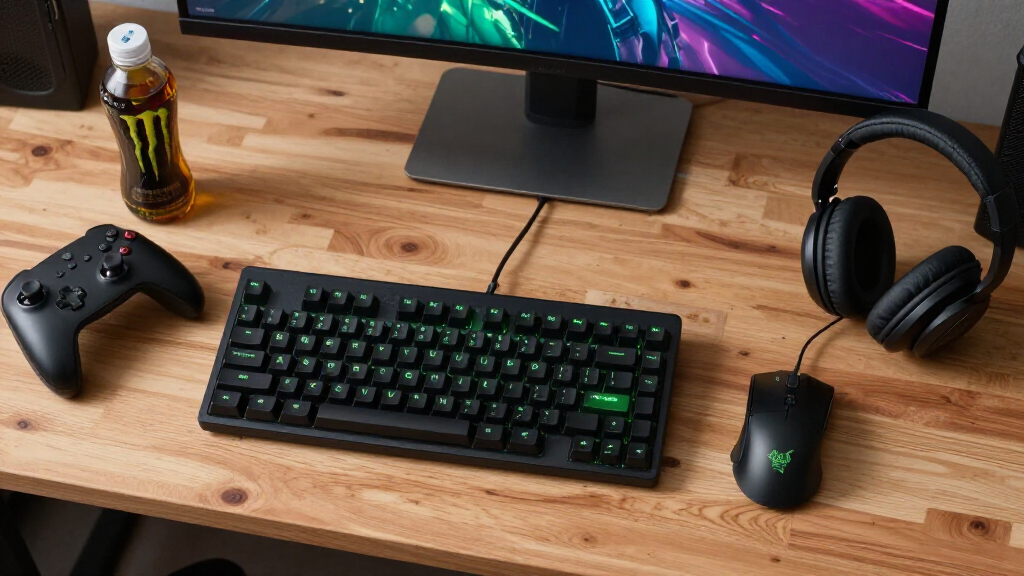
Choosing the right Razer gaming accessories in 2026 means balancing performance, customization, and comfort. If you’re after a premium keyboard with wireless flexibility, the Razer BlackWidow V4 Pro stands out for its hot-swappable switches and OLED display, though its complexity and price may deter beginners. For a versatile mouse with long battery life, the Razer Cobra Pro offers high-precision tracking and extensive customization, but it requires software and can be pricey for casual players. If immersive sound is your priority, the Razer BlackShark V2 X provides excellent noise cancellation and surround sound at a reasonable price, though it’s not as feature-rich as pricier headsets. Lastly, for ergonomic comfort and macro-heavy gameplay, the Basilisk V3 combines high DPI and programmable buttons, but its premium cost and software dependence are potential downsides. This guide helps you weigh these tradeoffs to find the best fit for your gaming style.
Complete the kit



Key Takeaways
- Wireless keyboards like the BlackWidow V4 Pro deliver low latency but come with complex setup and higher costs.
- The Cobra Pro mouse excels in customization and battery life, making it ideal for long sessions, yet it depends on software for full features.
- BlackShark V2 X offers immersive surround sound and passive noise cancellation at a budget-friendly price, but may require additional adapters for some platforms.
- The Basilisk V3 stands out for its ergonomic design and macro capabilities, though its premium price and software reliance may be a barrier.
| Razer BlackWidow V4 Pro 75% Wireless Gaming Keyboard, Orange Switches |  | Best Overall Wireless Keyboard | Wireless Connectivity: 2.4 GHz, Bluetooth 5.1 | Switch Type: Orange switches | Compatibility: 3 or 5-pin switches | VIEW LATEST PRICE | See Our Full Breakdown |
| Razer Cobra Pro Wireless Gaming Mouse, 2.4 GHz, 170 Hr Battery, Black |  | Best Versatile Wireless Mouse | Connectivity: 2.4 GHz, Bluetooth | Battery Life: Up to 170 hours | Sensor: Focus Pro 30K optical | VIEW LATEST PRICE | See Our Full Breakdown |
| Razer BlackShark V2 X Gaming Headset |  | Best Budget Immersive Headset | Surround Sound: 7.1 | Drivers: 50mm | Weight: 240g | VIEW LATEST PRICE | See Our Full Breakdown |
| Razer Basilisk V3 Customizable RGB Wired Ergonomic Gaming Mouse |  | Best for Ergonomics and Macro Play | Number of Programmable Buttons: 11 | Lighting: RGB with 16.8 million colors | Sensor: Focus Plus 26K DPI | VIEW LATEST PRICE | See Our Full Breakdown |
| Razer gaming accessorie | Lighting | Switch Type | Compatibility | Sensor |
|---|---|---|---|---|
| Razer BlackWidow V4 Pro 75% Wi | Per-key RGB with 2-side underglow | Orange switches | 3 or 5-pin switches | — |
| Razer Cobra Pro Wireless Gamin | 11 Chroma RGB zones | — | — | Focus Pro 30K optical |
| Razer BlackShark V2 X Gaming H | — | — | PC, Mac, PS4, Xbox One, Switch | — |
| Razer Basilisk V3 Customizable | RGB with 16.8 million colors | Optical Mouse Switches Gen 2 | — | Focus Plus 26K DPI |
More Details on Our Top Picks
Razer BlackWidow V4 Pro 75% Wireless Gaming Keyboard, Orange Switches
The BlackWidow V4 Pro is a standout for gamers seeking a wireless option that doesn’t compromise on performance. Its low-latency 2.4 GHz and Bluetooth 5.1 connectivity make it reliable for fast-paced games. The OLED display and command dial add a layer of customization, letting you monitor stats or access controls at a glance. Unlike traditional wired keyboards, its hot-swappable switches enable tailored tactile feedback, catering to those who want a personalized typing experience. However, the setup can be complex for newcomers, and its premium price reflects the advanced features. Compared to full-size options, its 75% layout balances compactness with functionality, but the limited switch options might be restrictive for some users.
Pros:- Wireless with low latency and multi-device support
- Customizable OLED display and lighting effects
- Hot-swappable switches for personalized feel
- Premium build with sound dampening for quieter typing
Cons:- Complex setup process for beginners
- Higher price point due to advanced features
- Limited switch compatibility compared to full-sized keyboards
Best for: Gamers wanting a wireless, feature-rich keyboard with customization options
Not ideal for: Beginners or budget-conscious buyers who prefer straightforward setups
- Wireless Connectivity:2.4 GHz, Bluetooth 5.1
- Switch Type:Orange switches
- Compatibility:3 or 5-pin switches
- Display:OLED with command dial
- Lighting:Per-key RGB with 2-side underglow
- Design Features:Hot-swappable switches, gasket-mounted FR4 plate, sound-dampening foam
Our verdict“A premium wireless keyboard ideal for gamers who value customization and advanced features, despite its complexity and cost.”
Razer Cobra Pro Wireless Gaming Mouse, 2.4 GHz, 170 Hr Battery, Black
The Cobra Pro is designed for gamers who demand extensive customization and endurance. Its 30K optical sensor ensures pinpoint accuracy across all game types, while the multiple onboard profiles and customizable controls allow quick adjustments without software. The impressive 170-hour battery life makes it perfect for marathon gaming sessions, especially when wired charging isn’t feasible. It features 11 Chroma RGB zones for visual flair, but its high price might be a deterrent for casual players. The mouse requires the Razer Synapse software for full functionality, which could be a drawback for those wary of installing additional programs. Overall, this is a high-performance choice for players prioritizing durability and customization.
Pros:- Long-lasting 170-hour battery life
- Highly customizable controls and profiles
- High-precision 30K sensor
- Extensive RGB lighting for personalization
Cons:- Requires software (Razer Synapse) for full features
- No specific weight details provided
- Higher price may be prohibitive for casual players
Best for: Extended gaming sessions and players seeking high customization
Not ideal for: Casual gamers or those who dislike software dependencies
- Connectivity:2.4 GHz, Bluetooth
- Battery Life:Up to 170 hours
- Sensor:Focus Pro 30K optical
- Lighting:11 Chroma RGB zones
- Onboard Profiles:5
- Switches:Gen-3 optical, 90 million click lifecycle
Our verdict“A top-tier wireless mouse suited for gamers who need precision, long battery life, and extensive customization, despite its price and software dependency.”
Razer BlackShark V2 X Gaming Headset
The BlackShark V2 X strikes a balance between immersive sound and affordability. Its 7.1 surround sound with custom-tuned 50mm drivers delivers a compelling audio experience, making it suitable for competitive gaming or story-rich titles. The headset’s passive noise cancellation offers decent isolation, enhancing focus without the need for active noise-canceling tech. It’s lightweight at just 240g, which reduces fatigue during long sessions, and its cross-platform compatibility means it can be used across PC, consoles, and Switch, making it versatile. However, the headset may need an Xbox stereo adapter for Xbox compatibility, and its surround sound software is limited to Windows 10, which could restrict the experience for some users. Its microphone, while functional, isn’t as flexible as pricier models, but overall, it offers excellent value.
Pros:- Excellent passive noise cancellation
- Immersive 7.1 surround sound
- Lightweight and comfortable
- Cross-platform compatibility
Cons:- May require additional adapters for Xbox
- Software surround sound limited to Windows 10
- Microphone placement less flexible
Best for: Gamers seeking immersive audio on a budget with cross-platform use
Not ideal for: Users who need advanced microphone features or active noise cancellation
- Surround Sound:7.1
- Drivers:50mm
- Weight:240g
- Microphone:HyperClear Cardioid
- Compatibility:PC, Mac, PS4, Xbox One, Switch
Our verdict“A capable, affordable headset that offers immersive sound and comfort for gamers who need a versatile, budget-friendly option.”
Razer Basilisk V3 Customizable RGB Wired Ergonomic Gaming Mouse
The Basilisk V3 is a favorite for gamers who prioritize comfort combined with high performance. Its ergonomic design with a thumb rest ensures comfort during long gaming marathons, while the 11 programmable buttons provide extensive macro options. The high-precision 26K DPI optical sensor guarantees accurate tracking across all surfaces, and the hyperscroll tilt wheel adds quick navigation. It’s highly customizable with RGB lighting, but the premium price tag might be a hurdle for some, and its full potential depends on the Razer Synapse software, which can be complex for new users. Compared to wireless options, it sacrifices convenience for wired stability and potentially lower latency, making it ideal for competitive players who want responsiveness above all else.
Pros:- Ergonomic design with thumb rest
- 11 programmable buttons
- High DPI sensor for precise tracking
- Responsive optical switches
Cons:- Premium price point
- Requires software for full customization
- Wired connection limits mobility
Best for: Gamers needing ergonomic comfort and macro capabilities for competitive play
Not ideal for: Casual players or those preferring wireless setups
- Number of Programmable Buttons:11
- Lighting:RGB with 16.8 million colors
- Sensor:Focus Plus 26K DPI
- Switch Type:Optical Mouse Switches Gen 2
- Scroll Wheel:Hyperscroll tilt wheel
Our verdict“A highly capable ergonomic mouse with macro and customization features, best suited for competitive gamers willing to invest in comfort and precision.”

How We Picked
Our selection process focused on key factors such as performance, customization options, build quality, and value. We evaluated each product’s core features, comparing their technical specs and user experience reports to determine how well they serve different types of gamers. Priority was given to accessories that combine innovation with practicality, ensuring they meet real gaming needs while offering flexibility and durability. We also considered price points to recommend options suitable for varied budgets, and included different roles to cover diverse gaming preferences—from casual to professional players.
| Razer gaming accessorie | Switch Type | Sensor |
|---|---|---|
| Razer BlackWidow V4 Pro 75% Wi | Orange switches | — |
| Razer Cobra Pro Wireless Gamin | — | Focus Pro 30K optical |
| Razer BlackShark V2 X Gaming H | — | — |
| Razer Basilisk V3 Customizable | Optical Mouse Switches Gen 2 | Focus Plus 26K DPI |
Factors to Consider When Choosing Best Razer Gaming Accessories
Selecting the best Razer accessories hinges on understanding your gaming priorities—whether it’s performance, customization, comfort, or budget. Compatibility with your setup and preferred play style influences the choice, along with features like wireless connectivity, RGB lighting, or ergonomic design. Consider how each product’s tradeoffs—such as higher cost, setup complexity, or platform limitations—align with your needs. This guide breaks down key factors to help you choose accessories that enhance your gaming experience.Performance and Precision
For accuracy and responsiveness, look for high-DPI sensors and low-latency connections. Wired mice often offer lower latency, but premium wireless options like the Cobra Pro bridge the gap with advanced tech. Headsets with surround sound or passive noise cancellation improve immersion, especially for competitive gaming. The keyboard’s switch type and layout impact how fast and comfortably you can execute commands. Prioritize these features if your gaming relies on quick reflexes or detailed audio cues.
Customization and Features
Many Razer devices include RGB lighting, programmable buttons, and onboard profiles. These allow tailoring your setup for aesthetics and efficiency. The BlackWidow V4 Pro’s OLED display and hot-swappable switches support extensive personalization, while the Basilisk V3’s macro buttons enhance competitive play. Be aware that some features require software, which might add complexity but unlock deeper control. Decide if you need extensive customization or prefer straightforward functionality.
Comfort and Build Quality
Long gaming sessions demand ergonomic designs and lightweight construction. The BlackShark V2 X offers comfort and passive noise cancellation, suitable for prolonged use. The Basilisk V3’s ergonomic shape with a thumb rest minimizes fatigue, ideal for competitive players. Make sure your choice matches your preferred play style and physical comfort needs, especially if you game for hours at a stretch.
Budget and Value
While premium accessories offer advanced features, they come with higher price tags. The BlackShark V2 X is a cost-effective option that still delivers quality sound and comfort. The BlackWidow V4 Pro and Basilisk V3 target gamers willing to invest more for customization and performance. Balance your budget with your needs—paying more for features you’ll truly utilize makes your investment worthwhile.
Frequently Asked Questions
Are Razer gaming accessories compatible with all gaming setups?
Most Razer accessories are designed to be compatible with a wide range of gaming systems, including PC, Mac, and popular consoles like PS4, Xbox One, and Switch. However, some features, particularly those relying on proprietary software like Razer Synapse, may have platform-specific limitations. For example, surround sound customization on headsets might only be fully accessible on Windows 10. Always check the product specifications for compatibility details to ensure they fit your specific setup.
Is wireless gaming gear as reliable as wired options?
Wireless gaming accessories have advanced significantly, offering low-latency connections suitable for most competitive scenarios. The Cobra Pro, for instance, uses advanced wireless tech to minimize lag, making it nearly as responsive as wired mice. However, wired devices generally still have the edge in absolute latency and stability, which can matter in high-stakes competitive environments. For casual or long gaming sessions, wireless options provide convenience without compromising much on performance.
How important is software for customizing Razer devices?
Software like Razer Synapse unlocks many customization features, including lighting effects, macros, and profile management. While basic functionality might be accessible without it, full control over device features typically requires the software. Be aware that some users find software installation and updates cumbersome, and it can introduce compatibility issues. If you prefer plug-and-play simplicity, look for devices with extensive onboard controls or presets.
Do Razer headsets support active noise cancellation?
Most Razer headsets, including the BlackShark V2 X, rely on passive noise cancellation through design and earcup materials. Active noise cancellation (ANC) is generally found in higher-end models like the BlackShark V2 Pro, but the V2 X does not include ANC. For immersive sound on a budget, passive isolation often suffices, but if noise cancellation is a priority, consider stepping up to models with ANC features.
Are premium Razer accessories worth the investment?
Premium Razer accessories typically offer advanced features, higher build quality, and greater customization, making them ideal for dedicated gamers or professionals. If your gaming relies heavily on precision, comfort, or aesthetic customization, these products can improve your experience and potentially elevate your gameplay. However, if you are a casual gamer or have a limited budget, more affordable options still deliver solid performance without all the bells and whistles. Think about your gaming needs and how much value extra features add for you.
Conclusion
For casual gamers or those on a budget, the BlackShark V2 X provides excellent sound and comfort without breaking the bank. Serious enthusiasts or competitive players will appreciate the BlackWidow V4 Pro’s advanced features and wireless convenience, while those seeking a versatile, long-lasting mouse should consider the Cobra Pro. If ergonomic comfort and macro capabilities are your priorities, the Basilisk V3 offers a compelling package. Ultimately, your choice depends on your specific gaming style, setup, and budget—each of these Razer accessories is tailored to different needs, ensuring there’s a suitable option for every gamer in 2026.